SIPLACE Station Software 7xx to 714 介绍.pdf - 第71页
Station Software 7xx to 714.0 (R20-2) / Feature Description 11/2020 Edition 71 Garage has been scanned and a new nozzle type has been det ected – If the nozzle type i s equal to the stored nozzle in the software nothing …
Station Software 7xx to 714.0 (R20-2) / Feature Description 11/2020 Edition
70
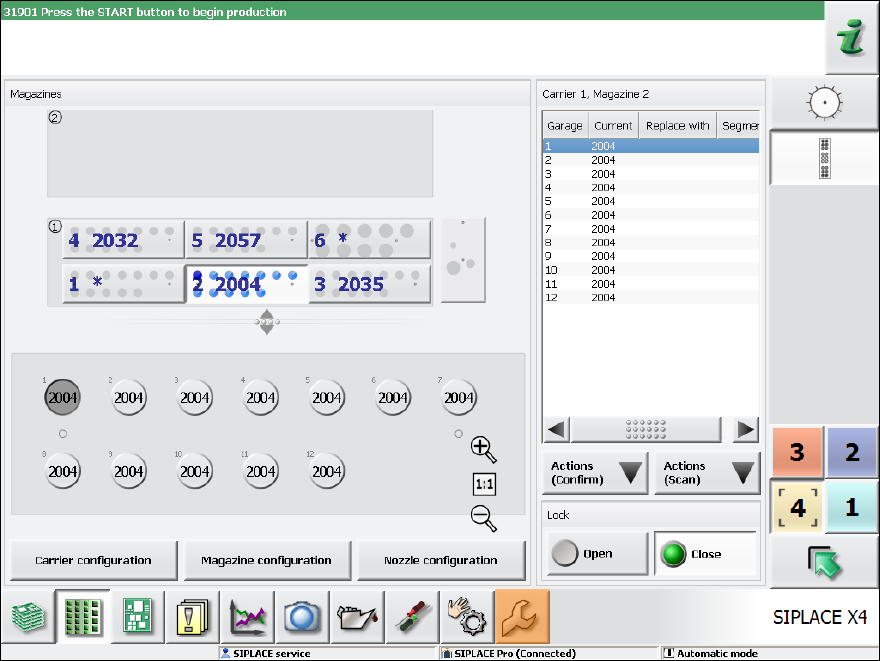
After successful scanning (ID recognized or garage empty) the garage is highlighted in the
overview and the detailed view:
Figure 7-6: Result of the nozzle scan
The scanned data is valid until the next scan but is not available after a machine reboot anymore.
The operator may change the nozzle type at any time.
SIPLACE Vision recognizes the following states of a nozzle in the nozzle changer:
– Garage is empty
– Nozzle ID can be determined (the nozzle is marked with an ID)
– Nozzle ID cannot be determined (the nozzle is marked with an ID)
– Nozzle has no ID (old nozzle)
– Standard nozzle or customer-specific nozzle
After the garage has been scanned the software behaves as follows:
Garage has been scanned and is empty
– If no nozzle is stored in the software nothing will be changed.
– If a nozzle is stored in the software it will be deleted.
Station Software 7xx to 714.0 (R20-2) / Feature Description 11/2020 Edition
71
Garage has been scanned and a new nozzle type has been detected
– If the nozzle type is equal to the stored nozzle in the software nothing will be changed.
– If no nozzle is stored in the software a new nozzle with the corresponding nozzle type will be
created.
– If a different nozzle is stored in the software it will be deleted and a new nozzle corresponding
to the nozzle type will be created.
Garage has been scanned and nozzle type could not be identified due to old nozzle type
– No changes.
Garage has been scanned and an error occurred
– No changes.
Nozzles with and without IDs can be mixed in the machine and / or in the magazines. For the
nozzles without ID the operator then has to define the nozzle type for the magazines as before.
Restrictions
– Twin heads and SOKO nozzles of the C&P heads are not supported.
– The scanned nozzle data gets lost at a machine reboot.
7.12 Flexible Management of Activity Level Rights
As of this station software version the activity levels can be changed for functions for which a
certain activity level is defined. The activity levels can only be changed by the Machine service
and SIPLACE Service activity levels. For functions that are defined for the SIPLACE Service
activity level, the activity level cannot be changed. The activity level for a function cannot be
changed to a higher level as the current login level. For example, if the user is logged in under
Machine service he cannot set the activity level of any function higher than Machine service.
The activity level can be changed as follows:
► Log in on the suitable activity level.
► Right-click with the mouse on the function for which you wish to change the activity level.
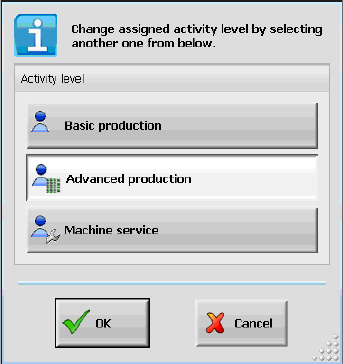
The following dialog box is displayed in which the default activity level is highlighted:
Figure 7-7: Changing activity level
Station Software 7xx to 714.0 (R20-2) / Feature Description 11/2020 Edition
72
The recommended activity level is marked with (suggested).
► Select the desired activity level.
► Click on OK.
The change is immediately activated and is available after a machine reboot as well.
Additionally, a shortcut can be used to change the activity level. It is not necessary to change the
activity level via Settings / User settings anymore, it is sufficient to click on the button for a
function. Then a dialog box is opened in which the activity level can be changed.When the activity
level has been changed, it can be changed for the desired function afterwards.
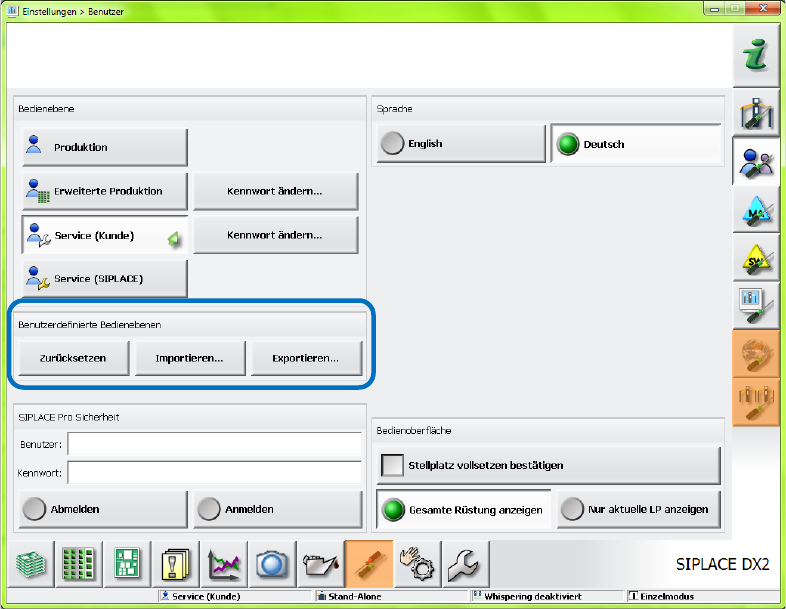
The changes can be reset, imported and exported as of the Machine service activity level via
Settings – User settings on the GUI, see Figure 7-8. The import and export functions contain the
passwords for the Advanced production and Machine service activity levels.
Figure 7-8: Resetting, importing, exporting activity level
Additionally, the used configuration file can be copied and imported to other placement machines /
lines. This has to be explicitly performed by the user on the Machine service activity level, as the
settings are not automatically distributed. The imported settings are immediately activated and no
machine reboot is required.