SIPLACE Station Software 7xx to 714 介绍.pdf - 第98页
Station Software 7xx to 714.0 (R20-2) / Feature Description 11/2020 Edition 98 Item 1: Nozzle Changer State This state is displayed in t he Nozzle changer view on the GUI. The state can be modified ( Open / Close). Figur…
Station Software 7xx to 714.0 (R20-2) / Feature Description 11/2020 Edition
97
WARNING
Changing Filling Level Manually after Exchanging Waffle Pack Tray and Pick-up
Errors!
With the buttons on the feeder a new waffle pack tray can be made available. However,
the filling level is not automatically modified at the station.
If the operator does not change the filling level manually, the pick-up sequence will be
continued at the filling level of the last waffle pack tray and some components will get
lost.
If the filling level is not manually modified after a waffle pack tray has been exchanged
and the components will be put back in the tray according to the configuration, it may
happen that they are put pack at occupied positions. Thus, strange noises arise, and
damages might result.
7.32 FCU State Display on the GUI
Compatible mode: Complete
In combination with a manual table, the LED state display and the DIP switch on the FCU (Feeder
Control Unit) are invisible or inaccessible on the SX1/SX2, DX1/DX2, SX4 and DX4 placement
machines.
For check and test purposes it is therefore possible to display the following states for the locations
1-4 on the GUI for these placement machines.
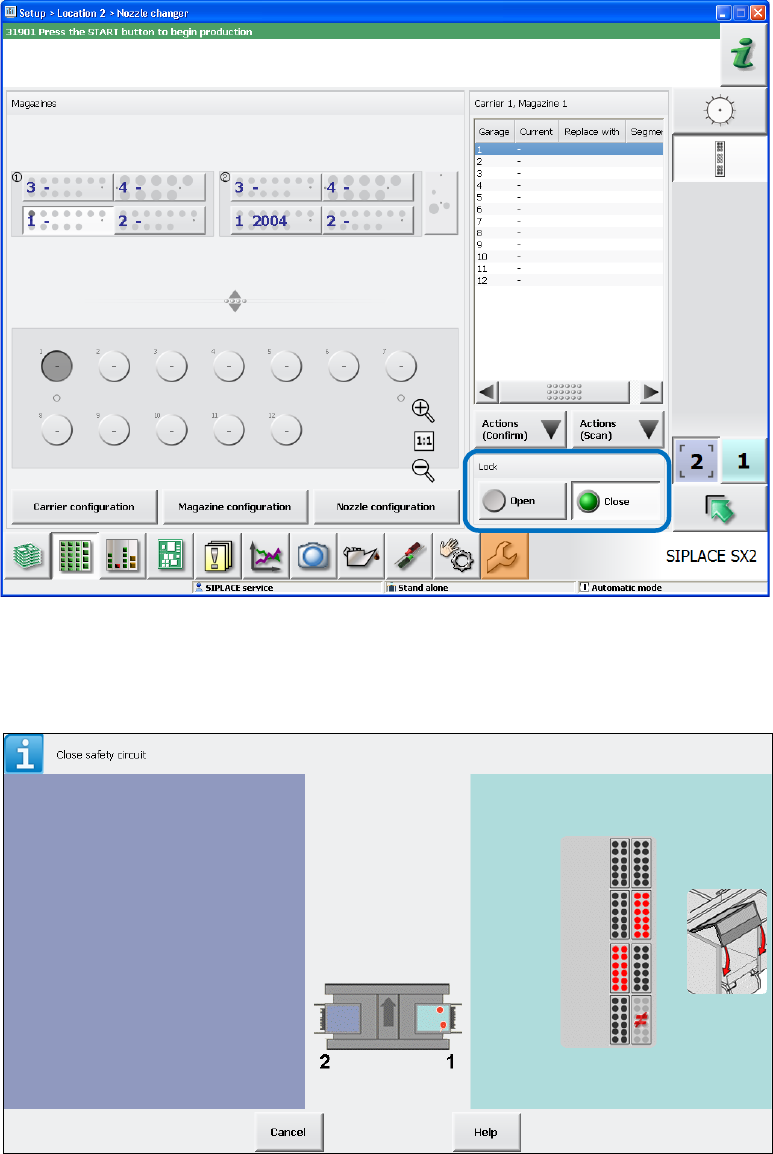
1. Lock state of the single nozzle changers (open / closed).
2. Magazine checking state for the single nozzle changer magazine location of the different
nozzle changers (magazine present / not present).
3. States of the reject bin query sensors (bin available / not available). The states of the sensors
that are not requested in the current bin configuration are explicitly shown (head / gantry
modularity).
4. Air blast valve output of the nozzle station (air blast enabled / disabled).
5. Current preset state of the FCU DIP switch (enabled / disabled).
Station Software 7xx to 714.0 (R20-2) / Feature Description 11/2020 Edition
98
Item 1: Nozzle Changer State
This state is displayed in the Nozzle changer view on the GUI. The state can be modified (Open /
Close).
Figure 7-31: Lock state of nozzle changer
Item 2: Magazine State
This state is displayed in the Safety circuit view on the GUI.
Figure 7-32: Magazine state
Station Software 7xx to 714.0 (R20-2) / Feature Description 11/2020 Edition
99
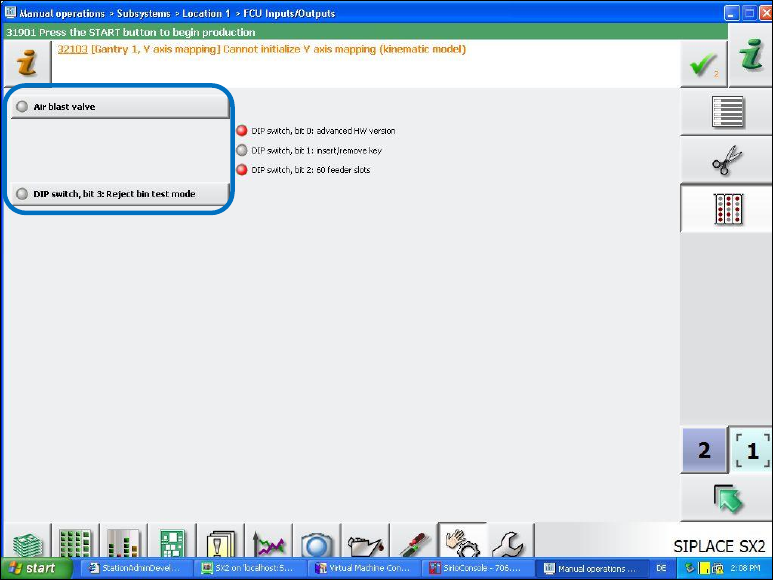
Items 3 to 5: LED for Air Blast Valve, DIP Switch and Reject Bin
These states are displayed in the new FCU Inputs/Outputs view under Manual operations –
Subsystems on the GUI and are accessible as of the Machine Service activity level.
Figure 7-33: States of air blast valve, DIP switch and reject bin
There are no sensors to check the state of the air blast valves. Only the ports to which the air blast
valves are connected can be tested - no matter what is connected and operable there. With the Air
blast valve button, it is possible to enable the display of changes on these ports. The displayed
state can be modified on the GUI.
The test mode to check the presence / absence of a reject bin can be enabled and disabled with
the DIP switch, bit 3: Reject bin test mode button.
Only bit 3 (=reject bin test mode) can be enabled and disabled for the DIP switch.
7.33 DX4 Placement Machine – PCB Barcode Reader Functions
Compatible mode: Complete, if the barcode reader is upgraded
All PCB barcode reader functions that can be used on the SX4 placement machine can be
unrestrictedly used on the DX4 placement machine as of this station software version.