Nordson_EFD_RV_Series_Operating_Manual - 第105页
RV Series Automated Dispensing Systems 105 www.nordsonefd.com info@nordsonefd.com +1-401-431-7000 Sales and service of Nordson EFD dispensing systems are available worldwide. Edge Adjust Click Function Double-click addre…
RV Series Automated Dispensing Systems
104 www.nordsonefd.com info@nordsonefd.com +1-401-431-7000 Sales and service of Nordson EFD dispensing systems are available worldwide.
Dispenser Off / Dispenser On
Click Function
or
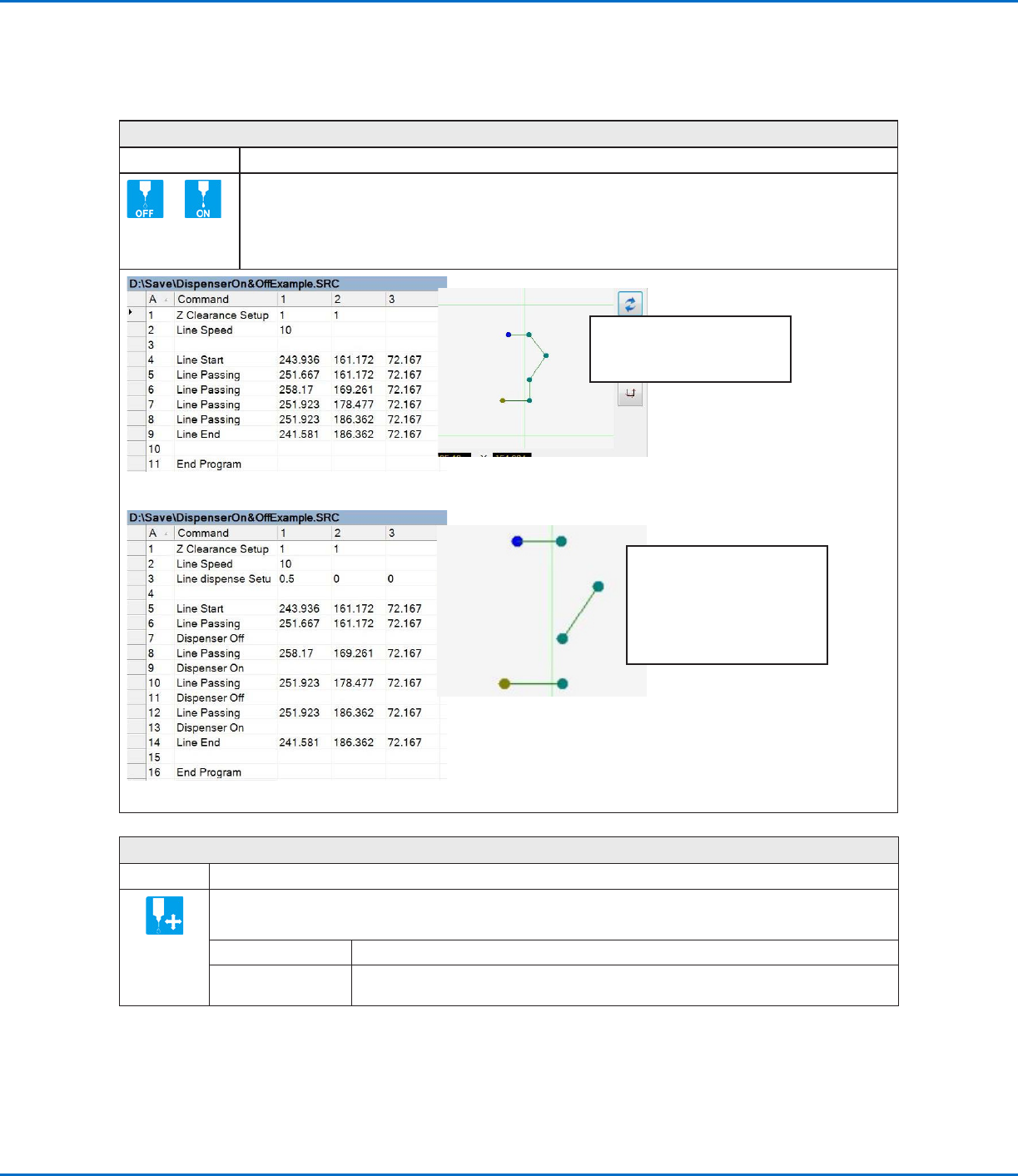
Turns the dispenser OFF or ON at the current address.
NOTE: This command is useful when you want to turn off (deactivate) dispensing for part of a line. To do
so, determine the beginning and end points where you want the line to be deactivated and then insert a
Dispenser Off command in between those points. When you want the line to be active, insert a Dispenser
On command between those points. An example program and the resulting pattern is shown below.
Original program and corresponding Path view
Program with Dispenser On / Dispenser Off commands and an example of the resulting dispense pattern
NOTE: The Path view in the
Secondary View screen will NOT
change when you add the Dispenser
Off / Dispenser On commands as
shown in this example; this image is
only a representation of the resulting
dispense pattern.
NOTE: This image is the actual
Path view of the example program
shown.
Dummy Point
Click Function
Registers the current XYZR location as a Dummy point. The dispensing tip passes through this point. A dummy
point is useful for avoiding obstacles on the workpiece.
Parameter Description
Speed The speed (inmm/s) at which the tip moves toward the dummy point.
Range: 0–150mm/s
AppendixA, Command Function Reference
(continued)
RV Series Automated Dispensing Systems
105www.nordsonefd.com info@nordsonefd.com +1-401-431-7000 Sales and service of Nordson EFD dispensing systems are available worldwide.
Edge Adjust
Click Function
Double-click
address and
select from drop-
down menu
Used in tandem with Find Marks when a workpiece presents one of the following challenges:
• Very large, rounded corners
• No obvious features for creating a mark image
Refer to “How to Use Marks to Dispense onto a Plain Workpiece” on page75 for instructions on using
this command.
End Pattern
Click Function
Double-click
address and
select from
drop-down
menu
Used in tandem with Call Pattern to return the program to the address that occurs just after a Call Pattern
command.
End Program
Click Function
Registers the current address as the end of the program. End Program returns the dispensing tip to the home
position (0, 0, 0).
End Subroutine
Click Function
Double-click
address and
select from
drop-down
menu
Used in tandem with Call Subroutine to return the program to the address that occurs just after a Call Subroutine
command.
AppendixA, Command Function Reference
(continued)
RV Series Automated Dispensing Systems
106 www.nordsonefd.com info@nordsonefd.com +1-401-431-7000 Sales and service of Nordson EFD dispensing systems are available worldwide.
Fiducial Mark
Click Function
Causes the system to search for the two fiducial marks specified in the No. (number) field of each Fiducial Mark
command. The two fiducial marks are then used by the Fiducial Mark Adjust command to adjust the dispense
program accordingly for any orientation changes between workpieces.
NOTES:
• For the best results, enter Fiducial Mark commands before any dispense or setup commands.
• Two Fiducial Mark commands must be present in a program for the system to perform this adjustment
function correctly.
• A Fiducial Mark is different from a Find Mark. A Find Mark is used only to check the XY position of a workpiece
whereas a Fiducial Mark is used to check the orientation of a workpiece.
• Refer to “About Marks” on page24 for more information on marks.
Fiducial Mark Adjust
Click Function
Double-click
address and
select from
drop-down
menu
Adjusts the program (from one workpiece to another) for any XY orientation changes in workpiece placement.
The system determines orientation correctness by finding two Fiducial Marks. Refer to “Fiducial Mark” on
page106.
NOTES:
• This command is used only in conjunction with a Step & Repeat command.
• Two Fiducial Mark commands must be present in a program for the system to perform this adjustment
function correctly.
• Refer to “About Marks” on page24 for more information on marks.
AppendixA, Command Function Reference
(continued)