Nordson_EFD_RV_Series_Operating_Manual - 第47页
RV Series Automated Dispensing Systems 47 www.nordsonefd.com info@nordsonefd.com +1-401-431-7000 Sales and service of Nordson EFD dispensing systems are available worldwide. V erifying the 4-Axis Selection # Click Step R…
RV Series Automated Dispensing Systems
46 www.nordsonefd.com info@nordsonefd.com +1-401-431-7000 Sales and service of Nordson EFD dispensing systems are available worldwide.
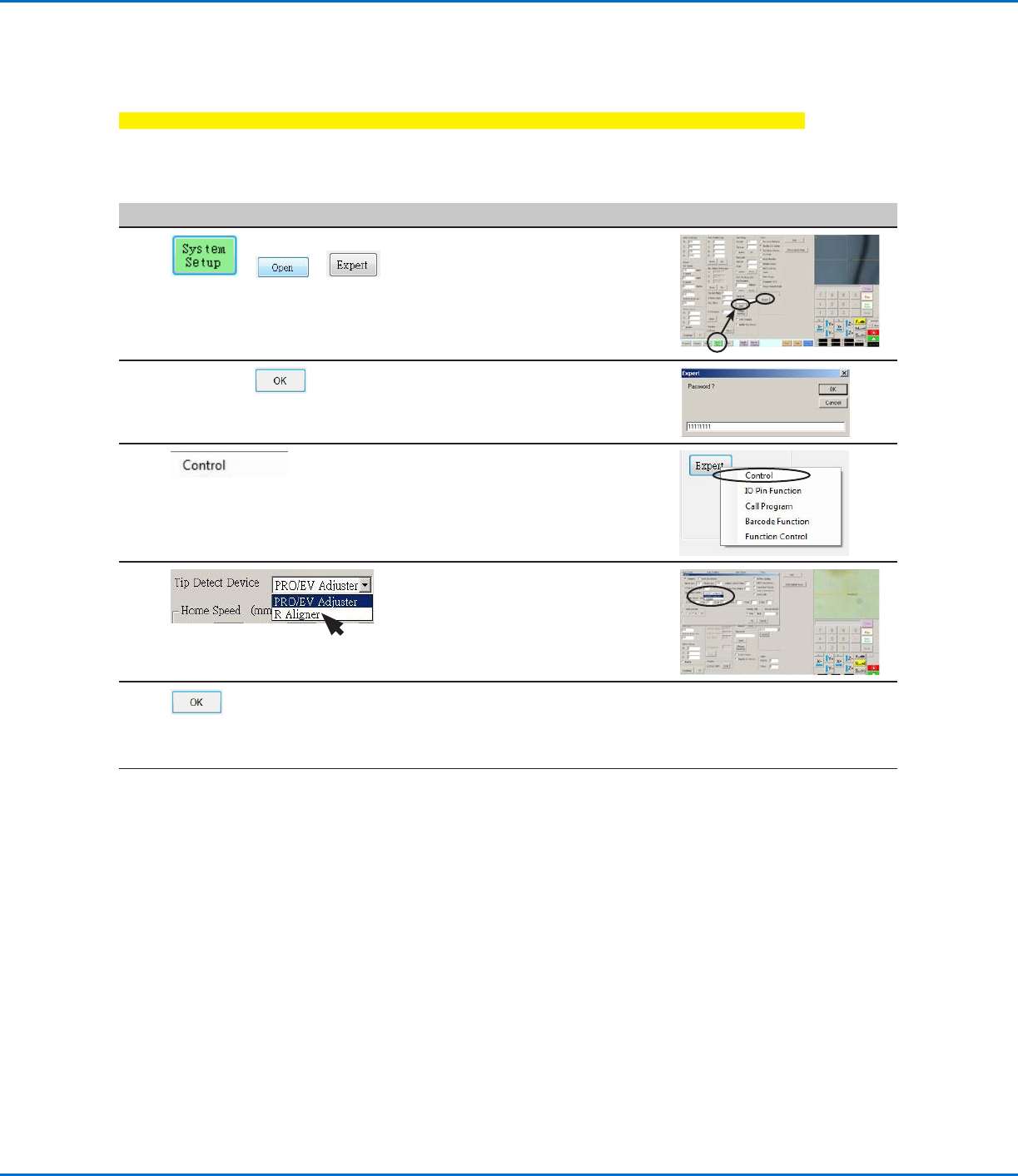
Setting the Optional Tip Aligner Selection
IMPORTANT: If your system does not include this optional tip aligner, skip to the next procedure.
If you installed the optional tip aligner, follow this procedure to specify the kit in the Expert window. A tip aligner
allows tip-to-workpiece offset setup, or tip height calibration, without the need for the tip to physically touch the
sensor. Refer to “Accessories” on page91 for the optional tip aligner part number.
# Click Step Reference Image
1
> >
• Click SYSTEM SETUP > OPEN >
EXPERT.
2
11111111 >
• Enter 11111111, then click OK.
3 • Click CONTROL.
4 • In the Expert window, select
RALIGNER.
• Click OK to save the setting, then
click OK again to confirm.
5 • Click OK to save the setting.
The system automatically exits the
software to allow the change to take
effect.
6
• Continue to “Verifying the 4-Axis
Selection” on page47.
Setting Up and Calibrating the System (Required) (continued)
RV Series Automated Dispensing Systems
47www.nordsonefd.com info@nordsonefd.com +1-401-431-7000 Sales and service of Nordson EFD dispensing systems are available worldwide.
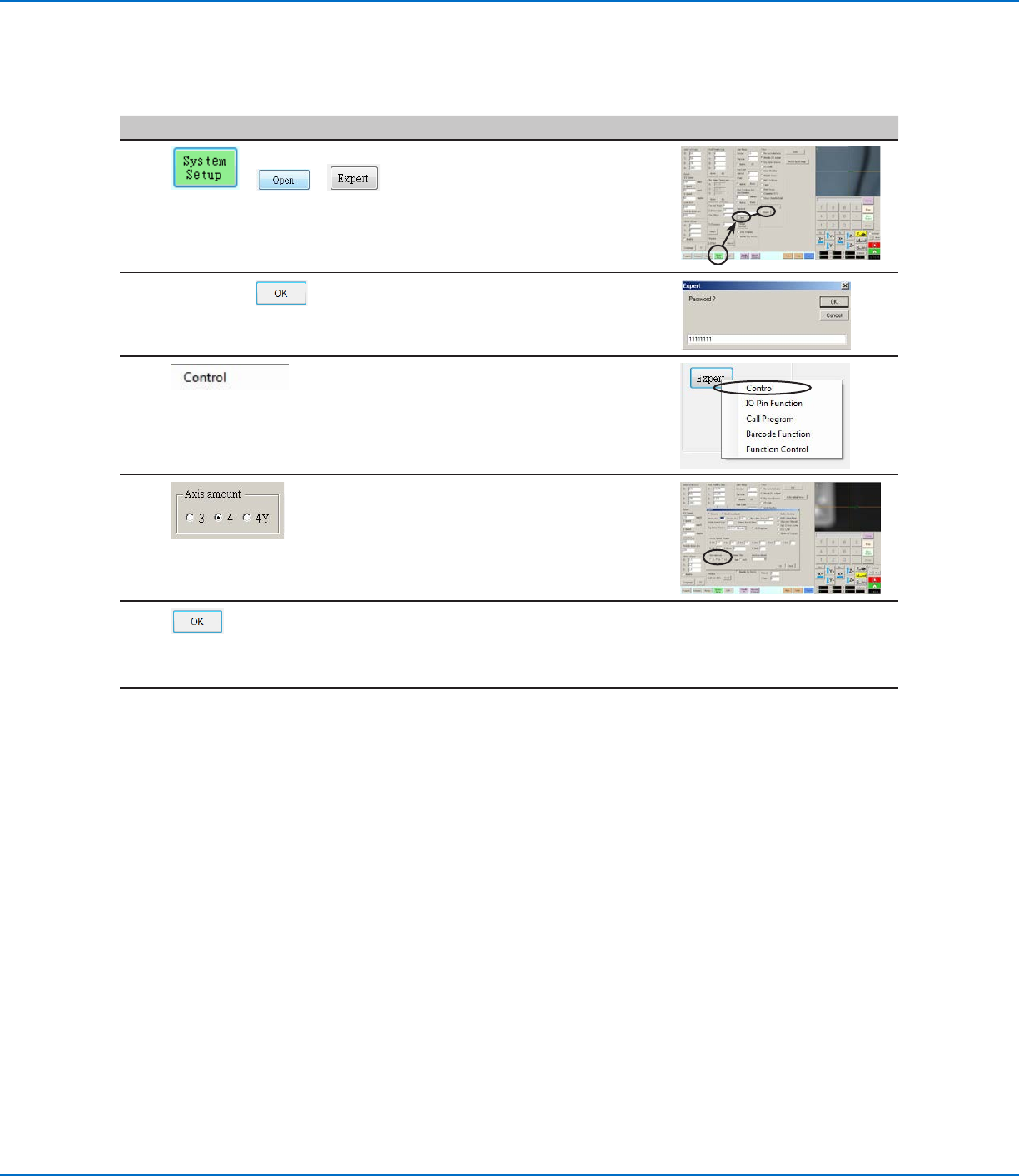
Verifying the 4-Axis Selection
# Click Step Reference Image
1
> >
• Click SYSTEM SETUP > OPEN >
EXPERT.
2
11111111 >
• Enter 11111111, then click OK.
3 • Click CONTROL.
4
• In the Expert window, select 4 under
AXIS AMOUNT.
5 • Click OK to save the setting.
The system automatically exits the
software to allow the change to take
effect.
6
• Continue to “Setting Up the System
Using the Robot Initial Setup Wizard”
on page48.
Setting Up and Calibrating the System (Required) (continued)
RV Series Automated Dispensing Systems
48 www.nordsonefd.com info@nordsonefd.com +1-401-431-7000 Sales and service of Nordson EFD dispensing systems are available worldwide.
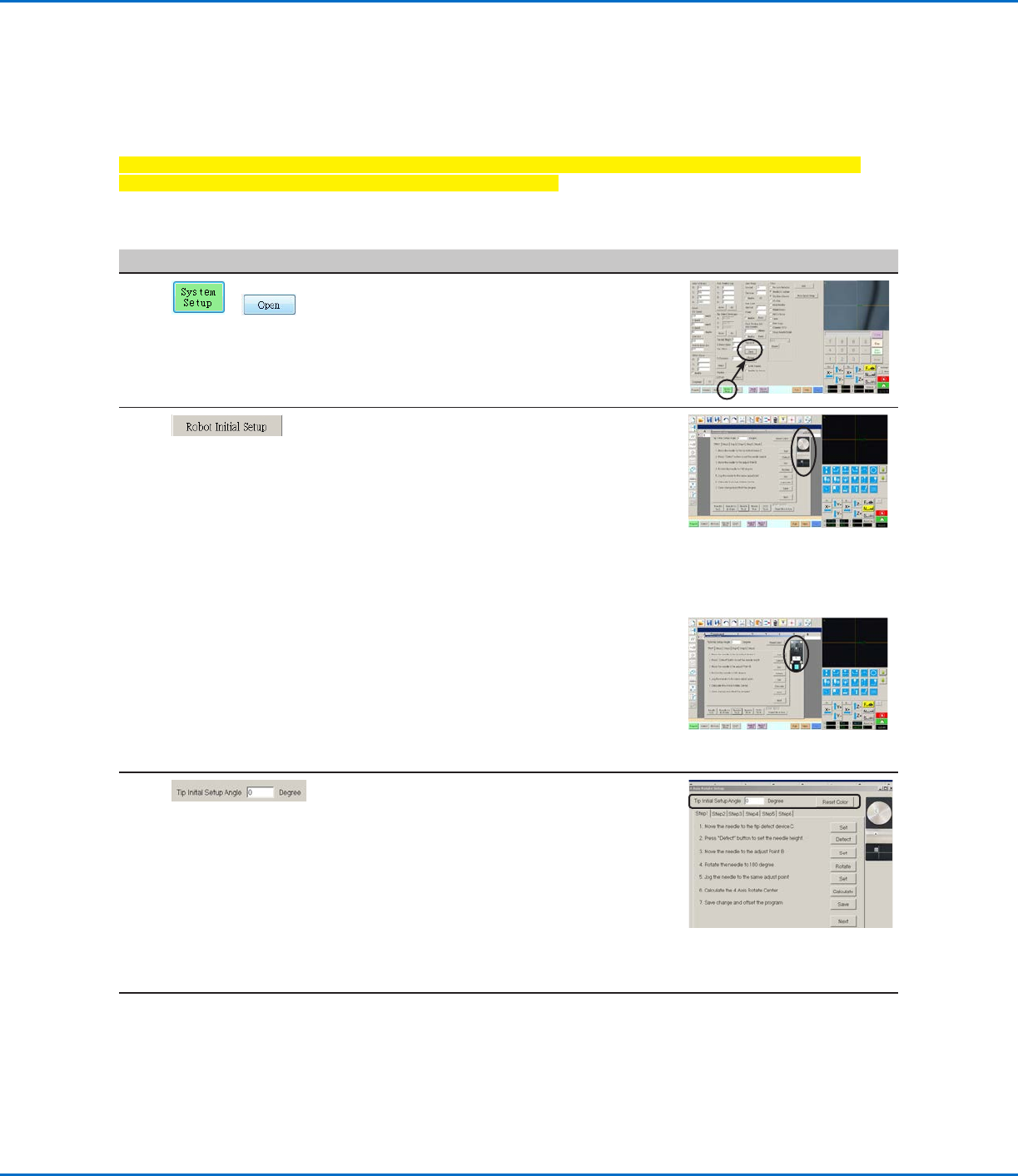
Setting Up the System Using the Robot Initial Setup Wizard
The Robot Initial Setup wizard guides you through all the steps required to properly set up the system, including the
calibration and setting of offsets.
Important: The tip will not rotate, either virtually or physically, until the tool centering calibration portion
(Step1) of the Robot Initial Setup wizard has been performed.
Opening the Robot Initial Setup Wizard and Setting the Angle of Rotation
# Click Step Reference Image
1
>
• Click SYSTEM SETUP > OPEN.
2 • Click ROBOT INITIAL SETUP.
The Robot Initial Setup wizard opens.
NOTE: If the optional tip detector or tip
aligner was installed, the wizard shows an
image of the applicable device.
• Perform the actions on tabs 1–6 one at a
time. The actions are also provided in this
manual for your reference as needed.
NOTE: The wizard buttons change to the
color blue when clicked. All the wizard tabs
include the following two buttons:
- RESET THE 4 AXIS: Click to restart the
wizard from Step 1, using the default
values.
- RESET COLOR: Click to return all
selections on the tab to their default
settings.
Robot Initial Setup wizard
showing the optional tip detector
Robot Initial Setup wizard
showing the optional tip aligner
3 • Enter the desired number of degrees for the
Tip Initial Setup Angle.
The green arrow on the screen changes
based on the entered value. Refer to
“Example of the how the green arrow
changes based on the value entered for
Tip Initial Setup Angle” on page49 for
images.
NOTE: Ensure that the angle does not
cause the dispensing device to obscure the
camera view.
4 • Continue to “Robot Initial Setup (Step1
Tab): Setting Up Tip Detection and Tool
Centering Calibration” on page49.
Setting Up and Calibrating the System (Required) (continued)