3 Stage Conveyor.pdf - 第51页
TECHNIC AL REFEREN CE ADJUS TMENT S & SETTI NGS Chapter Issue 2 May 02 High Throughput Conveyor Manual 1.45 5. Remove the two b olts securing the sensor mount ing bracket to the front conveyor rai l. 6. Refit the mou…
TECHNICAL REFERENCE
ADJUSTMENTS & SETTINGS
1.44 High Throughput Conveyor Manual Chapter Issue 2 May 02
Rail Shock Absorber Setting
1. Ensure the machine is powered down.
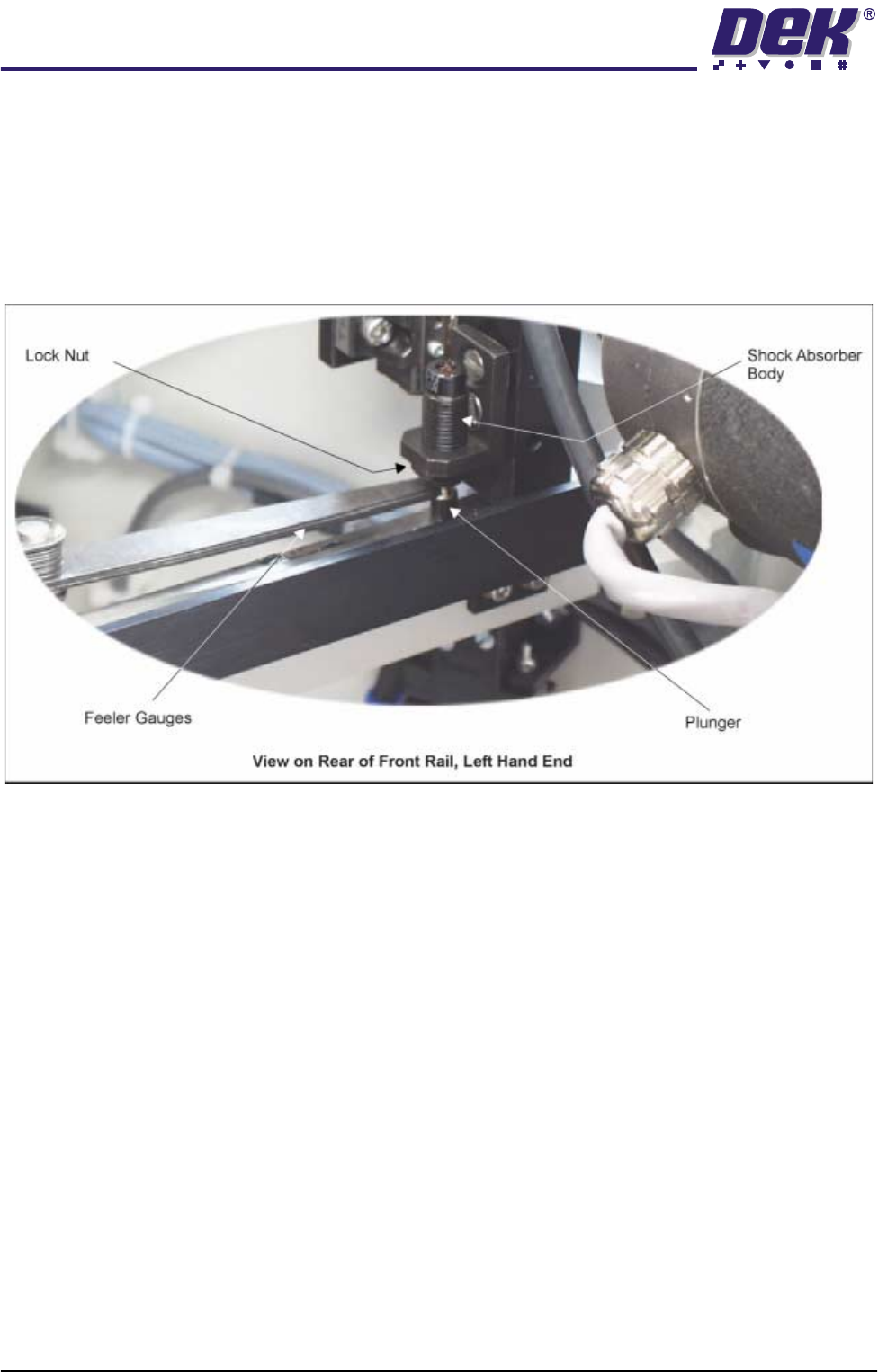
2. Using feeler gauges, check that a gap of 2.5mm - 3.0mm exists between
the top of the plunger and the shock absorber body. Alternatively use a
2.5mm and 3.0mm Allen key as a Go, No Go Gauge.
3. Repeat Step 2 for the three other rail shock absorbers.
4. If adjustment is necessary, slacken the lock nut.
5. Rotate the shock absorber body as required, clockwise to reduce the gap,
anti-clockwise to increase the gap.
6. Check the gap is between 2.5mm - 3.0mm.
7. Repeat Steps 5 and 6 until the correct dimension is achieved
8. Tighten the lock nut.
9. Recheck the gap is still within limits.
Reversing Throughput Direction
To change the direction of throughput of the machine, carry out one of the
following two procedures:
Right to Left
Configuration
To change the configuration of the machine from Left to Right to Right to Left
throughput carry out the following:
1. If required, raise the head and insert the head prop.
2. Power down the machine and disconnect the quick release pneumatic
connection at the machine’s external services panel
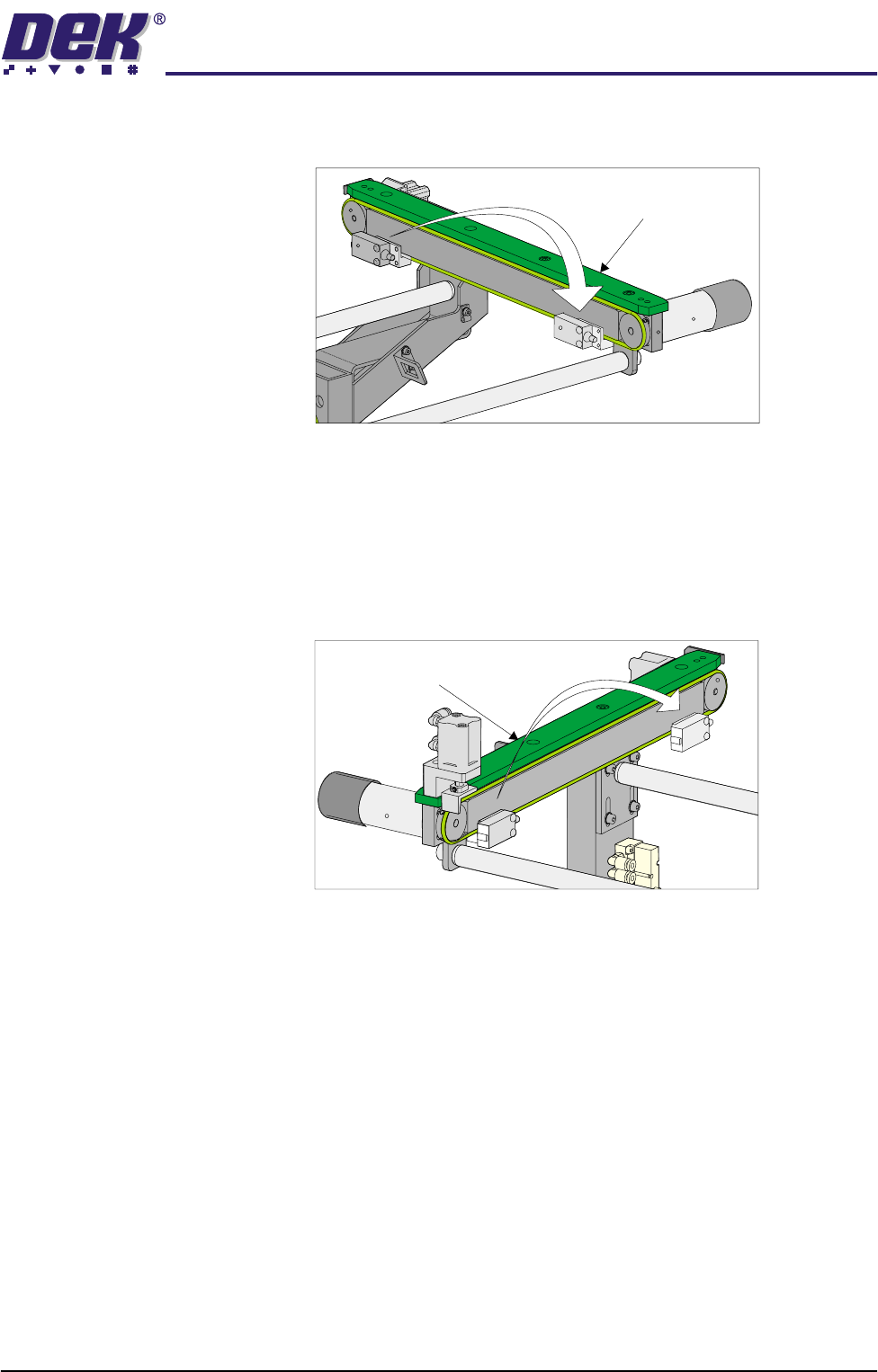
3. Gain access to the left hand auxiliary conveyor sensor.
4. Remove the two sensor securing screws and remove the sensor from the
mounting bracket.
TECHNICAL REFERENCE
ADJUSTMENTS & SETTINGS
Chapter Issue 2 May 02 High Throughput Conveyor Manual 1.45
5. Remove the two bolts securing the sensor mounting bracket to the front
conveyor rail.
6. Refit the mounting bracket to left hand conveyor front rail using the outer-
most bracket mounting holes and refit the sensor removed in Step 4 to the
mounting bracket.
7. Identify the right hand auxiliary conveyor sensor, remove the two sensor
securing screws and remove the sensor.
8. Remove the two bolts securing the sensor mounting bracket to the front
conveyor rail.
9. Refit the mounting bracket to right hand conveyor front rail using the
innermost bracket mounting holes and refit the sensor removed in Step 7 to
the mounting bracket.
10. Identify the downline conveyor board stop fitted to the right hand auxiliary
conveyor.
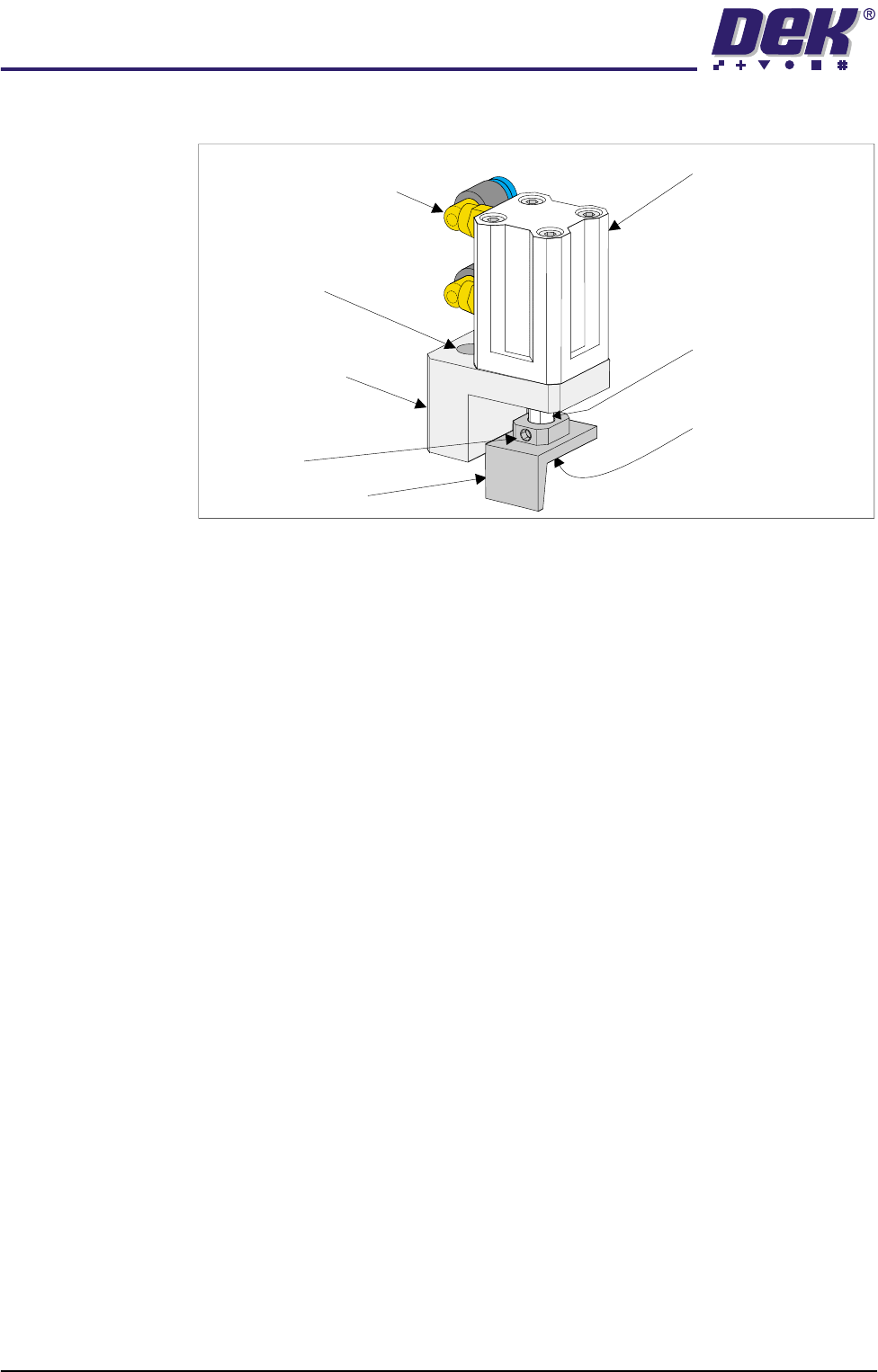
11. Disconnect the two 4mm pneumatic pipes feeding the conveyor board stop.
12. Remove the pneumatic elbow connectors to gain access to the two 3mm
allen screws securing the board stop bracket to the conveyor rail.
Left Hand
Auxiliary Conveyor
Right Hand
Auxiliary Conveyor
TECHNICAL REFERENCE
ADJUSTMENTS & SETTINGS
1.46 High Throughput Conveyor Manual Chapter Issue 2 May 02
13. Withdraw the allen screws and remove the board stop bracket from the rail.
14. To orientate the downline conveyor board stop for fitment to the left hand
auxiliary conveyor, remove the small pan head screw securing the board
stop bracket to the actuator rod.
15. Loosen the grubscrew on the board stop bracket and rotate the bracket
180°; re-tighten the grubscrew.
NOTE
Ensure the grubscrew is located onto the flat side of the actuator rod.
16. Secure the board stop bracket to the actuator rod by refitting the pan head
screw.
17. Fit the downline board stop to the left hand auxiliary conveyor front rail
utilizing the existing securing points and the 3mm allen screws.
NOTE
Ensure the board stop bracket is orientated in the correct direction, ie angled
face of bracket towards the machine.
18. Disconnect the two pneumatic pipes supplying the conveyor board stop
fitted to the inboard end of the left hand auxiliary conveyor from solenoid
(SOL 02).
19. Re-route the two pneumatic pipes to the downline conveyor board stop fitted
Pneumatic Elbow Joints
(2 Positions)
3mm Allen Screw
(2 Positions)
Securing Bracket
Board Stop Actuator
(Double Acting Cylinder)
Actuator Rod
Pan Head Securing
Screw (Underside of
Bracket)
Board Stop Bracket
Grubscrew