3 Stage Conveyor.pdf - 第63页
MACHINE PROGRA MMING INTRODUCTION Chapter Issue 2 May 02 High Throughput Conveyor Manual 2.1 CHAPTER 2 MACHINE PROGRAMMING INTRODUCTION In general, t he High Throu ghput Conveyor machi ne software is t he same as those f…
TECHNICAL REFERENCE
PREVENTIVE MAINTENANCE
1.56 High Throughput Conveyor Manual Chapter Issue 2 May 02
PREVENTIVE MAINTENANCE
Weekly
Maintenance
Program
This procedure is to be carried out in conjunction with the machine’s Weekly
Maintenance Program.
WARNING
HARMFUL SUBSTANCES. CLEANING WIPES AND CLEANING SOLUTIONS MAY
CONTAIN SUBSTANCES HAZARDOUS TO HEALTH. OBSERVE ALL
MANUFACTURERS’ HEALTH AND SAFETY GUIDELINES. ALWAYS WEAR
APPROVED PROTECTIVE CLOTHING WHEN CLEANING THE MACHINE.
Preparation The machine must be isolated from electrical power and air pressure.
Transport Belts
NOTE
If the above procedure is not adhered to, board slip or board overshoot may
occur.
Monthly
Maintenance
Program
This procedure is to be carried out in conjunction with the machine’s Monthly
Maintenance Program.
WARNING
HARMFUL SUBSTANCES. CLEANING WIPES AND CLEANING SOLUTIONS MAY
CONTAIN SUBSTANCES HAZARDOUS TO HEALTH. OBSERVE ALL
MANUFACTURERS’ HEALTH AND SAFETY GUIDELINES. ALWAYS WEAR
APPROVED PROTECTIVE CLOTHING WHEN CLEANING THE MACHINE.
Preparation The machine must be isolated from electrical power and air pressure.
Rail Guide Shafts
CAUTION
CONTAMINATION.
Due to the highly corrosive effects of certain solvents
and solder pastes. Care should be taken to prevent spillage/splashes
onto the rail guide shafts. Remove any contamination from the guide
shafts using IPA impregnated wipes, and re-lubricate guide shaft using
light oil.
No. Task Tools Completed Comments
1 Inspect and clean the green transport
belts of the print station and auxiliary
conveyors.
IPA Impregnated
Wipes
No. Task Tools Completed Comments
1 Clean and lightly lubricate the rail guide
shafts.
IPA Impregnated
Wipes
Light Oil
MACHINE PROGRAMMING
INTRODUCTION
Chapter Issue 2 May 02 High Throughput Conveyor Manual 2.1
CHAPTER 2 MACHINE PROGRAMMING
INTRODUCTION In general, the High Throughput Conveyor machine software is the same as
those for a single stage machine. Where the HTC is used in single stage/normal
mode, its operation is identical. This chapter highlights the operating difference
between the HTC and a standard machine.
Run on Delay This parameter sets a delay of up to one second for the print station belts to stop
once the board is detected at the camera board stop. Effectively this prevents
any board ’bounce back’ which may occur when belt speeds are high.
Parameter settings for run on delay are:
To edit the run on delay parameters carry out the following:
1. Press Setup.
2. Press Edit Data.
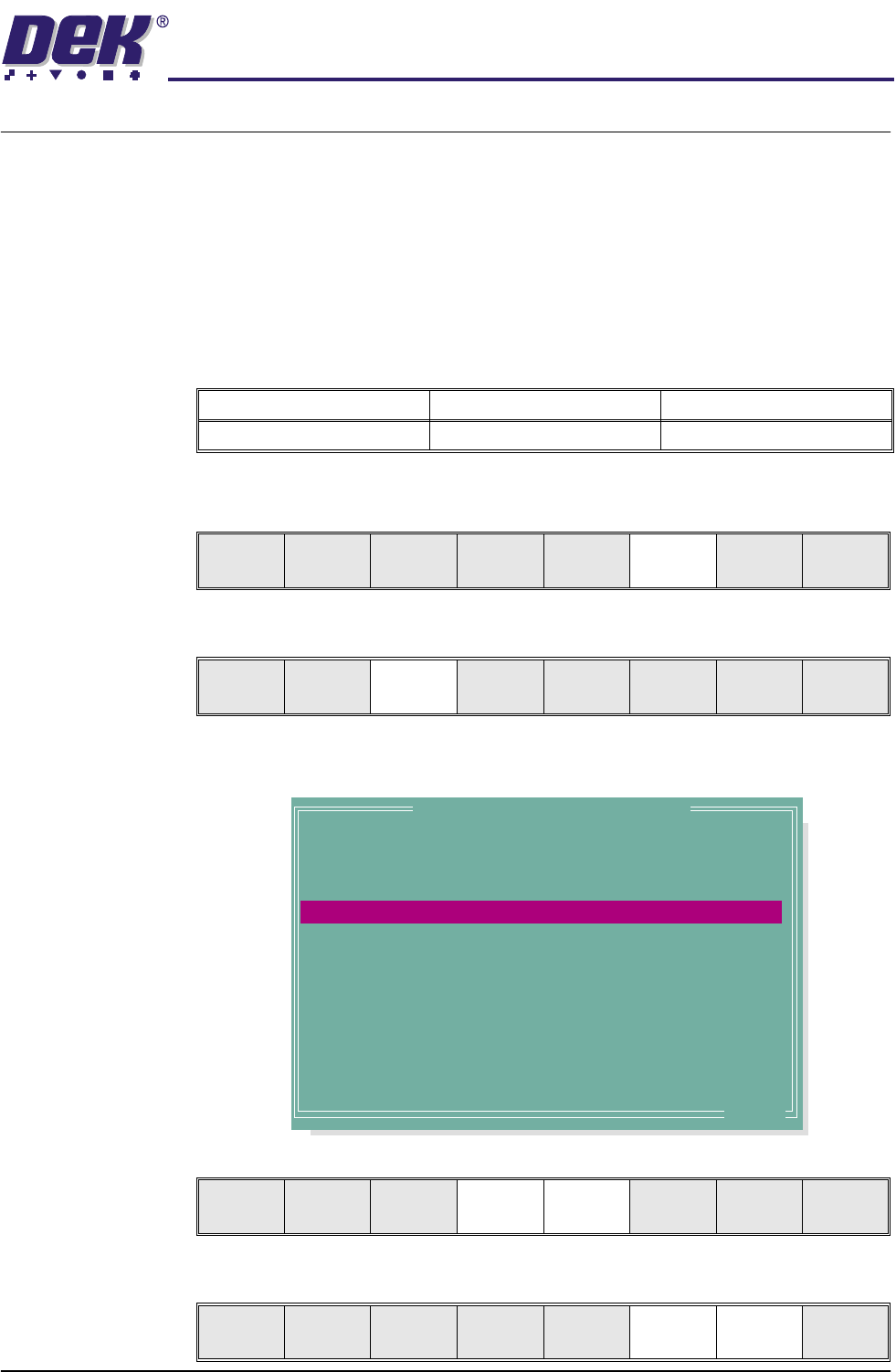
The following window is displayed:
3. Use Next and Previous to highlight the required parameter.
4. Use Incr. and Decr. to change the value of the parameter selected.
Minimum Maximum Increment
0.000 Sec 1.000 Sec 0.100 Sec
Run Head
Paste
Load
Clean
Screen
Adjust Setup Monitor Maint.
Mode
Load
Data
Edit
Data
Setup
Squeegee
Change
Screen
Change
Tool in g
Change
Language
Exit
.. more
Edit Current Process Parameters
TOOLING TYPE
BOARD STOP X
BOARD STOP Y
RIGHT FEED DELAY
RUN ON DELAY
SPC CONFIGURATION
2D INSPECT RATE
STENCIL 2DI TYPE
BOARD 2DI TYPE
PRE-IMAGE MODE
MIN SITES/CYCLE
WARNING LIMIT
BLOCKAGE ACTION
BLOCKAGE CLEAN
MAGNETIC
125.0 mm
164.0 mm
0.0 secs
0.2 secs
EDIT
0
NONE
NONE
ONE
0
3
MANUAL ACTION
MODE 1
Save Next Previous Incr. Decr. Exit
Save Next Previous Incr. Decr. Exit

2.2 High Throughput Conveyor Manual Chapter Issue 2 May 02
MACHINE PROGRAMMING
INTRODUCTION
5. Press Save on completion of parameter setup.
6. Press Exit.
7. Press Exit.
Save Next Previous Incr. Decr. Exit
Save Next Previous Incr. Decr. Exit
Mode
Load
Data
Edit
Data
Setup
Squeegee
Change
Screen
Change
Tool in g
Change
Language
Exit