LCMS_010 - 第12页
12 ① ② ③ ② ① ③ 报告项目 点击 菜单栏 【 File】 下 的图标 【 Save】, 在弹 出的对 话框中 输入要 保存的 文件名 称后, 4. 打 印结果 点击 菜单栏 【 Report】 下 的图标 【 Reports】, 选 择报告 项目, 以 Batch Report 为 例。 设置 Report Option: 选中 Highlighted Samples 和 Highlighted Compounds, 表示 …
11
②
Calibration
-
MPA-gluc
Q51420>207.10
Y
=
0.1172518x
+
0.4429481
炉
=
0.998651
5
R
=
0.9993255
Curve
Fit:
Default
『
Lire
mF
Weiqhtirxj:
Default
「
None〉
Ze
ro*
Default
〔'Not
Forced)
MeanRR1233382e-001
SD
RR4.745360e-003
%RSD:
3.847437
幻
Display
Setting,
ConAgure
the
display:
Point
settings
Q
Display
Average
Calibration
Points
0
Display
Repeated
Calibration
Points
0
Display
Control
Points
Restrict
C<x«rol
Points
to
the
Jlibration
fUnc
B
Ditptey
Exduded
JGbc.hoc
Points
Gen«,R
sMtings
B
Include
RewduaiPlot
团
Di»p**yCrO9»K»ir
B
Display
Statistics
QC
Chart
CaGbcation
poant
(aver*g_
X
QRxation
point
(repeat);
•
口
X
Qxitrofc
•
X
Cro«sh*r
color
Residual
Plot
Det*
Source:
—pome%
3.4.2
调整色
谱图视
图显示
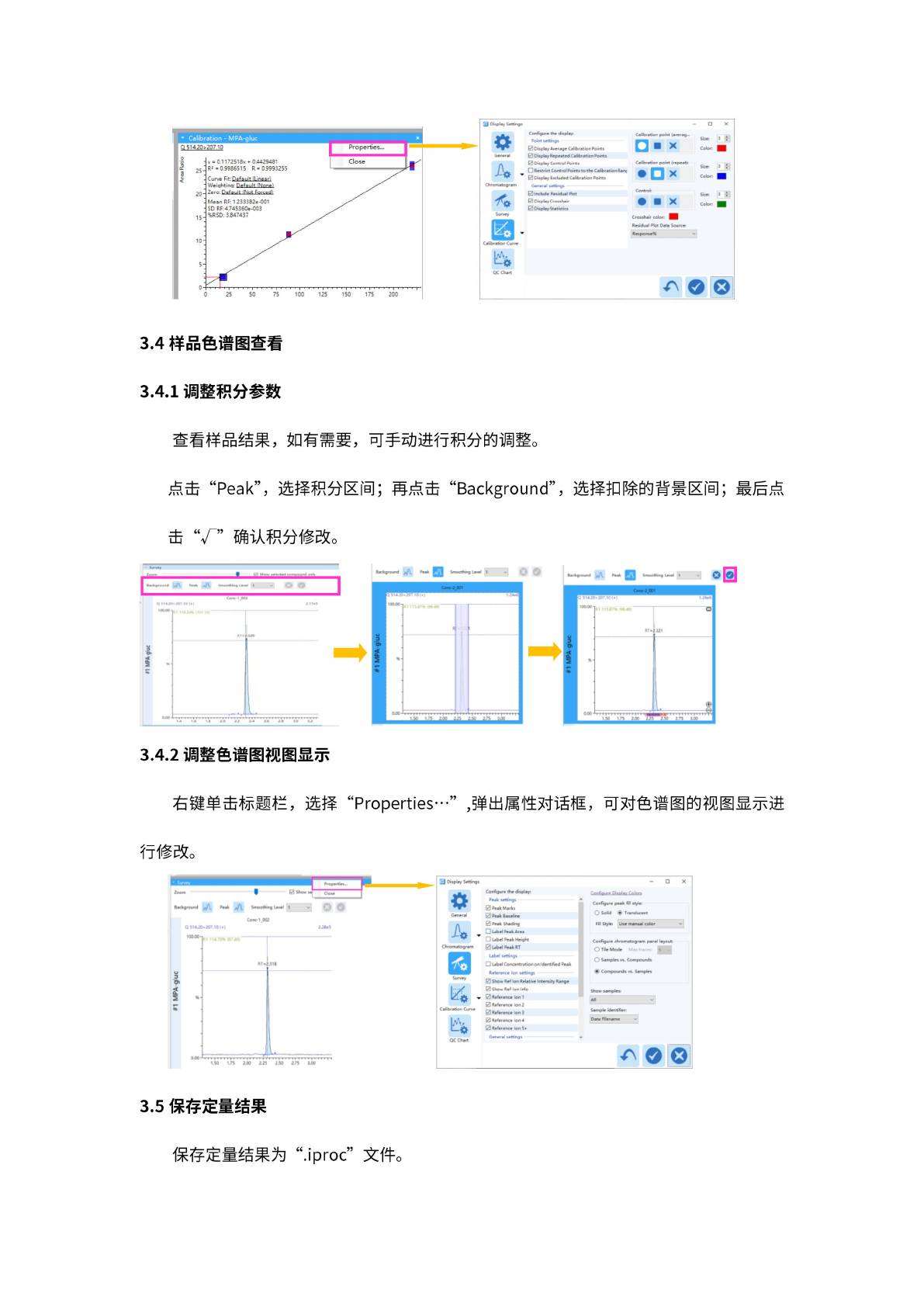
右键
单击标
题栏,
选择
“Properties
…”
,弹出
属性对
话框,
可对
色谱图
的视图
显示进
行
修改。
Display
Settings
QC
Chart
Configs
Z
dkpl”
Peak
settings
0PMk
Marks
0
PMk
Ssline
0
P»k
Shading
Ubei
Pe』
Area
Label
Peak
Height
团
Label
Z.k
RT
Uibd
Ubd
Conc«f«ration
on
I
dent
iM
PmIc
R«<er»nc»
18
Mating*
0
Show
RM
Ion
Relate
Intensity
R®nge
Q
Show
Re<
Ion
IrWo
0
Reference
18
1
团
RM“・nc・
l8
2
团
Rt<«r»nct
5
3
团
l84
团
V
・r.nc・
18
5*
Generel
teflg.
G
二
rhguy
二
upla上
二
Configure
peak
fil
ftylr
O
So«
领
STm
Fil
Style:
Us*
manual
color
Configure
chromatogrMn
pand
layout:
O
Tie
Mode
Man
trace:
5
O
amp—
v».
Compounds
®
Compounds
vs.
Samples
3.5
保存定
量结果
3.4
样
品色谱
图查看
3.4.1
调整积
分参数
查
看样品
结果,
如有
需要,
可手
动进行
积分的
调整。
点击
“Peak”,
选
择积分
区间;
再点击
“Background”,
选
择扣除
的背景
区间;
最后点
击
确
认积分
修改。
25
50
75
100
125
150
175
200
C
Properties...
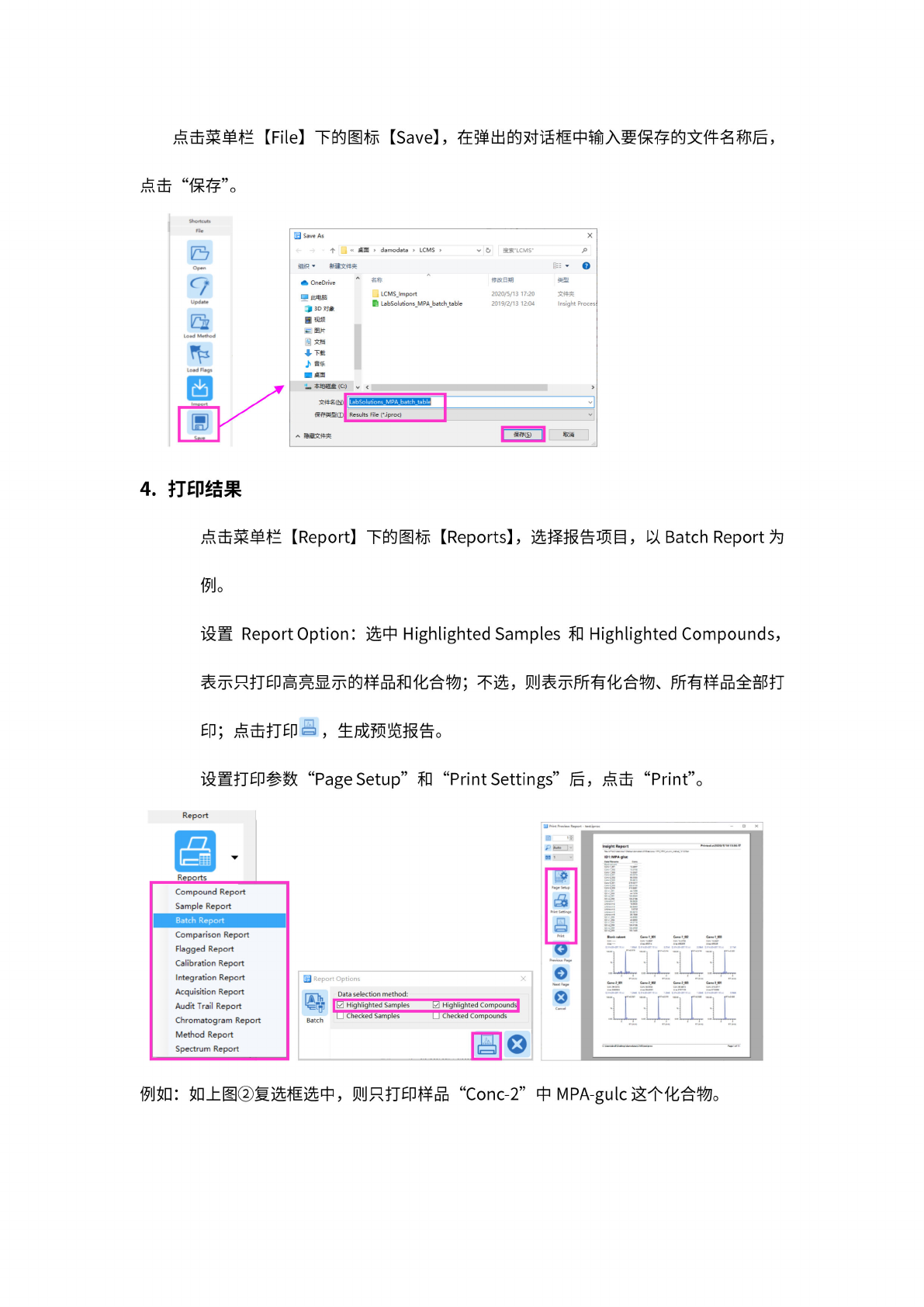
保
存定量
结果为
“.iproc”
文件。
12
①
②
③
②
①
③
报告项目
点击
菜单栏
【
File】
下
的图标
【
Save】,
在弹
出的对
话框中
输入要
保存的
文件名
称后,
4.
打
印结果
点击
菜单栏
【
Report】
下
的图标
【
Reports】,
选
择报告
项目,
以
Batch
Report
为
例。
设置
Report
Option:
选中
Highlighted
Samples
和
Highlighted
Compounds,
表示
只打印
高亮显
示的样
品和化
合物;
不选,
则表示
所有化
合物、
所
有样品
全部打
EP;
点击打
印旦,
生
成预览
报告。
设置打
印参数
“Page
Setup”
和
“Print
Settings”
后
,点击
“Print”。
Inttghc
Rapod
Report
Reoorts
点击
“保
存”。
3
Report
Options
0
Highlighted
Compounds]
Checked
Compounds
Data
selection
method:
10
Highlighted
Samples
„
LJ
Checked
Samples
Batch
H©
Compound
Report
Sample
Report
Batch
Report
Comparison
Report
Flagged
Report
Calibration
Report
Integration
Report
Acquisition
Report
Audit
Trail
Report
Chromatogram
Report
Method
Report
Spectrum
Report
阴
Save
As
个
«
桌面
>
damodata
>
LCMS
>
U
OneDrive
Q
此电脑
13D
对象
脚酶
目图片
图
g
,下我
J
音乐
名称
,
LCMSJmport
厨
LabSolutions
MPA
batch
table
修
改日期
2020/5/13
17:20
2019/2/13
12:04
建
文件夹
Insight
Proces;
二
本
地磁盘
(C:)
7
人
项藏文
件夹
孰肖
例如:
如
上图②
复选框
选中,
则只打
印样品
“Conc-2”
中
MPA-guIc
这个化
合物。
13
Blank^systern
Rmding
Unknown
也
solvent
Rdhg
[
.PWndin^
[
Standard
CcocT
眄
Pending
Standard
Cor*-1
[®P»ndin9
J
Standard
Ccnc・2
Standard
Cw1
002
C<xk-\003
Ccnc-2
001
C
Name
_
Status
‘
SMnplelD
~
那
pie
Type
Cal
Point
-0-
Levd
Found
RT^
MPA-gkx
Dw
filename
Blank.
w?te*n
Blank
QE
C<xk-1
001
二
S*E・
Re»Ut»
Haqi
U
labSok/tions
Insight
(Admin)
•
(tmtiproc
•
MPA
MRM^cokjmn^mcthod^l
21
205-km)
[Pre-Rdease]
Shortcut
H
。
•
Compound
lilt
5
EEEB
I
Status
ISTD
Group
rryz
.
View
S
1
I
|
MPApluc
•
Pending
丁吟*
Edit
E
4
T>
1
Lz
)
1
//)
•
JUO.UU
0
3
【
MPA
2
321.15»3O3X»5
Report
__
_
]d
3
M
PA
‘
・
2
32425»
306.15
召
Reports
CcncfoOZ
Cone;
'
:
-
_
;
_
N
|
Pendg
5”U
~
0
!■
'
3
2.319
CcfKiMi
C<x»c-3
PS
Pending
Standard
面
)
2317'
QC41.001
QC41
Fe
Pending
Unknot
2324
QC-L1
002
QC41
•
Pending
Unknown
―
2.324
1
QC
L2
001
,
[ocu
—
Unknown
2.314
QC
-12.002
f
u
j
・—
—
・
QC-12
1
・
•
Pimdin^
1
d.*・.
Unknown
*
j
1
一
―
-
2.322
I
1'
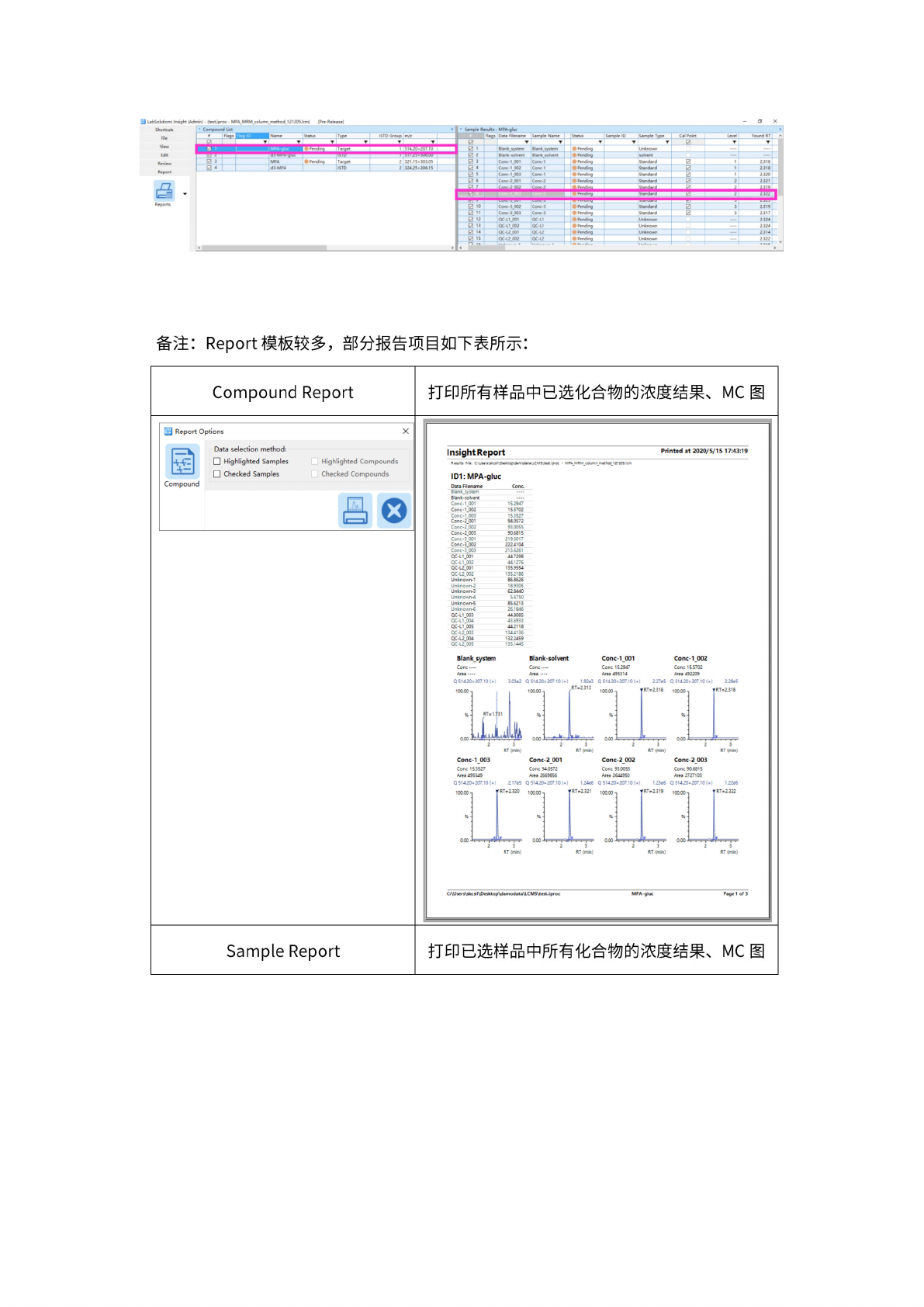
备注:
Report
模板
较多,
部分报
告项目
如下表
所示:
Compound
Report
打印所
有样品
中已选
化合物
的浓度
结果、
MC
图
|
Report
Options
X
国
Compound
Data
selection
method:
Highlighted
Samples
Checked
Samples
(Si
Highlighted
Compounds
Checked
Compounds
Insight
Report
Printed
at
2020/5/15
17:43:19
File:
C:\J5fi-ff
Ac8
ya
-
MPA
MRM
column
m^hod
i2*20S.lcm
ID1:
MPA-gluc
Data
Filename
Cone
B
Ian
k_sy
stem
—
-
Blank-solvent
—
—
Conc-1_001
152947
Conc-1_002
15.5702
Conc-1~003
153527
Conc-2_81
94.0572
Conc-2_002
93.005S
Conc-2_003
90.6815
Conc-3-001
219.5017
Conc-3_82
2224104
Conc・3_83
213.6261
QC-L1.001
44.7298
QC-L1
002
44.1276
QC-L2.001
135.9554
QC-L2.002
1352186
Unknown-1
86.8626
Unknown-2
1&9305
Unknown-3
628440
Unknown-4
5.6750
Unknown-S
85.5213
Unknown-6
26.1646
QC-L1
003
44.8085
QC-L1.004
43.6953
QC-L1.005
442118
QC-L2.003
1344156
QC-L2
004
1322459
QC-L2
005
135.1445
Blanksystem
Cone
—
Area
—
-
Blank-solvent
Cone
—
Area
—
-
Q51420>
207.1
0(+)
3
一。%2
Conc-1_003
Cone
153527
Area
495549
Q51420>
207.10(+)
217e5
Conc-2_001
Cone
W.0572
Area
26698%
Q51420>
207.10(+)
124e€
Conc-1_001
Cone
152947
Area
495314
Q51420>207.10(+)
227e5
Conc-1_002
Cone
15.5702
Area
492209
Q51420>
207.10(+)
228e5
RT(min)
Conc-2_002
Cone
93.0055
Area
2644950
Q51420>207.10(+)
123e6
RT
(min)
Conc-2_003
Cone
90.6815
Area
2727103
Q
51420a207J0
(+}
RT(min)
RT
(min)
C:\Users\5kcsll\Desktop\damodata\LCMS\test.iproc
MPA-gluc
Page
1
of
3
Sample
Report
打印已
选样品
中所有
化合物
的浓度
结果、
MC
图
-00