LCMS_010 - 第4页
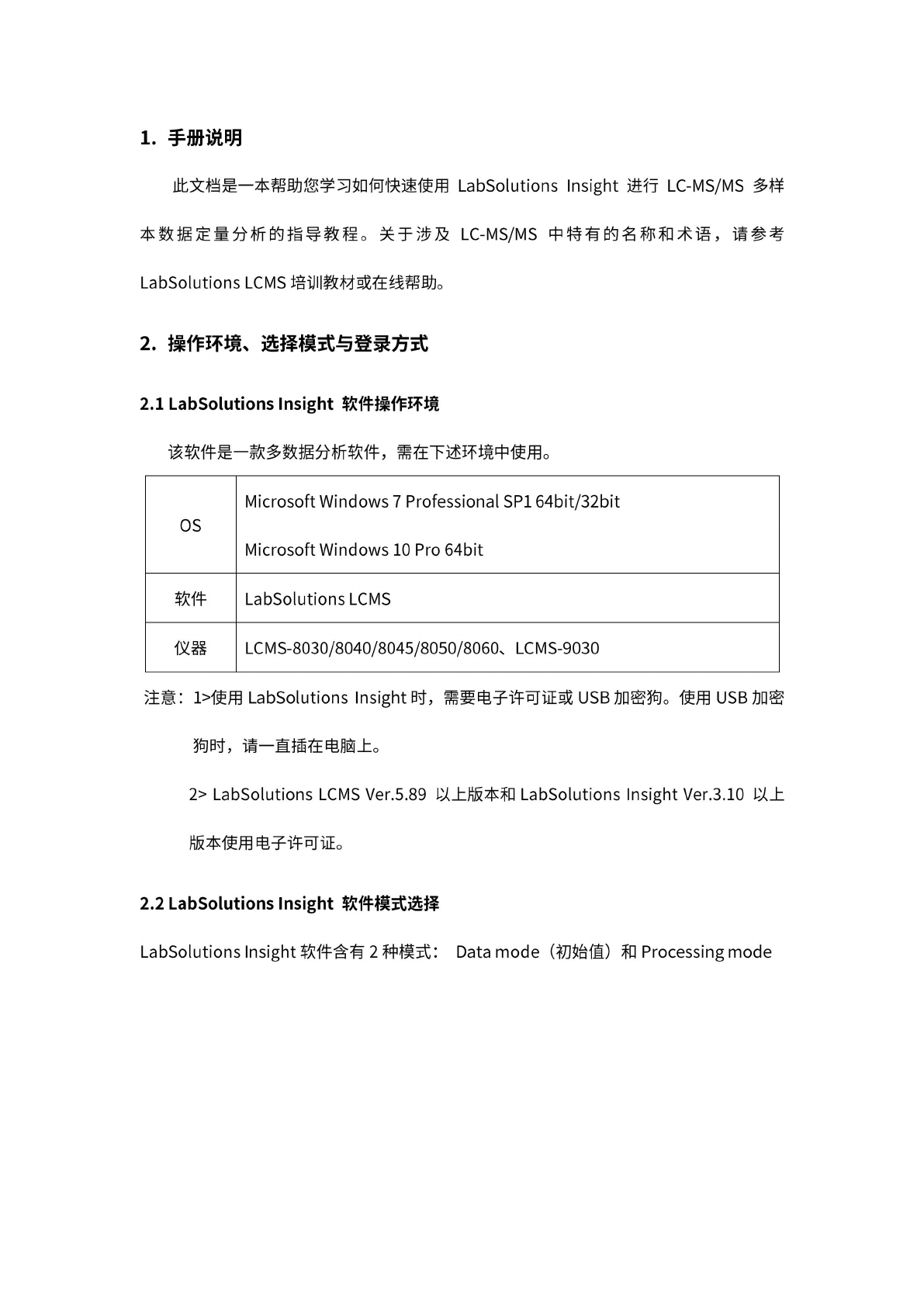
4 Data mode 巴 二 3 Open (Jem, .led) Open Files Processing... I Over write (.Icm, .lcd> Processing mode Open Files Processing... Over write to Processing File (.iproc) or Save as new Processing File (.iproc) D 注: 1) Dat…
3
1
.
手
册说明
此文
档是一
本帮助
您学习
如何快
速使用
LabSolutions
Insight
进行
LC-MS/MS
多样
本
数据定
量分析
的指导
教程。
关
于涉及
LC-MS/MS
中
特有的
名称和
术语,
请参考
LabSolutions
LCMS
培
训教材
或在线
帮助。
2
.
操作
环境、
选择模
式与登
录方式
2.1
LabSolutions
Insight
软件操
作环境
该软
件是一
款多数
据分析
软件,
需
在下述
环境中
使用。
OS
Microsoft
Windows
7
Professional
SP1
64bit/32bit
Microsoft
Windows
10
Pro
64bit
软件
LabSolutions
LCMS
仪器
LCMS-8030/8040/8045/8050/8060s
LCMS-9030
注意:
使用
LabSolutions
Insight
时,
需要
电子许
可证或
USB
加
密狗。
使用
USB
加密
狗时,
请一直
插在电
脑上。
2>
LabSolutions
LCMS
Ver.5.89
以上
版本和
LabSolutions
Insight
Ver.3.10
以上
版
本使用
电子许
可证。
2.2
LabSolutions
Insight
软件模
式选择
LabSolutions
Insight
软
件含有
2
种
模式:
Data
mode
(初
始值)
和
Processing
mode
4
Data
mode
巴
二
3
Open
(Jem,
.led)
Open
Files
Processing...
I
Over
write
(.Icm,
.lcd>
Processing
mode
Open
Files
Processing...
Over
write
to
Processing
File
(.iproc)
or
Save
as
new
Processing
File
(.iproc)
D
注:
1)
Data
mode
和
Processing
mode
两
种模式
切换的
具体操
作参考
“5.
附录
5.1"
2)
文件
(」cm;
.led)
是
LabSolutions
LCMS
软件生
成的方
法文件
和数据
文件;
文件
(.iproc)
是
LabSolutions
Insight
软件
生成的
多数据
文件。
2.3
LabSolutions
Insight
软
件登录
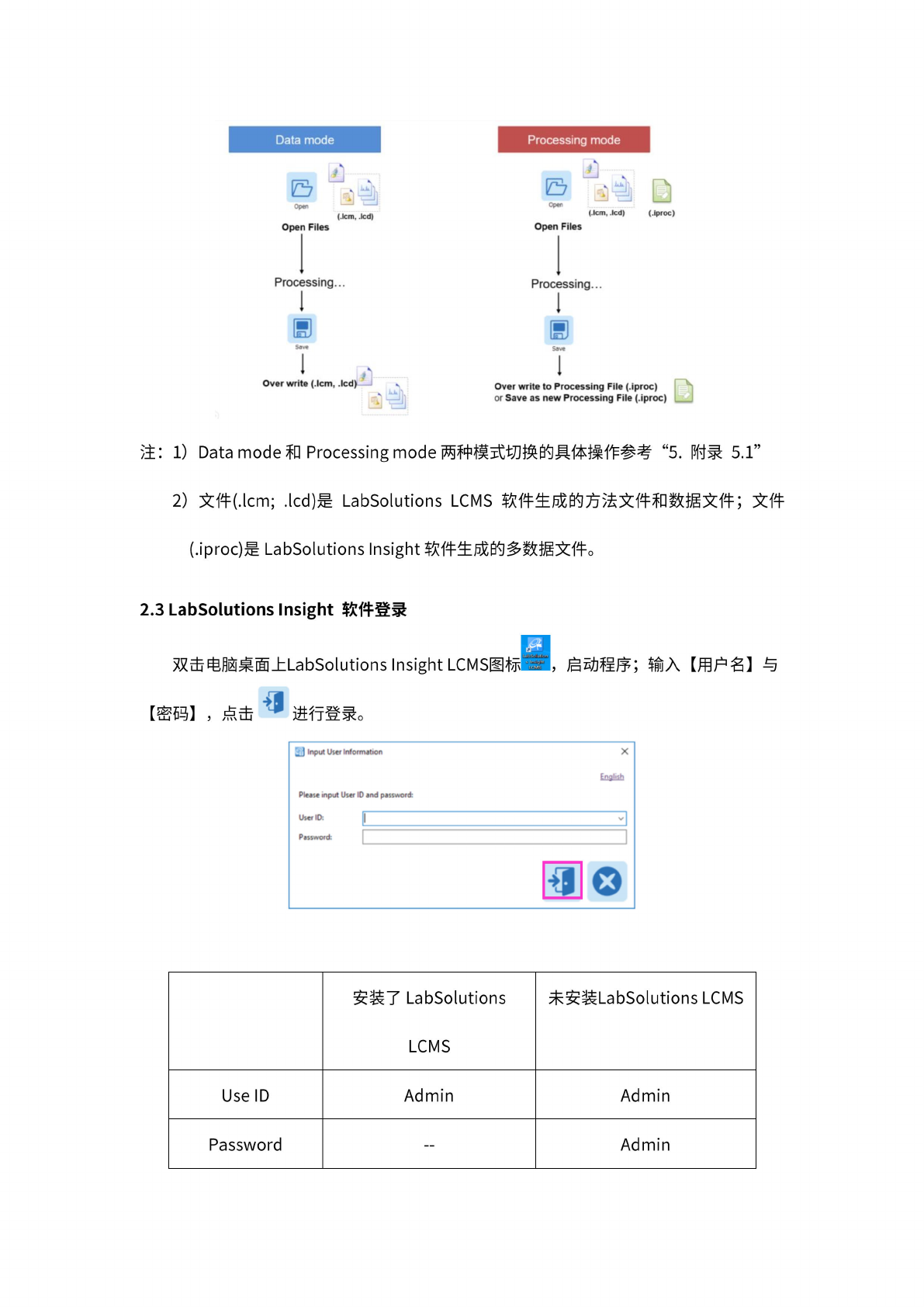
双
击电脑
桌面上
LabSolutions
Insight
LCMS
图标
I,
启动
程序;
输入
【用
户名】
与
【密
码】
,点击
进行
登录。
寓
Input
User
Infornution
X
English
Please
input
User
ID
and
password:
User
10:
||
3
Password:
|
]
安装了
LabSolutions
LCMS
未安装
LabSolutions
LCMS
Use
ID
Admin Admin
Password
—
Admin
5
3.
数
据处理
3.1
数
据导入
3.1.1
导
入批处
理文件
(
Processing
mode)
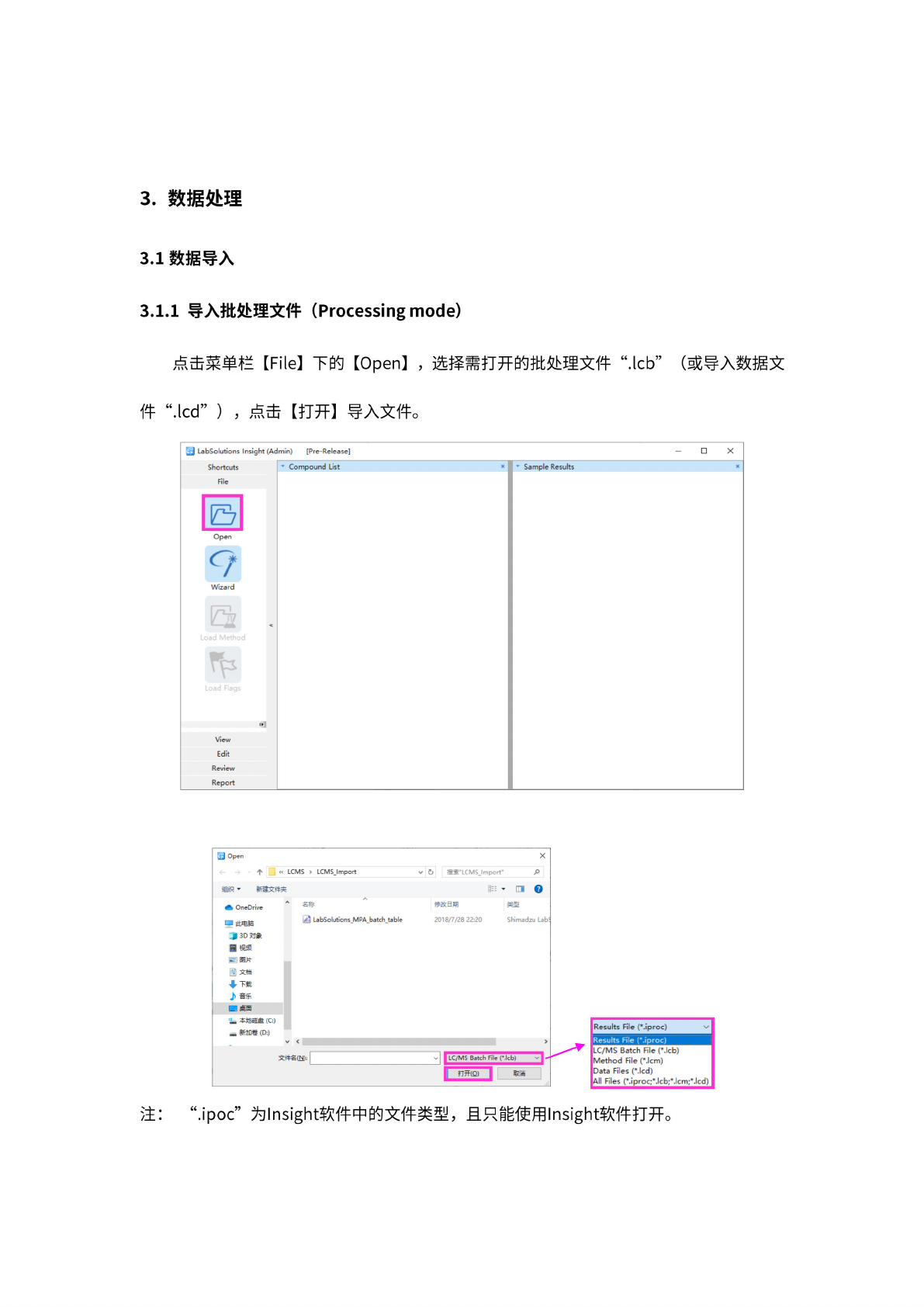
点击
菜单栏
【
File】
下的
【
Open】
,
选择
需打开
的批处
理文件
Feb”
(或
导入
数据文
件
件
cd”
)
,
点击
【打
开】
导入
文件。
阳
LabSolutions
Insight
(Admin)
[Pre-Release]
Shortcuts
*
Compound
List
File
固
Open
Wizard
View
Edit
Review
Report
-
X
Sample
Results
I
Results
File
(*.iproc)
Results
File
(*.iproc)
LC/MS
Batch
File
(*.lcb)
Method
File
(*.lcm)
Data
Files
(Med)
All
Files
(*.iproc;Mcb;*.lcm;*.lcd)
注:
".ipoc”
为
Insight
软件中
的文件
类型,
且只
能使用
Insight
软件
打开。