4OM-1011-002.pdf - 第110页
0305-001 Tg0860-PM-MM 3-59 (7) Select the [PICK FROM FDR.] key and press the [MOVE] button. The head moves to the designated position and stops. (8) Set the [OPERA TION/SET UP] switch to the "SET UP" side and p…
0305-001 Tg0860-PM-MM
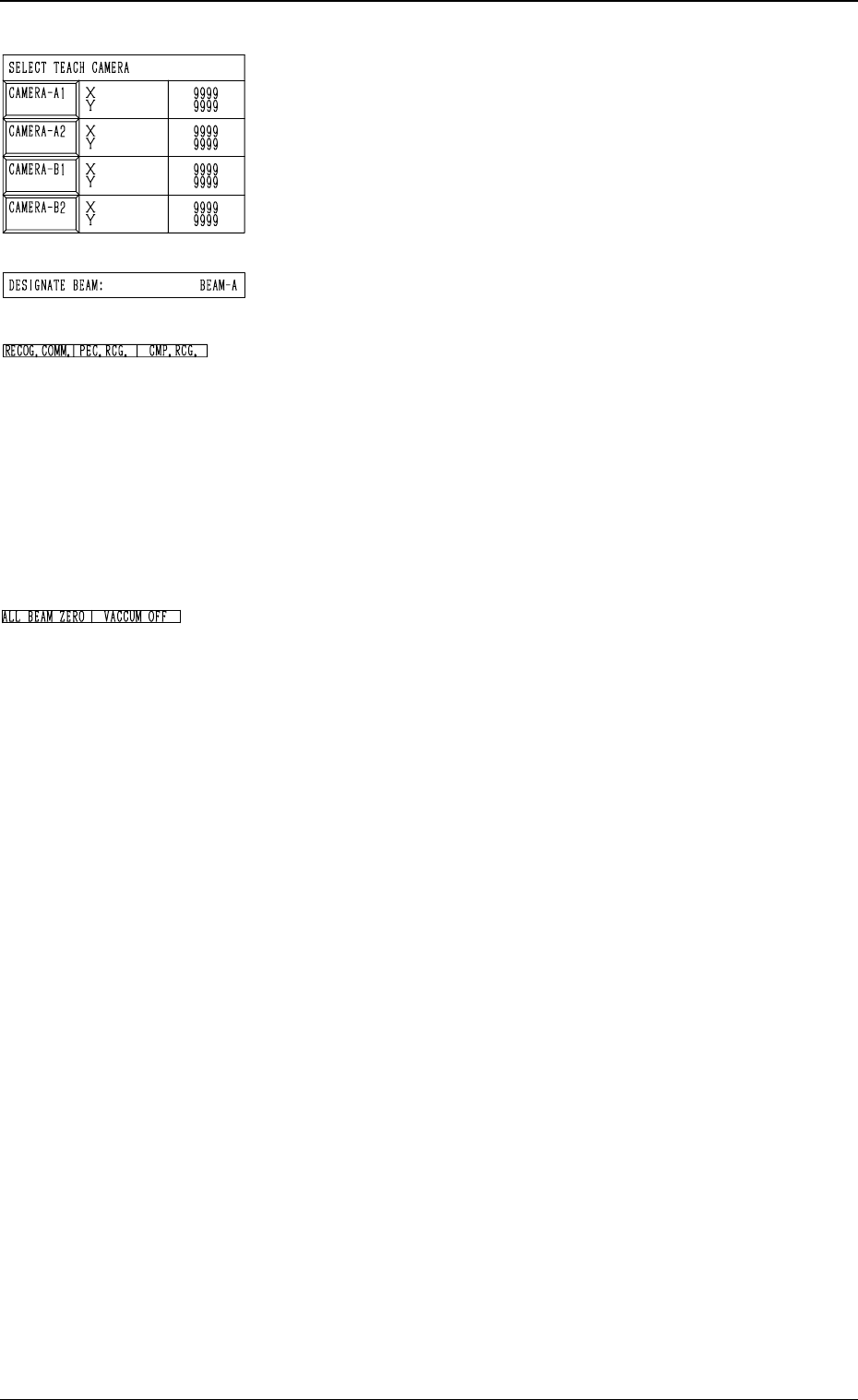
*12 SELECT TEACH CAMERA
A component recognition camera can be designated for
camera magnification teaching operation.
Press the [CAMERA-A1], the [CAMERA-A2], the
[CAMERA-B1], or the [CAMERA-B2] key.
Two or more cameras can be designated.
*13 DESIGNATE BEAM
Shown is the beam selected to pick up the special jig.
*14 RECOG. COMM.
When “DISABLE” is set in the “P.E.C.” and "COMPO
NENT RECOGNITION” data boxes at the “TEST
MODE” display, the background color of “P.E.C. RECOG.”
and “COMP. RECOG.” becomes light red. (No background
color in normal cases)
Note: In this case, the recognition processing is not made
even if the teaching operations are performed.
Therefore, the results of various teaching opera-
tions are not reflected on the offset data.
*15 Set State Indications
When all beams are zeroed completely, the background
color of “ALL BEAM ZERO” turns green. Otherwise,
the background has no color.
“VACUUM ON” or “VACUUM OFF” indicates that the
vacuum is turned ON or OFF.
Operation Procedure
• Required Items
Nozzle: Either “MF01”, “MF02” or “MA06”
Special Jig (Option): Component Recognition Calibration Jig
(JG-0084)
(1) Set either “MF01”-, “MF02”- or “MA06”-type nozzle in
the nozzle stocker.
(2) Check the followings.
• Check that the machine is powered.
• Check that the supply cover is completely closed.
(3) Check the following data.
• “DESIGNATE BEAM”
• “DESIGNATE HEAD”
• “FEEDER #”
• “SELECT TEACH CAMERA”
(4) Select the [ALL BEAM HEADS ZERO [MOVE]] key
and press the [MOVE] button to zero all beam heads.
(5) Attach either “MF01”-, “MF02”- or “MA06”-type nozzle
at the “MANUAL NOZZLE CHANGE OPERATION”
display.
(6) To specify the gain and level, use the “GAIN・LEVEL”
display.
Note: In normal cases, set “DISABLE” in the “DES-
IGNATE” data box.
3-58
Fig. 4C86
Fig. 4C87
Fig. 4C88
Fig. 4C89
6.2 COMP. RECOG. CAMERA MAG. (STEP-2) Display
0305-001 Tg0860-PM-MM3-59
(7) Select the [PICK FROM FDR.] key and press the
[MOVE] button.
The head moves to the designated position and stops.
(8) Set the [OPERATION/SET UP] switch to the "SET UP"
side and press the [READY] button to turn off the LED.
(9) Open the supply cover.
(10) Select the [VACUUM PICK-UP ON/OFF [MOVE]]
key and press the [MOVE] button to turn on the vacuum.
(11) Attach the special jig (option) to the head by hand.
Notes: (a) Be sure to make the nozzle pick up the center of
the special jig with the printed mark side facing
downward.
(b) Do not touch the printed mark side with your
finger.
(12) Close the supply cover.
(13) Press the [READY] button to turn on the LED and set
the [OPERATION/SET UP] switch to the "OPERA-
TION" side.
(14) Select the [CAMERA MAGNIFICATION TEACH
START] key and press the [MOVE] button. The machine
starts the teaching operations.
(15) When the teaching is completed, select the [COMPO-
NENT COLLECTION] key and press the [MOVE]
button.
The head moves to the designated position and stops.
(16) Set the [OPERATION/SET UP] switch to the "SET UP"
side and press the [READY] button to turn off the LED.
(17) Open the supply cover.
(18) Select the [VACUUM PICK-UP ON/OFF [MOVE]]
key and press the [MOVE] button to turn off the vacuum.
(19) Collect the special jig (option) from the head.
Note: Be sure not to drop the special jig. Otherwise, it may
break because it is very fragile.
6.2 COMP. RECOG. CAMERA MAG. (STEP-2) Display
CAUTION
Special care is required for safety
purposes because the operator
has to put part of his/her body in-
side the machine.
CAUTION
Special care is required for safety
purposes because the operator
has to put part of his/her body in-
side the machine.
0305-001 Tg0860-PM-MM
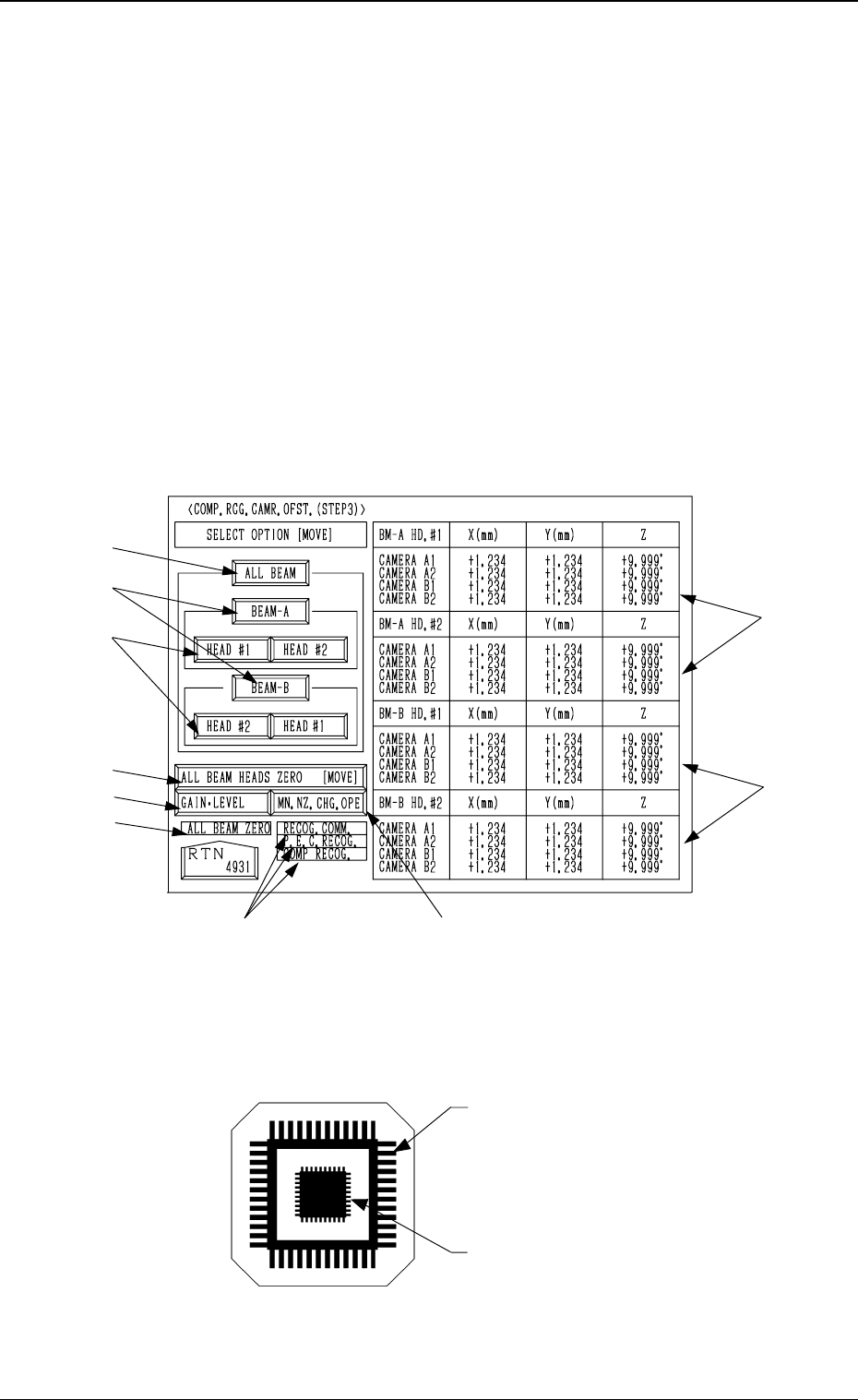
6.3 COMP. RCG. CAMR. OFST. (STEP3) Display
• This display allows teaching the offset data of the component recognition
camera.
The offset values are calculated by recognizing the printed pattern on the jig
component (the teaching plate (component recognition offset jig)) picked
up by a nozzle with both component recognition and P.E.C. recognition cam-
eras.
Note: Follow the teaching procedures in the specified order. Otherwise, some
trouble (such as inaccurate component placement, frequent mechani-
cal errors, etc.) will arise.
When the [COMPONENT RECOG CAMERA OFFSET (STEP-3)] key is
pressed at the “TEACH OFFSET” display, the following display appears on
the screen.
Teaching Plate (Component Recognition Offset Jig: JG-0085)
(Standard Accessory Part)
Note: Handle this fragile jig very carefully.
• Two types of patterns are printed through vapor deposition on the glass for
positional calculation.
*4
*7
*8
*2
*1
*3
*5
*6
*9
*4
3-60
6.3 COMP. RCG. CAMR. OFST. (STEP3) Display
Fig. 4C90
Fig. 4C91
Pattern to be captured by the
component recognition camera
Pattern to be captured by the
P.E.C. recognition camera