4OM-1011-002.pdf - 第132页
0305-001 Tg0860-PM-MM (1.8) Close the supply cover and press the [READY] button for the per- tinent beam to lock the cover . Then, set the [OPERA TION/SET UP] switch to the “OPERA TION” side. (1.9) Select the [ALL BEAM H…
0305-001 Tg0860-PM-MM
Operation Procedure
(1) Coarse Angle Teaching Operation
Follow the steps below to perform the coarse angle teaching operation
such that the nozzle can be picked up from the nozzle stocker.
(1.1) The dummy data for the special jig nozzle can be registered at the
“NOZZLE LIBRARY INFO” display. (Hierarchical Sequence:
“DATA EDIT” Display → “NOZZLE LIBRARY INFO” Display)
Enter the following parameters.
NOZZLE ID: JG01
SHAPE: ROUND or RECTANGLE
NOZZLE LENGTH: 19.0 mm
NOZZLE OUTER SIZE X: 10.0 mm
NOZZLE OUTER SIZE Y: 10.0 mm
It is not necessary to set the other parameters.
Refer to “Section 8 Nozzle Type Data in Volume 2” for details.
(1.2) Register “JG01” individually for both nozzle stockers A and B at
the “NOZZLE STOCKER DATA” display. (Hierarchical Sequence:
“DATA EDIT” Display → “NOZZLE STOCKER DATA” Display)
Refer to “Nozzle Stocker Data of Section 7 in Volume 2” for de-
tails.
(1.3) Open the “HEAD ROTATION OFFSET” display. (Hierarchical Se-
quence: “SPECIAL SEL.” Display → “TEACH OFFSET” Display
→ “HEAD ROTATION OFFSET” Display)
(1.4) Press the [MANUAL NOZZLE CHANGE OPE] key at the “HEAD
ROTATION OFFSET” display (Fig. 4C139). The “MANUAL
NOZZLE CHANGE OPERATION” display (Fig. 4C85) appears
on the screen. Return all nozzles on the head to the nozzle stocker.
Refer to “9. Manual Nozzle Change Operation of Section 4 in Vol-
ume 1” for details.
(1.5) Designate the beam and the head to be used for teaching operations
by setting parameters in the “DESIGNATE BEAM” and “DESIG-
NATE HEAD” data boxes at the “HEAD ROTATION OFFSET”
display (Fig. 4C139).
Designate the feeder No. (the feeder position where the nozzle must
be attached by hand) in the “FEEDER #” data box.
Note:
“110 to 130” must be set in the data box when “BEAM-A”
is entered in the “DESIGNATE BEAM” data box and “210
to 230
” when “BEAM-B” is set in the “DESIGNATE
BEAM
” data box.
(1.6) When the [PICK UP NOZZLE] key is selected and the [MOVE]
button is pressed, the selected head moves to the designated feeder
# position.
(1.7) Set the [OPERATION/SET UP] switch to the “SET UP” side and
press the [READY] button for the pertinent beam to unlock the
supply cover.
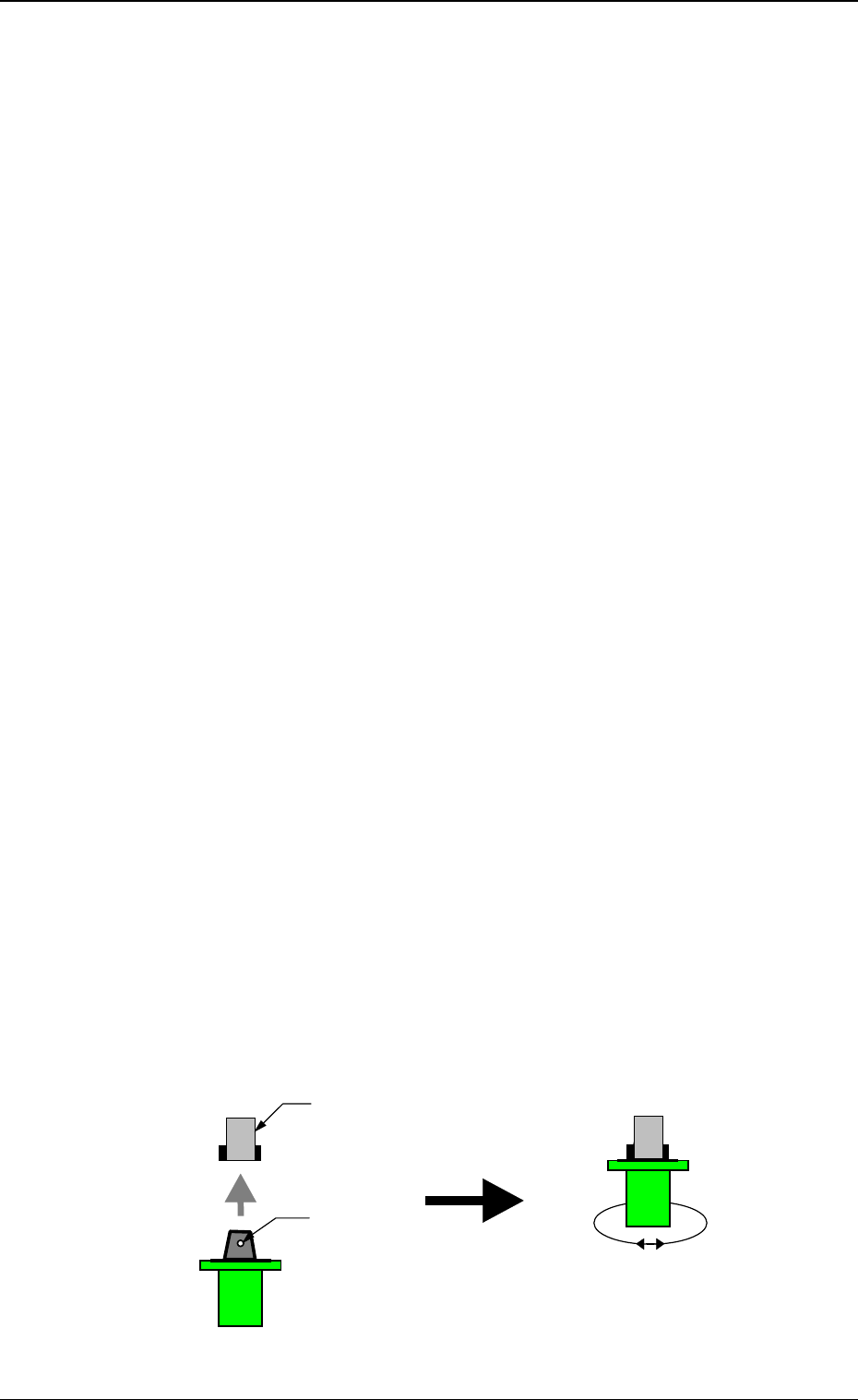
Open the supply cover and attach the special jig nozzle to the head.
3-80
6.7 HEAD ROTATION OFFSET Display
Fig. 4C156
Nozzle Clamp Section
The clamp lever comes to the
position where it opens both in
front and rear.
Note the direction of the nozzle.
The groove for the clamp is
directed forward and backward.
Turn the special jig nozzle
slightly right and let and check
that the nozzle is clamped
securely by the clamp section.
Groove for Clamp

0305-001 Tg0860-PM-MM
(1.8) Close the supply cover and press the [READY] button for the per-
tinent beam to lock the cover. Then, set the [OPERATION/SET
UP] switch to the “OPERATION” side.
(1.9) Select the [ALL BEAM HEADS ZERO [MOVE]] key and press
the [MOVE] button to zero the X/Y beam.
(1.10) A camera must be selected for teaching operations as follows.
One of the four cameras can be selected. It is advisable that the
nearest camera should be selected.
Example:
Head #1 on Beam A → Camera A1, Head #2 on Beam A →
Camera A2
Head #1 on Beam B → Camera B1, Head #2 on Beam B →
Camera B2
(1.11) When the [HEAD ROTATION OFFSET TEACH START] key is
selected and the [MOVE] button is pressed, the machine performs
the teaching operation.
When the teaching operation is completed normally, the specified
data is updated on the top right of the screen.
Note: The results of the teaching operation are directly written
as the offset data.
(1.12) When the [NOZZLE COLLECTION] key is selected and the
[MOVE] button is pressed, the special jig nozzle comes back to
the place where it is attached. Detach the special jig nozzle through
the same procedure for the attachment.
(1.13) Perform the teaching operations on all heads through almost the
same procedures.
(2) Angle Teaching Operation
The special jig nozzle is picked up from the nozzle stocker and the teach-
ing operation is re-performed.
(2.1) Attach the special jig nozzle (JG01) to the nozzle stocker position
specified in “Step (1.2)” of “(1) Coarse Angle Teaching Operation”.
(2.2) Open the “HEAD ROTATION OFFSET” display. (Hierarchical Se-
quence: “SPECIAL SEL.” Display → “TEACH OFFSET” Display
→ “HEAD ROTATION OFFSET” Display).
Check that the result of the teaching operation described in “(1)
Coarse Angle Teaching Operation” is displayed in the offset dis-
play section on the top right of the display.
(2.3) Press [NAMUAL NOZZLE CHANGE OPE] key. The “MANUAL
NOZZLE CHANGE OPERATION” display appears on the screen.
Attach the special jig nozzle (JG01) to the head for teaching opera-
tions.
(2.4) When the [HEAD ROTATION OFFSET TEACH START] key is
selected and the [MOVE] button is pressed, the machine starts the
teaching operations.
When the teaching operation is completed normally, the specified
data is updated on the top right of the screen.
(2.5) Store the special jig nozzle (JG01) at the “MANUAL NOZZLE
CHANGE OPERATION” display.
(2.6) Perform the teaching operations described in (2.3) through (2.5)
several times until the results of the teaching operations are pro-
duced in stable condition.
(2.7) Perform the teaching operations on all heads through almost the
same procedures.
3-81
6.7 HEAD ROTATION OFFSET Display
0305-001 Tg0860-PM-MM
6.8 UNIT MANUAL ALIGNMENT TEACH Display
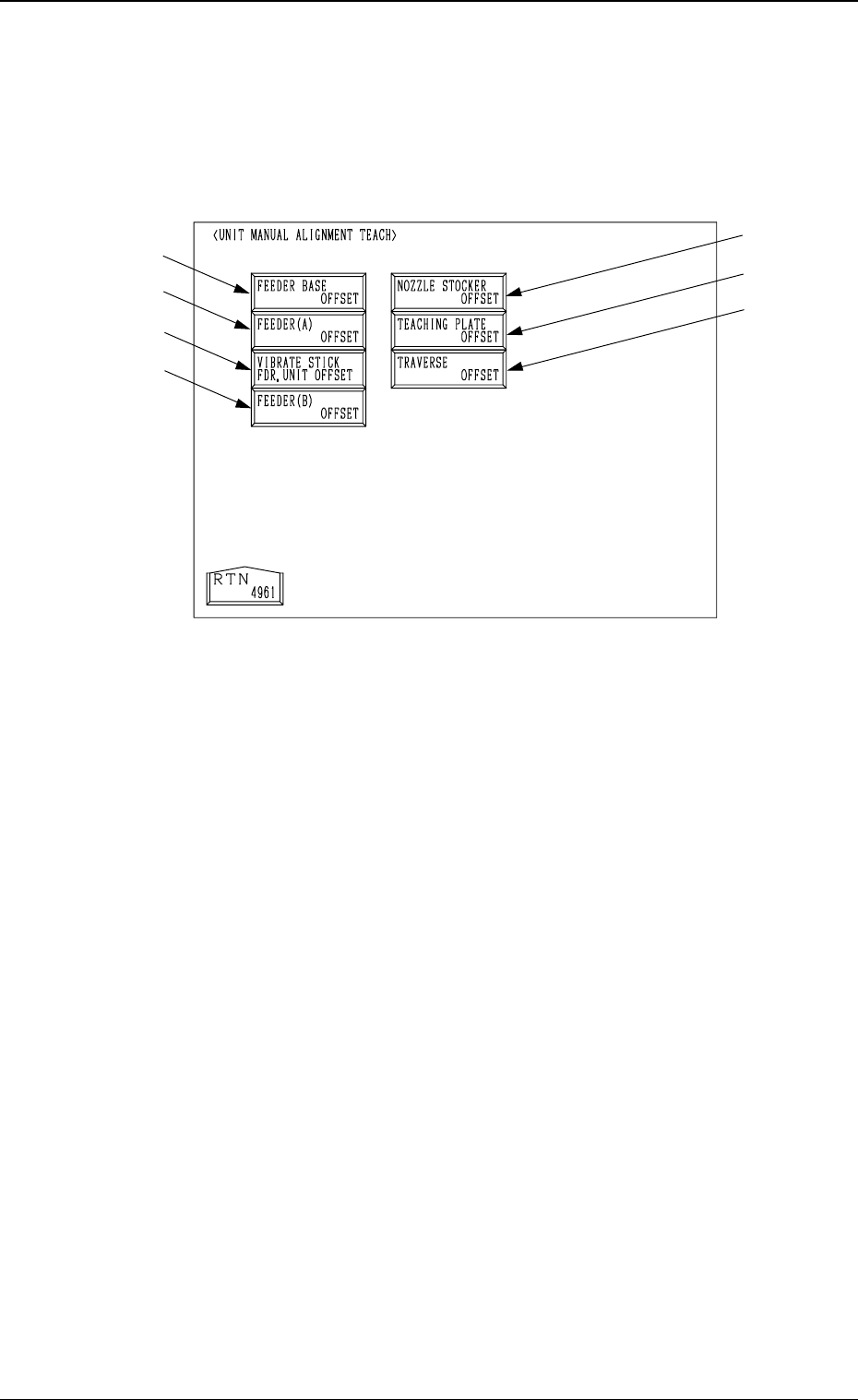
When the [UNIT MANUAL ALIGNMENT TEACH] key is pressed at the
“TEACH OFFSET” display, the following display appears on the screen.
Note: The -marked item is optional.
• This display is used to teach offset data of each unit through manual align-
ment operation.
When the item to be aligned manually is selected at each display for manual
alignment operation and the [MOVE] button is pressed, an image of the
teaching point and a template appear on the recognition monitor. Align them
manually using a track ball and teach the offset data.
Refer to “6.7.8 Teaching Operation with Track Ball” for details.
*1 [FEEDER BASE OFFSET] Key
When this key is pressed, the “FEEDER BASE OFFSET” display appears
on the screen, enabling the offset teaching of the master feeder through
manual alignment operation.
*2 [FEEDER (A) OFFSET] Key
When this key is pressed, the “FEEDER (A) OFFSET” display appears on
the screen, enabling the offset teaching of the master feeder through manual
alignment operation.
*3 [VIBRATE STICK FDR. UNIT OFFSET] Key
When this key is pressed, the “VIBRATE STICK FEEDER UNIT OFF-
SET” display appears on the screen, enabling the offset teaching of the
vibratory stick feeder unit through manual alignment operation.
*4 [FEEDER (B) OFFSET] Key
When this key is pressed, the “FEEDER (B) OFFSET” display appears on
the screen, enabling the offset teaching of the feeder through manual align-
ment operation.
3-82
6.8 UNIT MANUAL ALIGNMENT TEACH Display
*1
*2
*3
*4
*5
*6
*7
Fig. 4C157