4OM-1011-002.pdf - 第134页
0305-001 Tg0860-PM-MM *5 [NOZZLE STOCKER OFFSET] Key When this key is pressed, the “NOZZLE STOCKER OFFSET” display appears on the screen, enabling the offset teaching of the nozzle stocker position through manual alignme…
0305-001 Tg0860-PM-MM
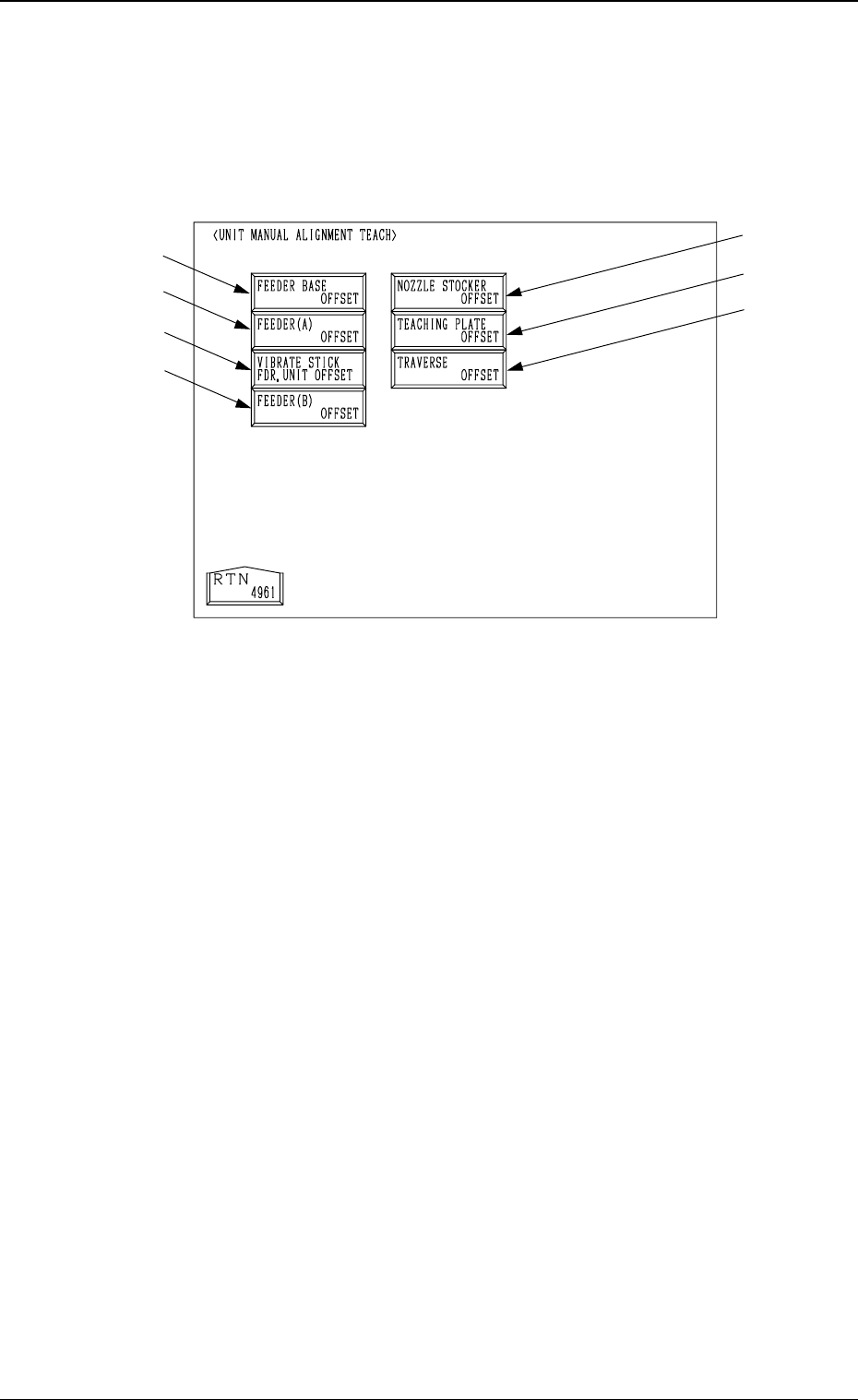
6.8 UNIT MANUAL ALIGNMENT TEACH Display
When the [UNIT MANUAL ALIGNMENT TEACH] key is pressed at the
“TEACH OFFSET” display, the following display appears on the screen.
Note: The -marked item is optional.
• This display is used to teach offset data of each unit through manual align-
ment operation.
When the item to be aligned manually is selected at each display for manual
alignment operation and the [MOVE] button is pressed, an image of the
teaching point and a template appear on the recognition monitor. Align them
manually using a track ball and teach the offset data.
Refer to “6.7.8 Teaching Operation with Track Ball” for details.
*1 [FEEDER BASE OFFSET] Key
When this key is pressed, the “FEEDER BASE OFFSET” display appears
on the screen, enabling the offset teaching of the master feeder through
manual alignment operation.
*2 [FEEDER (A) OFFSET] Key
When this key is pressed, the “FEEDER (A) OFFSET” display appears on
the screen, enabling the offset teaching of the master feeder through manual
alignment operation.
*3 [VIBRATE STICK FDR. UNIT OFFSET] Key
When this key is pressed, the “VIBRATE STICK FEEDER UNIT OFF-
SET” display appears on the screen, enabling the offset teaching of the
vibratory stick feeder unit through manual alignment operation.
*4 [FEEDER (B) OFFSET] Key
When this key is pressed, the “FEEDER (B) OFFSET” display appears on
the screen, enabling the offset teaching of the feeder through manual align-
ment operation.
3-82
6.8 UNIT MANUAL ALIGNMENT TEACH Display
*1
*2
*3
*4
*5
*6
*7
Fig. 4C157

0305-001 Tg0860-PM-MM
*5 [NOZZLE STOCKER OFFSET] Key
When this key is pressed, the “NOZZLE STOCKER OFFSET” display
appears on the screen, enabling the offset teaching of the nozzle stocker
position through manual alignment operation.
*6 [TEACHING PLATE OFFSET] Key
When this key is pressed, the “TEACHING PLATE OFFSET” display ap-
pears on the screen, enabling the offset teaching of the teaching plate posi-
tion through manual alignment operation.
*7 [TRAVERSE OFFSET] Key (Option)
When this key is pressed, the “TRAVERSE OFFSET” display appears on
the screen, enabling the offset teaching of the traverse pullout position through
manual alignment operation.
3-83
6.8 UNIT MANUAL ALIGNMENT TEACH Display
0305-001 Tg0860-PM-MM
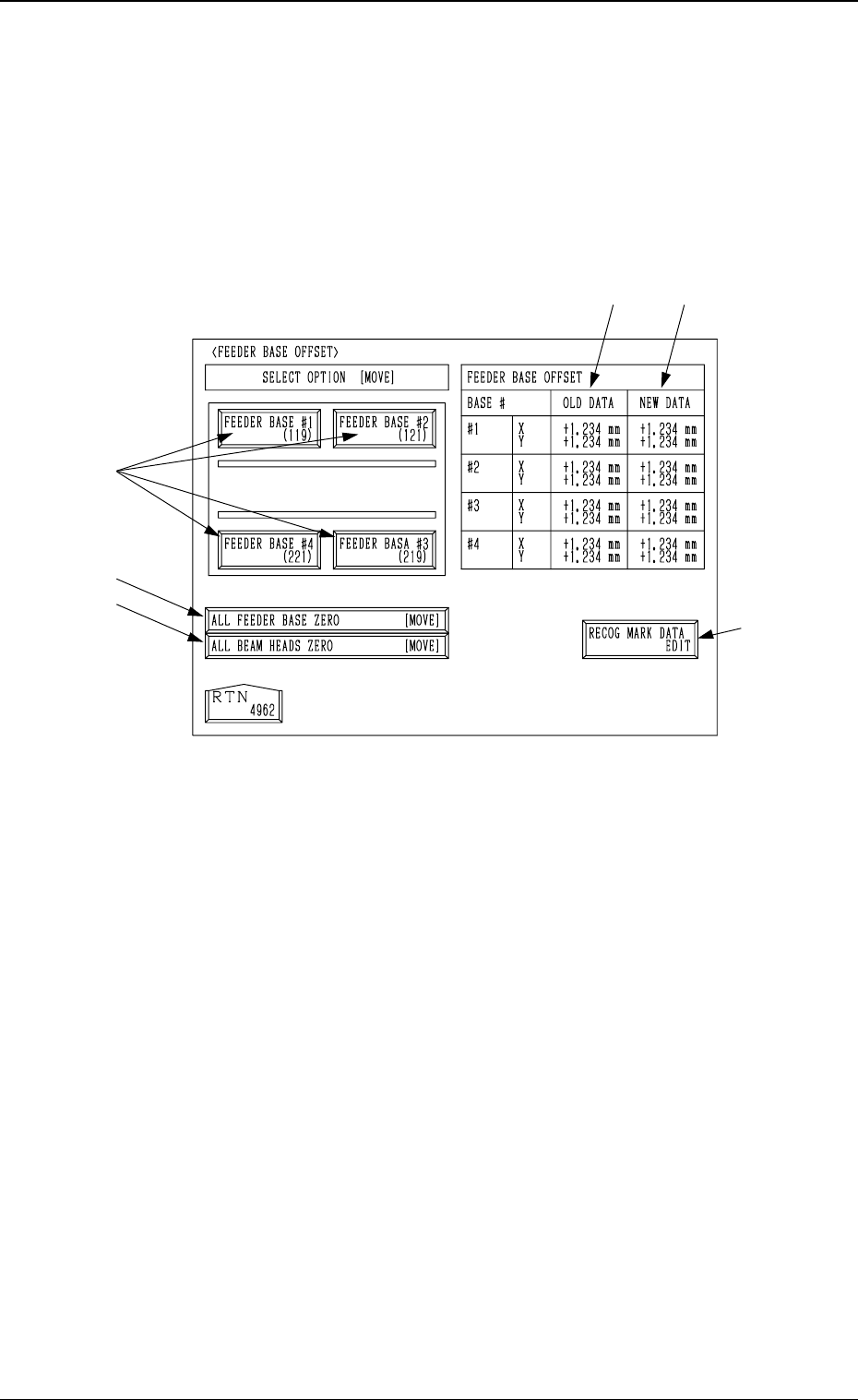
6.8.1 Feeder Base Offset
• Attach the master jig (standard accessory part) to the specified feeder No.
position (119, 121, 221, and 219) and perform the teaching operation for the
offset data of the master jig through manual alignment operation.
When the [FEEDER BASE OFFSET] key is pressed at the “UNIT MANUAL
ALIGNMENT TEACH” display, the following display appears on the screen.
.
*1 [RECOG MARK DATA EDIT] Key
When this key is pressed, the “RECOG. MARK DATA EDIT” display (Fig.
4C168) appears on the screen, enabling the designation of a template shape
to appear on the recognition monitor.
The template shape can be specified for manual alignment with the align-
ment point.
Refer to “6.8.8 Editing of Recognition Mark Data” for details.
*2 [ALL FEEDER BASE ZERO] Key
All feeder bases are zeroed.
When this key is selected and the [MOVE] button is pressed, the zeroing
operation starts.
*3 [ALL BEAM HEADS ZERO] Key
Both Beams A and B are zeroed.
When this key is selected and the [MOVE] button is pressed, the zeroing
operation starts.
*4
*2
*3
*5
*1
*6
3-84
6.8 UNIT MANUAL ALIGNMENT TEACH Display
Fig. 4C158