4OM-1011-002.pdf - 第196页
0305-001 Tg0860-PM-MM *6 [RECOGNITION LIGHTING SET] Key When this key is pressed, the “RECOGNITION LIGHT- ING SET” display appears on the screen. The default of “Recognition Lighting” is set as the speci- fied test libra…
0305-001 Tg0860-PM-MM
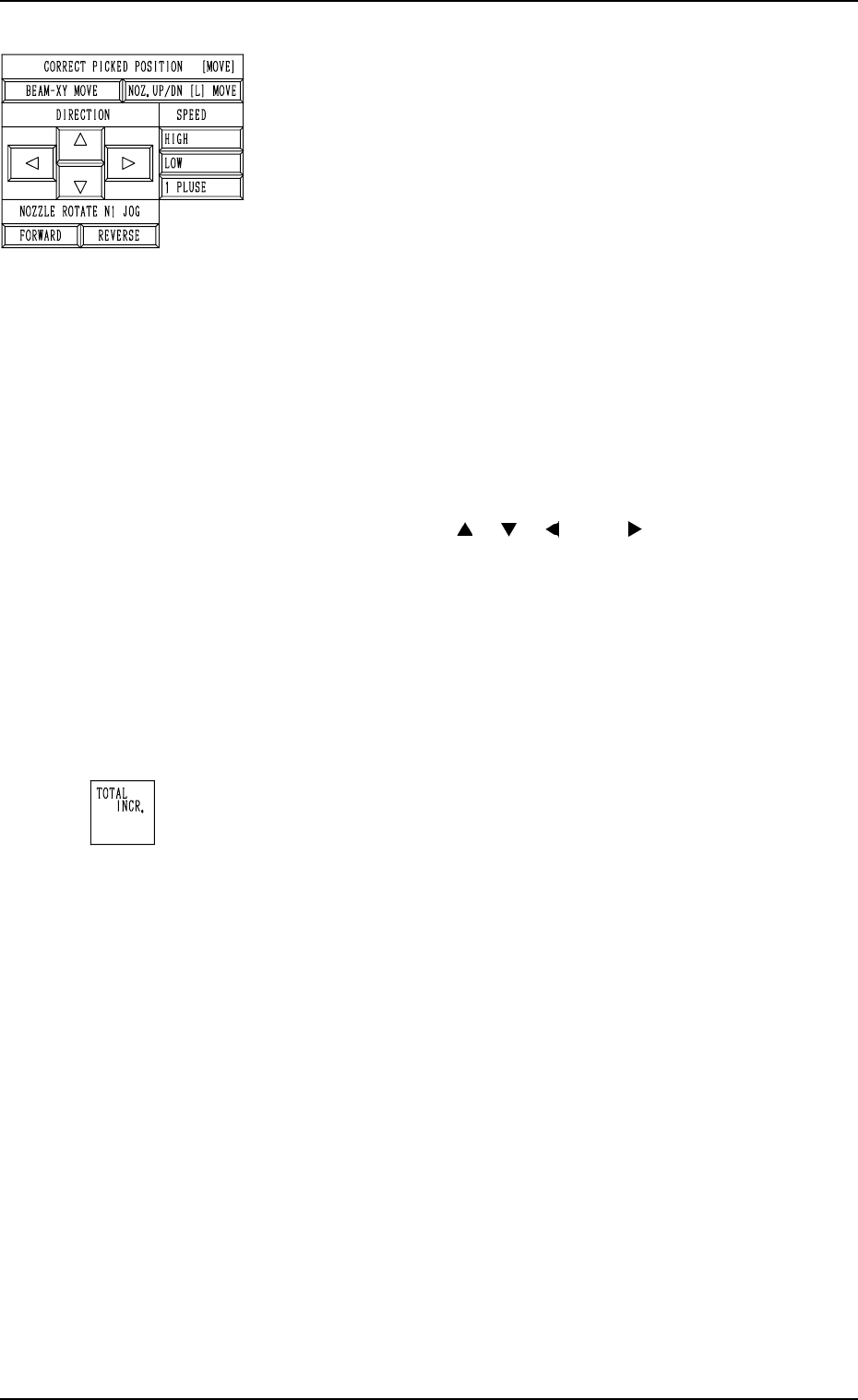
*4 CORRECT PICKED POSITION [MOVE]
The posture of the picked component can be corrected while
the movement is being checked on the recognition moni-
tor.
[BEAM-XY MOVE] Key
This key is used to correct the posture of the picked
component by moving it in the X/Y direction.
When the direction and speed are specified by using
the keys located under “DIRECTION” and “SPEED”
and the [MOVE] button is pressed after this key is
selected, the beam moves in the X/Y direction.
[NOZ. UP/DN [L] MOVE] Key
This key is used to correct the posture of the picked
component by moving it up or down (L direction).
When the direction and speed are specified by using
the keys located under “DIRECTION” and “SPEED”
and the [MOVE] button is pressed after this key is
selected, the nozzle moves up or down (L direction).
“DIRECTION” [ ], [ ], [ ], and [ ] Keys
These keys are used to select the direction in which
the head should be moved.
“SPEED” [HIGH], [LOW], and [1 PULSE] Keys
These keys are used to select the speed at which the
head should be moved.
“NOZZLE ROTATE N1 JOG” [FORWARD] and
[REVERSE] Keys
These keys are used to select the direction in which
the head should be rotated.
*5 “TOTAL INCR.”
Displayed is the accumulated total as the result of the “COR-
RECT PICKED POSITION [MOVE]” operation.
7.2 COMPONENT RECOG. TEST Display
3-144
Fig. 4C298
Fig. 4C299
0305-001 Tg0860-PM-MM
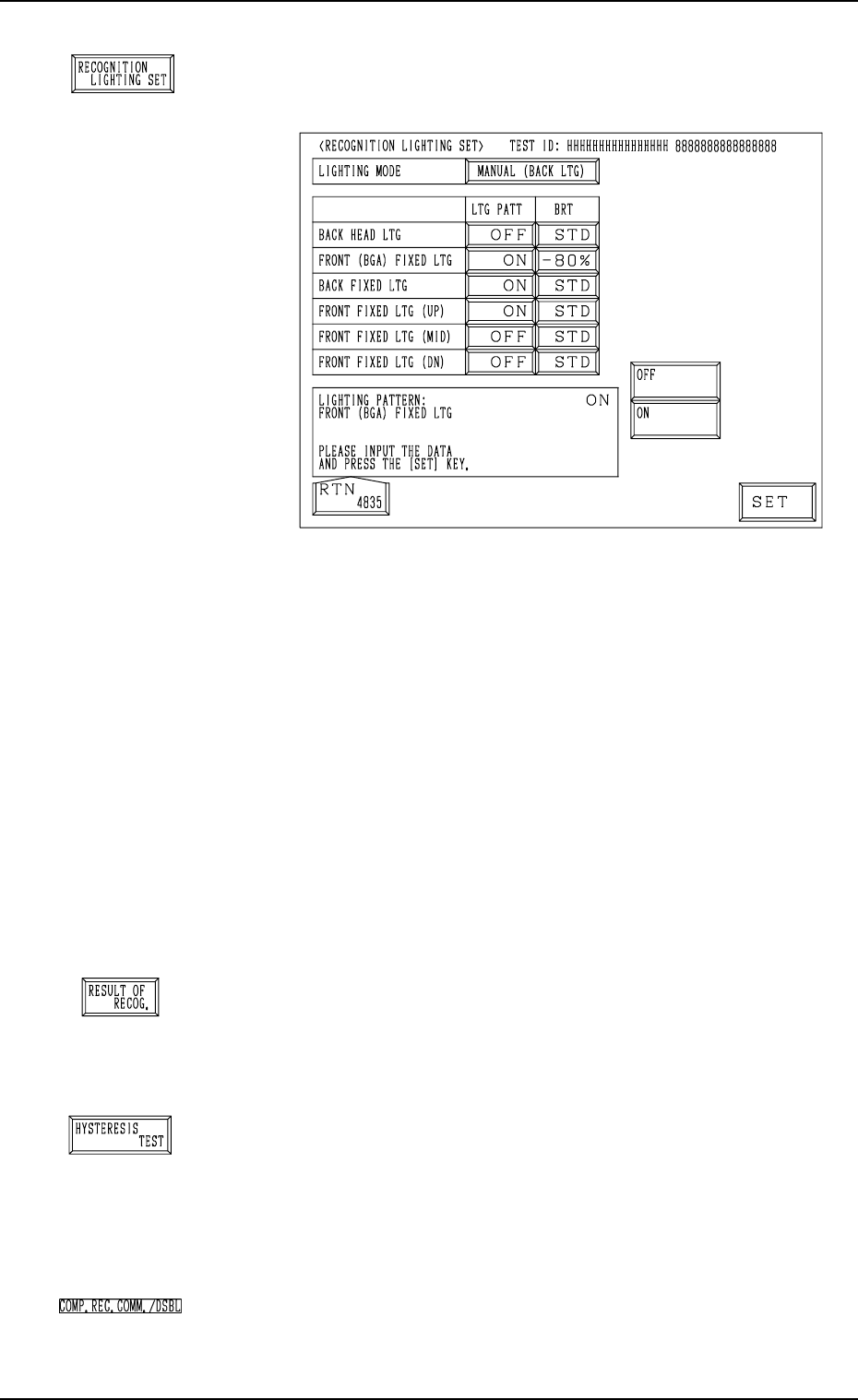
*6 [RECOGNITION LIGHTING SET] Key
When this key is pressed, the “RECOGNITION LIGHT-
ING SET” display appears on the screen.
The default of “Recognition Lighting” is set as the speci-
fied test library data.
If this data is edited, it is not regarded as test library data
but used temporarily as operation data.
Notes: (a) When “MANUAL (XXX)” is not set in the
“LIGHTING MODE” data box, nothing re-
lated to the lighting pattern (“LTG PATT”) and
the brightness (“BRT”) appears for each light-
ing system in this display.
(b) The test library data can be changed at any
timing as long as the machine is not running.
However, when the “SET TEST ID” display
appears on the screen, the parameters changed
temporarily in the “PICK-UP LEVEL”, the
“PICK-UP LOCATION ADJUSTMENT”,
and the “LIGHTING MODE” data boxes are
reset to the defaults.
*7 [RESULT OF RECOG.] Key
When this key is pressed, the “RESULT OF COMPONENT
RECOGNITION” display appears on the screen, enabling
the operator to check the result of the component recogni-
tion operation.
*8 [HYSTERESIS TEST] Key
When this key is pressed, the “HYSTERESIS TEST” dis-
play appears on the screen, enabling the operator to verify
the beam speed reduction and the θ-rotational speed reduc-
tion (specified in the component library data) for compo-
nent picks. Some supplementary data can also be set in re-
lation to the beam and rotational speed reduction.
*9 “COMP. REC. COMM./DSBL”
The background color becomes light red when “DISABLE”
is set in the “COMPONENT RECOGNITION” data box at
the “TEST MODE” display.
7.2 COMPONENT RECOG. TEST Display
3-145
Fig. 4C301
Fig. 4C300
Fig. 4C302
Fig. 4C303
Fig. 4C304
0305-001 Tg0860-PM-MM
7.2.4 HYSTERESIS TEST Display
• This display allows the operator to verify the beam speed reduction and the
θ-rotational speed reduction (specified in the component library data) for
component picks. Some supplementary data can also be set in relation to the
beam and rotational speed reduction.
• “MANUAL” or “AUTO” can be selected as a hysteresis test mode.
When “MANUAL” is set in the “TEST” data box, parameters must be set in
the “SPEED DATA”, “# OF HYSTERESIS”, and “TEST MODE” data boxes
to determine how the hysteresis test should be performed manually.
When “AUTO” is set, the speed increases gradually and the test operation is
performed repeatedly in a specific pattern.
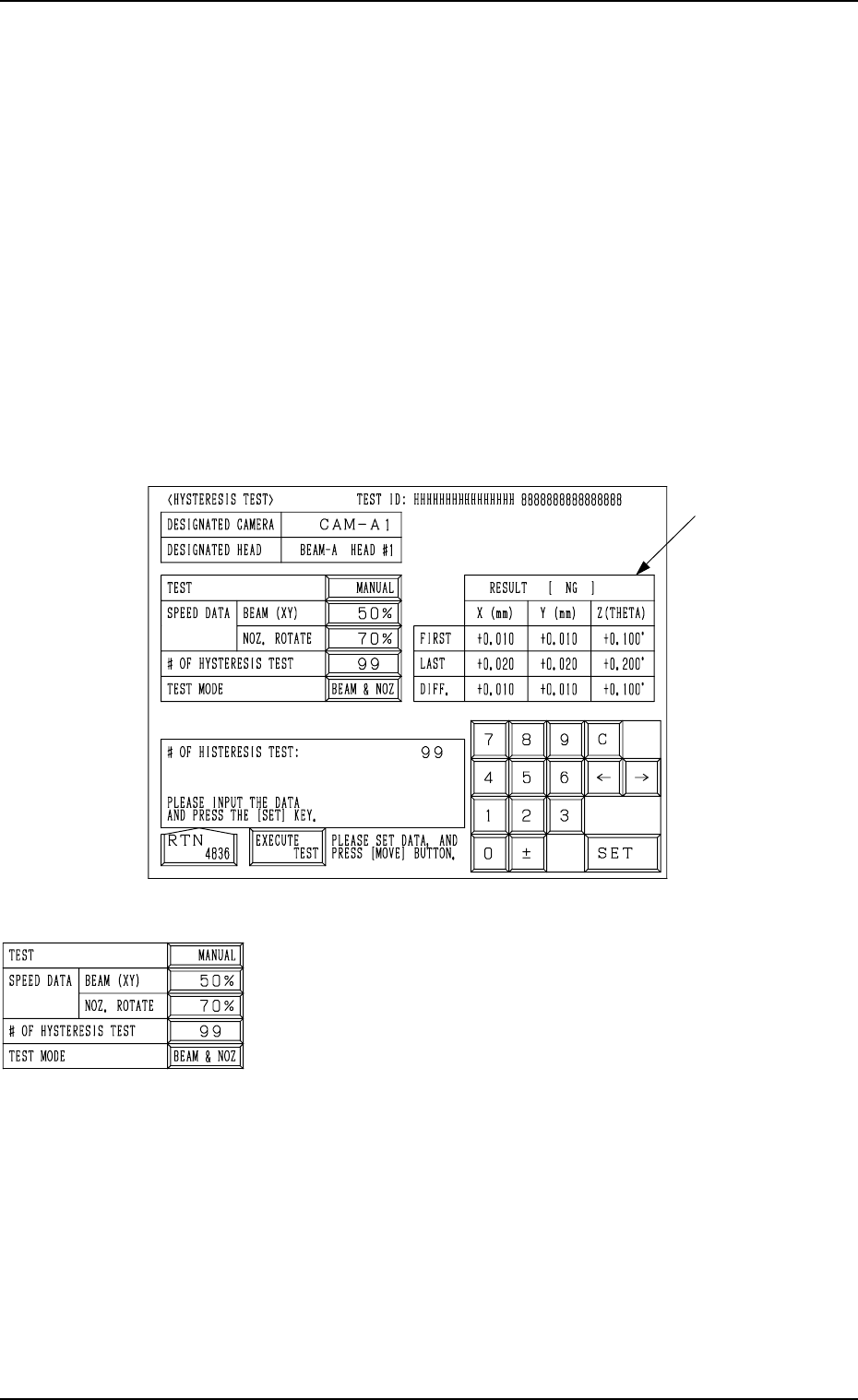
When the [HYSTERESIS TEST] key is pressed at the “COMPONENT REC-
OGNITION TEST” display, the following display appears on the screen.
TEST
“MANUAL” or “AUTO” can be set in this data box.
SPEED DATA BEAM (XY), NOZ. ROTATE
Parameters can be set to specify how much the test speed
should be reduced.
• Data Input Range
One of the 10 steps (“FULL SPEED” to “90%”) can be
selected.
##
##
# OF HYSTERESIS TEST
• Data Input Range
1 to 99
TEST MODE
• Options
“BEAM & NOZ”
“BEAM (XY)”
“NOZ. ROTATE”
7.2 COMPONENT RECOG. TEST Display
3-146
A
Fig. 4C305
Fig. 4C306