4OM-1011-002.pdf - 第237页
0305-001 Tg0860-PM-MM 8.2 MACHINE PROGRAM INFORMATION Display When the [MACHINE PROGRAM INFORMATION] key is pressed at the “DEVICE CHECK” display, the following display appears on the screen. Note: The -marked item is …
Tg0860-PM-MM
8.1 INPUT CHECK Display
0305-001 3-185
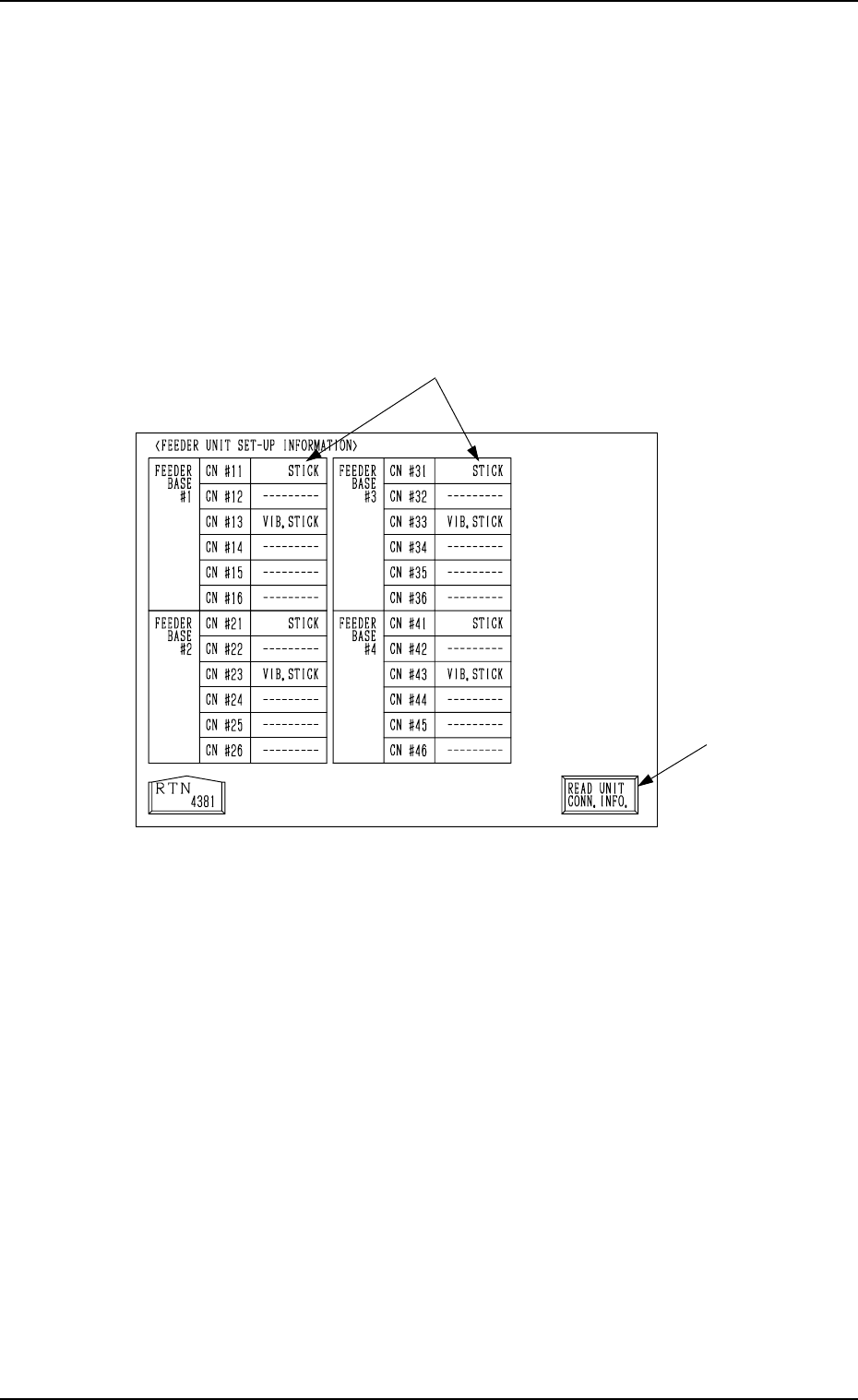
8.1.5 FEEDER UNIT SET-UP INFORMATION Display
• Displayed are the names of the feeders installed on the feeder base units #1
through #4.
When the [FEEDER UNIT SET-UP INFO.] key is pressed at the “INPUT
CHECK” display, the following display appears on the screen.
Note: When the connection of the unit is changed after this display is opened,
be sure to press the [READ UNIT CONN. INFO.] key. Otherwise, the
correct device information will not be displayed.
*1 Indicated are what types of feeders are connected with which connectors.
*2 [READ UNIT CONN. INFO.] Key
This key is used to update the feeder unit set-up information.
*2
*1
Fig. 4C335
0305-001 Tg0860-PM-MM
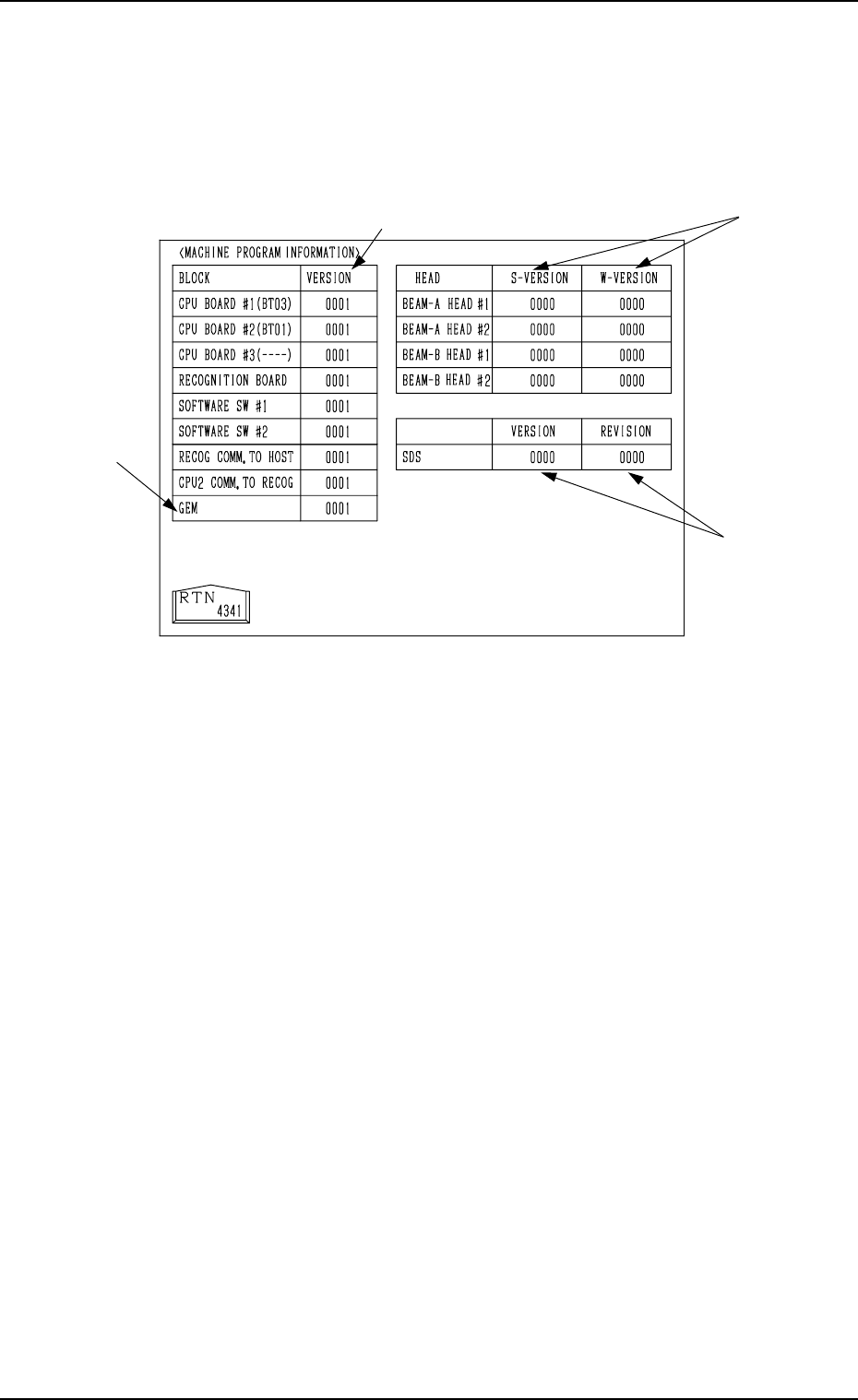
8.2 MACHINE PROGRAM INFORMATION Display
When the [MACHINE PROGRAM INFORMATION] key is pressed at the
“DEVICE CHECK” display, the following display appears on the screen.
Note: The -marked item is optional.
• Software versions of the machine control system are displayed in A-marked
text boxes.
CPU BOARD #1 : Version of Software which controls the op-
eration system.
CPU BOARD #2 : Version of Software which controls the me-
chanical system.
CPU BOARD #3 : Version of Software which controls the multi-
layer tray feeder.
RECOGNITION BOARD : Software Version for Recognition System
SOFTWARE SW #1, #2 : Version of ROM Switches for Distinction of
Options
RECOG COMM. TO HOST: Software Version for Communication be-
tween Recognition and Host Computer
CPU2 COMM. TO RECOG: Software Version for Communication be-
tween Control and Recognition
GEM : Software Version of GEM System (Option)
• Software versions of the placement heads (ZA1, ZA2, ZB1, ZB2 axis) are
displayed in the B-marked text boxes.
S-VERSION : Version of Software for Head Motor Drivers
W-VERSION : Version of Waveforms for Head Motor Drivers
Note: “----” appears in the text box for a head where a communication error
has occurred during version reading.
• Software versions of the SDS (Serial I/O Interface) P.C.B. are displayed in
the C-marked text boxes.
VERSION : Main Version
REVISION : Minor Version (Minute Correction Record No.)
8.2 MACHINE PROGRAM INFORMATION Display
3-186
A
B
C
Fig. 4C336
0305-001 Tg0860-PM-MM
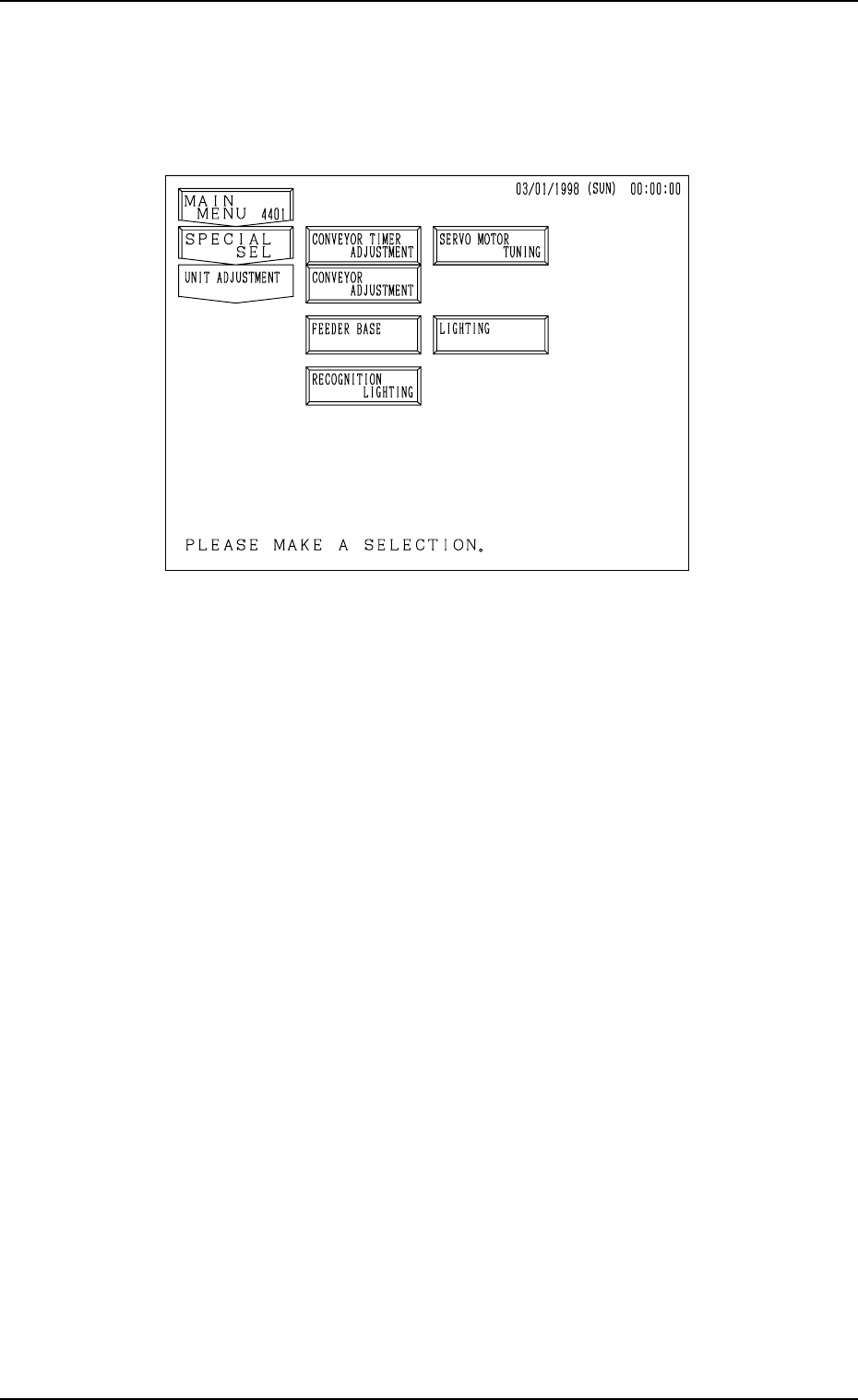
9. UNIT ADJUSTMENT Display
When the [UNIT ADJUSTMENT] key is pressed at the “SPECIAL SEL.”
display, the following display appears on the screen.
[CONVEYOR TIMER ADJUSTMENT] Key
When this key is pressed, the “CONVEYOR TIMER ADJUSTMENT” dis-
play appears on the screen, enabling to change the parameters related to the
conveyor timer for an operation test.
The set parameters for the timer are reflected on actual transfer operations.
[CONVEYOR ADJUSTMENT] Key
When this key is pressed, the “CONVEYOR ADJUSTMENT” display ap-
pears on the screen, enabling the operation of the conveyor motor.
[FEEDER BASE] Key
When this key is pressed, the “FEEDER BASE” display appears on the
screen, enabling an operation test on the feeder base.
■ [RECOGNITION LIGHTING] Key
When this key is pressed, the “RECOGNITION LIGHTING” display ap-
pears on the screen, enabling illumination tests on the lamps for the P.E.C.
and component recognition systems.
[SERVO MOTOR TUNING] Key
When this key is pressed, the “SERVO MOTOR TUNING” display ap-
pears on the screen, enabling to set the working speed of each servomotor
shaft for an operation test.
Note: This display is prepared only for a service personnel. No operation
is required.
[LIGHTING] Key
When this key is pressed, the “LIGHTING” display appears on the screen,
enabling the teaching operation of various lighting systems.
Note: This display is prepared only for a service personnel. No operation
is required.
9. UNIT ADJUSTMENT Display
3-187
Fig. 4C337