4OM-1011-002.pdf - 第240页
0305-001 Tg0860-PM-MM 9.1 CONVEYOR TIMER ADJUSTMENT Display 3-189 *4 P .C.B.-T Set the thickness of the P .C.B. which is used for a transfer test. • Standard V alue Same V alue as P .C.B. Thickness in Current Pattern Pro…
0305-001 Tg0860-PM-MM
9.1 CONVEYOR TIMER ADJUSTMENT Display
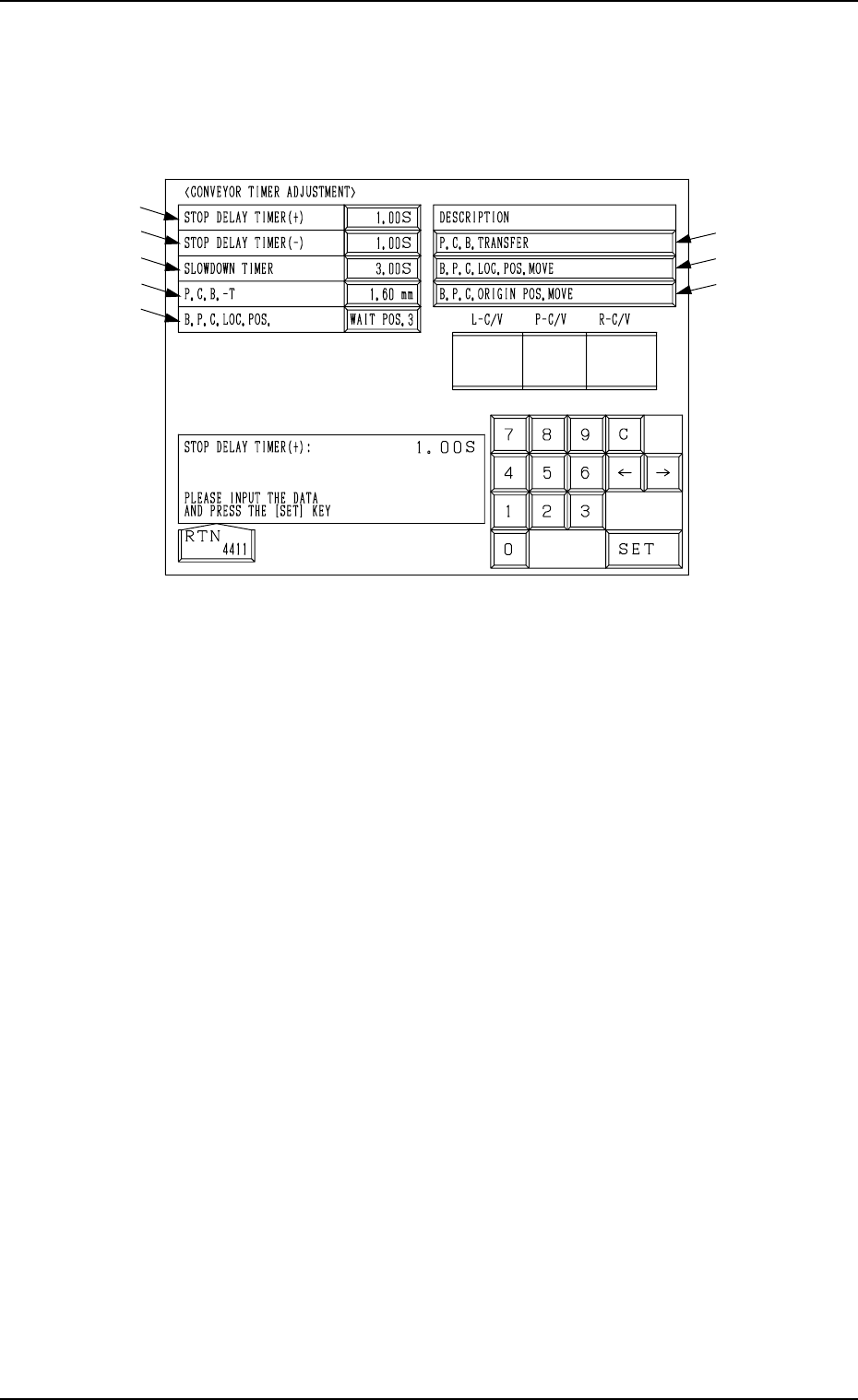
When the [CONVEYOR TIMER ADJUSTMENT] key is pressed at the “UNIT
ADJUSTMENT” display, the following display appears on the screen.
Parameters related to various operation timers can be set, enabling a test on
transfer operations.
*1 STOP DELAY TIMER (+)
When a P.C.B. is positioned at the P.C.B. positioning section (P conveyor
moving forward), this timer is used to correct the position where the P.C.B.
should be stopped.
Set the period of time (time of the delay timer) during which the location of
the P.C.B. detection sensor (BPH144) is detected and the motor is stopped
for P.C.B. positioning.
This parameter (the value for the timer) must be adjusted to ensure that a
P.C.B. comes to the P.C.B. stopper position and stops there.
●
Standard Value
0.25 seconds
*2 STOP DELAY TIMER (−)
When a P.C.B. is positioned at the P.C.B. positioning section (P conveyor
moving backward), this timer is used to correct the position where the P.C.B.
should be stopped.
Set the period of time (time of the delay timer) during which the location of
the P.C.B. detection sensor (BPH144) is detected and the motor is stopped
for P.C.B. positioning.
This parameter (the value for the timer) must be adjusted to ensure that a
P.C.B. comes to the P.C.B. stopper position and stops there.
• Standard Value
0.25 seconds
*3 SLOWDOWN TIMER
Set the period of time in which the transfer speed should be slowed down
while P.C.B.’s are being transferred at high speed from the input conveyor
to the P.C.B. positioning section.
• Standard Value
0.76 seconds
9.1 CONVEYOR TIMER ADJUSTMENT Display
*1
*2
*3
*4
*5
*8
*7
*6
Fig. 4C338
3-188

0305-001 Tg0860-PM-MM
9.1 CONVEYOR TIMER ADJUSTMENT Display
3-189
*4 P.C.B.-T
Set the thickness of the P.C.B. which is used for a transfer test.
• Standard Value
Same Value as P.C.B. Thickness in Current Pattern Program
5 mm when a Current Pattern Program is not Specified
*5 B.P.C. LOC. POS.
“WAIT POS. 1”, “WAIT POS. 2”, or “WAIT POS. 3” can be selected.
WAIT POS. 1 : Set this in the data box when a P.C.B. has no previously-
placed components and is positioned based on “Outline
Reference”.
The backup base ascends to an area near the P.C.B. trans-
fer plane in advance and is set in the standby mode during
P.C.B. tansfer operation.
WAIT POS. 2 : Set this in the data box when the height of a previously-
placed component is less than 6.5 mm.
The backup base ascends to an area near “P.C.B. Transfer
Plane + Previously-Placed Component” in advance and is
set in the standby mode during P.C.B. transfer operation.
WAIT POS. 3 : Set this in the data box when the height of a previously-
placed component is 6.5 mm or more.
The backup base waits at its origin.
The parameters set here become valid only when a transfer test is performed,
using this display.
The standby position during automatic operation is determined according
to the operation data in the pattern program.
• Standard Value
Wait (Standby) Position designated in the current program
“WAIT POS. 3” when the current program is indefinite
*6 [P.C.B. TRANSFER] Key
This key is used to perform the P.C.B. transfer operation after the param-
eters (described in *1 through *5) are set.
When this key is selected and the [MOVE] button is pressed, the machine
performs the P.C.B. transfer and positioning operations.
*7 [B.P.C. LOC. POS. MOVE] Key
When this key is selected and the [MOVE] button is pressed, the backup
base ascends to the point where a P.C.B. is positioned.
*8 [B.P.C. ORIGIN POS. MOVE] Key
When this key is selected and the [MOVE] button is pressed, the backup
base descends to its origin position.
0305-001 Tg0860-PM-MM
9.2 FEEDER BASE Display
3-190
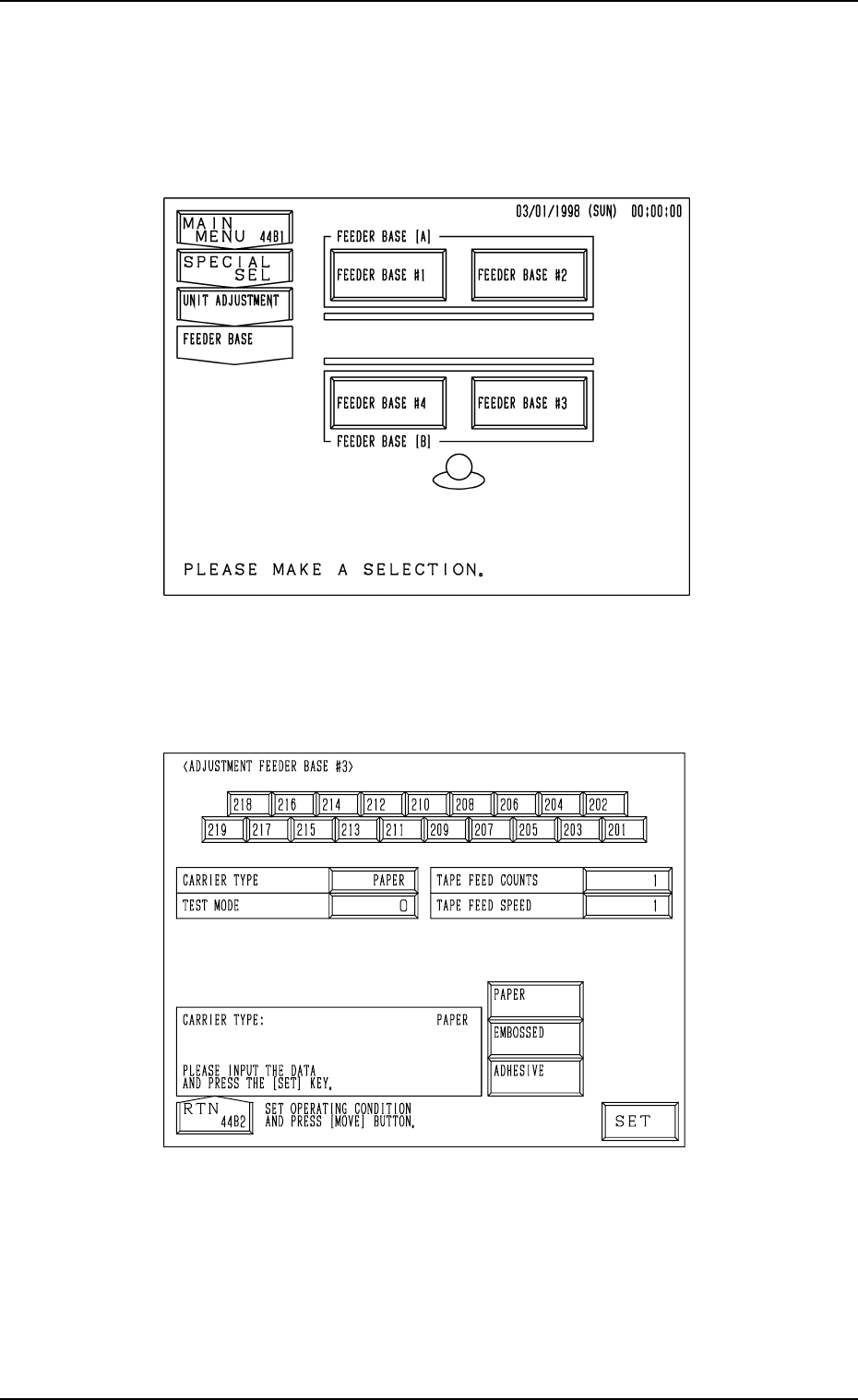
9.2 FEEDER BASE Display
When the [FEEDER BASE] key is pressed at the “UNIT ADJUSTMENT”
display, the following display appears on the screen.
When the [FEEDER BASE #1], the [FEEDER BASE #2], the [FEEDER BASE
#3], or the [FEEDER BASE #4] key is pressed, the corresponding display such
as the following dispiay appears on the screen.
“ADJUSTMENT FEEDER BASE
##
##
#3” Display
Fig. 4C340
Fig. 4C339