4OM-1011-002.pdf - 第249页
0307-002 Tg0860-PM-MM 10. HDD/FDD OPERA TION Display 3-198 10. HDD/FDD OPERA TION Display When the [HDD/FDD OPERA TION] key is pressed at the “SPECIAL SEL.” display , the following display appears on the screen. [SA VE A…
0305-001 Tg0860-PM-MM
9.4.2 P.E.C. RECOG LIGHTING Display
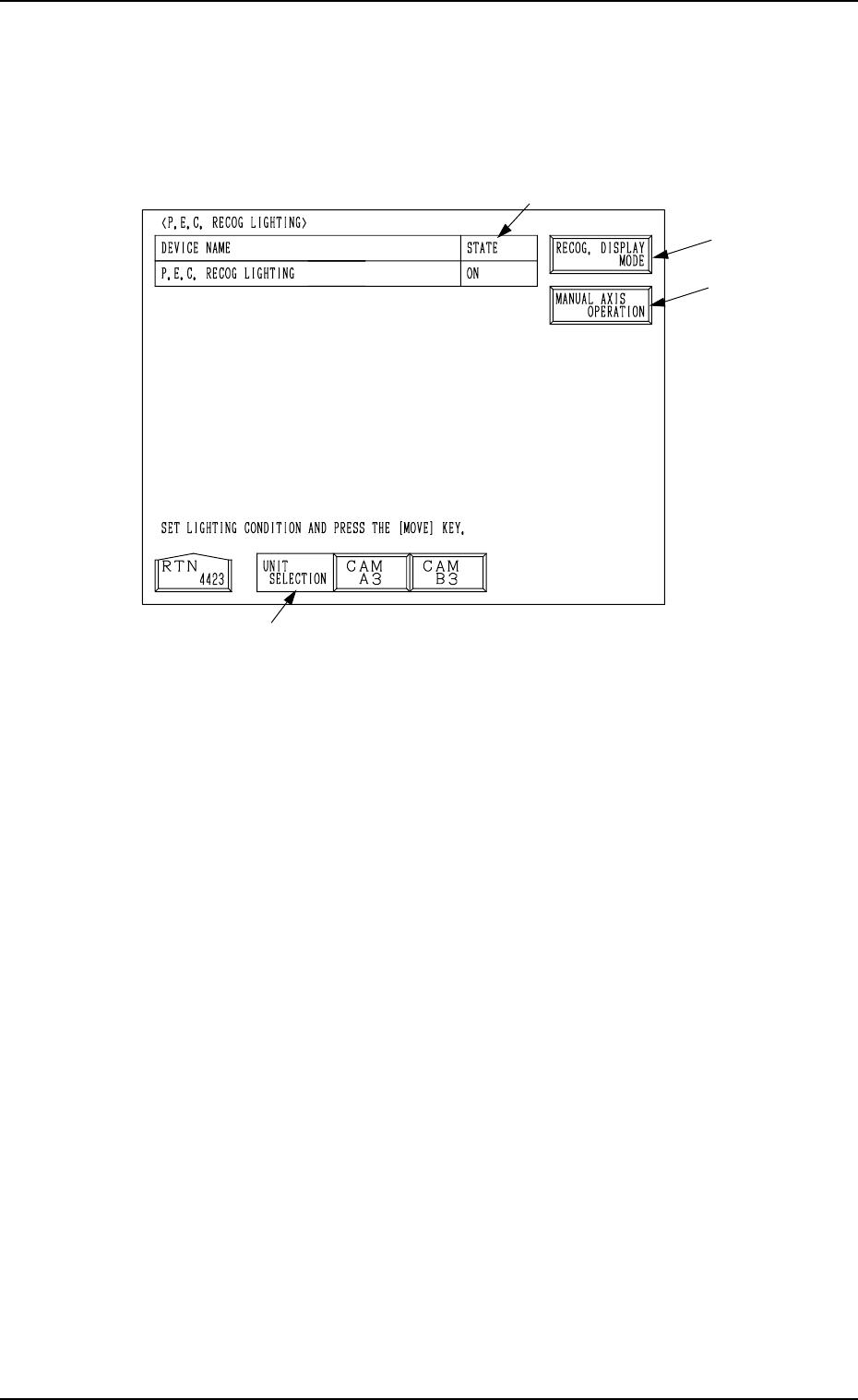
When the [P.E.C. RECOG LIGHTING] key is pressed at the “RECOGNITION
LIGHTING” display, the following display appears on the screen.
When a lighting unit is selected by pressing the corresponding key beside the
label “UNIT SELECTION” *1 and the [MOVE] button is pressed, the lamps
for P.E.C. recognition lighting can be turned ON or OFF.
*1 UNIT SELECTION
Select a unit for which the lamps for P.E.C. recognition lighting must be
turned ON.
The [CAM A3] or the [CAM B3] key can be selected.
*2 STATE
Shown is the state “ON” or “OFF” of the lamps for P.E.C. recognition light-
ing.
*3 [RECOG. DISPLAY MODE] Key
When this key is pressed, the “RECOG. DISPLAY MODE” display ap-
pears on the screen, enabling the setting of the display mode for the recog-
nition monitor.
Refer to “*6 [RECOG. DISPLAY MODE] Key” in “9.4.1 COMPONENT
RECOG LIGHTING Display” for details.
*4 [MANUAL AXIS OPERATION] Key
When this key is pressed, the “MANUAL AXIS OPERATION” display
appears on the screen, enabling the manual axis operation of each indi-
vidual devices.
The operation is the same as the manual axis operation performed through
manual operations.
Refer to “7. Manual Axis Operation of Section 4 in Volume 1” for details.
9.4 RECOGNITION LIGHTING Display
3-197
Fig. 4C346
*1
*3
*4
*2
0307-002 Tg0860-PM-MM
10. HDD/FDD OPERATION Display
3-198
10. HDD/FDD OPERATION Display
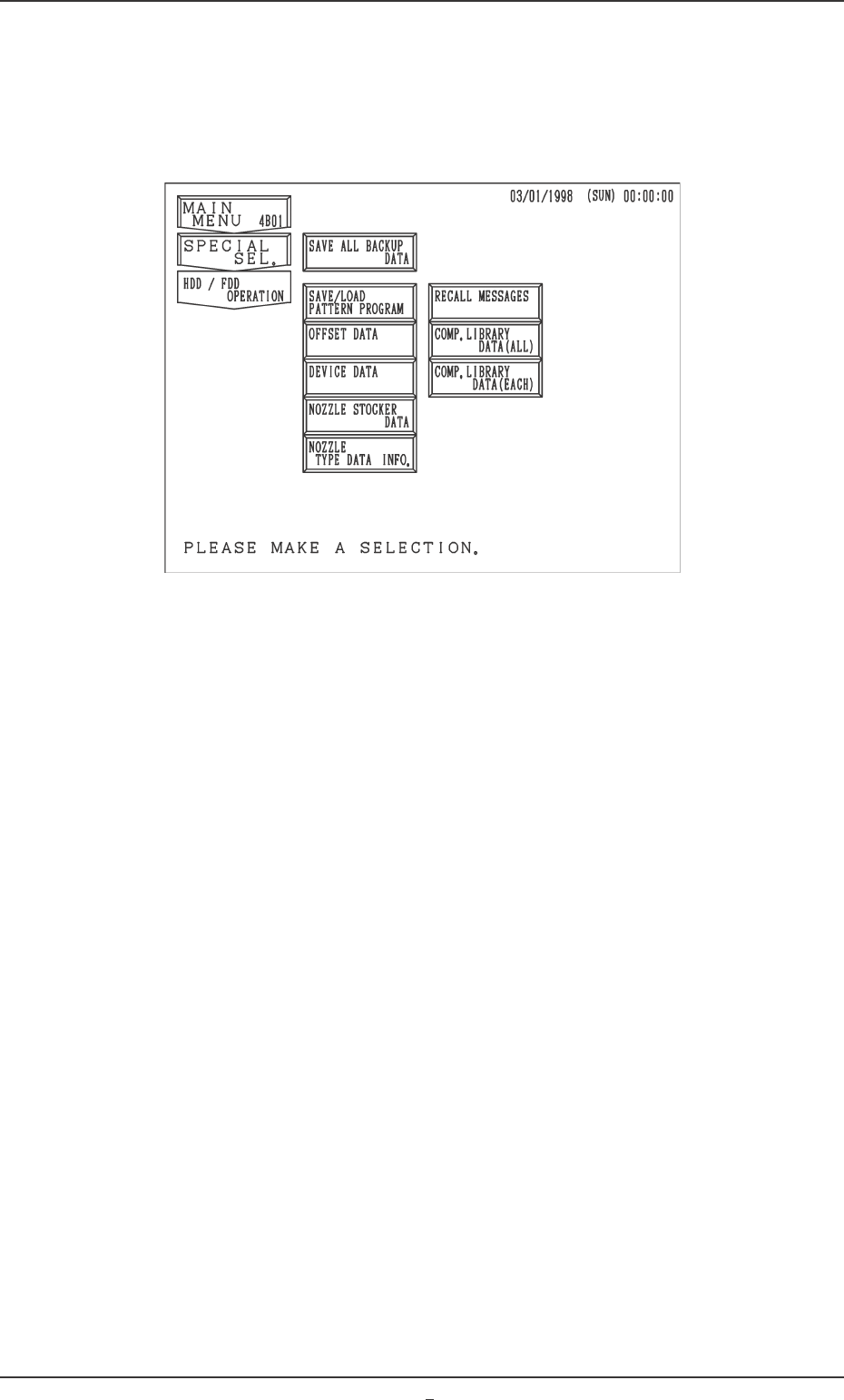
When the [HDD/FDD OPERATION] key is pressed at the “SPECIAL SEL.”
display, the following display appears on the screen.
[SAVE ALL BACKUP DATA] Key
All backup data can be saved from the machine side to floppy disks (4 pcs.).
[SAVE/LOAD PATTERN PROGRAM] Key
The pattern program can be saved on or loaded from floppy disks.
[OFFSET DATA] Key
When this key is pressed, the “HDD/FDD OPERATION - OFFSET DATA”
display appears on the screen, enabling you to save the offset data on a
floppy disk or read it from the floppy disk.
[DEVICE DATA] Key
When this key is pressed, the “HDD/FDD OPERATION - DEVICE DATA”
display appears on the screen, enabling you to save the device data on a
floppy disk or read it from the floppy disk.
[NOZZLE STOCKER DATA] Key
When this key is pressed, the “HDD/FDD OPERATION - NOZZLE
STOCKER DATA” display appears on the screen, enabling you to save the
nozzle stocker data on a floppy disk or read it from the floppy disk.
[NOZZLE TYPE DATA INFO.] Key
When this key is pressed, the “HDD/FDD OPERATION - NOZZLE TYPE
DATA INFO.” display appears on the screen, enabling you to save the
nozzle type data on a floppy disk or read it from the floppy disk.
[RECALL MESSAGES] Key
When this key is pressed, the “HDD/FDD OPERATION - RECALL MES-
SAGES” display appears on the screen, enabling you to save the recalled
data (recalled messages) on a floppy disk or read it from the floppy disk.
Fig. 4C347

0307-001 Tg0860-PM-MM
10. HDD/FDD OPERATION Display
3-198-1
[COMP. LIBRARY DATA (ALL)] Key
When this key is pressed, the “HDD/FDD OPERATION - COMPONENT
LIBRARY (ALL)” display appears on the screen, enabling you to save all
component library data on a floppy disk or read it from the floppy disk at a
time.
[COMP. LIBRARY DATA (EACH)] Key
When this key is pressed, the “HDD/FDD OPERATION - COMPONENT
LIBRARY (EACH)” display appears on the screen, enabling you to save
the component library data on a floppy disk or read it from the floppy disk
one by one.