4OM-1011-002.pdf - 第251页
0305-001 Tg0860-PM-MM 10.1 SA VE ALL BACKUP DA T A Display 3-199 10.1 SA VE ALL BACKUP DA T A Display This function can be used to temporarily save data before version improve- ment operation of the machine software, ana…

0307-001 Tg0860-PM-MM
10. HDD/FDD OPERATION Display
3-198-1
[COMP. LIBRARY DATA (ALL)] Key
When this key is pressed, the “HDD/FDD OPERATION - COMPONENT
LIBRARY (ALL)” display appears on the screen, enabling you to save all
component library data on a floppy disk or read it from the floppy disk at a
time.
[COMP. LIBRARY DATA (EACH)] Key
When this key is pressed, the “HDD/FDD OPERATION - COMPONENT
LIBRARY (EACH)” display appears on the screen, enabling you to save
the component library data on a floppy disk or read it from the floppy disk
one by one.
0305-001 Tg0860-PM-MM
10.1 SAVE ALL BACKUP DATA Display
3-199
10.1 SAVE ALL BACKUP DATA Display
This function can be used to temporarily save data before version improve-
ment operation of the machine software, analyze data after an error has oc-
curred, and save such data that cannot be exchanged between the machine and
the programming device (option). It is recommended that all backup data should
be saved on floppy disks.
Note: Special operation is required when all backup data must be loaded.
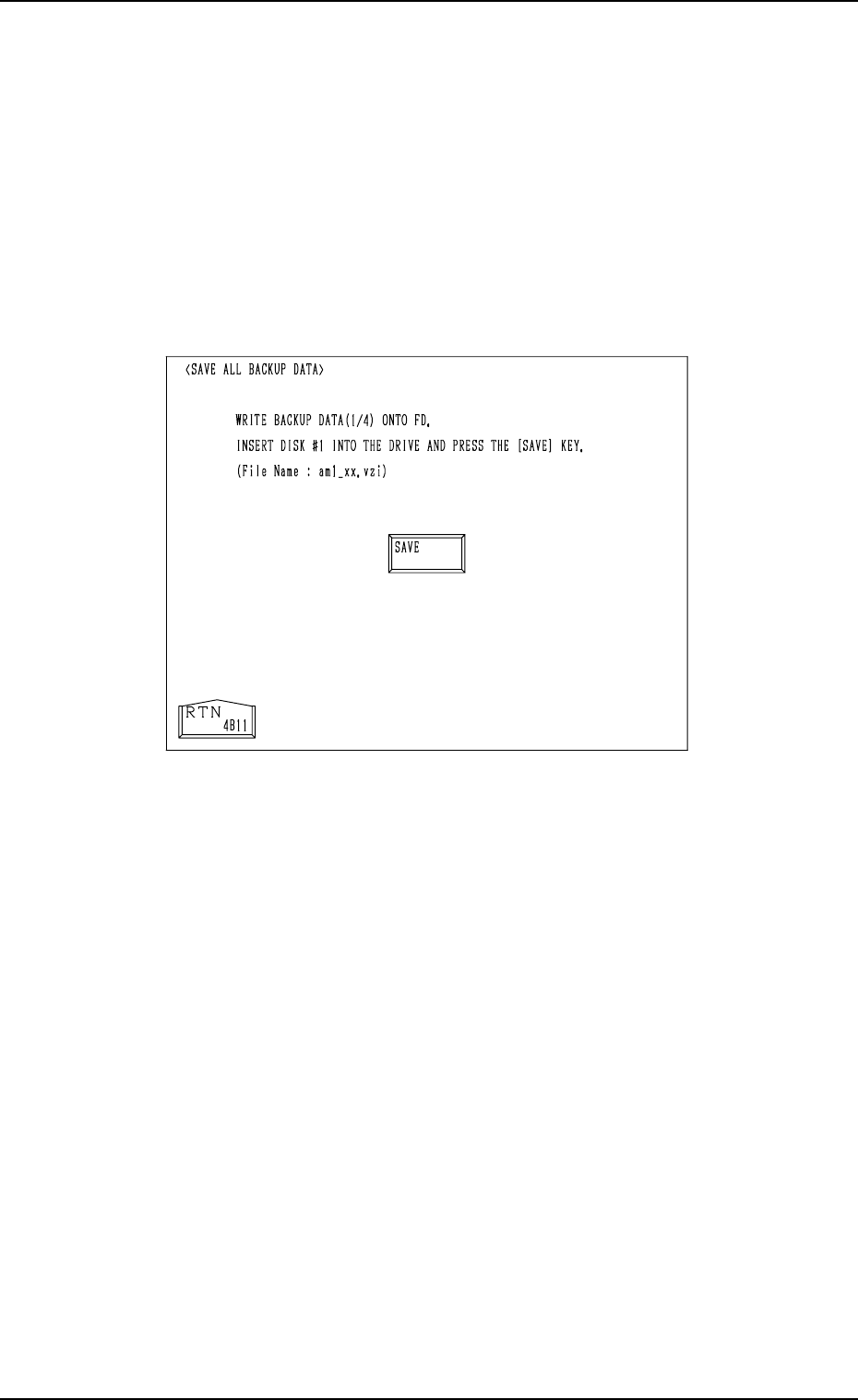
When the [SAVE ALL BACKUP DATA] key is pressed at the “HDD/FDD
OPERATION” display, the following display appears on the screen.
Operation Procedure
(1) Prepare four pieces of 2HD floppy disks (1.44 MB, DOS-Formatted).
Label the floppy disks “1/4”, “2/4”, “3/4”, and “4/4” individually.
(2) Insert the floppy disk (labeled 1/4) into FDD and press the [SAVE] key.
• After the data is written (saved), a message is issued, reminding that
the floppy disk should be replaced with another one.
(3) Insert the floppy disk (labeled 2/4) into FDD and press the [SAVE] key.
(4) Follow the same procedure until all four disks are used up.
(5) After all data is saved, a message is issued, indicating that the save opera-
tion is completed.
• While the data is being saved, a [CANCEL] key and a progress bar
appear in the display.
• When the [CANCEL] key is pressed, the save operation is interrupted
and the “HDD/FDD OPERATION” display appears on the screen.
Fig. 4C348
0307-002 Tg0860-PM-MM
10.1 SAVE ALL BACKUP DATA Display
3-200
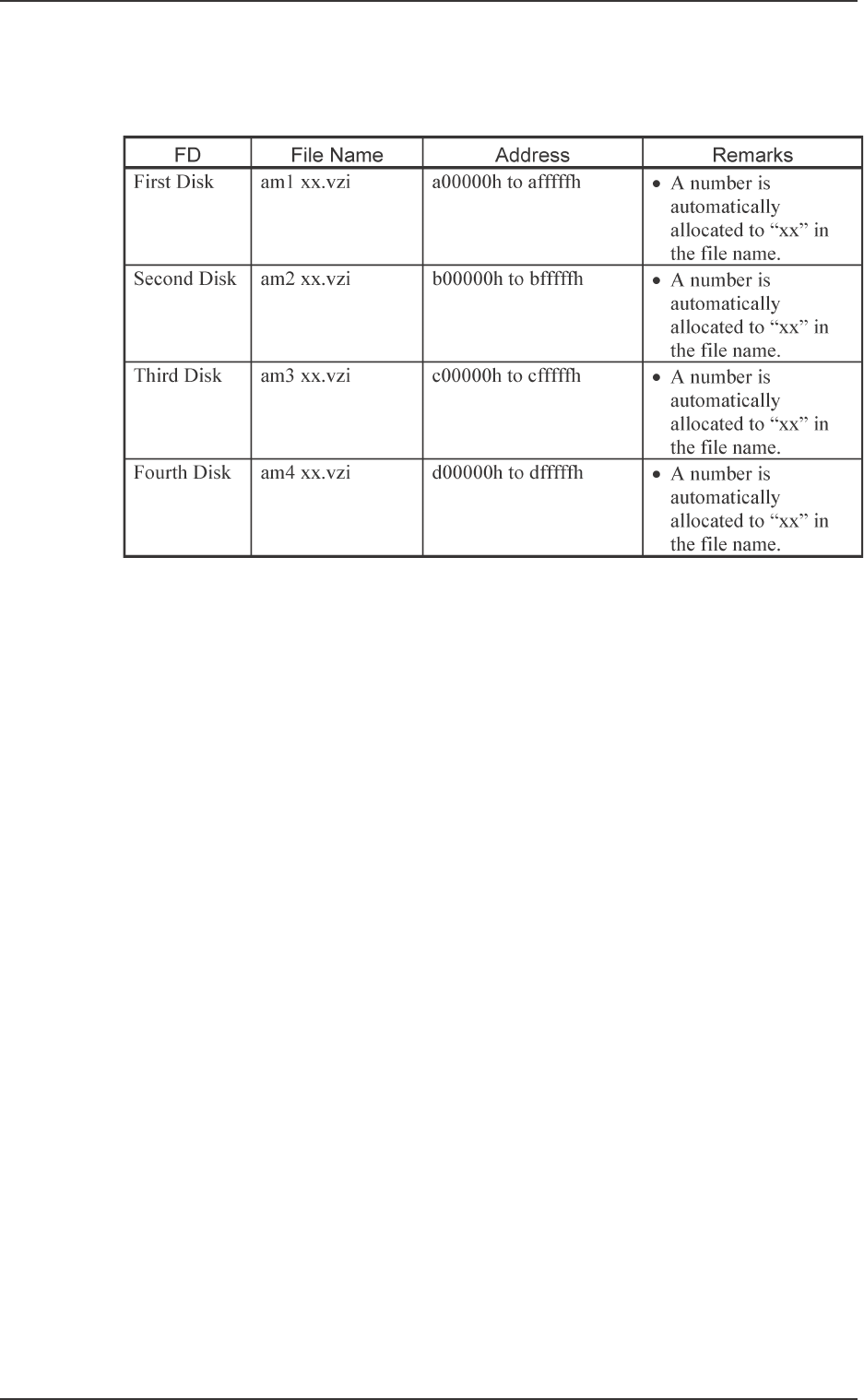
Created Files
Shown below are the files and the addresses created in the four floppy disks.
Table 4C18