4OM-1011-002.pdf - 第254页
Tg0860-PM-MM 10.2 SA VE/LOAD P A TTERN PROGRAM Display 0305-001 3-202 Load Operation (FD → → → → → Machine) (1) Insert a floppy disk (a disk in which the nozzle stocker data is saved) into the FDD (floppy disk drive). (2…
Tg0860-PM-MM
10.2 SAVE/LOAD PATTERN PROGRAM Display
0307-002 3-201
10.2 SAVE/LOAD PATTERN PROGRAM Display
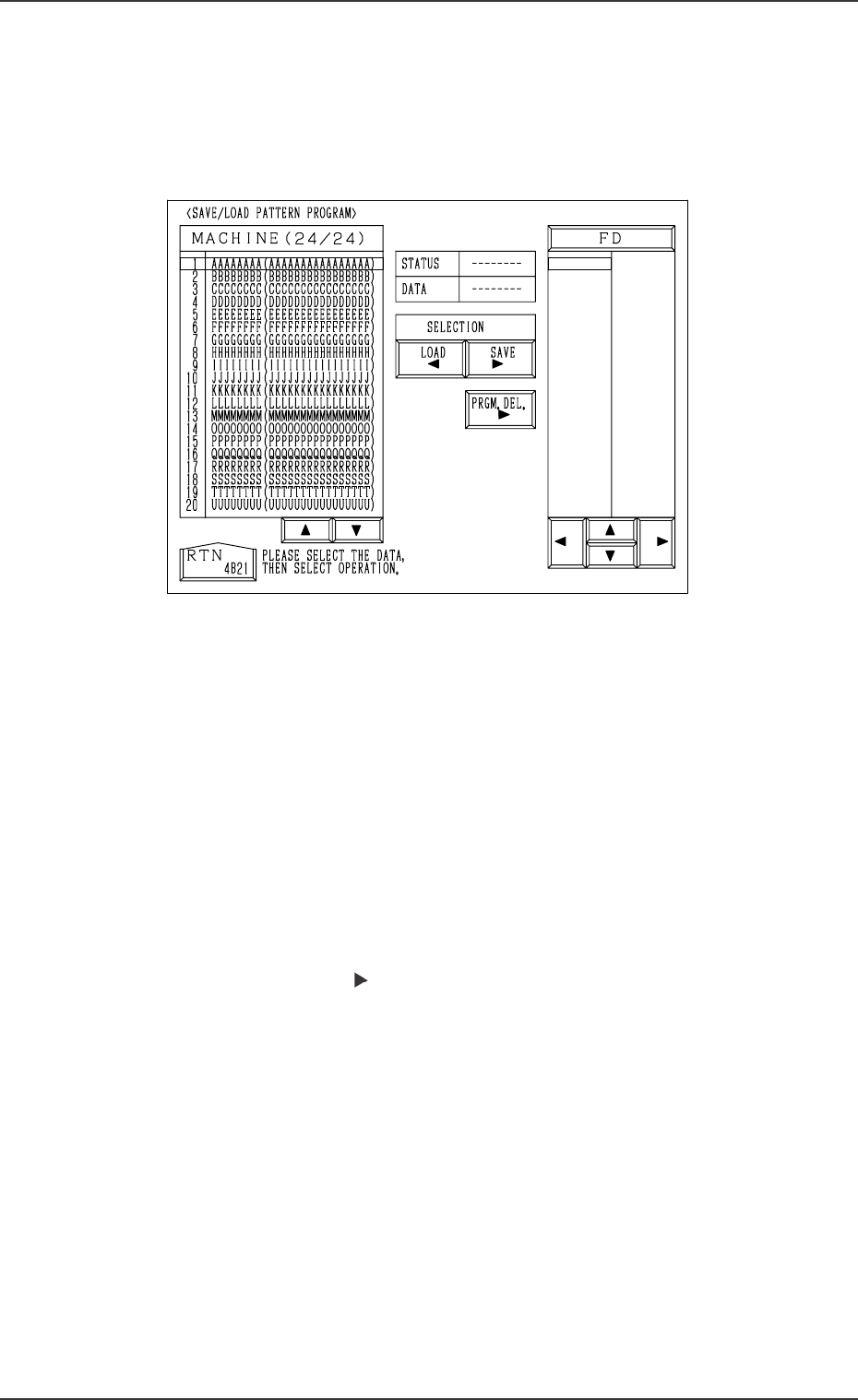
When the [SAVE/LOAD PATTERN PROGRAM] key is pressed at the
“HDD/FDD OPERATION” display, the following display appears on the
screen.
Notes: (a) This display can be opened only when the machine is in the
“STOP” mode and no pattern program data or component library
data is exchanged between the machine and the programming
device (option).
(b) While this display is open, no pattern program data or compo-
nent library data can be exchanged between the machine and the
programming device.
The [ZERO] and [READY] buttons also become unavailable.
(c) Another display cannot be opened from this display during save
and load operation.
Save Operation (Machine
→→
→→
→
FD)
(1) Insert a DOS-formatted floppy disk (1.44 MB) into the FDD (floppy
disk drive).
(2) Move the line cursor (“MACHINE” side) to the pattern program data
to be saved.
Press the [SAVE ] key.
(3) “SAVING” appears in the “STATUS” text box, indicating that the
selected pattern program data is being saved.
• When the data is saved normally, “SAVED” appears in the text box
and the saved pattern program data name appears on the “FD” side.
• When an error is found during save operation, an error message is
issued and the save operation is interrupted.
Ref.: When the pattern program data having the same name is found
in the floppy disk, the display for confirmation to overwrite
appears on the screen.
Note: When a file in the floppy disk (a program file created on the
programming device side) keeps the data to be used exclu-
sively for another machine and is replaced with the new one,
it cannot be used for another machine.
To keep the exclusive data stored in memory, follow the data
replacement procedure through data communication with the
programming device.
Fig. 4C349
Tg0860-PM-MM
10.2 SAVE/LOAD PATTERN PROGRAM Display
0305-001 3-202
Load Operation (FD
→→
→→
→
Machine)
(1) Insert a floppy disk (a disk in which the nozzle stocker data is saved)
into the FDD (floppy disk drive).
(2) Press the [FD] key. The pattern program data names are displayed.
Note: Data other than the pattern program data is not displayed.
(3) Move the line cursor on the “FD” side to the pattern program data
name to be loaded and press the [LOAD ] key.
(4) “LOADING” appears in the “STATUS” text box, indicating that the
data is being loaded.
• When the data is loaded normally, “LOADED” appears in the text
box and the loaded pattern program data name appears on the ma-
chine side.
• When an error is found during load operation, an error message is
issued and the load operation is interrupted.
Ref.: When the pattern program data having the same name is
found in the floppy disk, the display for confirmation to
overwrite appears on the screen.
Notes: (a) When the loaded pattern progrma data contains some
component IDs which do not exist in the component li-
brary data on the machine side, it is required to load such
IDs from the programming device.
(b) Pattern Program Memory Capacity
The occupied capacity is determined according to the
interrelation of the below-described conditions.
Maximum Number of Steps: 5,000 steps/model
Maximum Memorized Number of Steps: 7,600 steps
Maximum Memorized Number of Models: 24 models
How to Delete the Pattem Program Data on “FD” Side
(1) Insert a floppy disk into FDD.
(2) Press the [FD] key. The pattern program data names are displayed.
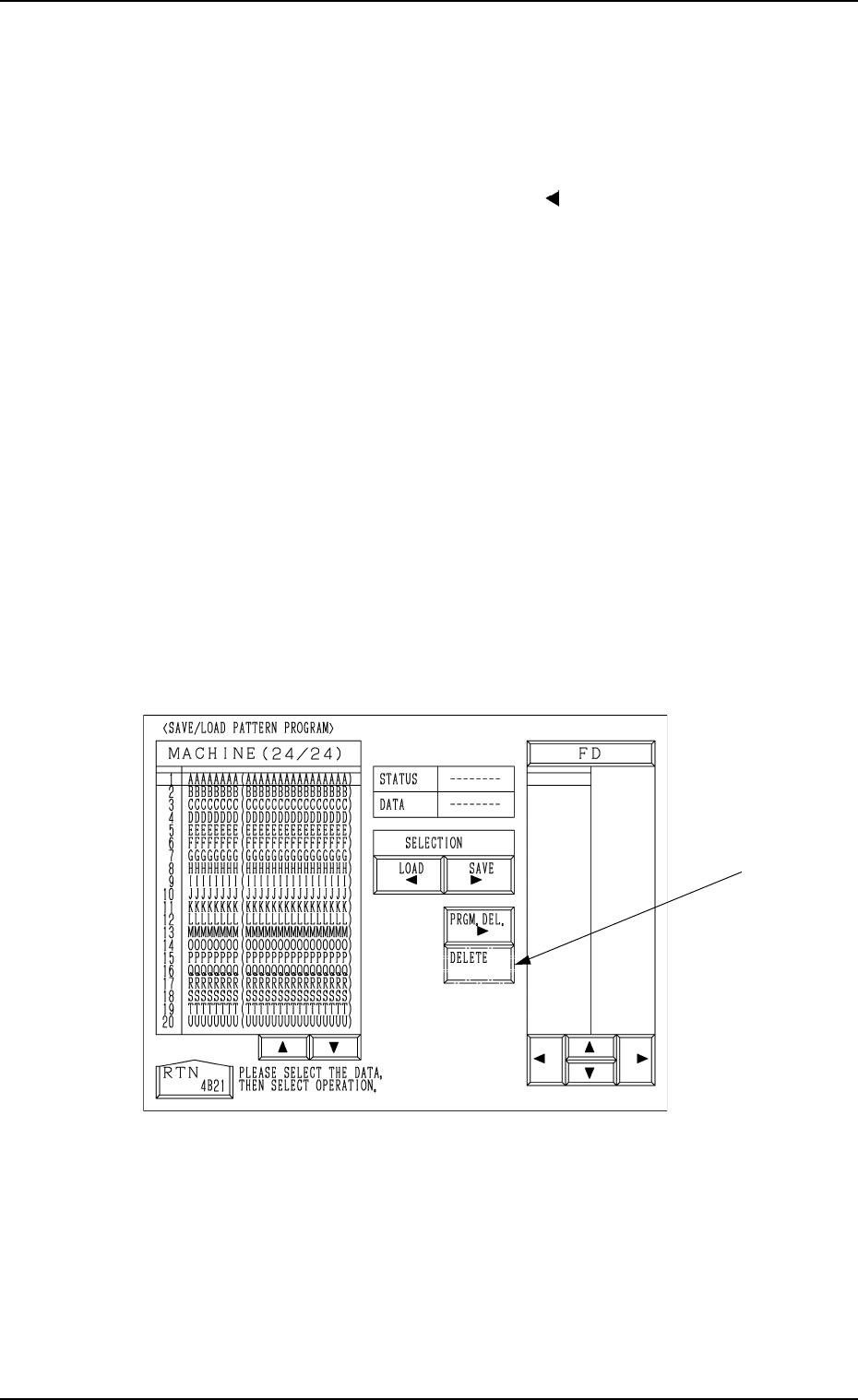
(3) Move the line cursor (“FD” side) to the pattern program data name to
be deleted and press the [PRGM. DEL.] key.
The [DELETE] key appears at A in Fig. 4C350.
(4) When the [DELETE] key is pressed, the delete operation starts.
After the delete operation is completed, the pattern program names in
the floppy disk are displayed again.
• Data other than the pattern program data is not displayed.
• When an unformatted floppy disk is inserted into FDD and the
save operation is performed, an error message is issued.
A
Fig. 4C350
Tg0860-PM-MM
10.3 HDD/FDD OPERATION - OFFSET DATA Display
0305-001 3-203
10.3 HDD/FDD OPERATION - OFFSET DATA Display
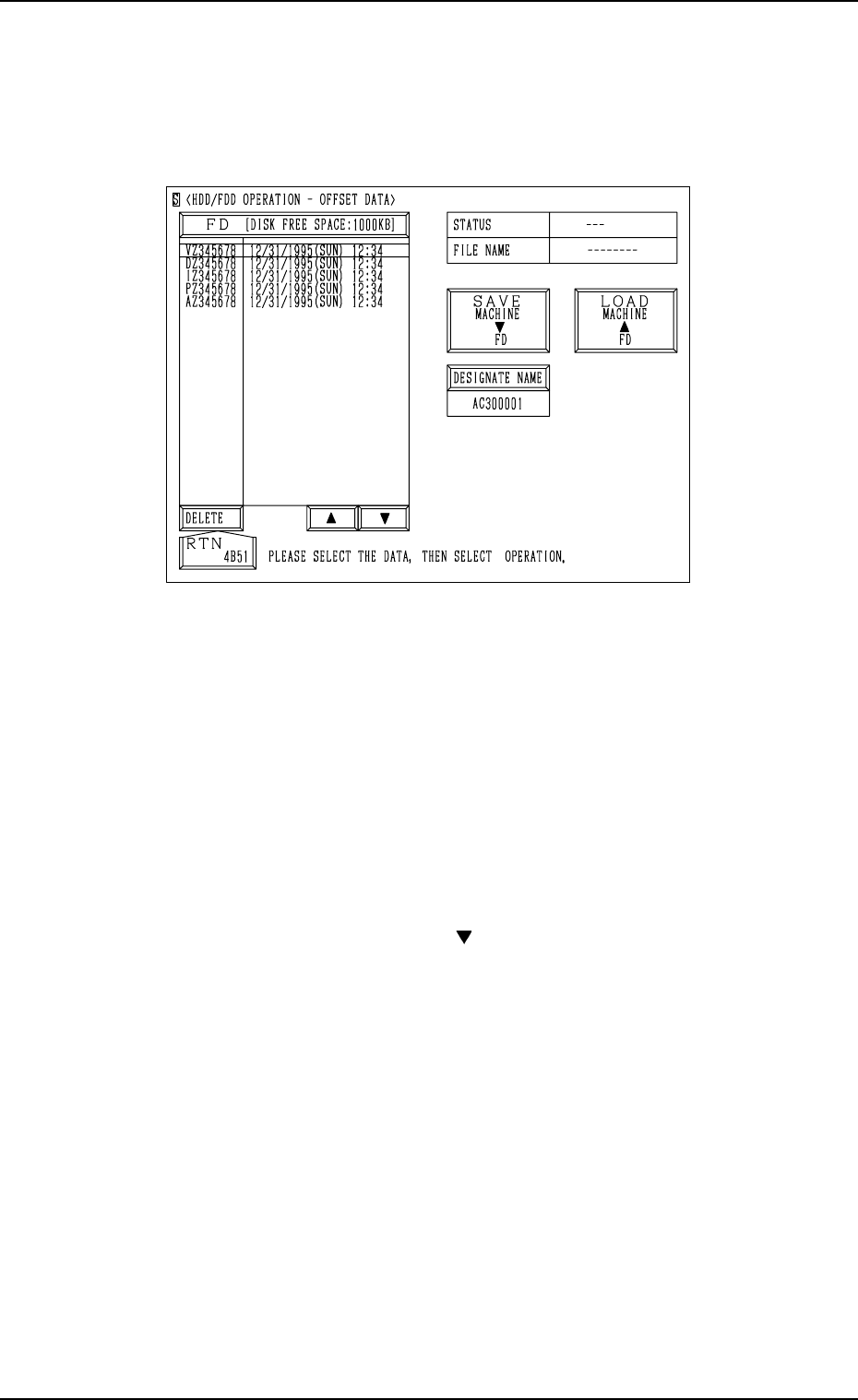
When the [OFFSET DATA] key is pressed at the “HDD/FDD OPERATION”
display, the following display appears on the screen.
Notes: (a) This display can be opened only when the machine is in the
“STOP” mode and the offset data is not exchanged between the
machine and the programming device (option).
(b) While this display is active, the offset data cannot be exchanged
between the machine and the programming device.
The [ZERO] and [READY] buttons also become invalid.
(c) Another display cannot be opened from this display during save
and load operation.
Save Operation (Machine
→→
→→
→
FD)
(1) Insert a DOS-formatted floppy disk (1.44 MB) into the FDD (floppy
disk drive).
(2) Press the [SAVE MACHINE FD] key.
(3) “SAVING” appears in the “STATUS” text box, indicating that the
offset data is being saved.
• When the data is saved normally, “SAVED” appears in the text box
and the saved offset data name appears on the “FD” side.
• When an error is found during save operation, an error message is
issued and the save operation is interrupted.
Ref.: When the offset data having the same name is found in the
floppy disk, the display for confirmation to overwrite appears
on the screen.
Note: When a file in the floppy disk (a program file created on the pro-
gramming device side) keeps the data to be used exclusively for
another machine and is replaced with the new one, it cannot be
used for another machine.
To keep the exclusive data stored in memory, follow the data re-
placement procedure through data communication with the pro-
gramming device.
Fig. 4C351