4OM-1011-002.pdf - 第279页
0305-001 Tg0860-PM-MM 7. Screen Mode Function When the [SCREEN MODE] key is pressed at the “MACHINE SET-UP” dis- play , the following display appears on the screen. TOUCH SCRN. BUZZER FRONT-CR T and BACK-CRT Set “ON” or …
0305-001 Tg0860-PM-MM
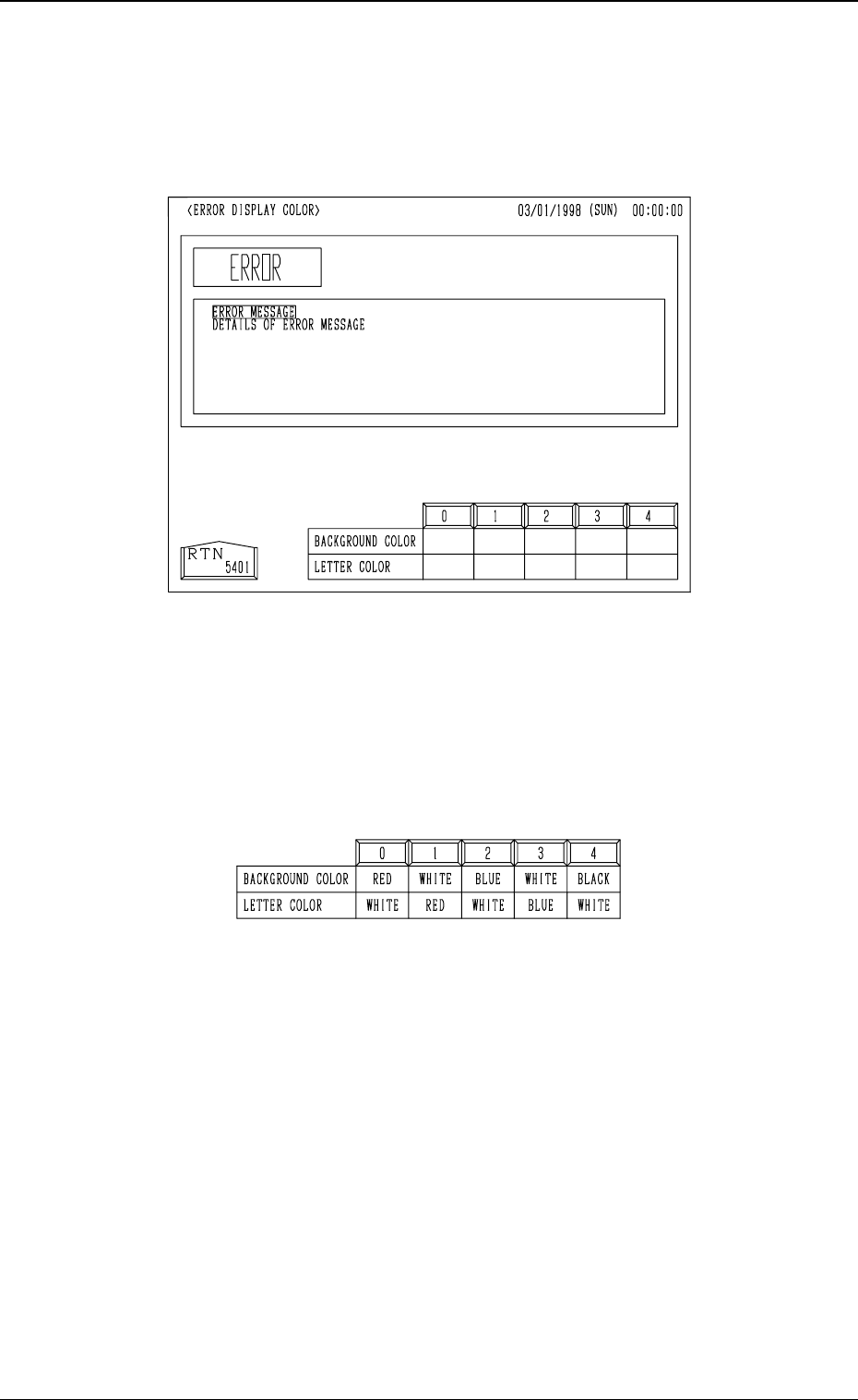
6. Setting of Error Display Colors
When the [ERROR DISPLAY COLOR] key is pressed at the “MACHINE
SET-UP” display, the following display appears on the screen.
• The background and letter colors of the error information box can be changed
according to one of the five optional combinations (0 to 4). When the de-
sired combination No. box is pressed, the colors are reflected in the error
information box.
• One of the five patterns (combinations of background and letter colors) can
be selected.
4-13
6. Setting of Error Display Colors
Fig. 4D16
Fig. 4D17
0305-001 Tg0860-PM-MM
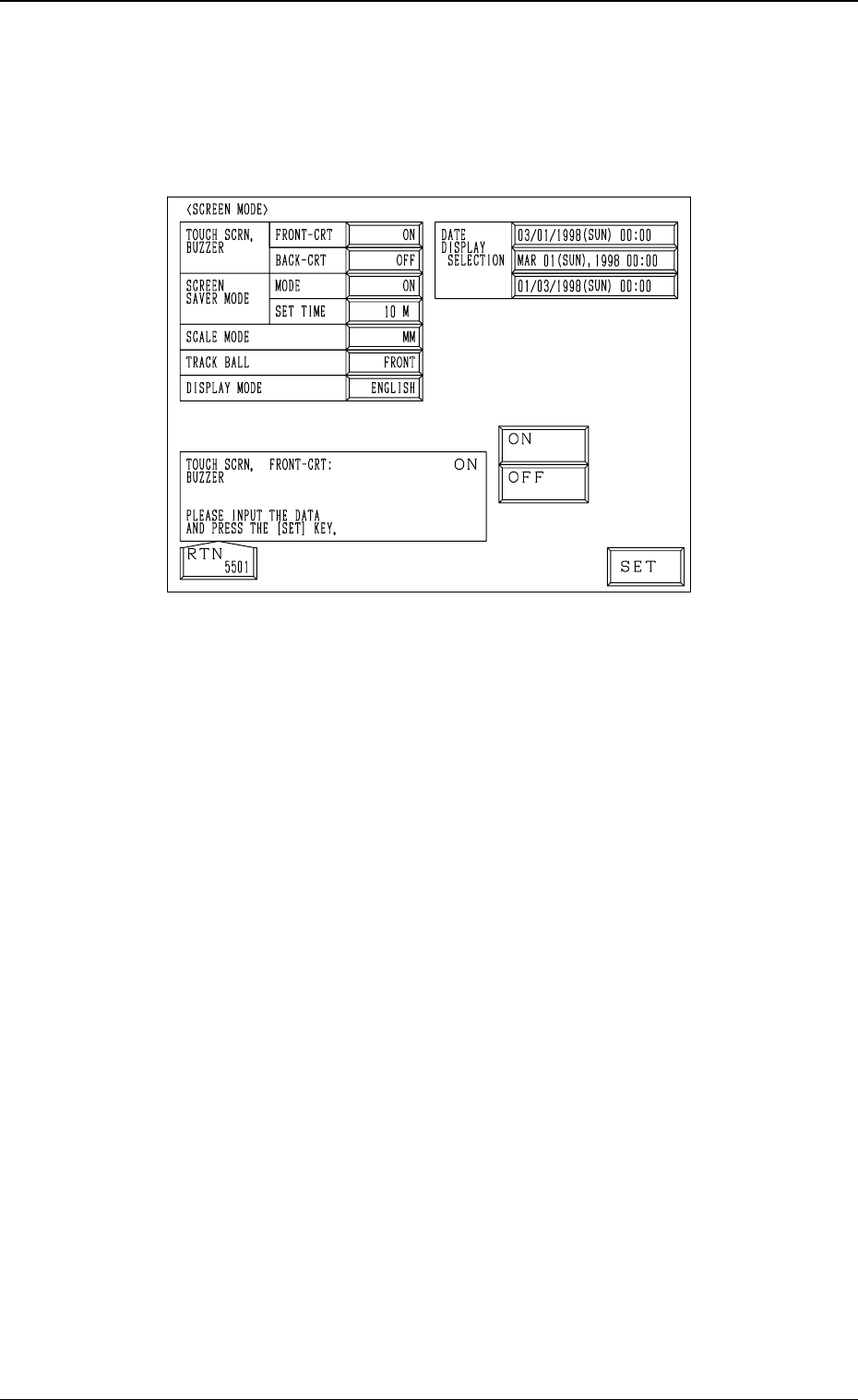
7. Screen Mode Function
When the [SCREEN MODE] key is pressed at the “MACHINE SET-UP” dis-
play, the following display appears on the screen.
TOUCH SCRN. BUZZER FRONT-CRT and BACK-CRT
Set “ON” or “OFF” in the data boxes to determine whether or not the
buzzers should be used.
SCREEN SAVER MODE
When the touch screen or the operation panel is kept intact (keys and but-
tons kept intact) for the specified period of time, the screen saver mode
(function) is activated to avoid burning the CRT or the LCD screen.
Note: While the “ERROR” display is active or a message is issued in the
“MGT. INFO.” text box, the screen saver function does not work.
MODE
Set “ON” or “OFF” in the data box to determine whether or not the screen
saver mode should be set.
SET TIME
Set the delay time for the screen saver mode to be activated in the data box.
Time (a period of time before the screen saver function starts working) can
be set in the range of 1 to 60 minutes in the increments of 1 minute.
4-14
7. Screen Mode Function
Fig. 4D18

0305-001 Tg0860-PM-MM
Requirements for Cancellation of Screen Saver Mode
The screen saver mode is canceled when,
• the touch screen on the operation-available panel is touched.
• a push button other than the [POWER OFF] button is pressed.
Note: While the screen saver function is activated, no effect is given to
any operation of the machine. However, when the [STOP],
[PAUSE], or [OPERATION/SET UP] button is pressed, the screen
saver function is canceled and the button function is implemented.
• an error occurs.
• a message is issued in the text box of the label “MGT. INFO.”.
Screens in Screen Saver Mode
• Front and Rear Touch Screens
Light cast on the operation panel is darkened further.
(The back light is automatically turned off.)
• Recognition Monitor
The power switch of the recognition monitor is automatically turned off.
SCALE MODE (MM/lNCH)
“MM” : The US customary system (inches) is changed to the metric
system.
“INCH” : The metric system is changed to the US customary system
(inches).
DISPLAY MODE (JAPANESE/ENGLISH)
“JAPANESE”: Every label on the screen is expressed in Japanese.
“ENGLISH” : Every label on the screen is expressed in English.
DATE DISPLAY SELECTION
One of the pre-defined date formats (3 date and time expressions) can be
selected.
Operation Procedure
(1) Select the desired data key.
The selected data key turns blue, indicating that it is selected.
(2) Use option keys or the ten-key pad to enter a parameter and press the
[SET] key. Option keys or the ten-key pad appears depending on which
data box is selected.
Notes: (a) The “AUTOMATIC OPERATION SUBSTITUTION” display
can’t be opened. For the “AUTOMATIC OPERATION SUBSTI-
TUTION” display, refer to “1. One Touch Jump Function (Jump
to Substitute AUTO OPN. MODE <PLACEMENT> Display) of
Section 3 in Volume 5” for details.
(b) The buttons on the operation panel are not available.
(c) The communication with the programming device (Option) is not
available.
4-15
7. Screen Mode Function