4OM-1011-002.pdf - 第288页
0305-001 Tg0860-PM-MM 5-5 3. DA T A SA VE MODE Display 3. DA T A SA VE MODE Display The parameters set for touch screen adjustment can be stored at this display. When the [RTN] key is pressed at the “SCREEN ADJUSTMENT” d…
0305-001 Tg0860-PM-MM
2. RGB (Red-Green-Blue Signal) Adjustment
The produced RGB of the touch screen can be adjusted.
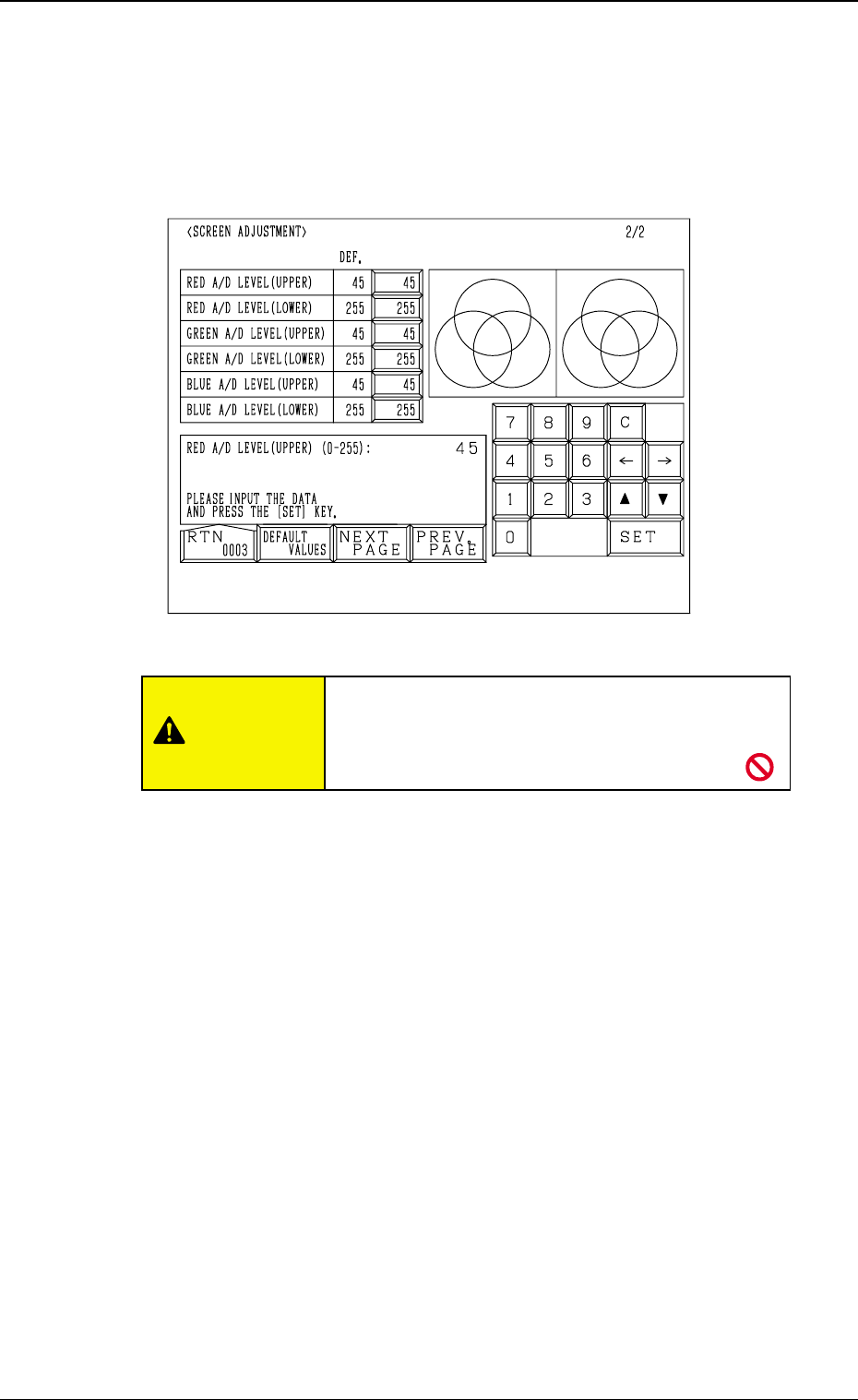
When the [NEXT PAGE] or the [PREV. PAGE] key is pressed at the “SCREEN
ADJUSTMENT” display (Fig. 4E1), the following display appears on the screen.
RED A/D LEVEL (UPPER)
Set the upper limit of the reference voltage for the A/D converter. (R Signal)
The standard value is “45”.
RED A/D LEVEL (LOWER)
Set the lower limit of the reference voltage for the A/D converter. (R signal)
The standard value is “255”.
GREEN A/D LEVEL (UPPER)
Set the upper limit of the reference voltage for the A/D converter. (G Signal)
The standard value is “45”.
GREEN A/D LEVEL (LOWER)
Set the lower limit of the reference voltage for the A/D converter. (G Signal)
The standard value is “255”.
BLUE A/D LEVEL (UPPER)
Set the upper limit of the reference voltage for the A/D converter. (B Signal)
The standard value is “45”.
BLUE A/D LEVEL (LOWER)
Set the lower limit of the reference voltage for the A/D converter. (B Signal)
The standard value is “255”.
[DEFAULT VALUES] Key
When this key is pressed, each parameter is reset to its default.
5-4
2. RGB (Red-Green-Blue Signal) Adjustment
Fig. 4E2
CAUTION
Do not change the parameters unless necessary.
These parameters are factory-adjusted upon ship-
ment of the machine.
0305-001 Tg0860-PM-MM5-5
3. DATA SAVE MODE Display
3. DATA SAVE MODE Display
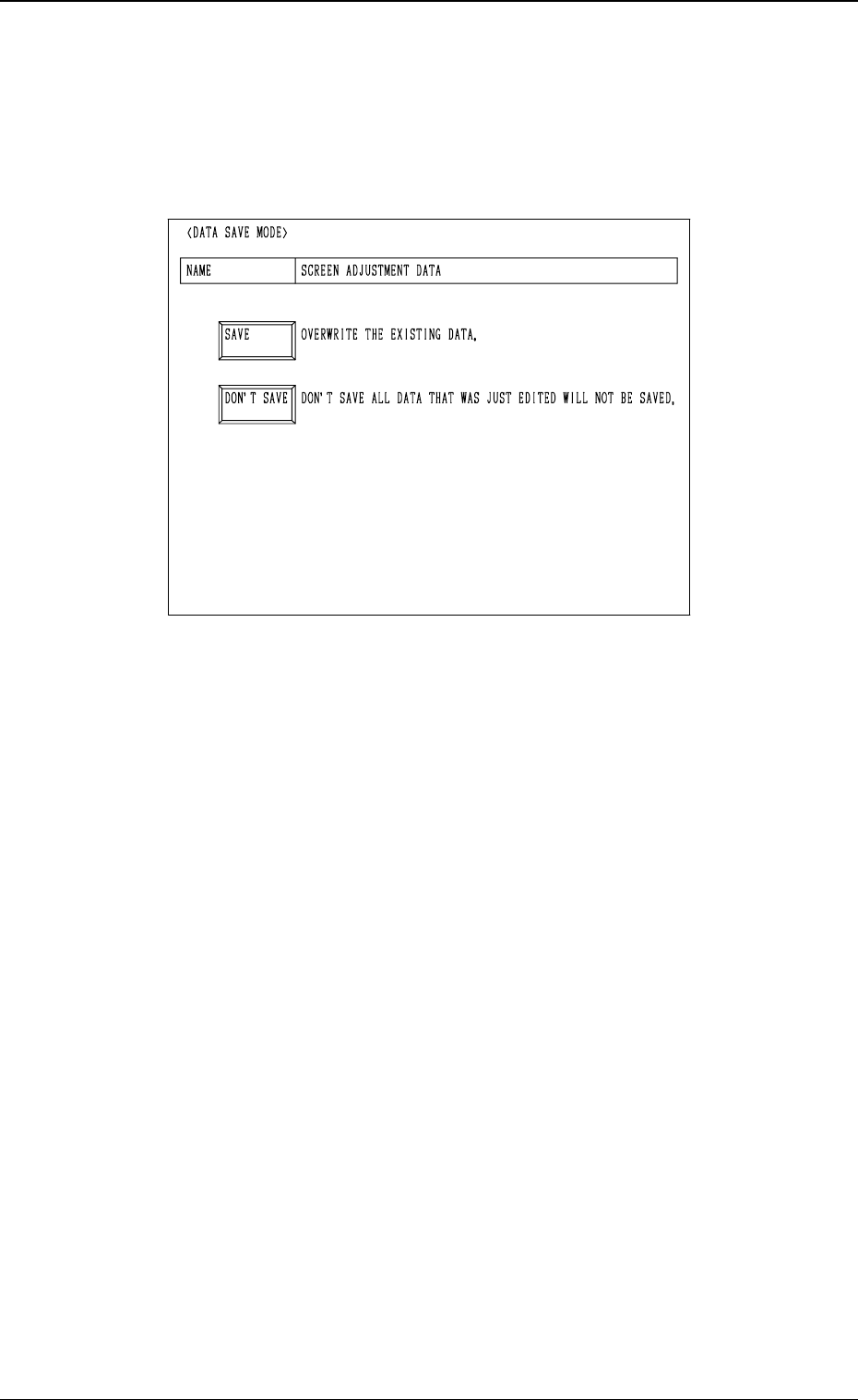
The parameters set for touch screen adjustment can be stored at this display.
When the [RTN] key is pressed at the “SCREEN ADJUSTMENT” display
(Fig. 4E1 or Fig. 4E2), the following display appears on the screen.
[SAVE] Key
When this key is pressed, the parameters changed at the “SCREEN ADJUST-
MENT” display (Figs. 4E1 and 4E2) are saved and then the “MAIN MENU”
display appears on the screen.
[DON’T SAVE] Key
When this key is pressed, the parameters changed at the “SCREEN ADJUST-
MENT” display (Figs. 4E1 and 4E2) are not saved and then the “MAIN MENU”
display appears on the screen.
Fig. 4E3

1st Edition Issued May, 2003 Copying Prohibited
2nd Edition Issued Jul., 2003
Compiled and Distributed by
0307-002
Tg0860-PM-MM