4OM-1011-002.pdf - 第89页
0305-001 Tg0860-PM-MM 4.1 Error Image Save Function When the “RECALL (IMAGE) RECOG. ERROR”(Fig. 4C48) display appears on the screen, an error image appears on the recognition monitor . Error images can be saved on a flop…
0305-001 Tg0860-PM-MM
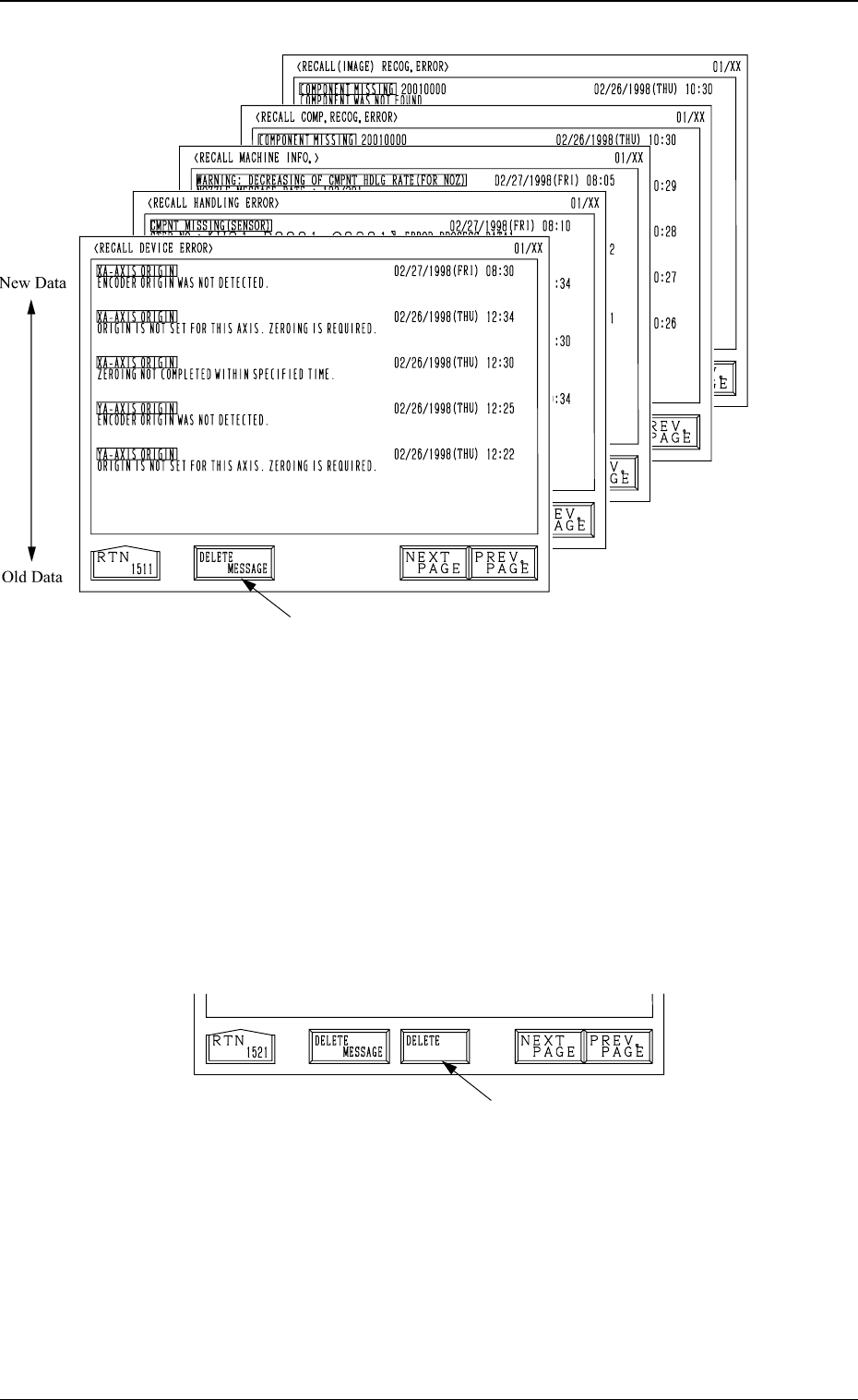
• Each message is arranged and recalled in a time series.
• Mark (green) shows an error ocurred during operation.
How to Delete the Recalled Messages
(1) Press the [DELETE MESSAGE] key A.
The key turns red, indicating that the delete mode is set.
The [DELETE] key B appears beside the [DELETE MESSAGE] key as
shown in Fig. 4C49.
(To cancel the delete mode, press the [DELETE MESSAGE] key again.)
(2) When the [DELETE] key is pressed, the registered information messages
are deleted and the “RECALL MESSAGES” display (Fig. 4C43) appears
on the screen.
Fig. 4C48
Fig. 4C46
Fig. 4C45
Fig. 4C44
Fig. 4C47
3-37
4. RECALL MESSAGES Display
A
B
Fig. 4C49
0305-001 Tg0860-PM-MM
4.1 Error Image Save Function
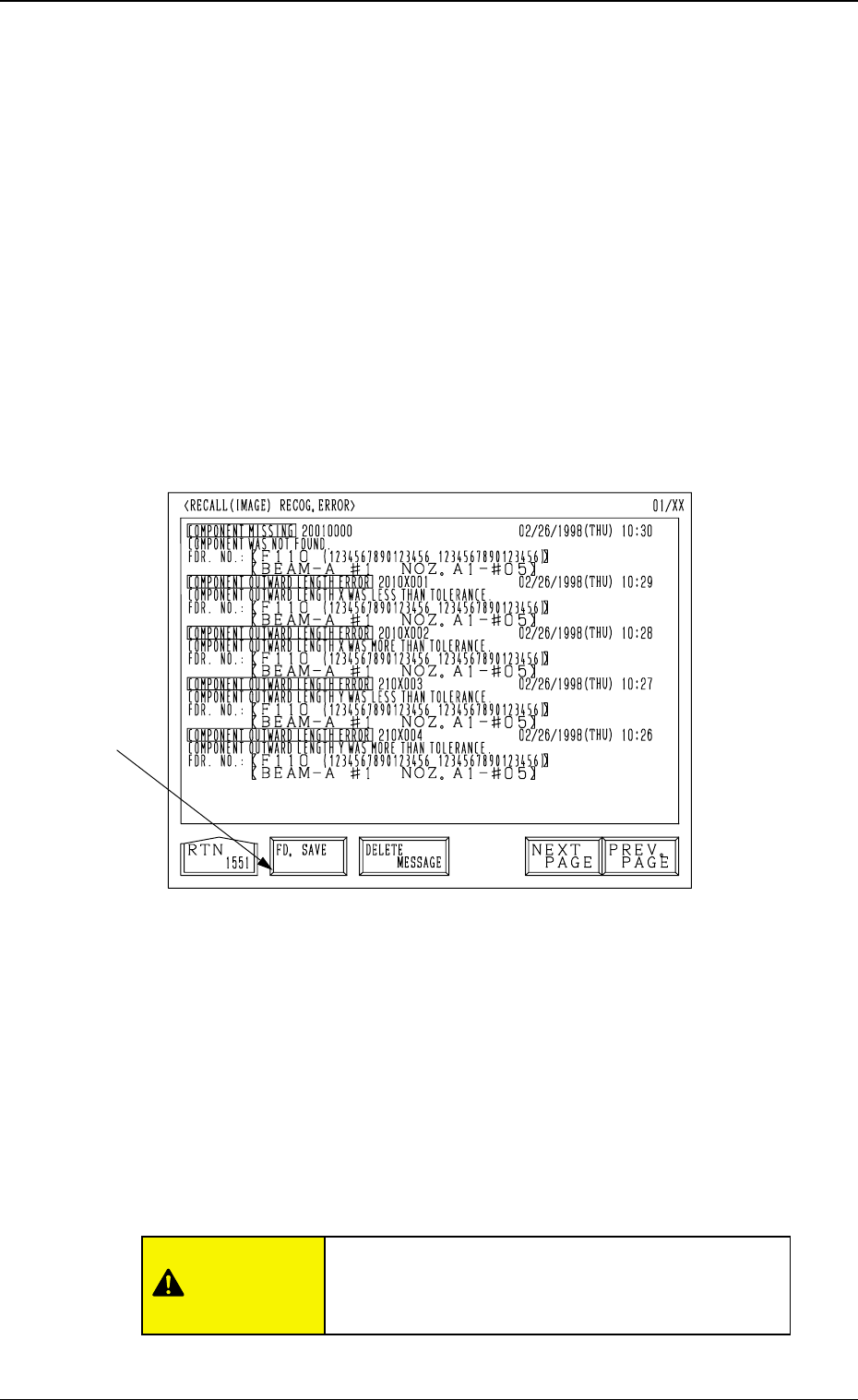
When the “RECALL (IMAGE) RECOG. ERROR”(Fig. 4C48) display appears
on the screen, an error image appears on the recognition monitor.
Error images can be saved on a floppy disk and sent to us for error analysis.
• To activate this function, set “SAVE” in the “FUNCTION” data box at the
“RECOGNITION ERROR IMAGE SAVE SET-UP” display.
Refer to “3. RECOGNITION ERROR IMAGE SAVE SET-UP Display of
Section 4 in Volume 2” for details.
To save a recognition error image on a floppy disk
(1) When the [RECALL (IMAGE) RECOG. ERROR] key is pressed at the
“RECALL MESSAGES” display, the following display appears on the
screen and an error image appears on the recognition monitor.
(2) Insert a formatted floppy disk (FD) into the floppy disk drive (FDD) on
the front console panel.
(3) When the [FD. SAVE] key A in Fig. 4C50 is pressed, the image on the
recognition monitor is saved on the floppy disk (FD).
• Up to 3 image planes (resolution: 100 %) can be saved on one piece of
floppy disk. (Excluding any divided recognition error)
(4) When the access lamp of the FDD extinguishes, it indicates that data is
saved completely.
Press the eject button and take out the floppy disk from the disk drive.
3-38
4.1 Error Image Save Function
Fig. 4C50
A
CAUTION
Do not press the eject button of the disk drive when
the access lamp is ON. Otherwise, the data stored
on the inserted floppy disk may be corrupted.

0305-001 Tg0860-PM-MM
Notes: (a) Image data cannot be saved during data communication with the
external device (during communication with the programming
device).
Data communication with the external device becomes unavail-
able while data is being saved on a floppy disk.
(b) The [SYSTEM CLEAR] key becomes unavailable while data is
being saved on a floppy disk.
(c) Before saving an error image, be sure to insert a formatted floppy
disk (1.44MB, DOS-Formatted) because the machine is not pro-
vided with the format function.
(d) When the error image analysis is performed on the manufacturer's
side, set “1” in the “IMAGE NO” data box at the “RECOGNI-
TION ERROR IMAGE SAVE SET-UP” display.
Refer to “3. RECOGNITION ERROR IMAGE SAVE SET-UP
Display of Section 4 in Volume 2” for details.
3-39
4.1 Error Image Save Function