4OM-1011-002.pdf - 第98页
0305-001 Tg0860-PM-MM Special Jig P .C.B. (Option) Note: Consult our sales personnel for the detailed information on how to use the special jig P .C.B. Name : P .C.B. Recognition Calibration Jig Model Name : JG-0086 Dime…
0305-001 Tg0860-PM-MM
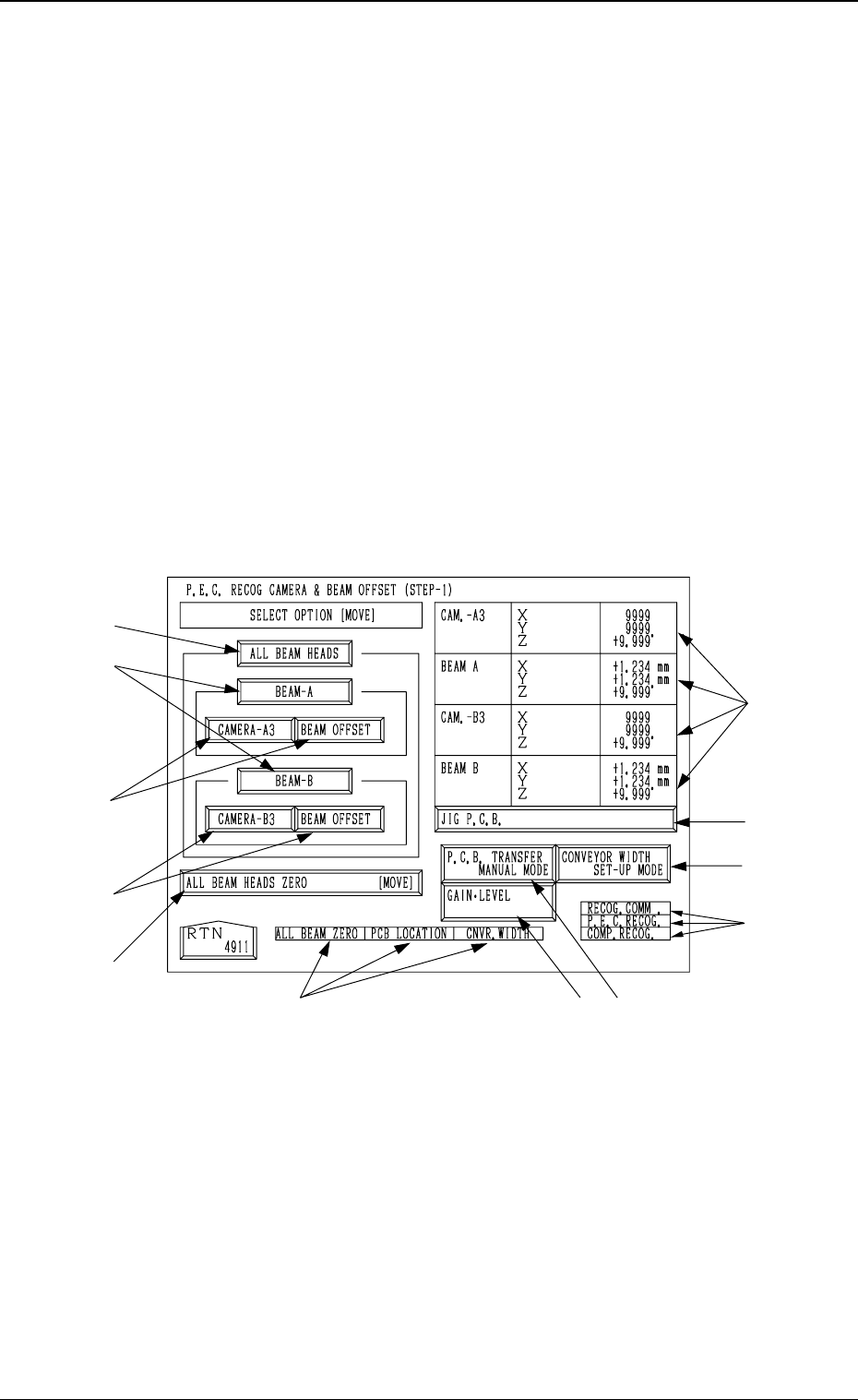
6.1 P.E.C. RECOG CAMERA & BEAM OFFSET
(STEP-1) Display
• This display allows teaching the offset data for Beams A and B and the
offset data for the P.E.C. recognition camera.
The patterns printed on the positioned special jig P.C.B. (option) are recog-
nized by the P.E.C. recognition camera and each offset data is calculated
through the recognition.
Notes: (a) A special jig P.C.B. (option) is required.
The parameters are factory-set at shipment. It is not necessary
to teach these parameters.
(b) Follow the teaching procedures in the specified order. Otherwise,
some trouble (such as inaccurate component placement, frequent
mechanical errors, etc.) will arise.
When the [P.E.C. RECOG CAMERA & BEAM OFFSET (STEP-1)] key is
pressed at the “TEACH OFFSET” display, the following display appears on
the screen.
*5
*6
*8
*10
*7*9
*11
*4
*3
*3
*2
*1
3-46
6.1 P.E.C. RECOG CAMERA & BEAM OFFSET (STEP-1) Display
Fig. 4C55
0305-001 Tg0860-PM-MM
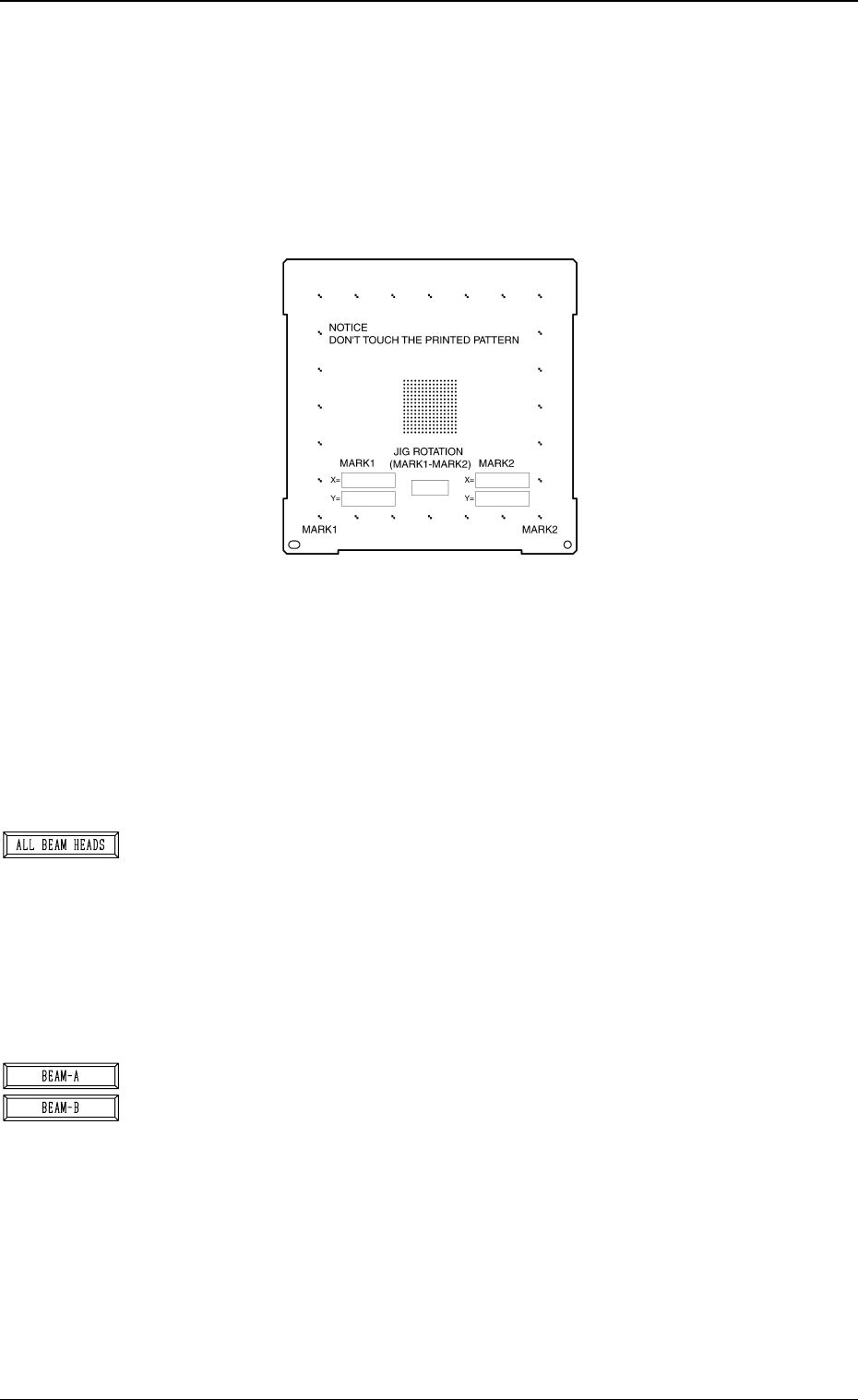
Special Jig P.C.B. (Option)
Note: Consult our sales personnel for the detailed information on how to use
the special jig P.C.B.
Name : P.C.B. Recognition Calibration Jig
Model Name : JG-0086
Dimensions : Approx. 160 (width) × 160 (depth) × 1.6 (thickness) mm
• The special jig P.C.B. has printed round marks forming a matrix on its
center. The marks are used to calculate the magnification and angle of
the selected camera.
Checker marks are also printed around the matrix and used to calculate
the angle between the P.E.C. recognition camera magnification beam X/
Y axis and the P.C.B. positioning X/Y coordinates (orthogonal degree of
vertical and horizontal axis).
*1 [ALL BEAM HEADS] Key
The machine performs the teaching operation of the P.E.C. recognition
camera and beam offset data related to both Beams A and B.
When this key is selected and the [MOVE] button is pressed, the ma-
chine starts the teaching operation.
The teaching operation is performed first on Beam A and then on Beam
B.
Note: Before performing any teaching operation, position the jig P.C.B.
and zero both beams.
*2 [BEAM-A] and [BEAM-B] Keys
The machine performs the teaching operation of the P.E.C. recognition
camera and beam offset data related to either Beam A or Beam B.
When the [BEAM-A] or the [BEAM-B] key is selected and the [MOVE]
button is pressed, the machine starts the teaching operation related to the
selected beam.
The machine performs the teaching operation related to either Beam A
or Beam B.
Note: Before performing any teaching operation, position the jig P.C.B.
and zero both beams.
3-47
6.1 P.E.C. RECOG CAMERA & BEAM OFFSET (STEP-1) Display
Fig. 4C56
Fig. 4C57
Fig. 4C58
0305-001 Tg0860-PM-MM
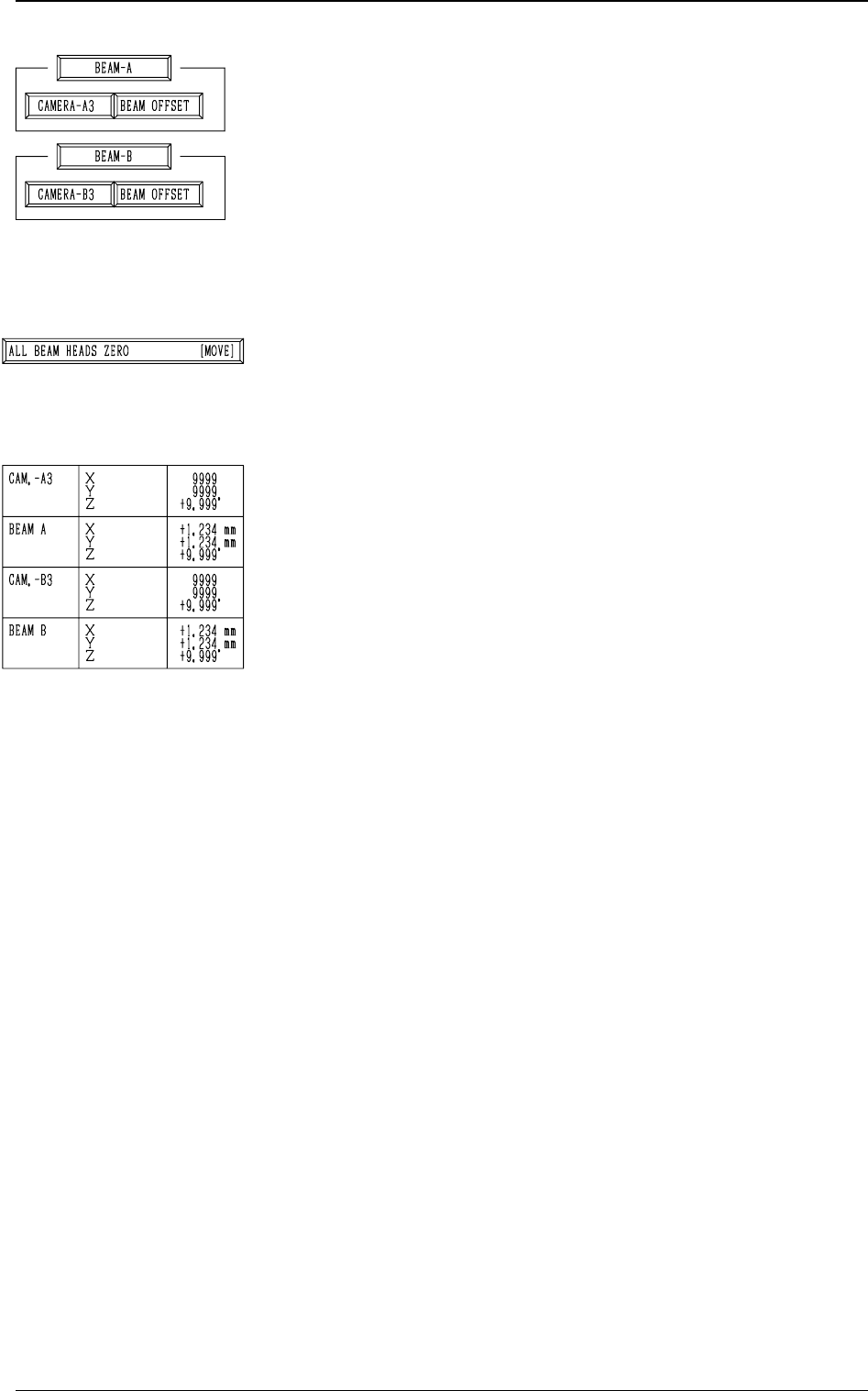
*3 [CAMERA-A3] and [BEAM OFFSET] Keys in “BEAM-
A” Group Box and [CAMERA-B3] and [BEAM OFFSET]
Keys in “BEAM-B” Group Box
The machine performs the offset teaching operation for each
individual units (devices).
When one of the above-described keys is selected and the
[MOVE] button is pressed, the machine starts teaching the
offset data related to the selected unit (device).
Note: Before performing any teaching operation, position
the jig P.C.B. and zero both beams.
*4 [ALL BEAM HEADS ZERO [MOVE]] Key
Both Beams A and B are zeroed.
When this key is selected and the [MOVE] button is pressed,
the zeroing operation starts.
*5 The following offset values are shown.
• Offset Values for Beam A:
“X (Horizontal)”, “Y (Vertical)”, and “Z (Theta)”
• Offset Values for Beam B:
“X (Horizontal)”, “Y (Vertical)”, and “Z (Theta)”
• Offset Values for Camera-A3 (P.E.C. Camera A3):
“Z (Theta)”
• Offset Values for Magnification of Camara-A3:
“X (Horizontal)” and “Y (Vertical)”
• Offset Values for Camera-B3 (P.E.C. Camera B3):
“Z (Theta)”
• Offset Values for Magnification of Camera-B3:
“X (Horizontal)” and “Y (Vertical)”
3-48
6.1 P.E.C. RECOG CAMERA & BEAM OFFSET (STEP-1) Display
Fig. 4C59
Fig. 4C60
Fig. 4C61