Oxford-100-Manual.pdf - 第118页
PlasmalabSystem 100 Oxford Instruments Plasma Technology System Manual Hide events after selection button Show all events button: 5.9 Log files Displays all events before and including the highlighted event. Displays all…
System
Manual
Oxford
Instruments
Plasma
Technology
PlasmalabSystem
100
5.8.9
System log
page
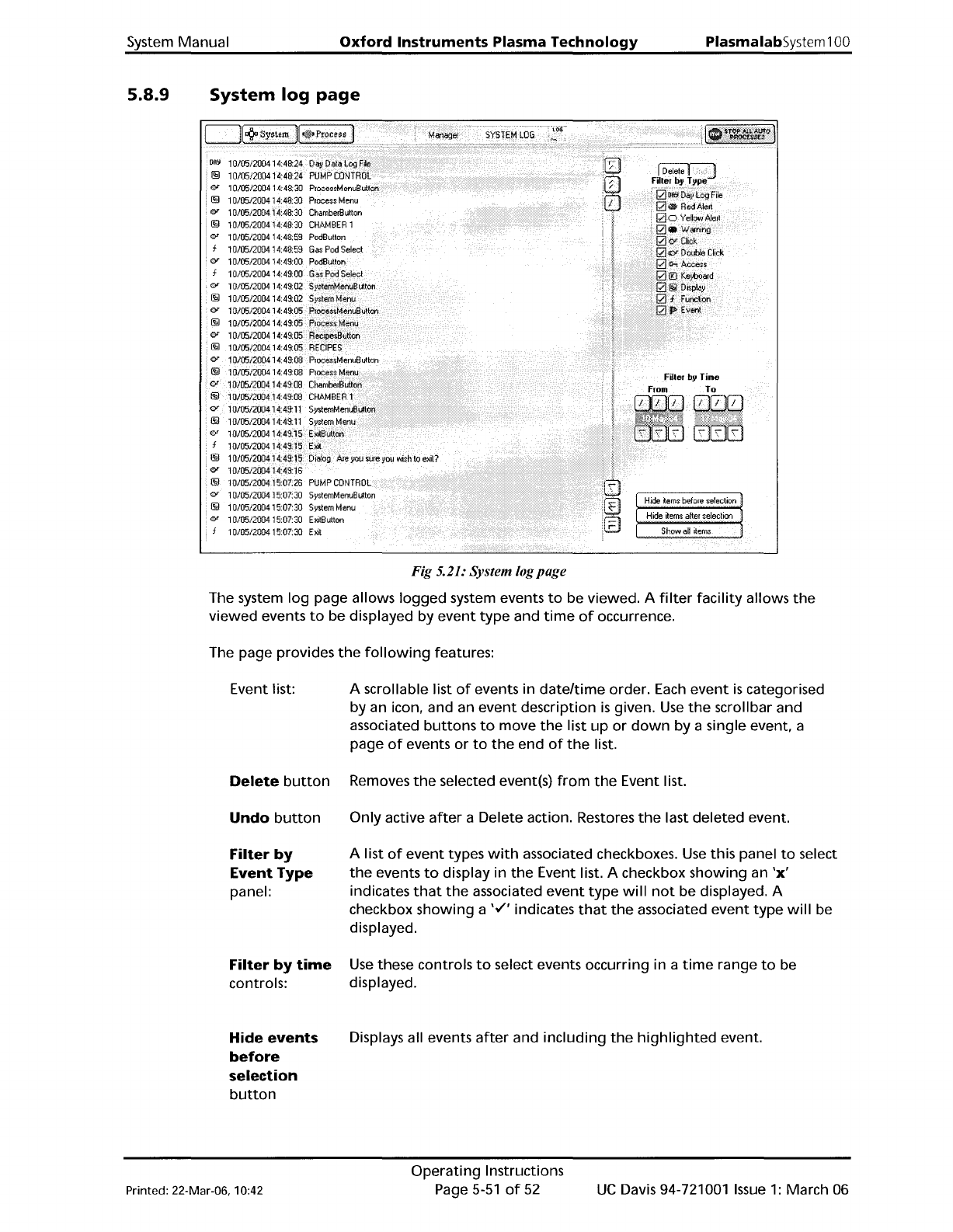
Fig 5.21: System logpage
The system
log
page allows
logged
system events
to
be viewed. A
filter
facility
allows
the
viewed events
to
be displayed by
event
type
and
time
of
occurrence.
The page provides
the
following
features:
Event list:
Delete
button
Undo
button
Filter
by
Event
Type
panel:
Filter
by
time
controls:
Hide
events
before
selection
button
A scrollable list
of
events in
dateltime
order.
Each
event
is
categorised
by an icon, and an
event
description
is
given.
Use
the
scrollbar and
associated
buttons
to
move
the
list
up
or
down
by a single event, a
page
of
events
or
to
the
end
of
the
list.
Removes
the
selected event(s)
from
the
Event list.
Only active
after
a Delete action. Restores
the
last
deleted
event.
A list
of
event
types
with
associated checkboxes.
Use
this panel
to
select
the
events
to
display in
the
Event list. A checkbox
showing
an
'x'
indicates
that
the
associated
event
type
will
not
be displayed. A
checkbox
showing
a
'v"
indicates
that
the
associated
event
type
will
be
displayed.
Use
these controls
to
select events occurring in a
time
range
to
be
displayed.
Displays all events
after
and
including
the
highlighted
event.
Printed: 22-Mar-06, 10:42
Operating
Instructions
Page
5-51
of
52
UC
Davis 94-721001
Issue
1:
March 06
PlasmalabSystem100
Oxford
Instruments
Plasma
Technology
System Manual
Hide
events
after
selection
button
Show
all
events
button:
5.9 Log
files
Displays all events
before
and including
the
highlighted
event.
Displays all previously
hidden
events.
While
PC
2000
is
running,
two
log
files are
maintained,
one
for
the
system log and
the
other
for
the
data log. These files are stored
on
your
hard disk in
the
folder
C:\Optsyslg. Details
of
the
log
files are
as
follows.
System
log
file
- The
filename
for
this
file
is
of
the
form
sOCaabb
where
aa
represents
the
month,
e.g. 06
(for
June) and
bb
represents
the
day
of
the
month,
e.g.
11
(for
the
eleventh
day).
Data
log
file
- The
filename
for
this
file
is
of
the
form
p1caabb
where
aa
represents
the
month,
e.g. 06
(for
June) and
bb
represents
the
day
of
the
month,
e.g.
11
(for
the
eleventh
day).
When
PC
2000
is
shut
down
correctly (select
the
System menu,
then
the
Exit
option),
both
log
files are
automatically
saved and closed.
If
PC
2000
is
then
started again,
the
files are
automatically
opened
and
their
data
is
available via
the
System Log page and
the
Select Log
Data page.
If
PC
2000
is
not
shut
down
correctly, e.g.
the
PC
is
switched
off
or
the
PC
'hangs' etc.,
one
or
both
of
the
log
files can become
corrupted.
If
this
happens,
the
next
time
PC
2000
is
started
the
corrupt
log file(s)
will
be
detected
and
reported
on-screen
by
an
error
dialogue. To
correct this
problem,
use
the
following
procedure:
1)
Close
PC
2000.
2)
Use
Windows
Explorer
to
navigate
to
C:\Optsyslg.
3)
Delete
the
reported
log
file.
4)
Re-start
PC
2000.
UC
Davis 94-721001
Issue
1:
March 06
Operating
Instructions
Page 5-52
of
52
Printed: 22-Mar-06. 10:42
System
Manual
Oxford
Instruments Plasma Technology
WARNING
PlasmalabSystem
100
BEFORE
PROCEEDING WITH
ANY
MAINTENANCE WORK, READ SECTION 1 - HEALTH
AND
SAFETY.
6.
Maintenance
6.
Maintenance
6-1
6.1
Customer
support
facilities
6-3
6.2
General 6-4
6.3
Safety maintenance 6-5
6.3.1 Inspection and renewal 6-5
6.3.1.1
Quartz
components
6-5
6.3.1.2
Alumina
components
6-5
6.4
94-100-BW-2F
Base
wired
2-frame
kit
6-6
6.4.1
Weekly
6-6
6.4.2
Monthly
6-6
6.4.3
Three-Monthly
6-7
6.4.4
Annually
6-7
6.4.5 Changing
the
gas
bottles
6-7
6.4.6 Etch cleaning 6-7
6.5
94-100-3-41C
ICP
180 chamber
kit
with
gate
valve 6-9
6.5.1
Monthly
6-9
6.5.2 O-rings 6-9
6.6
Top
electrode 6-10
6.6.1
Monthly
6-10
6.6.2 Six-monthly (tools
with
a removable showerhead) 6-10
6.6.3
Annually
(tools having
access
to
the
gas
inlet
isolation assembly
from
the
top
side only) 6-10
6.7
94-100-5-12A Cryo He
lower
electrode
6-11
6.7.1
Monthly
6-11
6.8
94-100-6-500/200V
RIE
500W
RF
generator
/
OIPT
AMU
kit..
6-12
6.8.1
Three-monthly
6-12
6.9
Vacuum system 6-13
6.9.1 Active Pirani
gauge
6-13
6.9.2 Capacitance
manometer
6-13
6.9.2.1 Six-monthly (or
as
necessary) 6-13
6.9.3 Penning
gauge
6-13
6.9.3.1 Dismantling
the
body
tube
6-14
6.9.3.2 Cleaning 6-15
6.9.4
Turbomolecular
pumps 6-15
6.9.4.1 Daily 6-15
6.9.4.2 Re-greasing
of
turbo
pumps
fitted
to
process chambers 6-15
6.9.4.3 2000
to
8000 hours
(3
to
12 months):
pump
relubrication
6-15
6.9.4.4 Alcatel
turbo
pumps
fitted
with
bake-out
collars 6-16
6.9.5 Rotary vane pumps 6-16
6.10
Gas
handling
system 6-17
6.10.1
Wall-mounted
gas
pod
6-17
6.10.1.1
Annually
6-17
6.10.2 Mass
flow
controllers 6-17
6.10.2.1
Annually
(or
as
necessary) 6-17
6.10.3 Filters 6-17
6.10.3.1
Annually
(or
as
necessary) 6-17
6.11
Pump lubricants 6-18
Printed: 22-Mar-06, 7:41
Maintenance
Page
6-1
of
22
UC
Davis 94-721001
Issue
1:
March 06