Oxford-100-Manual.pdf - 第291页
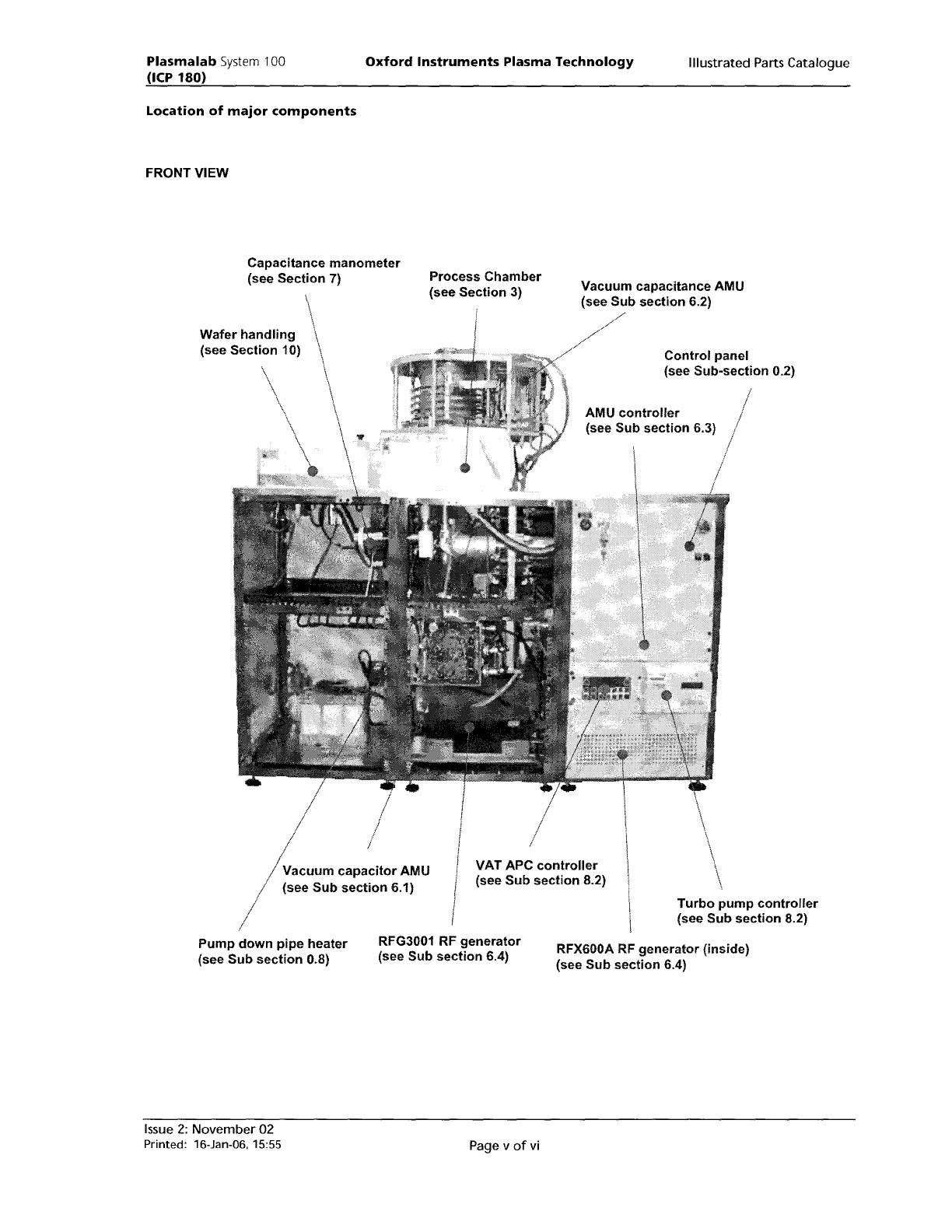
Plasma lab System 100 (ICP 180) Oxford Instruments Plasma Technology Illustrated Parts Catalogue Location of major components FRONT VIEW II VAT APC controller (see Sub section 8.2) Control panel (see Sub-section 0.2) AMU…
Plasma
lab
System
100
(ICP
180)
Using
the
Parts
Lists
Oxford
Instruments
Plasma
Technology
Illustrated Parts Catalogue
In this catalogue
'item
number'
refers
to
the
reference
number
used
on
an
illustration,
'part
number'
refers
to
the
unique
number
used
to
identify
the
part
in
Dxford Instruments Plasma Technology'.
To
identify
a part:
1)
Locate
the
appropriate
section
from
the
contents list.
2)
Find
the
required
component
on
the
relevant
illustration
and
note
its
item
number
(see
note
(d) below).
4)
Refer
to
the
associated parts list
table
and
find
the
item
number.
5)
Note
the
DPT
part
number
and description.
6)
Telephone
or
fax
the
part
number
and description
to
your
local DIPT sales
office
or
representative
who
can qUickly locate
the
part
on
the
spares database.
See
the
last page
of
this catalogue
for
DIPT locations
world-wide.
NOTES:
(a)
Where
possible,
the
item
number
used
in
the
illustrations
is
the
same
as
that
quoted
on
the
DIPT Bill
of
Materials
for
the
assembly. However, in some
cases
this has
not
been possible
as
more
than
one
assembly
may
be shown
in
an illustration.
(b) Where an
item
number
has
more
than
one
part
associated
with
it
in
a parts list
table,
this
indicates
component
options
which
may vary according
to
the
configuration
of
the
machine:
identify
the
component
from
the
actual machine
before
selecting
the
correct
option.
(c)
Items listed
without
item
numbers in
the
parts list tables are
not
shown
in
the
illustrations,
but
their
DIPT
Part Numbers and descriptions are listed
to
enable
identification.
(d)
Printed Circuit Boards
(PCBs)
illustrated
within
this
catalogue are assembled boards
which
include all
integrated
circuits
and
other
components. To ensure
the
correct assembled
board
is
supplied, read
the
PC
number
stamped
on
the
PCB.
This
will
read PC100xxxxxx. Check
this
with
the
DIPT spares
department
or
include
the
number
with
your
order,
making
sure
to
include any revision
number
printed
on
the
circuit
board.
Page iv
of
vi
Issue
2:
November 02
Printed: 16-Jan-06, 15:55
Plasma
lab
System
100
(ICP
180)
Oxford
Instruments
Plasma
Technology
Illustrated Parts Catalogue
Location
of
major
components
FRONT VIEW
II
VAT APC
controller
(see
Sub
section
8.2)
Control
panel
(see
Sub-section
0.2)
AMU
controller
(see
Sub
section
6.3)
Turbo
pump
controller
(see
Sub
section
8.2)
Vacuum
capacitance AMU
(see
Sub
section
6.2)
Process
Chamber
(see
Section
3)
Capacitance
manometer
(see
Section
7)
/
~acuum
capacitor
AMU
/ (see
Sub
section
6.1)
/
Wafer
handling
(see
Section
10)
Pump
down
pipe
heater
(see
Sub
section
0.8)
RFG3001
RF
generator
(see
Sub
section
6.4)
RFX600A
RF
generator
(inside)
(see
Sub
section
6.4)
Issue
2:
November
02
Printed:
16-Jan-06.15:55
Page v
of
vi
Plasma
lab
System
100
(ICP
180)
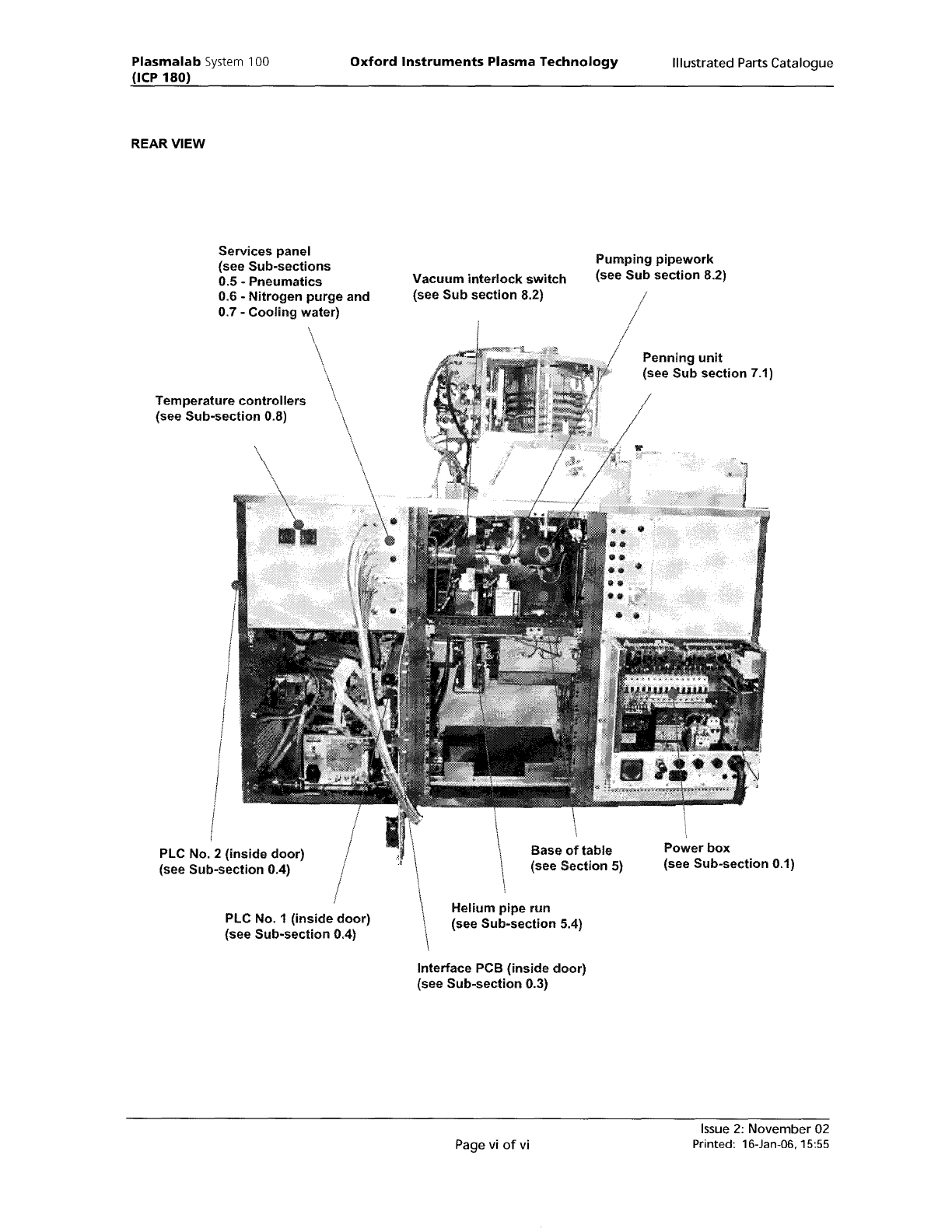
REAR
VIEW
Oxford
Instruments
Plasma Technology
Illustrated Parts Catalogue
Services
panel
(see
Sub-sections
0.5 -
Pneumatics
0.6 -
Nitrogen
purge
and
0.7 -
Cooling
water)
Vacuum
interlock
switch
(see
Sub
section
8.2)
Pumping
pipework
(see
Sub
section
8.2)
Temperature
controllers
(see
Sub-section
0.8)
\
PLC
No.2
(inside
door)
(see
Sub-section
0.4)
PLC
No.1
(inside
door)
(see
Sub-section
0.4)
Base
of
table
(see Section 5)
Helium
pipe
run
(see
Sub-section
5.4)
Interface PCB
(inside
door)
(see
Sub-section
0.3)
Page vi
of
vi
Penning
unit
(see
Sub
section
7.1)
Power
box
(see
Sub-section
0.1)
Issue
2:
November02
Printed:
16-Jan-06. 15:55