Oxford-100-Manual.pdf - 第96页
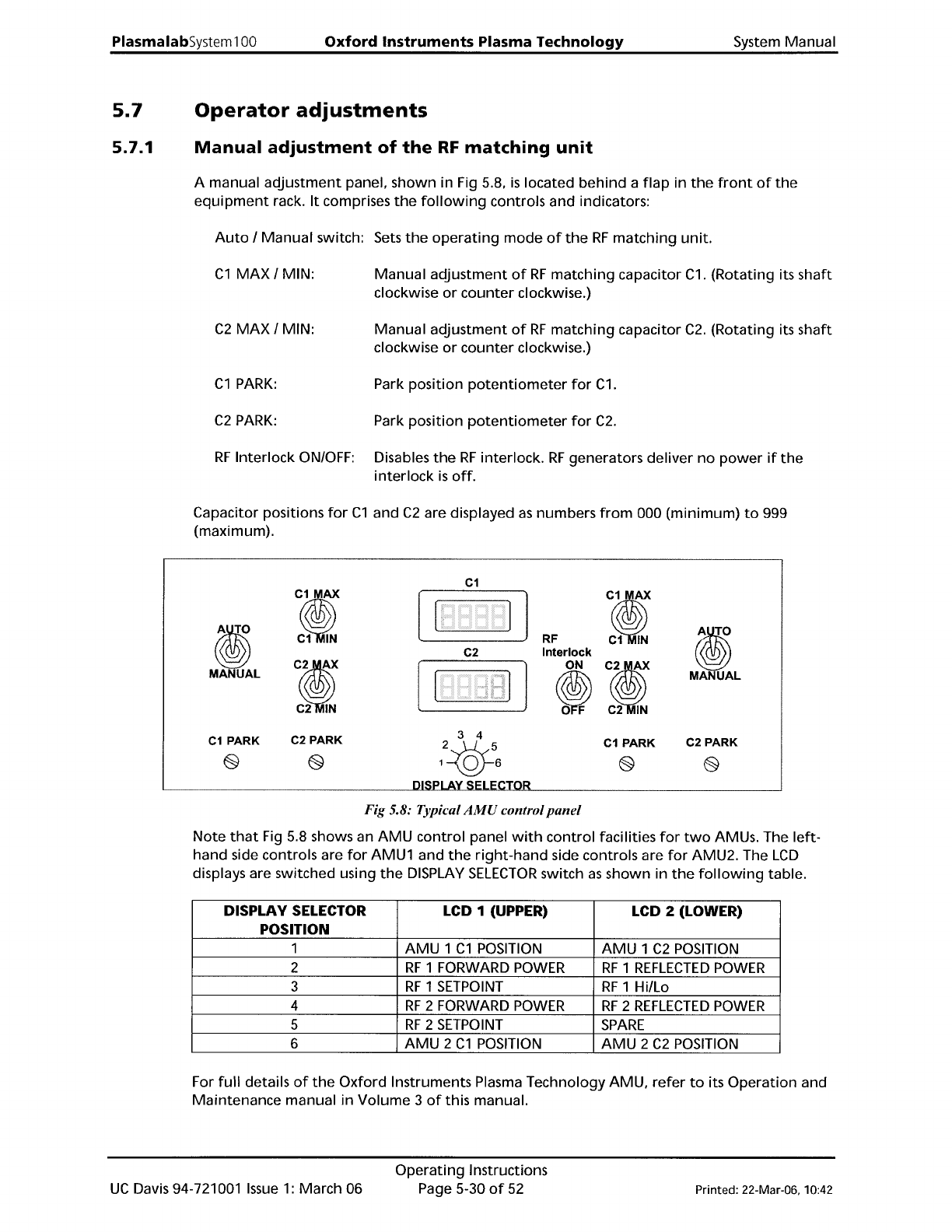
PiasmaiabSystem100 Oxford Instruments Plasma Technology System Manual 5.7 5.7.1 Operator adjustments Manual adjustment of the RF matching unit A manual adjustment panel, shown in Fig 5.8, is located behind a flap in the …
System
Manual
Oxford
Instruments
Plasma
Technology
PlasmalabSystem
100
5.6.3
Leak
detection
and
MFC
calibration
log
page
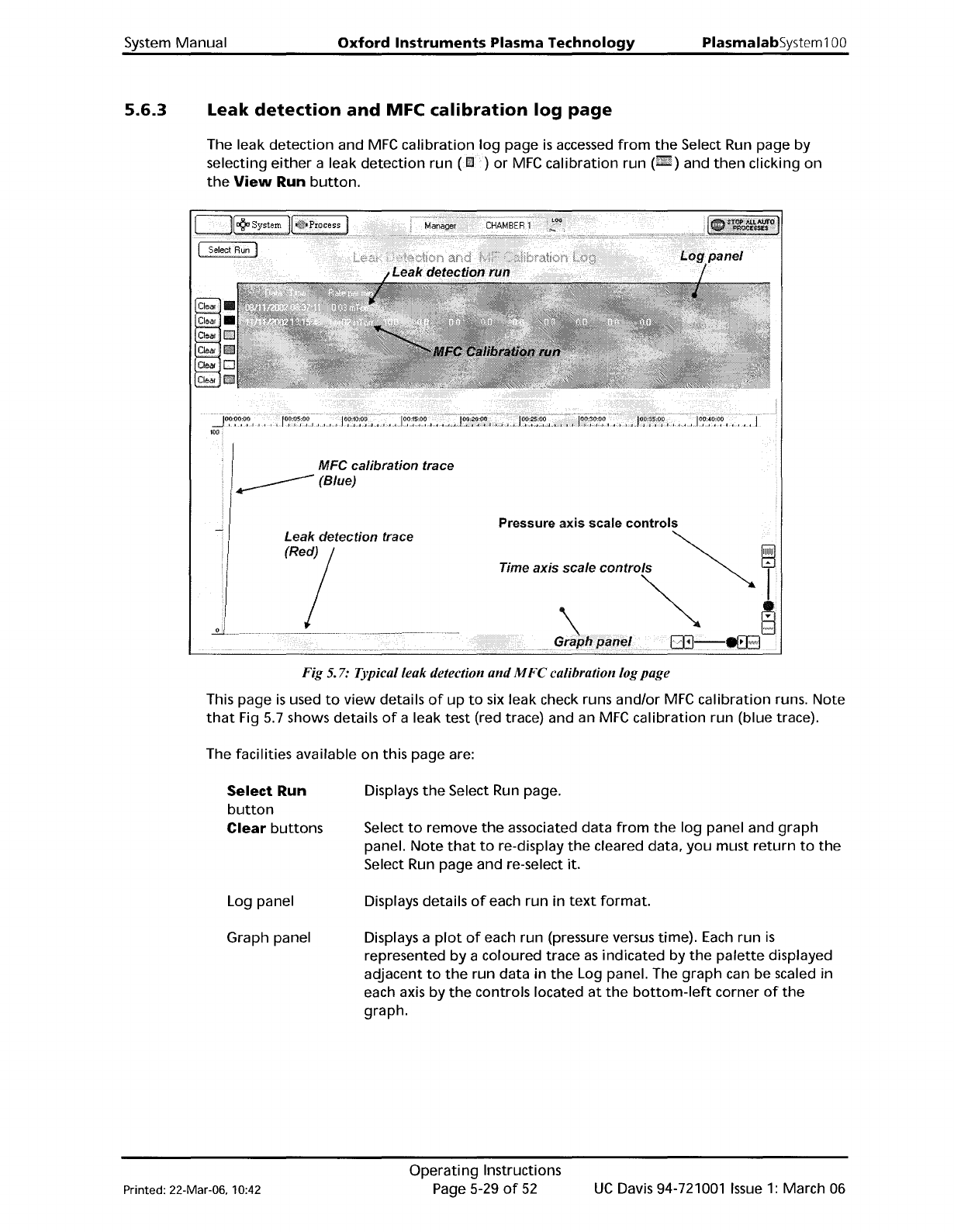
The leak
detection
and
MFC
calibration
log
page
is
accessed
from
the
Select Run page by
selecting
either
a leak
detection
run
(Il!]
)
or
MFC
calibration
run
(.)
and
then
clicking
on
the
View
Run
button.
MFC
calibration
trace
(Blue)
Leak
detection
trace
fRej
Pressure axis scale
controls
Time axIs
scale
contmls
~
~
Fig 5. 7: Typical leak detection
and
M
Fe
calibration logpage
This page
is
used
to
view
details
of
up
to
six leak check runs
and/or
MFC
calibration
runs.
Note
that
Fig 5.7 shows details
of
a leak test (red trace) and an
MFC
calibration
run (blue trace).
The facilities available on this page are:
Select Run
button
Clear
buttons
Log panel
Graph panel
Displays
the
Select Run page.
Select
to
remove
the
associated data
from
the
log
panel and
graph
panel.
Note
that
to
re-display
the
cleared data,
you
must
return
to
the
Select Run page and re-select it.
Displays details
of
each run in
text
format.
Displays a
plot
of
each run (pressure versus time).
Each
run
is
represented
by
a coloured trace
as
indicated by
the
palette
displayed
adjacent
to
the
run data in
the
Log panel. The
graph
can be scaled in
each axis by
the
controls located
at
the
bottom-left
corner
of
the
graph.
Printed: 22-Mar-06. 10:42
Operating
Instructions
Page 5-29
of
52
UC
Davis 94-721001
Issue
1:
March 06
PiasmaiabSystem100
Oxford
Instruments
Plasma
Technology
System Manual
5.7
5.7.1
Operator
adjustments
Manual
adjustment
of
the
RF
matching
unit
A manual
adjustment
panel, shown in Fig 5.8,
is
located
behind
a
flap
in
the
front
of
the
equipment
rack.
It
comprises
the
following
controls and indicators:
Auto
/
Manual
switch: Sets
the
operating
mode
of
the
RF
matching
unit.
C1
MAX
/ MIN:
Manual
adjustment
of
RF
matching
capacitor
C1.
(Rotating its
shaft
clockwise
or
counter
clockwise.)
C2
MAX
/ MIN:
Manual
adjustment
of
RF
matching
capacitor
C2.
(Rotating its
shaft
clockwise
or
counter
clockwise.)
C1
PARK:
Park position
potentiometer
for
C1.
C2
PARK:
Park
position
potentiometer
for
C2.
RF
Interlock
ON/OFF: Disables
the
RF
interlock.
RF
generators
deliver
no
power
if
the
interlock
is
off.
Capacitor positions
for
C1
and
C2
are displayed
as
numbers
from
000
(minimum)
to
999
(maximum).
C1
:i
:i
ti
ti
C1
IN
RF
C1
IN
C2
Interlock
CI
ON
CI
MANUAL
~
MANUAL
C2
IN
C2
IN
C1
PARK
C2 PARK
3 4
C1
PARK
C2 PARK
2-<:Q}
@
@
1 0 6
@
@
R
Fig 5.8: Typical
AMU
control
panel
Note
that
Fig
5.8 shows an
AMU
control
panel
with
control
facilities
for
two
AMUs. The
left-
hand side controls are
for
AMU1 and
the
right-hand
side controls are
for
AMU2. The
LCD
displays are switched using
the
DISPLAY
SELECTOR
switch
as
shown
in
the
following
table.
DISPLAY SELECTOR LCD 1 (UPPER) LCD 2 (LOWER)
POSITION
1
AMU
1
C1
POSITION
AMU
1
C2
POSITION
2
RF
1 FORWARD
POWER
RF
1
REFLECTED
POWER
3
RF
1
SETPOINT
RF
1
Hillo
4
RF
2 FORWARD
POWER
RF
2
REFLECTED
POWER
5
RF
2
SETPOINT
SPARE
6
AMU
2
C1
POSITION
AMU
2
C2
POSITION
For
full
details
of
the
Oxford
Instruments Plasma Technology AMU,
refer
to
its
Operation
and
Maintenance
manual
in
Volume
3
of
this manual.
UC
Davis 94-721001
Issue
1:
March 06
Operating
Instructions
Page 5-30
of
52
Printed: 22-Mar-06, 10:42
System
Manual
Oxford
Instruments
Plasma
Technology
PlasmalabSystem
100
5.7.2
Adjusting
the
nitrogen
regulator
outlet
pressure
NOTE:
Refer
to
Section 2
for
a description
of
the
Nitrogen
vent
distribution
circuit.
The
regulator
outlet
pressure should
not
usually
require
adjustment
from
its
factory
setting.
However,
if
adjustment
is
necessary, proceed
as
follows.
WARNING
THIS PROCEDURE INVOLVES WORKING ON THE SYSTEM WITH COVERS REMOVED
AND
WITH THE ELECTRICAL POWER ON. THEREFORE IT MUST ONLY
BE
CARRIED OUT
BY TRAINED
AND
COMPETENT PERSONNEL
WHO
ARE AWARE
OF
THE RISKS
INVOLVED.
1)
Remove system panels
as
necessary
to
gain
access
to
the
regulator.
Outlet
pressure
control
knob
~
/
Outlet
connector
'"
Outlet
pressure
gauge
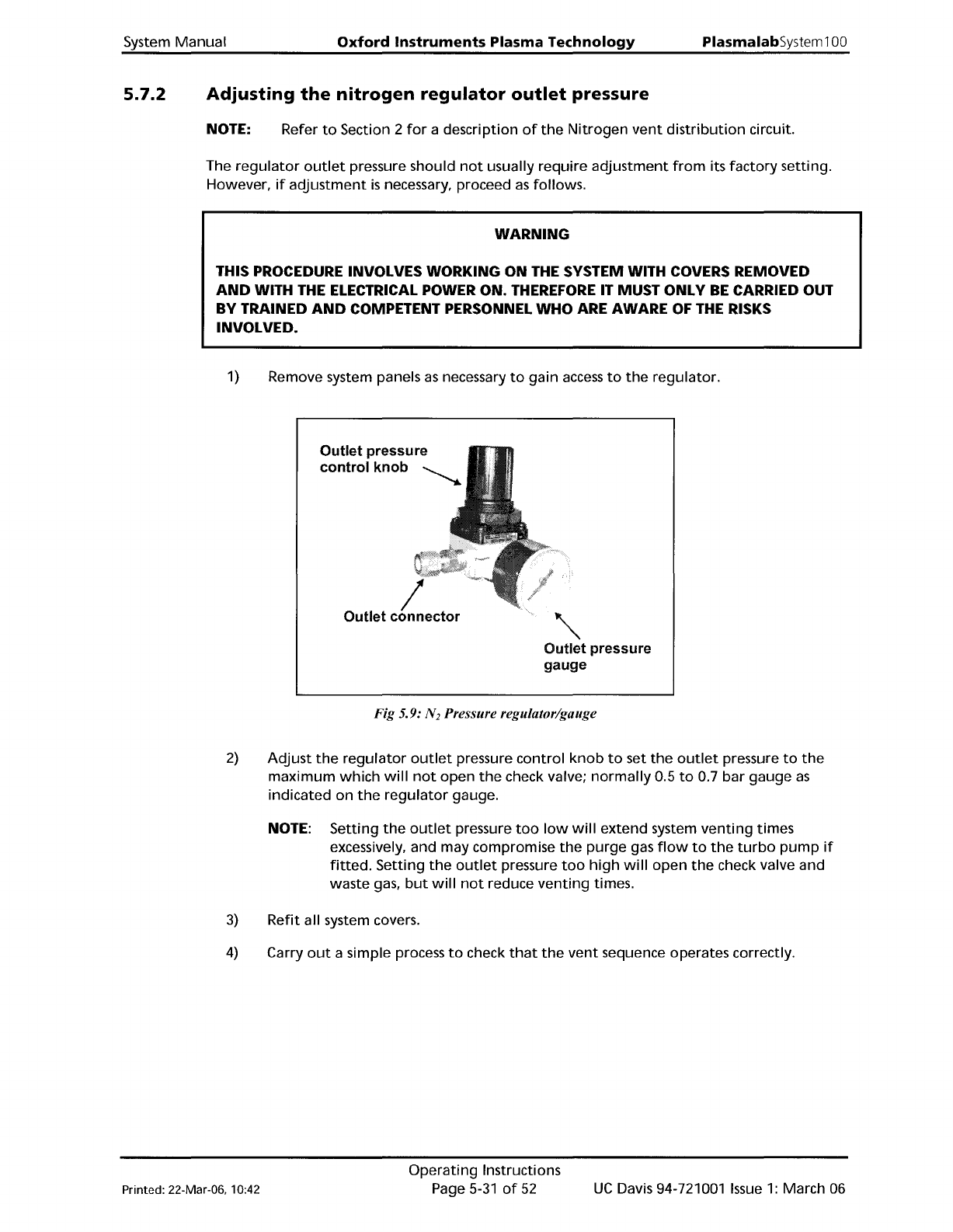
Fig 5.9: N
2
Pressure regulator/gauge
2)
Adjust
the
regulator
outlet
pressure
control
knob
to
set
the
outlet
pressure
to
the
maximum
which
will
not
open
the
check valve;
normally
0.5
to
0.7
bar
gauge
as
indicated
on
the
regulator
gauge.
NOTE: Setting
the
outlet
pressure
too
low
will
extend
system
venting
times
excessively, and may compromise
the
purge
gas
flow
to
the
turbo
pump
if
fitted.
Setting
the
outlet
pressure
too
high
will
open
the
check valve and
waste gas,
but
will
not
reduce
venting
times.
3)
Refit
all system covers.
4)
Carry
out
a simple process
to
check
that
the
vent
sequence operates correctly.
Printed: 22-Mar-06, 10:42
Operating
Instructions
Page
5-31
of
52
UC
Davis 94-721001
Issue
1:
March 06