00197475-01_IM_Traceability3.6_EN.pdf - 第15页
Installation of Trace Service and Monitor 4.1.1 System Requirements for Tr ace Service System Requirements and Software Componen ts for Traceability Modules Installation Manual SIPLACE Traceability 3.6 15 4 4 I n s t a l…
Installation Traceability
Uninstalling Traceability from the Station Computer
14 Installation Manual SIPLACE Traceability 3.6
3.3
3.3 Uninstalling Traceability from the Station Computer
Uninstalling Traceability from the Station Computer
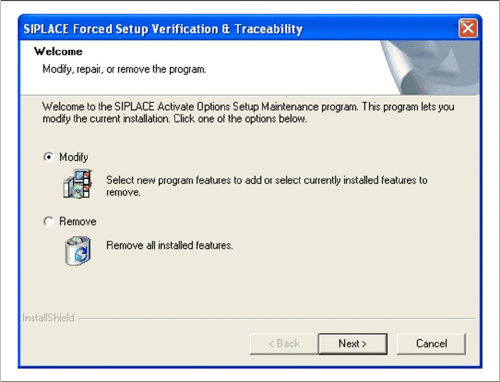
If the setup of the activation options at the Installation CD is called up again, the following dialog will ap-
pear. You can change the current settings by selecting the checkbox Modify. The following masks ap-
pear:
▪ Splice detection configuration for S-Feeders
▪ "Running tracks" empty is allowed
▪ Version of traceability data (XML-Files)
▪ Overview of the settings
▪ Finishing the installation
► If Remove is selected, the option Forced Setup Veri-
fication and Traceability will be uninstalled.

Installation of Trace Service and Monitor
4.1.1 System Requirements for Trace Service System Requirements and Software Components for Traceability Modules
Installation Manual SIPLACE Traceability 3.6 15
4
4 Installation of Trace Service and Monitor
Installation of Trace Service and Monitor
4.1
4.1 System Requirements and Software Components for Traceability Modules
System Requirements and Software Components for Traceabili-
ty Modules
4.1.1
4.1.1 System Requirements for Trace Service
System Requirements for Trace Service
▪ SIPLACE Pro Interface version 11.1 (preferred) 10.1 (compatible)
▪ SIPLACE Setup Center 6.0 (preferred), 5.1 (compatible)
▪ SIS 11.1 (preferred), 10.1 (compatible)
▪ OIB 3.2 (if Traceability Data is delivered via. OIB)
Supported Traceability Data Sources
▪ Traceability data in the form of XML files V1.0, V2.0, V1.1, V2.1 produced by 40x, 50x and 60x sta-
tions and Traceability data (internal format) produced by 70x stations.
NOTICE
System Requirements
The Support Media DVD included in the installation package checks the necessary system re-
quirements of your system and installs these. Amongst others e.g. Microsoft .NET Framework,
the License Manager and the Error Reporting tool. The use of the Support Media V1.15 is ob-
ligatory.
The system requirements (supported operating systems and database variants) and an over-
view of the interoperable products can be found in the SIPLACE Support Media Installation
Manual, item no. [00197214-xx].
NOTICE
Support Media DVD
Perform the Prerequisite Installation for the product SIPLACE Traceability 3.6 from the Support
Media DVD. See the "Prerequisite Analyzer" chapter in the Support Media Getting Started
[00195490-xx].
Installation of Trace Service and Monitor
System Requirements and Software Components for Traceability Modules 4.1.2 System Requirements for Trace Monitor
16 Installation Manual SIPLACE Traceability 3.6
4.1.2
4.1.2 System Requirements for Trace Monitor
System Requirements for Trace Monitor
The following hardware and software requirements must be fulfilled, before Trace Monitor can be in-
stalled.
The following software is not supplied on the Support Media DVD and must be acquired separately, if
needed:
▪ MS Excel (to visualize exported CSV files)
▪ MS SQL Server 2005 SP4 (Standard Edition)
▪ MS SQL Server 2008 SP2 (Standard Edition)
▪ MS SQL Server 2008 R2 SP (Standard Edition)
▪ MS SQL Server 2012 (Standard Edition)
▪ SIPLACE Explorer V2.10 SP1
4.1.3
4.1.3 System Requirements for the SIPLACE Explorers Traceability Option
System Requirements for the SIPLACE Explorers Traceability Option
The following requirements must be fulfilled for the installation of the traceability option in SIPLACE Ex-
plorer:
▪ Trace Monitor 3.6 application
▪ SIPLACE Explorer V2.11
For the SIPLACE Explorer system requirements, refer to the "Installation and Configuration Guide"
(Item No.: 00196800-xx).
4.1.4
4.1.4 Software Components and Configuration
Software Components and Configuration
4.1.4.1
4.1.4.1 Software Components
Software Components
The SIPLACE Traceability installation CD contains the following software components:
▪ Trace Service 3.6
▪ Trace Monitor 3.6
▪ Traceability Option 3.6 for SE 2.11
NOTICE
System Requirements
The Support Media DVD included in the installation package checks the necessary system re-
quirements of your system and installs these. Amongst others e.g. Microsoft .NET Framework,
the License Manager and the Error Reporting tool. The use of the Support Media V1.15 is ob-
ligatory.
The system requirements (supported operating systems and database variants) and an over-
view of the interoperable products can be found in the SIPLACE Support Media Installation
Manual, item no. [00197214-xx].
NOTICE
Support Media DVD
Perform the Prerequisite Installation for the product SIPLACE Traceability 3.6 from the Support
Media DVD. See the "Prerequisite Analyzer" chapter in the Support Media Getting Started
[00195490-xx].
NOTICE
SIPLACE Studio
SIPLACE Studio must be installed.