00197475-01_IM_Traceability3.6_EN.pdf - 第28页
Uninstalling 28 Installation Manual SIPLACE Traceability 3.6 Trace Monitor or Trace Service from Control Panel ► In the Control Panel -> Pro grams -> Programs and Features dialog select the applicati on SIPLACE Tra…
Uninstalling
Installation Manual SIPLACE Traceability 3.6 27
5
5 Uninstalling
Uninstalling
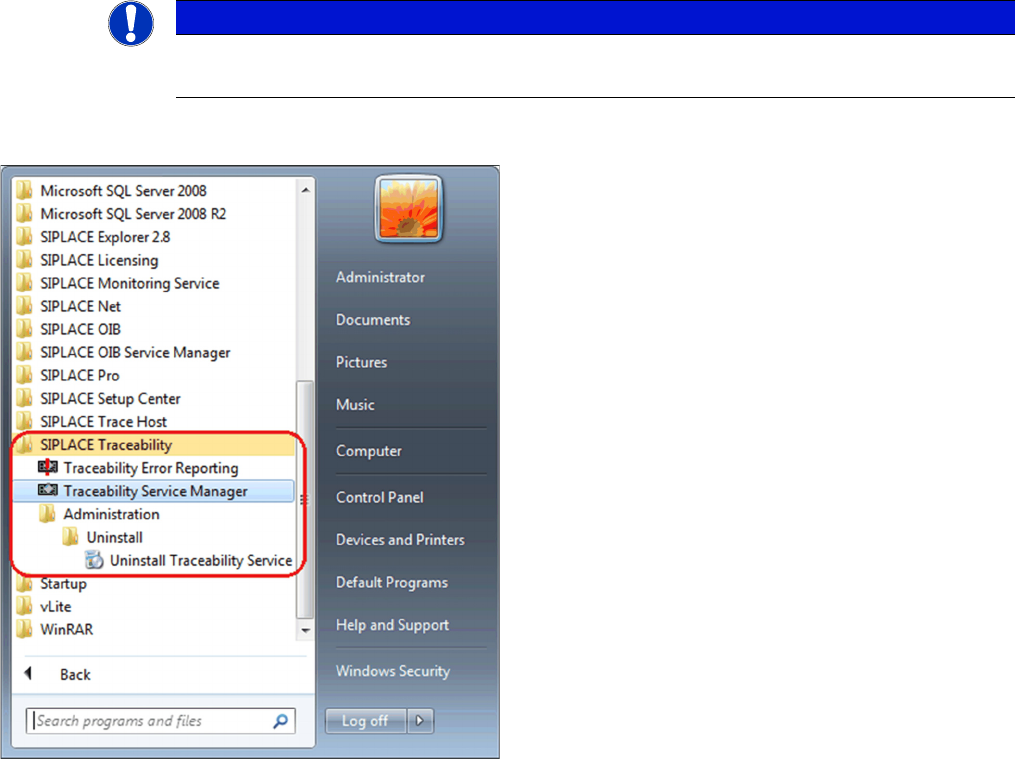
Trace Service from Start Menue
NOTICE
Requirement
You need administrator privilege for your operation system in order to perform this installation.
► In the Start Menu select the SIPLACE Traceability
program group -> Administration -> Uninstall (1) Un-
install Traceability Service.
⇨ The Application Setup is started where you can
choose to repair or remove the installation.
Uninstalling
28 Installation Manual SIPLACE Traceability 3.6
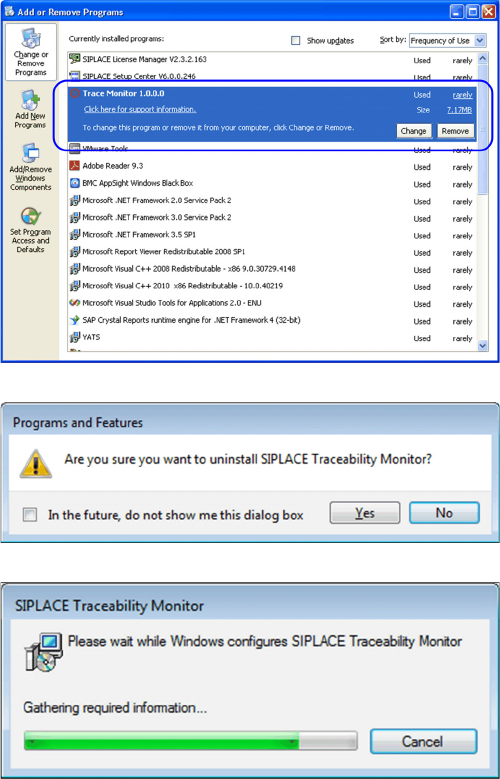
Trace Monitor or Trace Service from Control Panel
► In the Control Panel -> Programs -> Programs and
Features dialog select the application SIPLACE
Trace Monitor or Trace Service , right-click and select
Remove in the context menu.
You are prompted to confirm uninstalling Trace Monitor.
► Confirm with Yes.
► The Install Shield Wizard will start and uninstalling
Trace Monitor or Trace Service will be prepared. un-
installing Trace Monitor or Trace Service will be unin-
stalled.
► Monitor or Trace Service is no longer available.

Upgrade
New database concept introduced from Traceability version 3.3
Installation Manual SIPLACE Traceability 3.6 29
6
6 Upgrade
Upgrade
6.1
6.1 New database concept introduced from Traceability version 3.3
New database concept introduced from Traceability version 3.3
From version 3.3 Traceability comes with a new database concept which has significant impacts on the
deployment and the DBView interface.
The following has changed:
▪ The "Trace Host" Service was removed. Trace Service replaces the functionality and data will direct-
ly be exported to the database without detouring through the file system.
▪ The database schema was completely redesigned (see advantages).
This new concept has the following advantages for the customer:
▪ one service less needed for the traceability solution (less configuration options, less administrative
overhead)
▪ XML file export / file shares are not longer needed to store the traceability data to the database (al-
though XML file export is still an available export option in Trace Service for archiving purposes)
▪ less complexity, higher performance and improved reliability in the new database model compared
to the old solution
▪ the new DBView Interface is easier to comprehend than the old one
▪ The "Trace Monitor" tool supports the old TraceHost database schema (created/upgraded by Trace-
Host 3.2) and the new database schema (created by TraceServer 3.3 and newer) in common (only
one tool needed to query in databases)
The following restrictions exists":
▪ The old DBView Interface will not longer be supported. Customers have to adapt their own SQL
statements
▪ A database migration will only be supported as part of a customer project. We always recommend
to create a new database.
Please see the User Guide for further information about configuring the new traceability database.
NOTICE
Parallel operation
TraceHost 3.2 databases and TraceService 3.4 databases can be used with Trace Monitor 3.4