Operating Manual - 第75页
4022 591 960 62 Operating Manual 02.0 2 FCM Mu ltif lex 73 Err or Handling 7. Un e xpected bo ar d in run in se ction Solution: Rem o ve b oard thr ough the board i nle t at the run in. 8. Boar d stu ck in run in or run …
4022 591 96062 Operating Manual
02.02 FCM Multiflex 72
Error Handling
4. Feeder problem.
See feeder manual.
5. Laser beam obstructed
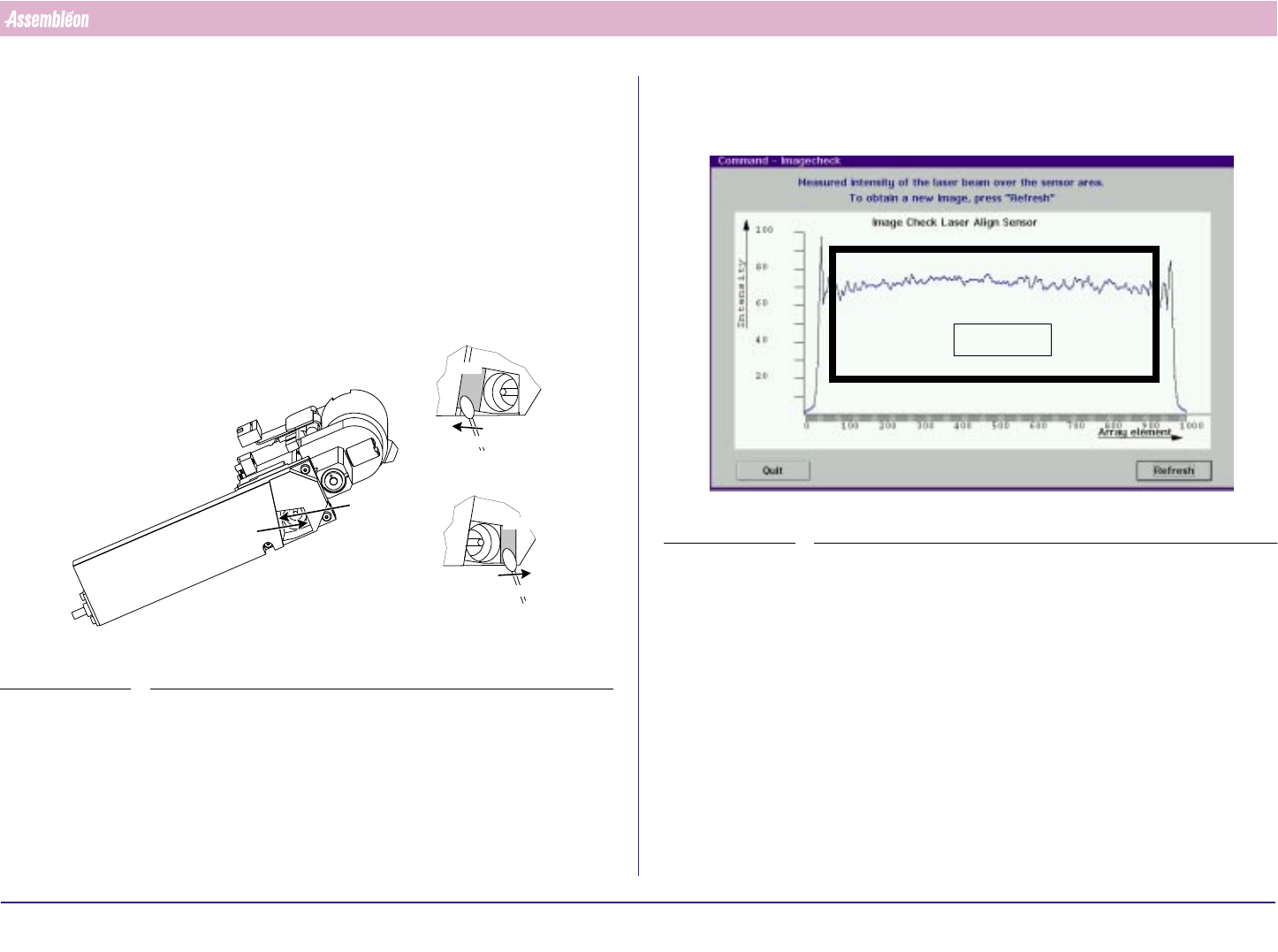
■ Dirty laser window: clean it:
Instruction:
a) Remove the dust on windows A & B with a Q-tip. Move the Q-tip from
the top to the bottom of the window and then out of the laser unit
(see FIGURE 113 on page 68).
FIGURE 115 Cleaning the laser window
b) Clean the laser window with a Q-tip and a little reagent grade
isopropyl alcohol. Use the same top-to-bottom movement (see step
a). Always use a clean part of the Q-tip.
view A
view B
Q-tip
Q-tip
Window
Window
view A
view B
c) Dry the treated surface with a Q-tip.
After cleaning the window check the PPU laser beam with the image
check function (see SCREEN 57 on page 72)
SCREEN 57 Image display
d) If results are not satisfactory repeat from step b onwards.
6. Cal high or cal low surpassed.
■ Wrong nozzle type.
■ Dirty nozzle.
■ Vacuum problems
Area of interest

4022 591 96062 Operating Manual
02.02 FCM Multiflex 73
Error Handling
7. Unexpected board in run in section
Solution:
Remove board through the board inlet at the run in.
8. Board stuck in run in or run out section:
Solution:
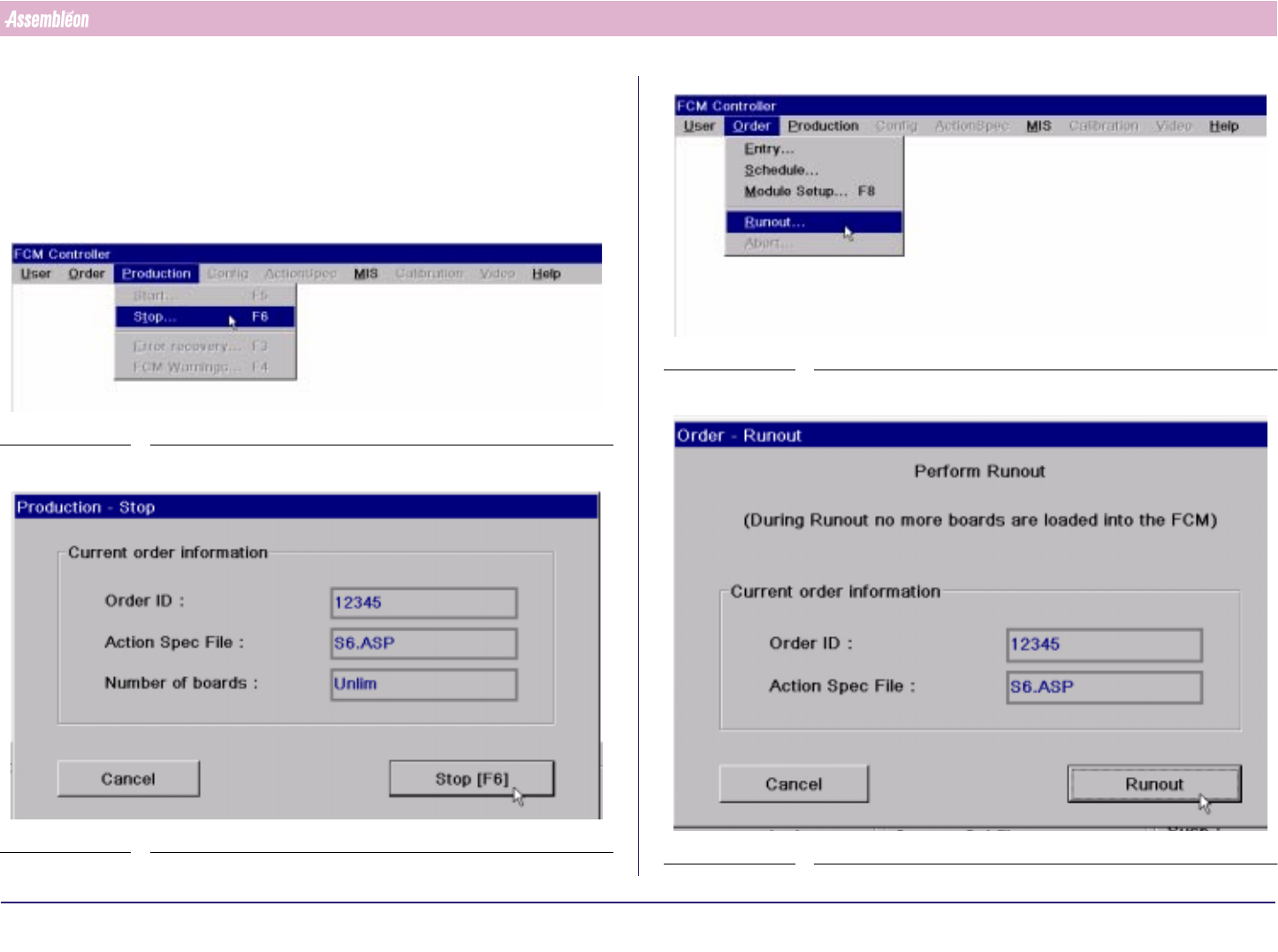
Select 'Production' - 'Stop…'
Select 'User' - 'Maintenance/Service funtions' - 'TC'
Select 'Command' - 'Move Hoist'
Select 'Hoist Down' and 'Move Hoist [F8]'
Select 'OK'
Open run in or run out cover
Remove board from run in or run out
Close run in or run out cover
Select 'Hoist Up' and 'Move Hoist [F8]'
Select 'OK'
Select 'Quit'
Select 'Command' - 'Exit'
Select 'Production' - 'Start…'
9. Fiducial measurement fail
■ Dirty fiducial: clean fiducial
■ Fiducial not taught: call for assistance
10.Servo tracking error on phi axis / Servo Tracking and Drift
■ Y-flexiguide of CLM brushes against phi axis: bend flexiguide away from
phi axis.
■ Bad PPU: call for assistance.
11.3 Warning Handling
Warnings are less important than errors: production can continue. In case of
a warning, note the warning and take action so the warning will be solved.
4022 591 96062 Operating Manual
02.02 FCM Multiflex 74
Stop Production
CHAPTER 12 Stop Production
If case of an error, see Chapter 11: Error Handling.
12.1 Run-Out Product
1.
SCREEN 58
2.
SCREEN 59
3.
SCREEN 60
4.
SCREEN 61