DEK INFINITY USER MANUAL.pdf.pdf - 第207页
INFINITY 021,725 3(5)250',6 3/$< Soft ware Ver sion 7 User Manual 6.7 Rec over y T im e T he e lapse d tim e dur ing a def ined p eriod tha t was s pen t runn ing init ial- ization or error recovery routines. Th…
INFINITY
021,725
3(5)250',63/$<
6.6 User Manual Software Version 7
PERFORM DISPLAY
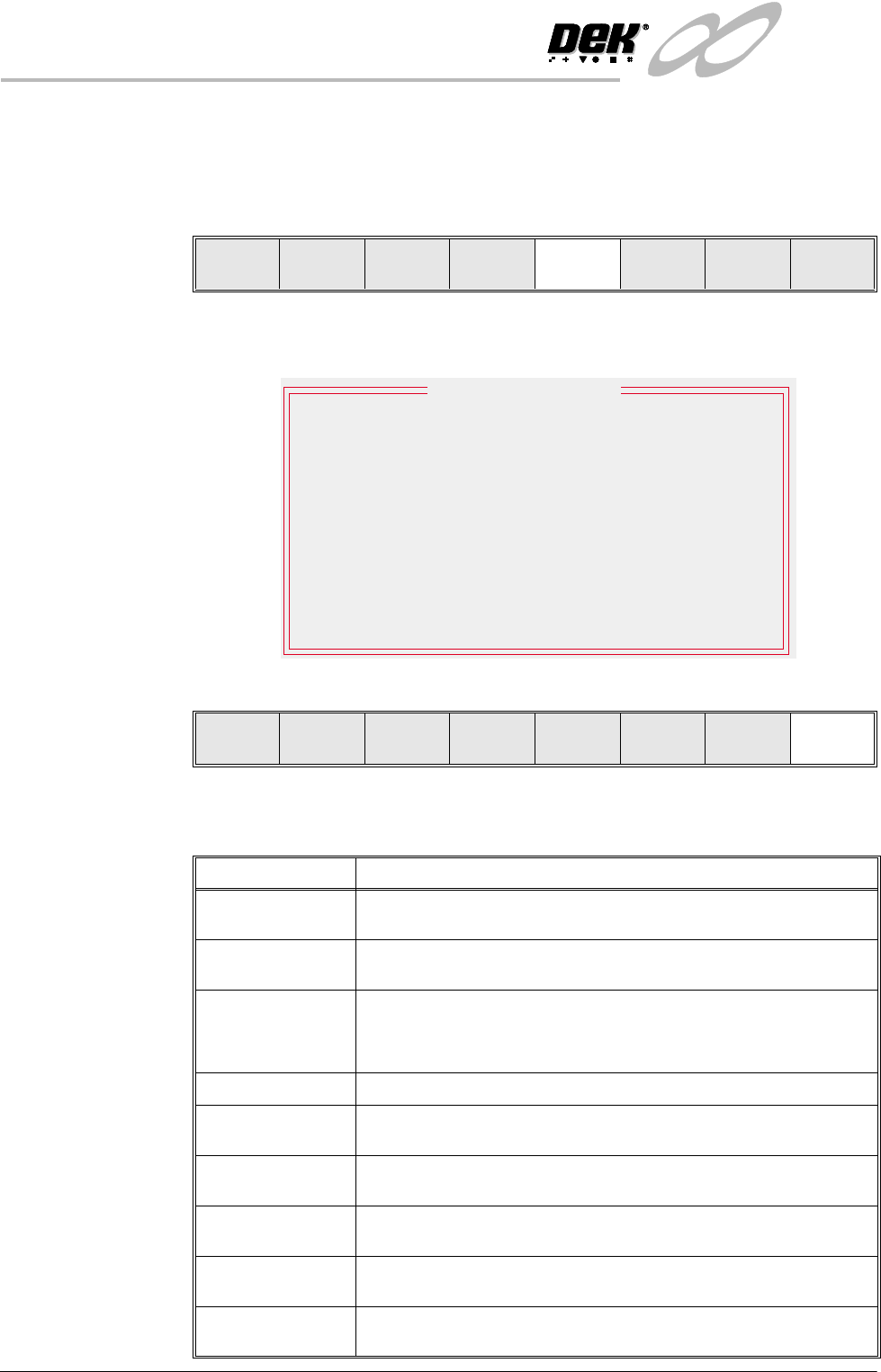
Displays machine performance information from the MANINF.DAT file in a
tabular format. To view the performance information proceed as follows:
1. Select Perform Display (F5).
The Performance Information window is displayed as follows:
2. Select Exit (F8).
Performance Data
Definitions
The following table lists the data definitions contained in the MANINF.DAT file
displayed in the Performance Information window.
Log
On
Host
Comms
Clear
Batch
Batch
Limit
Perform
Display
Event
Display
System
Disable
Exit
Current Status
Batch
0
0
Session
Total
1786
09:17:54
0:00:00
0:00:00
0:00:00
0:00:00
0:00:00
0:00:00 0:00:00
0:00:00
0:00:00
0:00:00
0:01:37
0:01:32
2:14:24
0:31:32
22:07:46
22:10:19
0:26:05
18:43:41
09:15:54
Start Time
Board Count
Wait Time
Down Time
Recovery Time
Maintenance Time
Setup Time
Run Time
Wait
:
Performance Information
Exit
Data Definition
Batch Data Data accumulated since a new product was loaded or the Batch Count
was reset.
Session Data Data accumulated from either Power Up of the machine or Log On of a
new operator.
Total Data Data accumulated since the MANINF.DAT file was deleted.
NOTE
MANINF.DAT file is overwritten during ghosting of software.
Board Count The number of boards printed in a defined period.
Start Time The time at which a defined period commenced, displayed in a 24 hour
clock.
Wait Time The elapsed time during a defined period that was spent in a ready state
waiting for a command, or in a run state waiting for a board transfer.
Run Time The elapsed time during a defined period that was spent printing boards
in either Single or Auto modes.
Setup Time The elapsed time during a defined period that was spent in screen
changing, change tooling, program editing and running in Step mode
Down Time The elapsed time during a defined period that was spent between an
error occurrence and the machine being ready to continue.
INFINITY
021,725
3(5)250',63/$<
Software Version 7 User Manual 6.7
Recovery Time The elapsed time during a defined period that was spent running initial-
ization or error recovery routines. This time is also included in Down
Time.
Maintenance Time The elapsed time during a defined period that was spent running main-
tenance or diagnostic routines.
Data Definition
INFINITY
021,725
(9(17',63/$<
6.8 User Manual Software Version 7
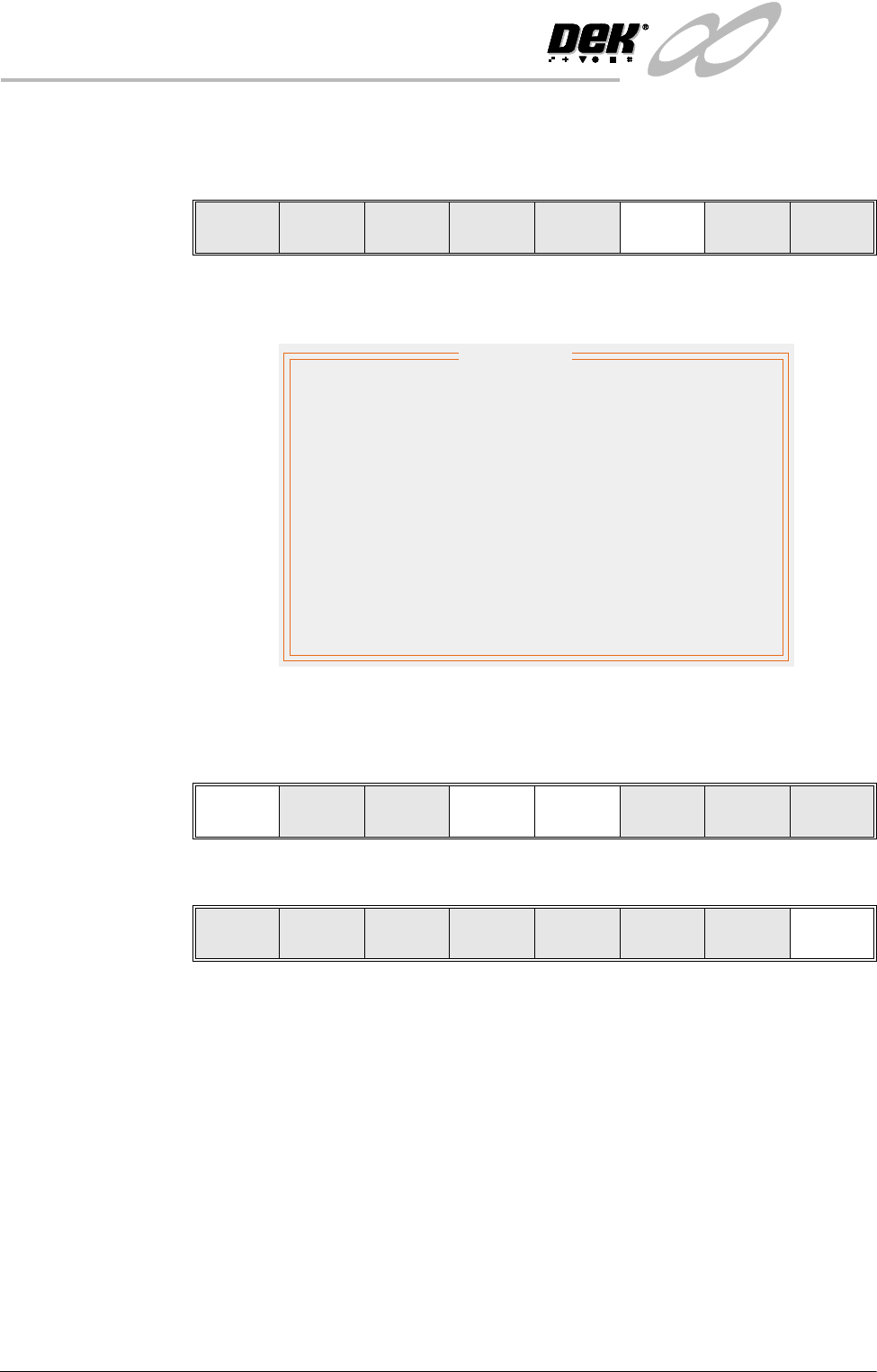
EVENT DISPLAY Displays the machine event record in a tabular format. To view the event record
proceed as follows:
1. Select Event Display (F6).
The Event Record window is displayed as follows:
2. Select Latest (F1) to access latest machine events.
Select Next (F4) to access later machine events.
Select Previous (F5) to access earlier machine events.
3. Select Exit (F8).
Log
On
Host
Comms
Clear
Batch
Batch
Limit
Perform
Display
Event
Display
System
Disable
Exit
Date
05/09/97
05/09/97
05/09/97
05/09/97
05/09/97
05/09/97
05/09/97
Time
11:08:58
11:11:02
11:11:37
11:13:31
11:13:52
11:14:36
11:16:12
11:16:45
11:17:01
11:17:59
31252
31251
31259
31269
31255
31273
31275
31279
31281
31289
05/09/97
05/09/97
05/09/97
Line Power Off
Line Power On
Paste Cartridge empty
Screen Loaded
Printer Ready
Clear Batch Count
Cover Closed
Setup Ended
System Power On
Clear Batch Count
Event
Event Record
Latest Next Previous Exit
Latest Next Previous Exit