DEK INFINITY USER MANUAL.pdf.pdf - 第229页
INFINITY +286 (.( (3, 1* 0$1$ *(0(1 7,1)250$ 7,219,(:(5 Soft ware Ver sion 7 User Manual 7.19 Saving A File 1. Select File , the following window is displayed: 2. Select Save As , the following window is displayed: 3.…

INFINITY
+286(.((3,1*
0$1$*(0(17,1)250$7,219,(:(5
7.18 User Manual Software Version 7
Analysis
Information
The table below compares the SEMI E10-96 specification, SEMI Standard for
the Definition and Measurement of Equipment Reliability, with those used by
DEK on their printing machines.
Productive State The period of time when the equipment is performing its intended function.
Standby State The period of time, other than non-scheduled time, when equipment is in a
condition to perform its intended function, but it is not operational, ie no product
available.
Engineering State The period of time when the equipment is in a condition to perform its intended
function, but is operated to conduct engineering experiments, ie process devel-
opement.
Scheduled
Downtime
The period of time when the equipment is not available to perform its intended
function due to planned downtime events.
• Maintenance Delay - Waiting for maintenance personnel, parts or manage-
ment decision.
• Production Test
• Preventive Maintenance
• Set Up
• Facilities Related - Environmental; House hook-up - Air/Power; Commu-
nications links with other equipment
Unscheduled
Downtime
The period of time when the equipment is in production, but normal production
has been halted other than for a scheduled downtime event, ie equipment failure.
Non Scheduled The period of time when the equipment has not been scheduled to be utilized in
a productive role, ie weekends, unworked shifts and holidays.
The terminology is defined in the SEMI-E10 96 standard.
SEMI Process State DEK Printer Process State
Productive State Running
Standby State Waiting Ready
Engineering State No Equivalent
Sched. Downtime Set Up, Maintenance
Unsched. Downtime Down, Recovery
Non Sched. Machine Switched off
INFINITY
+286(.((3,1*
0$1$*(0(17,1)250$7,219,(:(5
Software Version 7 User Manual 7.19
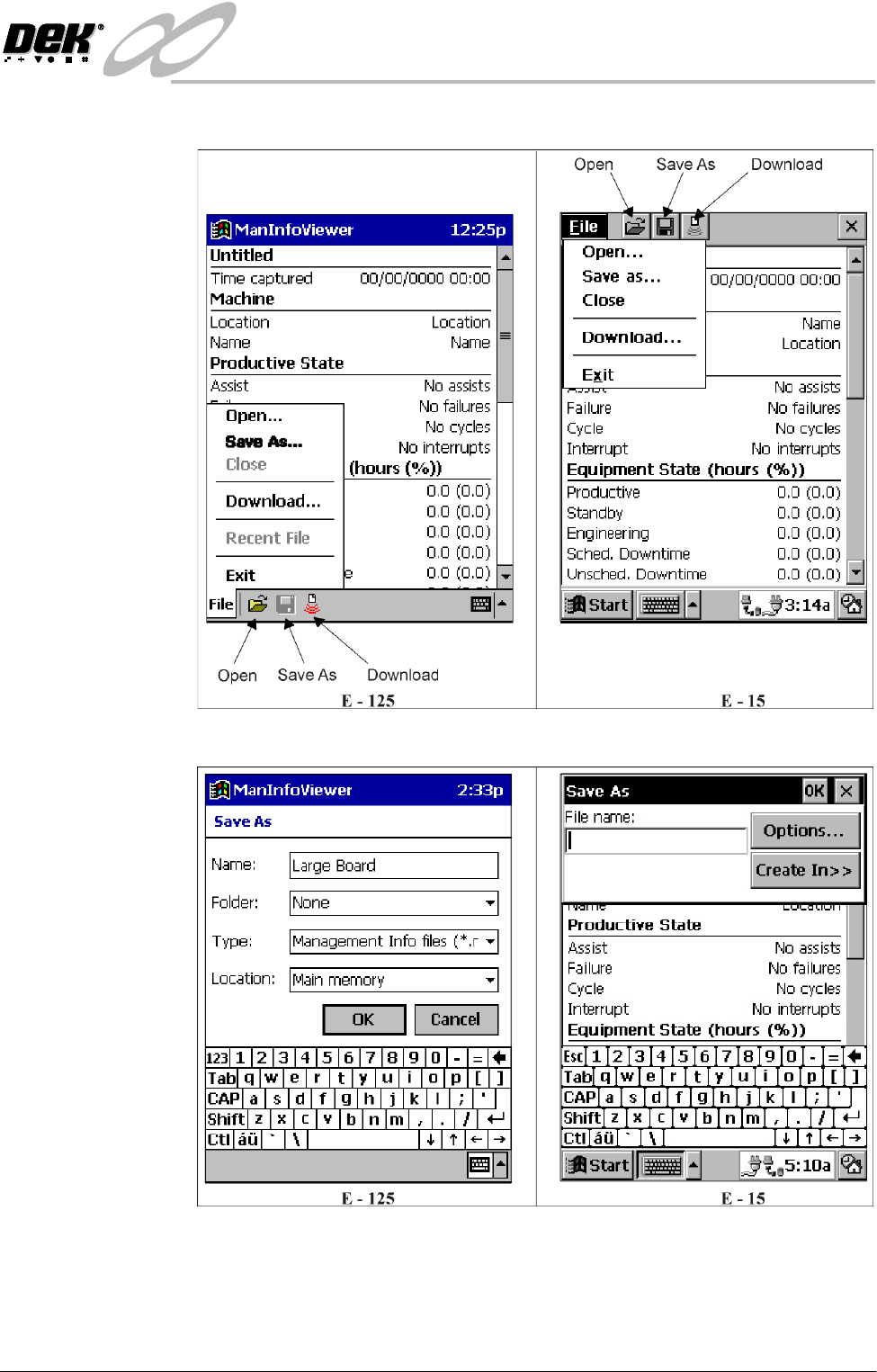
Saving A File 1. Select File, the following window is displayed:
2. Select Save As, the following window is displayed:
3. With the stylus enter a file name using the keyboard and select OK.
Confirmation is sought if overwriting an existing file.
The file is given a .man extension unless specified otherwise.
INFINITY
+286(.((3,1*
0$1$*(0(17,1)250$7,219,(:(5
7.20 User Manual Software Version 7
Opening A File To open a data file on the palm size PC, proceed as follows:
1. Ensure the Start Up section has been carried out.
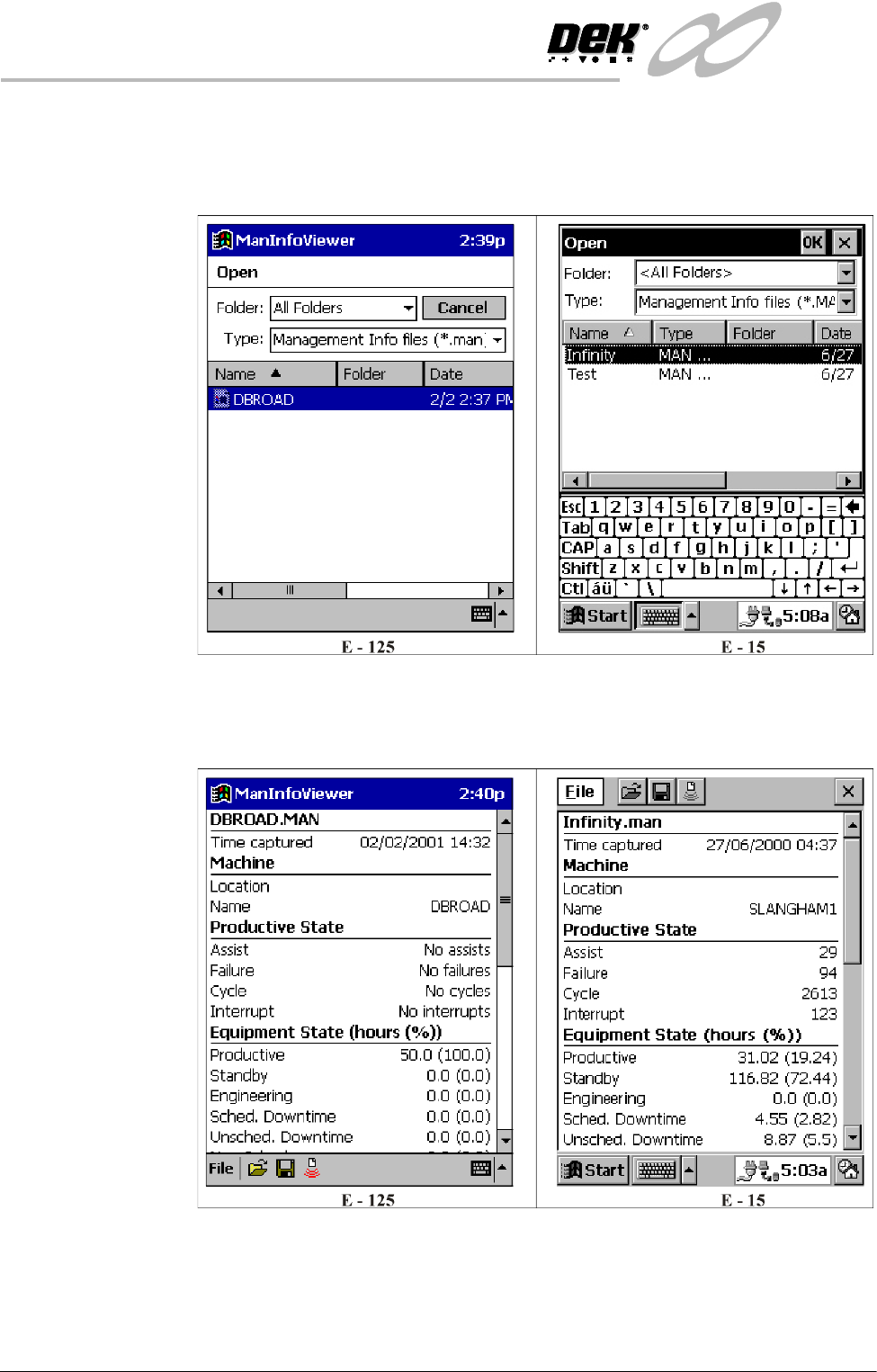
2. Select Open, the following window is displayed:
3. Using the stylus highlight the required file.
4. On the E-15 only select OK, a window of the following form, automatically
on the E-125, is displayed:
5. Use the scroller on the right to view all the data. A complete list of all the
data is shown in the Download section.