DEK INFINITY USER MANUAL.pdf.pdf - 第246页
INFINIT Y ',163(&7,21 02'8/(29( 59,(: 8.6 User Manual Software Version 7 Auto Learn 2Di inspection can automatically learn different types of features as shown below . Figur e 8-2 Auto Learn Site T ypes …
INFINITY
',163(&7,21
02'8/(29(59,(:
Software Version 7 User Manual 8.5
Paste Volume
Prediction
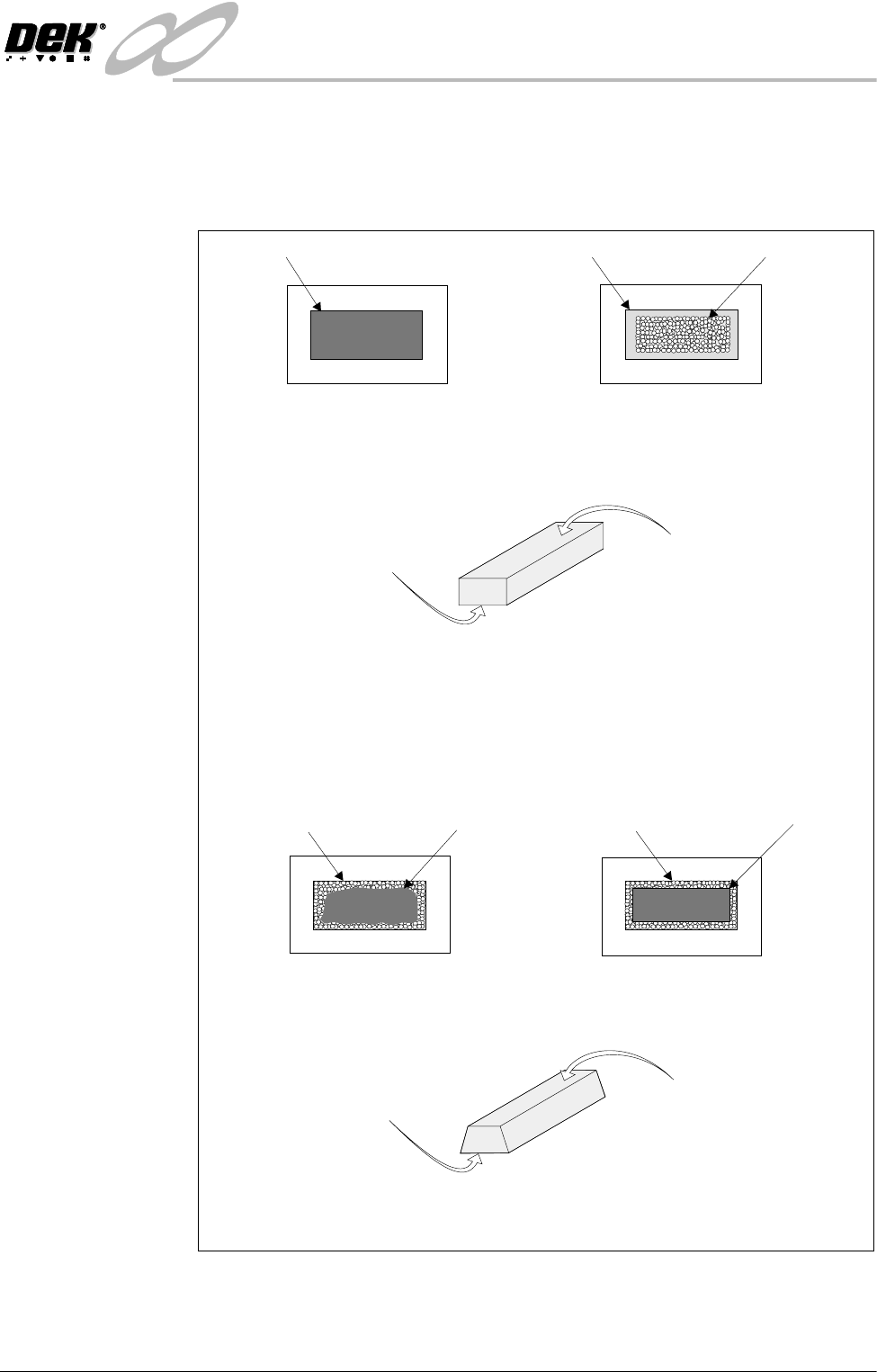
The volume of paste on a pad can be predicted using both 2Di blockage and paste
on pad inspection results. This is only available whilst the level of inspection is
set to Advanced for both board and stencil. An example of how paste volume
prediction is achieved is shown in the graphic below.
In the example shown the aperture is 100% clear. The paste on pad value was 100%.
This can be represented by the following model of the printed paste :
This is represented by the following model of the printed paste :
Top face equals area of
aperture not blocked by
paste, ie 100%.
Top face equals area of
aperture not blocked by
paste, ie 60%.
Bottom face equals area of
paste on pad, ie 100%.
Bottom face equals area of
paste on pad, ie 90%.
Using a complex formula 2Di predicts the volume of paste, in this case 74%
Aperture
From this information the system predicts the volume of paste, in this case 100%.
In the following example the aperture has a blockage of 40%. Therefore the aperture is
60% clear. The 60% is equal to a rectangle of the same size as shown below. The paste
on pad inspection result is 90%.
Stencil
Pad Paste on Pad
Board
AperturePaste (Blockage) 40%
Stencil
AperturePaste (Blockage) 40%
Stencil
Equals
=
INFINIT
Y
',163(&7,21
02'8/(29(59,(:
8.6 User Manual Software Version 7
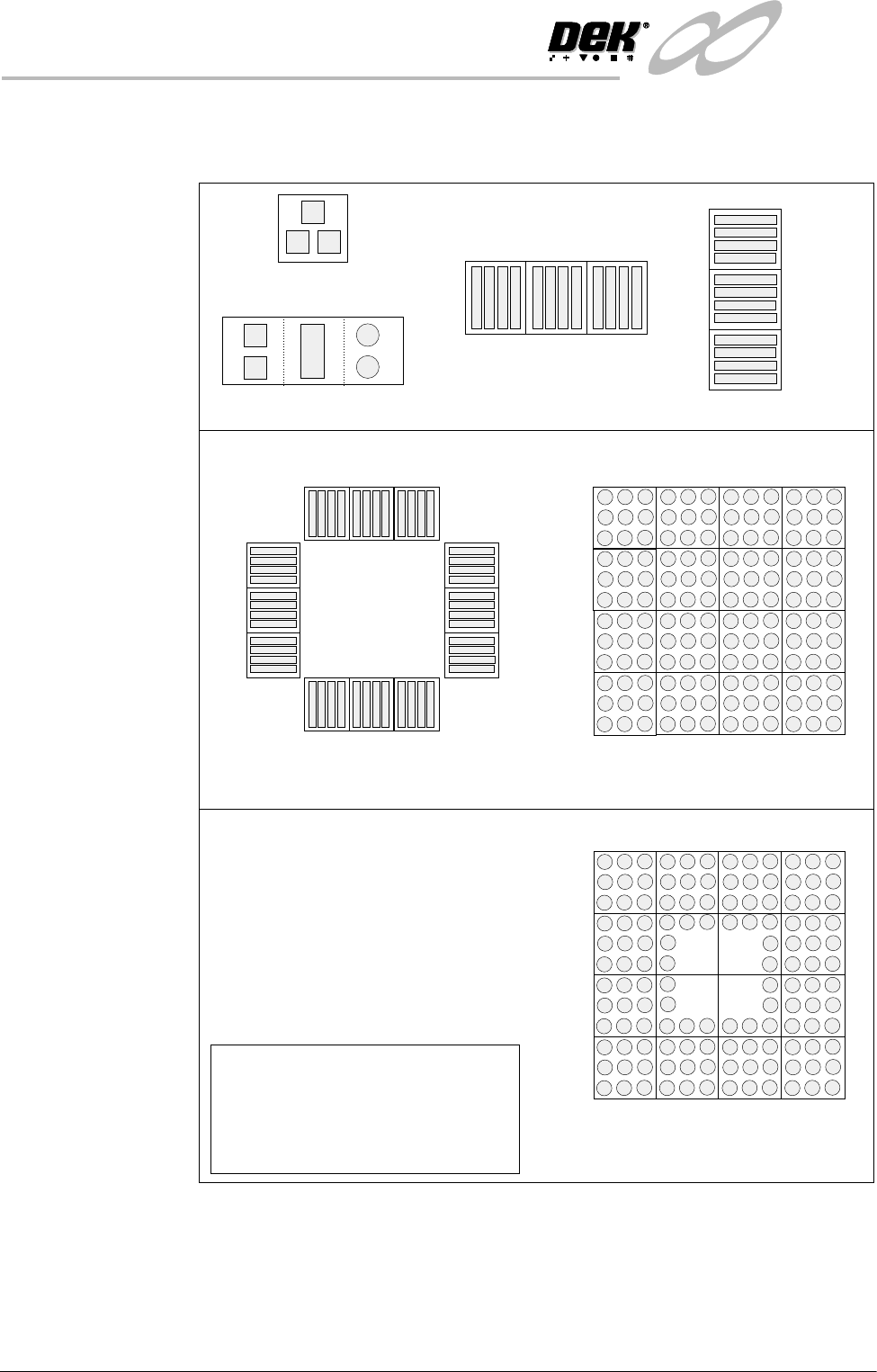
Auto Learn 2Di inspection can automatically learn different types of features as shown
below.
Figure 8-2 Auto Learn Site Types
Column of Sites
QFP
BGA
Single Site
Single Site Combination
Row of Sites
Site 1
2
3
Site 1
2
3
Site 1
2
3
4
5
6
7
8
9
10
11
12
Site 1
2
3
4
5
9
12
13
16
15
14
8
NOTE
When auto learning a component,
setup Site 1.
The component is learnt in the
sequences shown above, if the machine
is set to the correct reference.
BGA Frame
Site 1
2
3
4
16
6
14
7
8
13
5
12
15
11
10
9
INFINITY
',163(&7,21
02'8/(29(59,(:
Software Version 7 User Manual 8.7
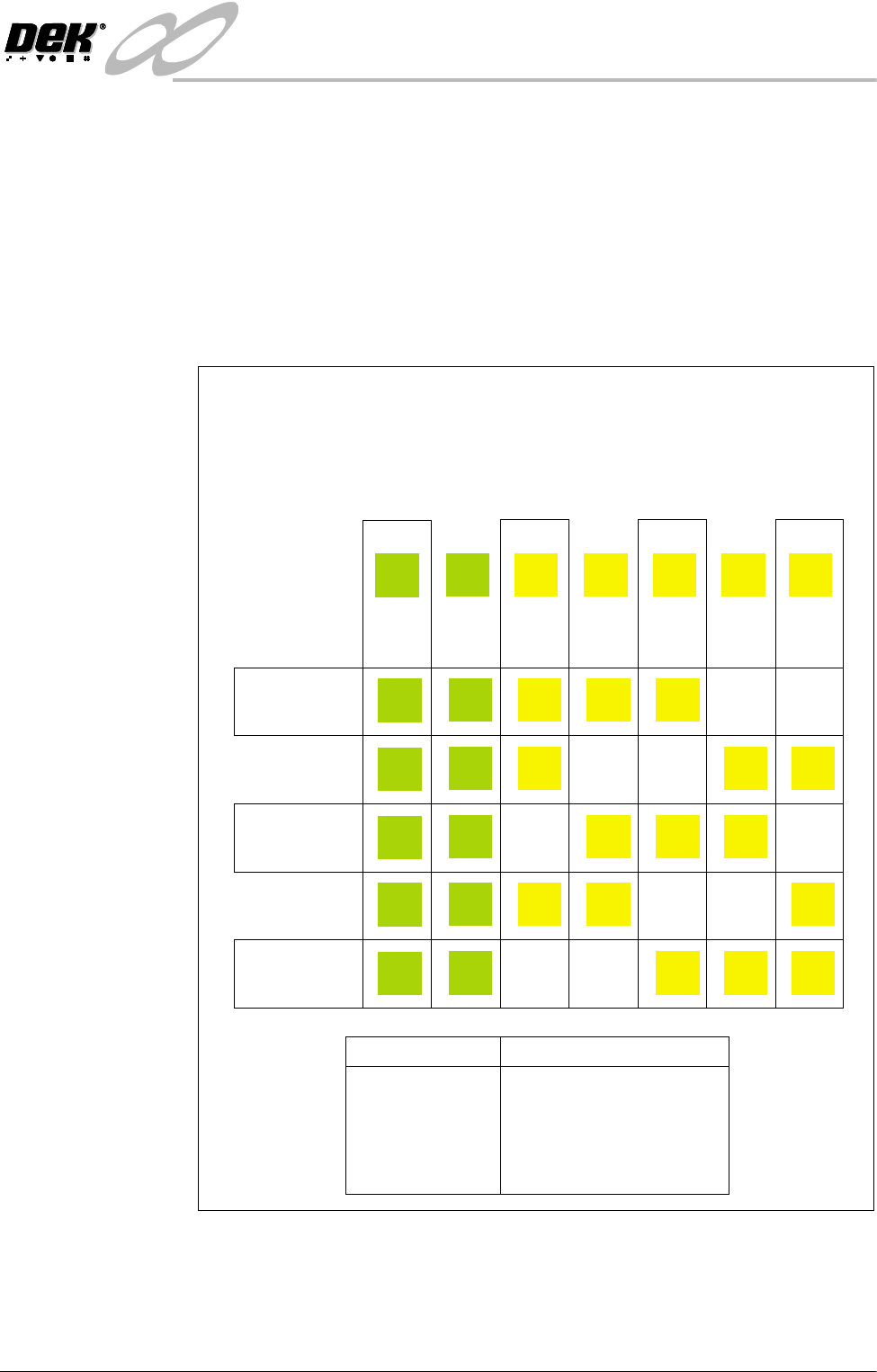
Inspection Cycles During setup, sites are given a priority of either Every Cycle (EC) or General
(G). The amount of sites inspected during each cycle is set using the min sites/
cycle parameter, this must be set to at least the amount of every cycle sites. As
the name suggests, EC sites are inspected every cycle. General sites are
inspected depending on the value of the min sites/cycle parameter and the
number of EC sites as follows:
Number of general sites inspected per cycle = Min sites/cycle parameter - EC
sites.
The general sites are inspected in rotation as shown below.
Figure 8-3 Site Inspection Cycles
min sites / cycle = 5
Cycle 1
Cycle 2
Cycle 3
Cycle 4
Cycle 5
In the example below, seven sites have been setup, with two given the priority
of and five given the priority of .
The min sites/cycle parameter is set at 5. As there are two EC sites, this leaves
three G sites to be inspected at each cycle as shown.
Every Cycle (EC) General (G)
Site 1
EC
EC
EC
EC
EC
EC
Site 2
EC
EC
EC
EC
EC
EC
Site 3
G
G
G
G
Site 4
G
G
G
G
Site 5
G
G
G
G
Site 6
G
G
G
G
Site 7
G
G
G
G
SITES
Cycle 1
Cycle 2
Cycle 3
Cycle 4
Cycle 5
Cycle 6
3, 4, 5
6, 7, 3
4, 5, 6
7, 3, 4
5, 6, 7
process repeats