DEK INFINITY USER MANUAL.pdf.pdf - 第296页
INFINITY &21680$ %/(5(3/ (1,6+0(1 76 3$67(/2$ ',1* 9.12 User Manual Software Versi on 7 18. Select Load Cart. (F1). The message ‘ Open the cover and load the new paste c artrid ge then close Cov er , press S y…
INFINITY
&21680$%/(5(3/(1,6+0(176
3$67(/2$',1*
Software Version 7 User Manual 9.11
10.If the set preference is set to pause, the tricoloured beacon shows red and the
following window is displayed:
11. Select Refill Paste (F1). The message ‘Select Load Cart to load the
cartridge or exit to abort.’ is displayed.
NOTE
Select Defer to continue printing without replacing the paste cartridge.
12.Select Load Cart. (F1). The message ‘Open the cover and load the new
paste cartridge then close Cover, press System Button and press Con-
tinue’ is displayed.
13.Carry out Steps 3-9 of Fitting a New Paste Cartridge procedure, later in this
section.
14.Select Continue (F1).
15.Go to Step 21.
16.If the set preference is set to suspend, the tricoloured beacon shows red and
the following window is displayed:
17.Select Refill Paste (F1). The message ‘Select Load Cart to load the
cartridge or exit to abort.’ is displayed.
NOTE
Select End Run to terminate the print run without replacing the paste
cartridge.
Pause on Warning
Print Medium Low. Please replenish.
Refill
Paste
Defer
Load
Cart.
Exit
Continue
Open
Cover
Suspend on Warning
Print Medium Low. Please replenish.
Refill
Paste
End
Run
INFINITY
&21680$%/(5(3/(1,6+0(176
3$67(/2$',1*
9.12 User Manual Software Version 7
18.Select Load Cart. (F1). The message ‘Open the cover and load the new
paste cartridge then close Cover, press System Button and press Con-
tinue’ is displayed.
19.Carry out Steps 3-9 of Fitting a New Paste Cartridge procedure, later in this
section.
20.Select Continue (F1).
21.Select Auto Dispense (F1).
22.After the dispense routine has been completed, press Exit (F8).
Fitting a New Paste
Cartridge
It is necessary at intervals to fit a new paste cartridge into the paste dispenser. If
there is no cartridge in the dispenser or the cartridge is empty, the warning
window ‘Print Medium Low. Please Replenish.’ is displayed.
If the consumable action option in set preferences is set to suspend, the paste
dispenser is checked to ensure availability of paste, before allowing a print run
to start. If paste isn’t available the warning window ‘Print Medium Low.
Please Replenish.’ is displayed.
WARNING
SOLDER PASTE AND SOLVENTS. WHEN USING OR HANDLING ANY SOLDER
PASTE OR SOLVENT FORMULATION THE MANUFACTURERS’ RECOMMEND
SAFETY PRECAUTIONS MUST BE STRICTLY ADHERED TO.
WARNING
PROTECTIVE CLOTHING. APPROVED PROTECTIVE CLOTHING SHOULD BE
WORN BY SOLDER PASTE AND SOLVENT HANDLERS AT ALL TIMES TO
ELIMINATE FUME INHALATION, EYE CONTACT, SKIN CONTACT AND
INGESTION.
To replace the paste cartridge carry out the following:
1. Press Paste Load (F3).
2. Press Load Cart. (F4). The print carriage drives to the front of the machine
and the dispenser rises to the vertical position. A message is displayed on
the screen ‘Open cover and replace Paste Cartridge’.
Load
Cart.
Exit
Continue
Open
Cover
Auto
Dispense
Manual
Load
Load
Cart.
Print
Directn
Exit
Auto
Dispense
Manual
Load
Load
Cart.
Print
Directn
Exit
Run Head
Paste
Load
Clean
Screen
Adjust Setup Monitor Maint.
Auto
Dispense
Manual
Load
Load
Cart.
Print
Directn
Exit
INFINITY
&21680$%/(5(3/(1,6+0(176
3$67(/2$',1*
Software Version 7 User Manual 9.13
3. Open the front printhead cover.
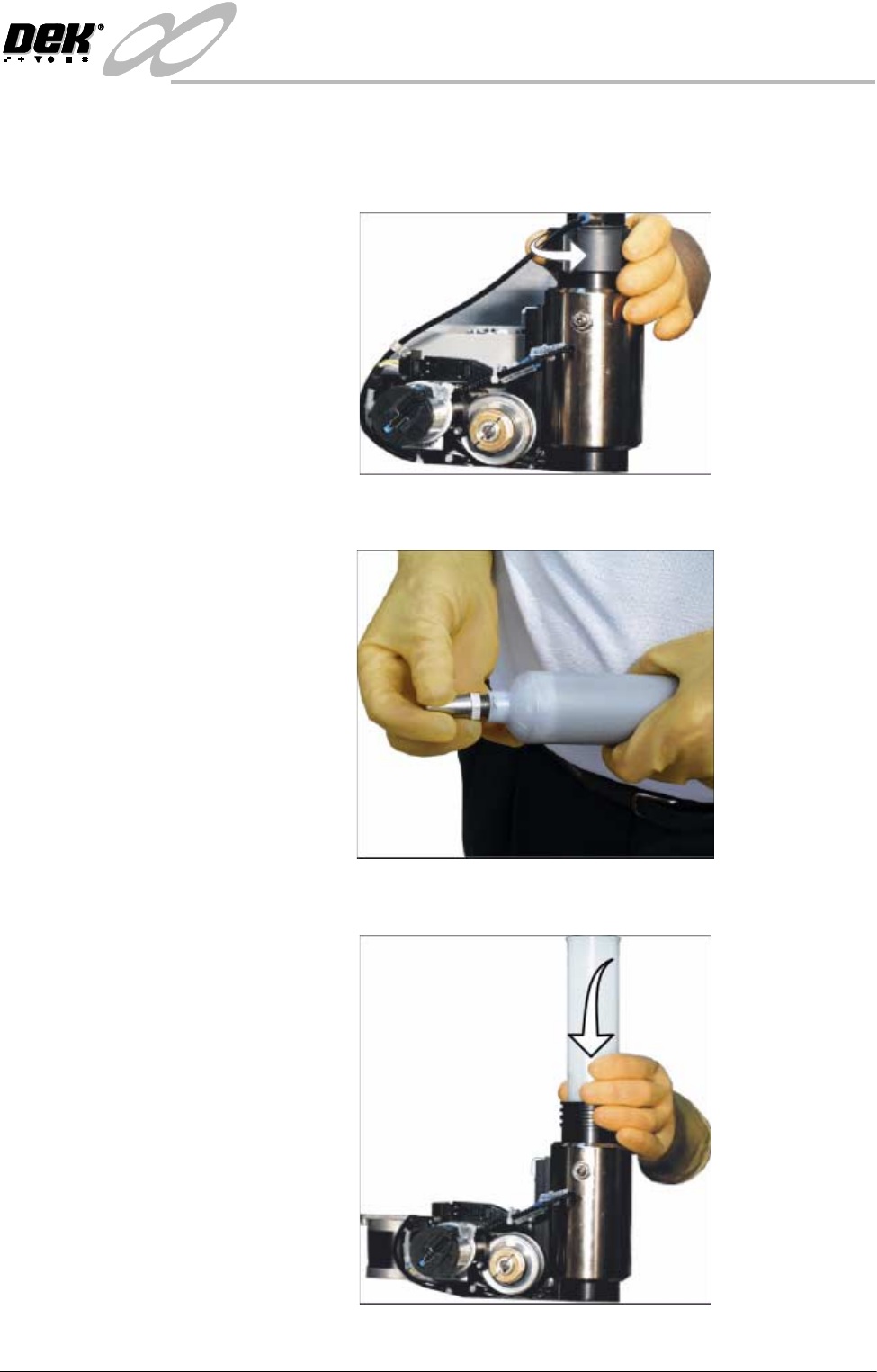
4. Remove the empty cartridge by unscrewing the cap at the rear of the paste
dispense tube to allow it to be withdrawn.
5. Unscrew the nozzle from the old cartridge and insert it into the new cartridge.
6. Fit the new cartridge into the dispenser.