DEK INFINITY USER MANUAL.pdf.pdf - 第322页
INFINITY &21680$ %/(5(3/ (1,6+0(1 76 648((*((6 9.38 User Manual Software Versi on 7 SQUEEGEES Fitting the Squeeg ees From the status pag e: 1. Press Setup (F6). 2. Press S etup S queegee (F4). 3. Press Change Squeeg…
INFINITY
&21680$%/(5(3/(1,6+0(176
9257(;81'(56&5((1&/($1(5
Software Version 7 User Manual 9.37
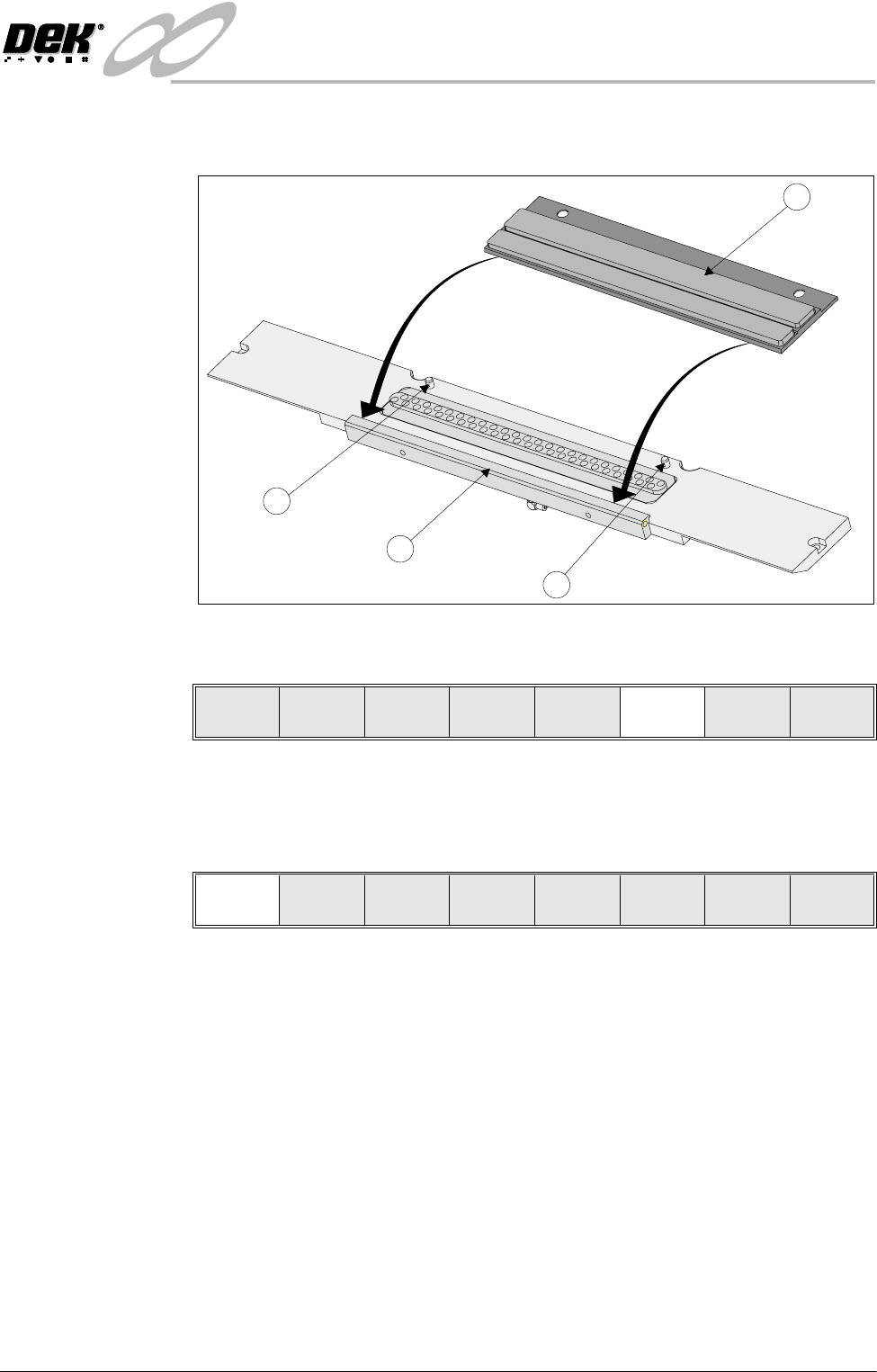
7. Fit the edge of the new cleaning cassette (1) beneath the solvent bar (3) and
snap into place on the two pip pins (2).
8. Press Prime Solvent (F6) key. The message ‘Press the two button control
buttons to prime solvent.’ is displayed.
9. Prime the solvent using the two button control.
10.Remove the head prop.
11. Select Confirm (F1).
12.Lower the printhead using two button control.
13.Close the front printhead cover.
14.Press the System button.
1
2
2
3
Lower
Head
Board
Clamps
Prime
Solvent
Exit
Confirm
INFINITY
&21680$%/(5(3/(1,6+0(176
648((*((6
9.38 User Manual Software Version 7
SQUEEGEES
Fitting the
Squeegees
From the status page:
1. Press Setup (F6).
2. Press Setup Squeegee (F4).
3. Press Change Squeegee (F1). The message ‘Open cover and change
squeegees’ is displayed.
4. Open the front printhead cover.
The front and rear squeegees must be fitted in the correct positions. Each
squeegee has a key-way machined into it to ensure that it cannot be incor-
rectly fitted.
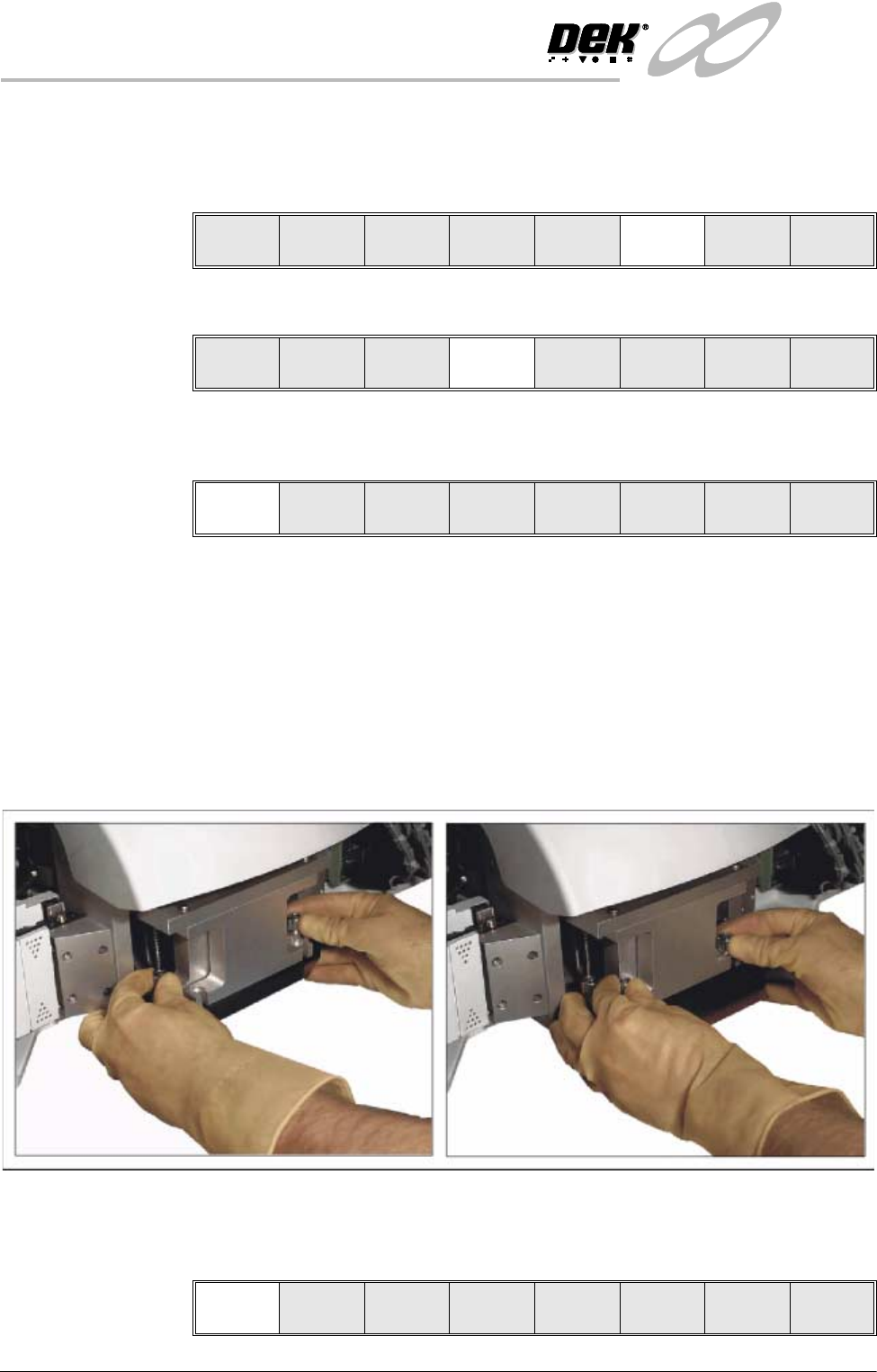
5. Fit the rear squeegee onto the rear squeegee mount tightening the thumb-
screws until they are finger tight.
6. Fit the front squeegee onto the front squeegee mount again ensuring that the
thumbscrews are only finger tight.
7. Close the front printhead cover.
8. Press the System button.
9. Press Continue (F1).
Run Head
Paste
Load
Clean
Screen
Adjust Setup Monitor Maint.
Mode
Load
Data
Edit
Data
Setup
Squeegee
Change
Screen
Change
Tooling
Change
Language
Exit
Change
Squeegee
Calibrat
Heights
Exit
Continue
INFINITY
&21680$%/(5(3/(1,6+0(176
648((*((6
Software Version 7 User Manual 9.39
10.Press Calibrat Heights (F2). The message ‘Remove Screen Before Com-
mencing Pressure Calibration!’ is displayed.
11. Press Exit (F8).
12.Press Change Screen (F5). The message ‘Remove Screen’ is displayed.
13.Open the front printhead cover.
14.Remove the screen.
15.Close the front printhead cover.
16.Press the System button.
17.Press Setup Squeegee (F4).
18.Press Calibrat Heights (F2). The message ‘Ensure that the Correct
Squeegees are fitted ’is displayed.
19.Press Continue (F1). The message ‘Calibrating Pressure Heights - DO
NOT Open Covers!’ is displayed.
20.Press Exit (F8).
21.Press Exit (F8).
Change
Squeegee
Calibrat
Heights
Exit
Change
Squeegee
Calibrat
Heights
Exit
Mode
Load
Data
Edit
Data
Setup
Squeegee
Change
Screen
Change
Tooling
Change
Language
Exit
Mode
Load
Data
Edit
Data
Setup
Squeegee
Change
Screen
Change
Tooling
Change
Language
Exit
Change
Squeegee
Calibrat
Heights
Exit
Continue
Restore
Defaults
Exit
Change
Squeegee
Calibrat
Heights
Exit
Mode
Load
Data
Edit
Data
Setup
Squeegee
Change
Screen
Change
Tooling
Change
Language
Exit