ASM_Guide To Adhesive Dot Dispensing_Stinger_en_0321_online.pdf - 第52页
2 STINGER, A GUIDE TO ADHESIVE DOT DISPENSING 2.5 RUNNING A PRODUCT 52 GUIDE TO ADHESIVE DOT DISPENSING STINGER 03/2021 2.5 RUNNING A PRODUCT 2.5.1 Deposit Sequence Adhesive deposit follows the sequence programmed in the…
2 STINGER, A GUIDE TO ADHESIVE DOT DISPENSING
2.4 PRODUCT CHANGEOVER
GUIDE TO ADHESIVE DOT DISPENSING STINGER 03/2021 51
4. Close the cover.
5. Press the System button.
6. Select Back.
7. Carry out the procedure for Calibrating Stinger Heights as described in the Software Interface
section of the manual.
2.4.4 Consumable Warnings
As the adhesive is consumed a sensor detects the consumable level and issues a warning as
shown in the table below.
Consumable Warnings
Title Warning Message Action Options
Stinger Dispenser Consumable
Warning
The Stinger dispenser consum-
able is low. There may be in-
sufficient materials to dispense
the next board.
Select Defer to print and dis-
pense the next board in the
batch. Select Stop
to end the
current print run.
Purge Consumable Low The Stinger purge consumable
needs replenishing. The purge
station may be full and the
nozzle cleaning pad may need
replacing.
Select Defer to carry out a
purge. Select Cancel
to cancel
the purge process.
2 STINGER, A GUIDE TO ADHESIVE DOT DISPENSING
2.5 RUNNING A PRODUCT
52 GUIDE TO ADHESIVE DOT DISPENSING STINGER 03/2021
2.5 RUNNING A PRODUCT
2.5.1 Deposit Sequence
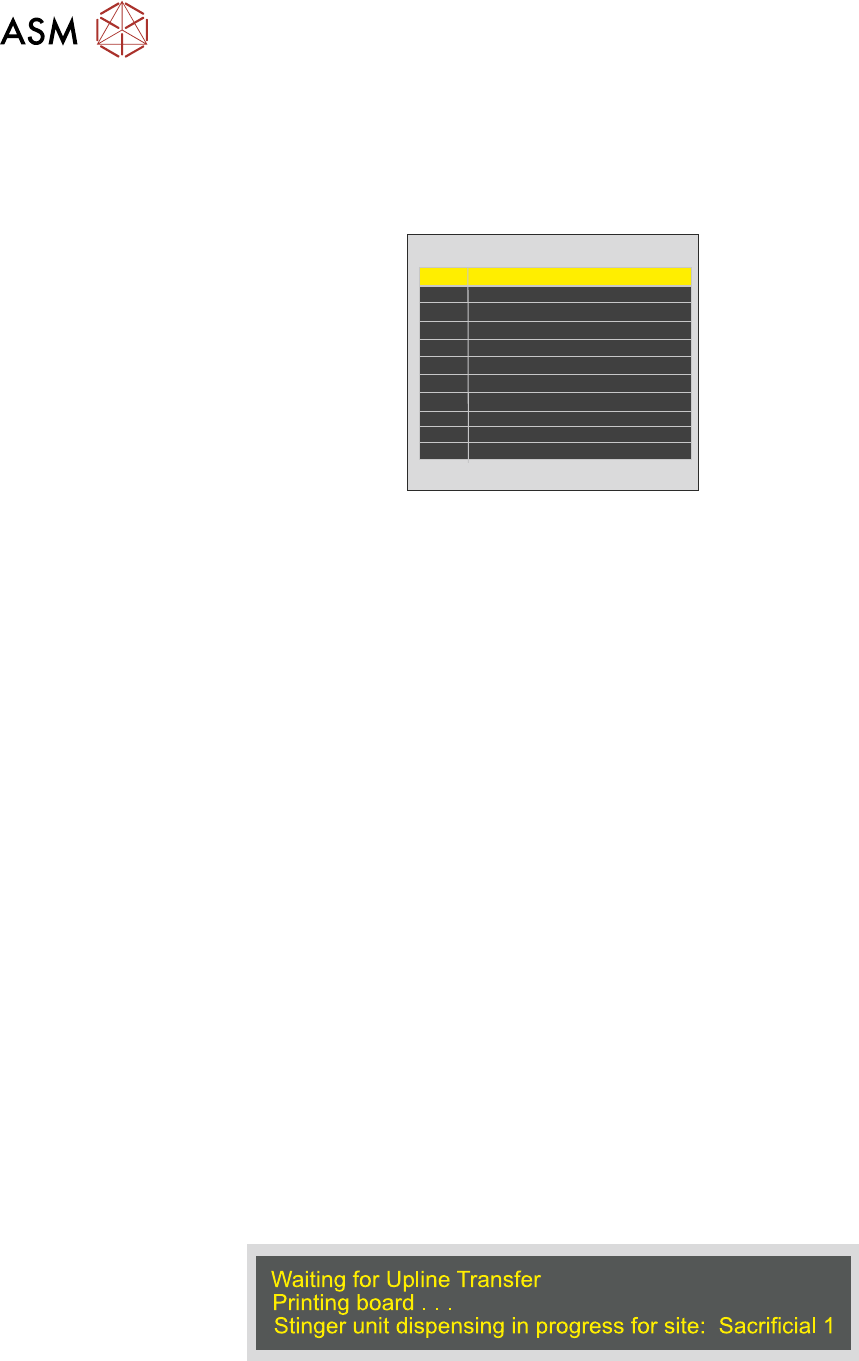
Adhesive deposit follows the sequence programmed in the product file; it is displayed in tabular
form on the Create Site page. It shows the site identity number (ID) and site name.
ID
1
2
3
4
5
6
7
8
9
10
11
Site Name
Purge 1
Purge 2
Purge 3
Purge 4
Production Site 1
Production Site 2
Production Site 3
Production Site 4
Site 5 110 20 DM
Site 6 110 30 DM
Site 7 140 20 M
The system automatically allocates the site name and number. All of the sites opposite have been
edited with information that may be more meaningful, examples being: device type, location and
deposit mode. On-board purging is carried out at sacrificial sites in distinct pre-programmed areas
(denoted by blue rectangles in the board view).
2.5.1.1 Optimisation
The time taken to measure and deposit at a site is approximately 1 second. If a large number of
sites are programmed this may add minutes into the cycle time. Planning can reduce this time:
●
The route that the camera axis moves to get from site-to-site
●
The number of measurement phases that have been programmed into the whole process
●
Run heights. The heights set for the Idle and Z Axis
●
Reordering sites that are added later to similar locations
2.5.1.2 Pre-Flight Checks
Before selecting Print to start the print (if printing is required) and deposit run, check that:
●
A test product has run successfully
●
The printing machine is clean
●
The correct product file is loaded for the product
●
The product is loaded correctly, is clean and ready to run
●
Consumable items required for the complete process (print and deposit) are at levels suffi-
cient to complete the run cycle
2.5.1.3 Print
Select Print to start the production run.
The interface informs the user which sites are being processed by pasting a message in the prompt
bar at the bottom of the page.
The cycle continues until the batch has been processed or:
●
A consumable low warning is posted
●
An error occurs that stops the process
●
The operator halts the process
2 STINGER, A GUIDE TO ADHESIVE DOT DISPENSING
2.6 BEST WORKING PRACTICES
GUIDE TO ADHESIVE DOT DISPENSING STINGER 03/2021 53
2.6 BEST WORKING PRACTICES
Developing, maintaining and managing best working practices is key to obtaining high quality
throughput.
2.6.1 The Product
The product needs to be kept clean, de-greased and dust free to ensure that the adhesive is able
to adhere to its surface and that of the placed component.
It should also have a good surface flatness and be well supported with tooling underneath. Vacuum
tooling offers excellent support and helps to eliminate board warpage. Any surface protection lay-
ers or masks should be smooth and flat.
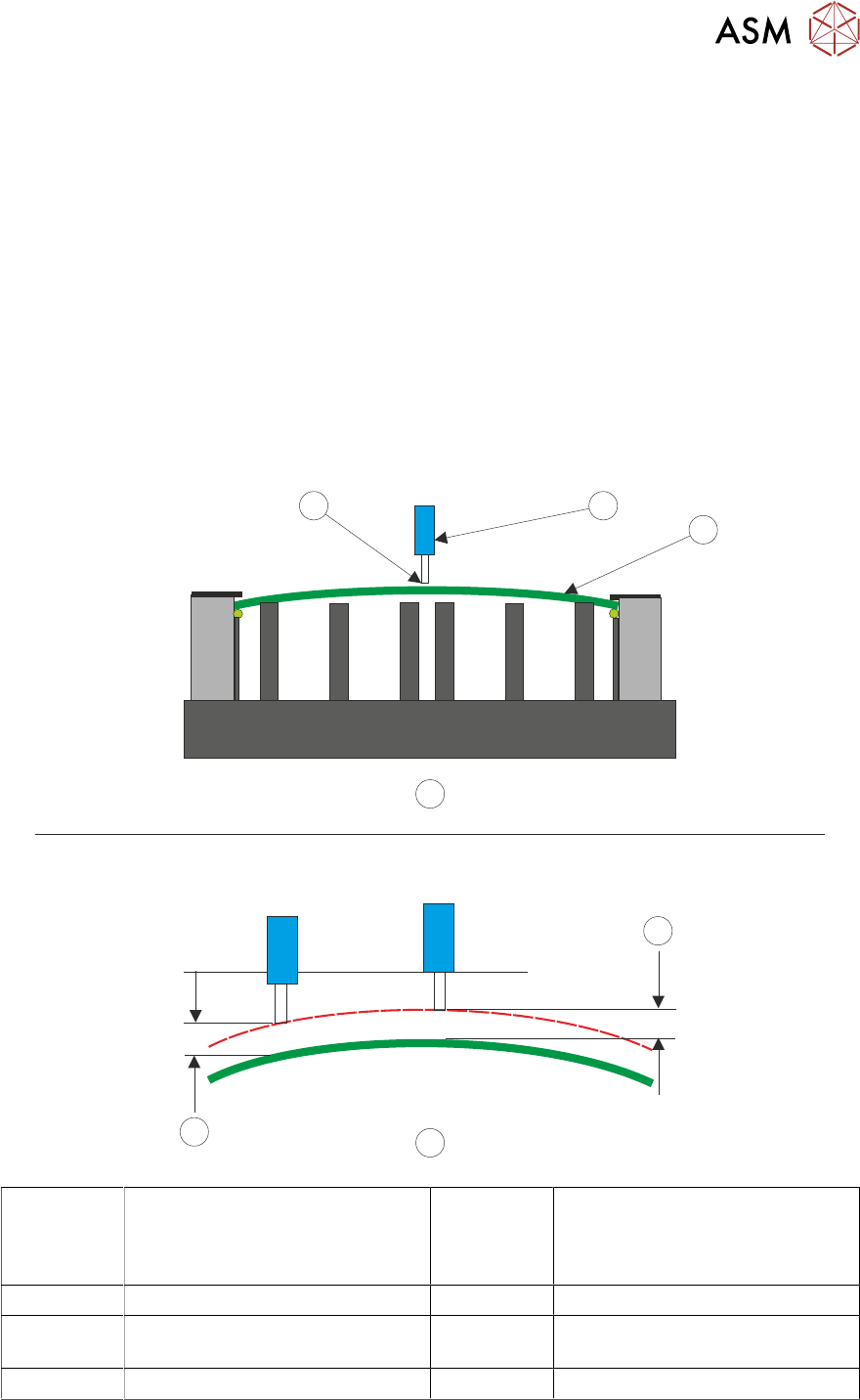
The diagram opposite shows how it is able to ‘track’ the contour of the product surface and main-
tain the dispense gap which has been set.
The contact height is set first, this is the datum point for setting the Z-Axis parameters including idle
height and dispense gap. When the dispense gap has been set up, this height is maintained des-
pite board warpage being present.
1
A
2
3
B
5
4
A Contact Height Setting – The Z-
Axis contact position, for any
product, is within +/-1mm
of the
calibrated contact position
3 Contact Height
B Dispense Gap 4 Dispense Gap
1 Dispense Nozzle 5 Dispense Gap Maintained Across
the Product
2 Product