CP7 training(6.0) (1).pdf - 第31页
FK-9F98-27 CP-7 Series T raini ng T ext for Service Engineers Edition 6.0 Chapter 3. X, Y , Z and D-axes Adjustm ent [17/36] 12. Lift the Z-axis to the + mechanical sto pper an d ensure the pulse count is within the foll…
FK-9F98-27 CP-7 Series Training Text for Service Engineers
Edition 6.0 Chapter 3. X, Y, Z and D-axes Adjustment [16/36]
3.9 Z -axis Adjustment and Calibration Data Setting
Equipment Checklist
1- 3mm L-wrench
1- 4mm T-wrench
1- Tension Meter
1- 1N.m torque wrench with 2mm attachment
1- 0.2mm feeler gauge
1- 2.5mm
T
-wrench
Note: The table must be level before making Z-axis adjustments.
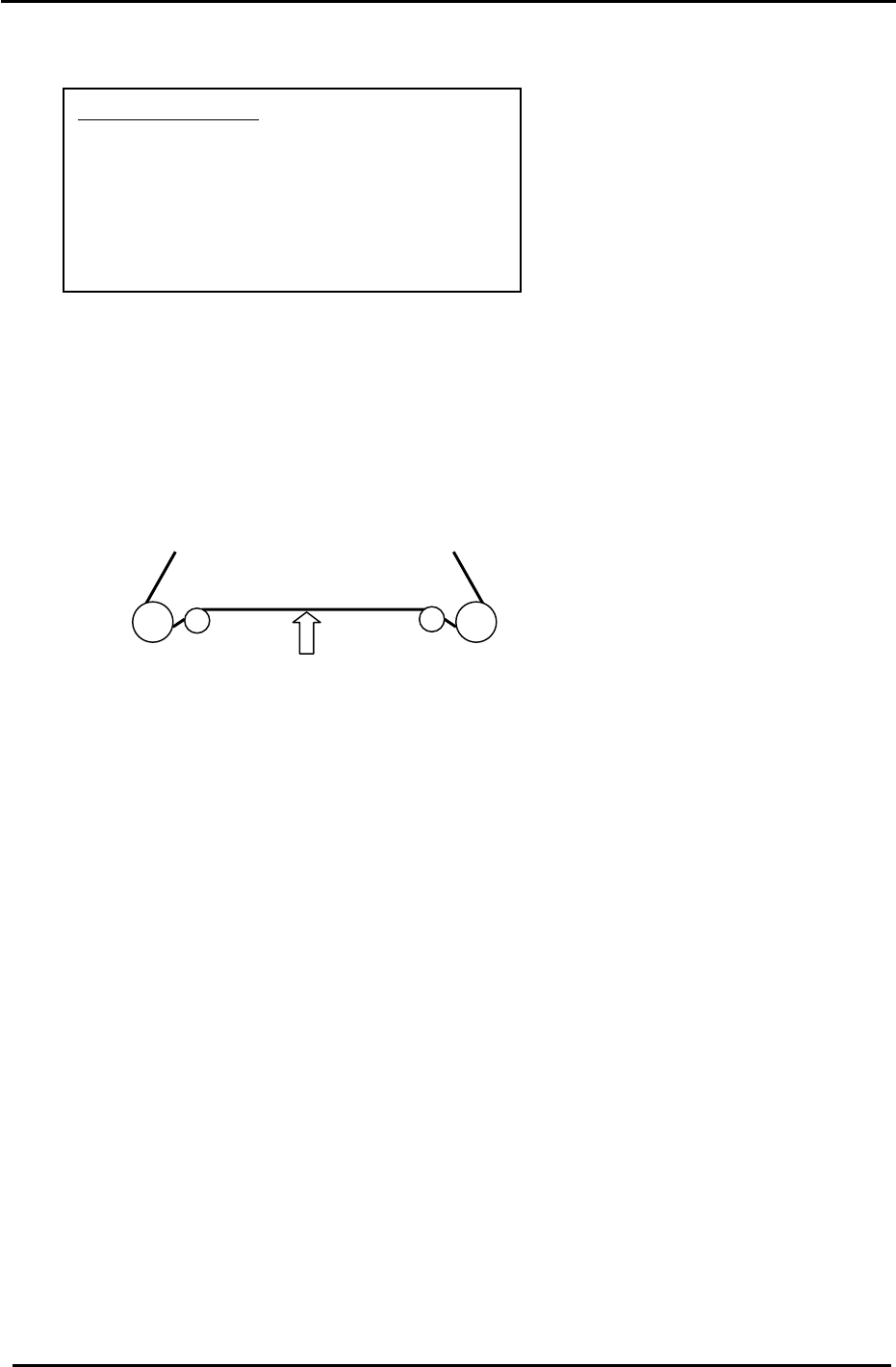
1. Set the tension of the Z-axis timing belt as follows:
CP-742/743(M)E = 64 +/- 2 Hz.
CP-732/733E = 119 +/- 2 Hz.
Measure the belt at a position where the span is the longest (front or back)
Measuring point
Figure 20
2. Remove the minus OT flag for the Z-axis.
3. Lower the servo pack gain value to 30. (Pn100) for CP-732/733E
4. Loosen the mechanical lock at the Z-axis drive pulley. (make sure the motor shaft turns freely)
5. Inch the Z servo count to – 900 pulses.
6. Lower the Z-axis table toward the (–) mechanical stopper and insert a 0.2mm feeler gauge
between the stopper and base of the table. (stopper at upper left side of table)
7. Lock the four securing bolts for the mechanical lock with a 1N.m torque wrench.
8. Check that the pulse count is close to – 900 when using the 0.2mm gap gauge.
9. Attach the – OT flag with the pulse count at – 500 pulses.
10. To set the software travel limit, find the pulse count where the minus OT sensor just turns ON.
Set the Z Min limit position as follows:
Press: [Maintenance] → [Calibration] → [Travel Limits] → [Minimum Limit Z]
Note: Set the Maximum limit after the loader adjustment has been completed.
(Refer to the tables in step 13 for details)
11. Return the Z-axis servo pack gain value (Pn100) for CP-732/733E to 70.
Fuji Machine Mfg. Co., Ltd. (Okazaki)
SMT Equipment Quality Assurance Dept.
CS Section
3-16
FK-9F98-27 CP-7 Series Training Text for Service Engineers
Edition 6.0 Chapter 3. X, Y, Z and D-axes Adjustment [17/36]
12. Lift the Z-axis to the + mechanical stopper and ensure the pulse count is within the following
range.
(CP-742/743(M)E) 24450 +/- 250 pulses
(CP-732/733E) 16850 to 17350 pulses
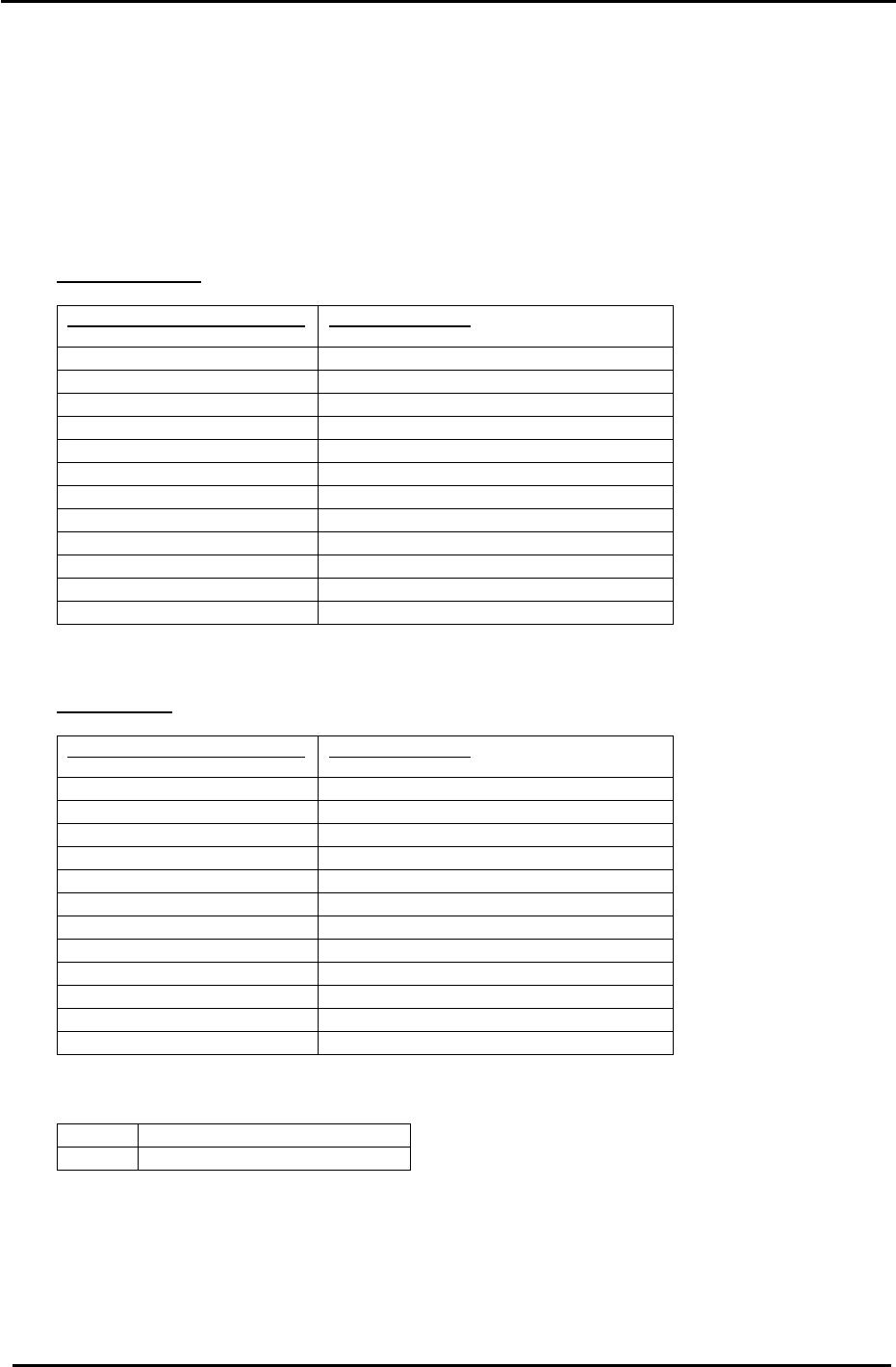
13. The following tables list the Z axis Calibration Data and physical data reference values:
CP-742/743(M)E
Z Axis Calibration Data Item
Reference Value (0.002mm/pulse)
+ Mechanical stopper 24450 +/- 250
+ OT sensor ON (ZL upper + 350) +/- 50
Max Limit Position Z same as the + OT
Loading Position ZL IN 23100 to 23600
Loading Position ZL OUT 23100 to 23600
Middle Loading Position (ZL lower – 14000) +/- 50
Upper Limit Sensor 1 ON (Middle Loading Position – 125) +/- 50
Middle O.T sensor ON (Z0 + 250) +/- 50
Z0 6000 +/- 500
Minimum Limit Position Z same as the – OT
– OT sensor ON – 500 +/- 50
– Mechanical stopper – 1000 +/- 50
CP-732/733E
Z Axis Calibration Data Item
Reference Value (0.002mm/pulse)
+ Mechanical stopper 16850 – 17350
+ OT sensor ON (ZL upper + 300) +/- 50
Max Limit Position Z same as the +OT
Loading Position ZL IN 15500 to 16250
Loading Position ZL OUT 15500 to 16250
Middle Loading Position (ZL lower – 9250) +/- 50
Upper Limit Sensor 1 ON (Middle Loading Position – 125) +/- 50
Middle OT sensor ON (Z0 + 250) +/- 50
Z0 5000 +/- 500
Minimum Limit Position Z same as the – OT
– OT sensor ON – 500 +/- 50
– Mechanical stopper – 1000 +/- 50
<I/O → Servo → IN>
SX019 Z axis + OT (Z plus OT)
SX01A Z axis – OT (Z minus OT)
Fuji Machine Mfg. Co., Ltd. (Okazaki)
SMT Equipment Quality Assurance Dept.
CS Section
3-17
FK-9F98-27 CP-7 Series Training Text for Service Engineers
Edition 6.0 Chapter 3. X, Y, Z and D-axes Adjustment [18/36]
3.10 Main Conveyor PCB Clamping Claw Check and Adjustment
3.10.1 (Part 1) Claw Positioning Adjustment
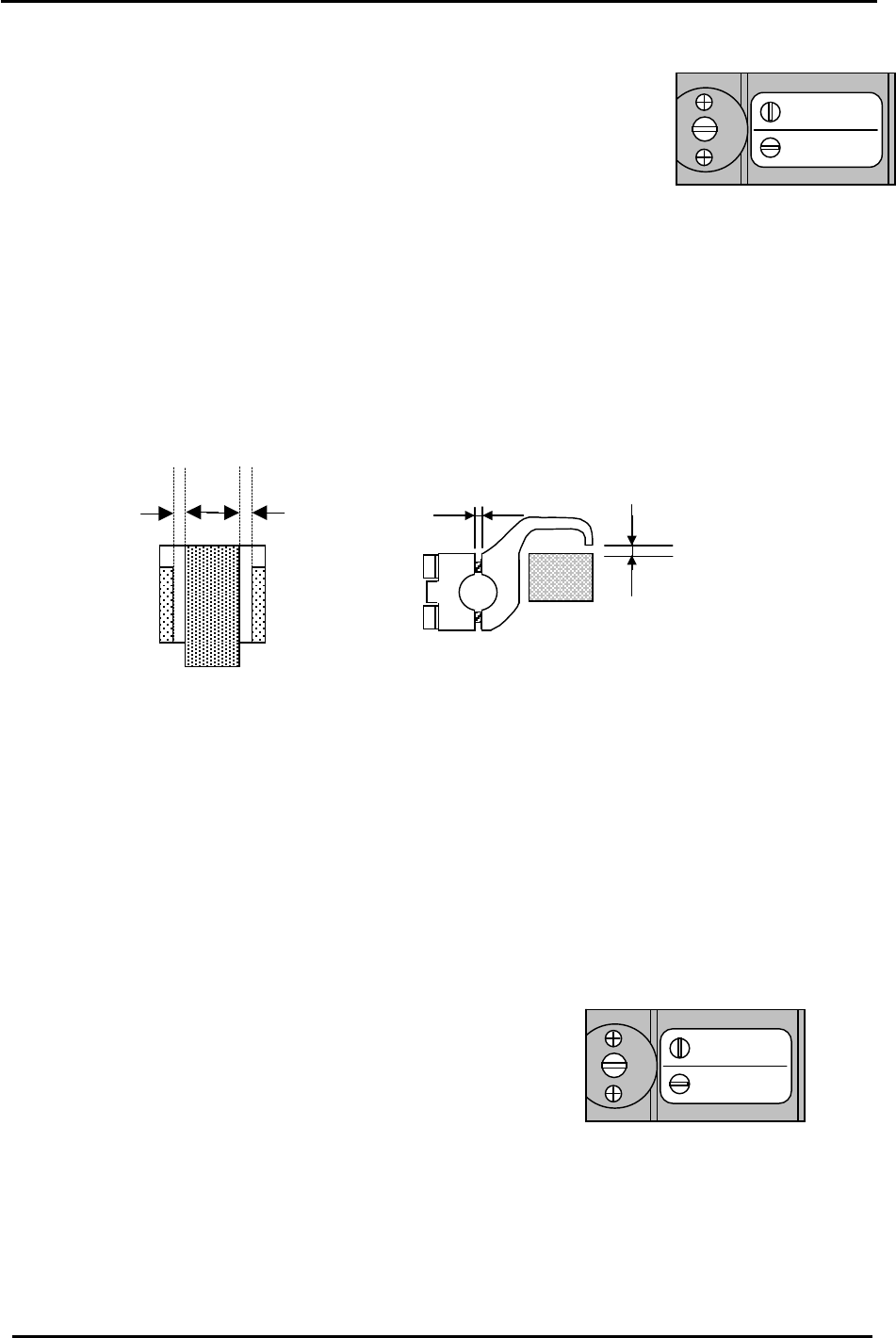
1. Check that the reference pin switch valve is set to “Mark Ref”.
(Not needed for CP-732/733E)
2. Lock the rail-clamping claw at the closed position using the solenoid valve.
Mark Ref.
Pin Ref.
Figure 21
3. Check that all the individual claws are loose.
4. There is some play in the position of the rail-clamping claw center bracket, so check that this is set
at the center of the play.
5. The next step is to lock all the individual claws. When these are locked, the clearance between the
tip of the claw and the guide rail should be in the range of 0.03 to 0.10 mm. (A) Each claw should
be locked using a 4N.m torque wrench. However, before proceeding to lock each claw, there are
some other considerations to bear in mind. (See fig.22)
0.5mm 0.5mm
(A)
0.9 mm
0.03 to 0.10 mm
Figure 22
* Note that 0.5mm clearance on both sides is the ideal. However, this may be difficult to
achieve. In such cases a rough balance between the two is acceptable.
6. Proceed to lock each claw making sure that the clearance values are within the ranges shown
above. It may be useful to lock the two center claws and the two claws at both ends of the rail first,
then proceed to lock the claws in between. Remember that clearance between the tip of the claw
and the guide rail should be in the range 0.03 to 0.10 mm. The claw is attached to the rail by two
3mm bolts. Tightening the top bolt will increase the clearance, tightening the bottom bolt will
decrease the clearance.
3.10.2 (Part 2) Claw Float Adjustment (for CP-742/743(M)E only)
Mark Ref.
Pin Ref.
1. Set the reference pin switch valve to “Pin Ref”.
2. Place a 5mm thick PCB in the main conveyor clamper.
3. Activate but do not lock the adjustable rail clamping solenoid.
Figure 23
4. At this position, there should be 0.5mm clearance between the clamper claw tips and the PCB.
Fuji Machine Mfg. Co., Ltd. (Okazaki)
SMT Equipment Quality Assurance Dept.
CS Section
3-18