CP7 training(6.0) (1).pdf - 第48页
FK-9F98-27 CP-7 Series T raini ng T ext for Service Engineers Edition 6.0 Chapter 3. X, Y , Z and D-axes Adjustm ent [34/36] 3.17.2 Adjusting the 9 th station slide r for CP-742/743(M)E 1. Remove shaf t G or O to gain ac…
FK-9F98-27 CP-7 Series Training Text for Service Engineers
Edition 6.0 Chapter 3. X, Y, Z and D-axes Adjustment [33/36]
3.17 Slider Height Adjustment for ST1, ST9
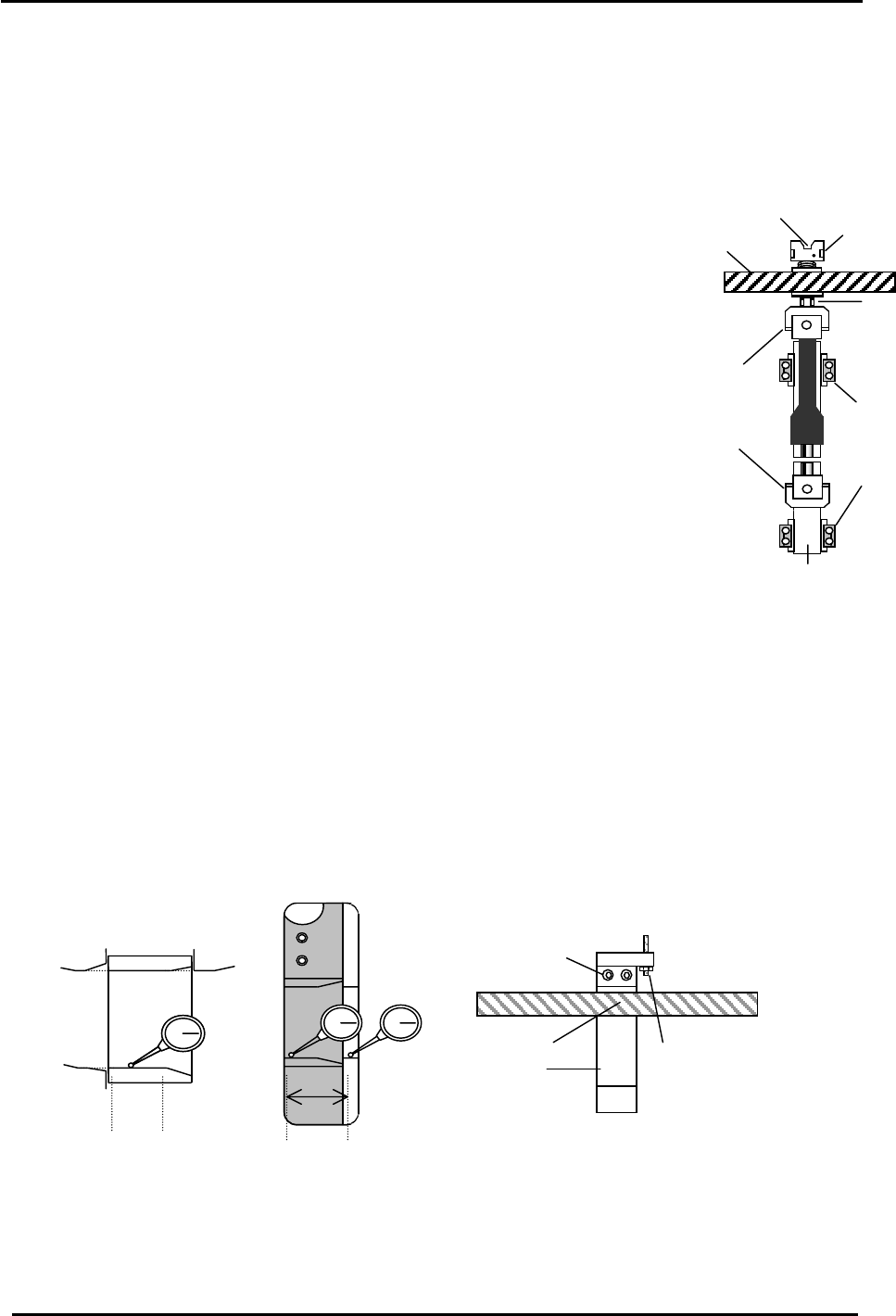
To set the slider height, it will be necessary to remove a shaft assembly. Choose either the G or
O shaft for removal, as these are the only two points open enough to make the measurements.
1. Move the shaft to be removed near ST9 and set the cam angle to 0
degrees. Place a 7mm spanner at position A and remove the 2.5mm socket
hex bolt from the top of the clutch.
2. Remove the four retainers for the linear guide and disconnect the
vacuum hose. Remove the shaft assembly from the index unit.
3.17.1 Adjusting the slider height
Note: The following procedure for CP-7 series machines is the same,
(except for the 9
th
station on CP-742/743(M)E which is written
in step 3.17.2.)
1. With the Placing and Pick-up valves OFF, move the opening where the
shaft was removed to Station 9 and set the cam at 180 degrees. Check
the flatness of the slider surface as indicated in Fig. 48. (the flatness
should be zero) Follow the same procedure for Station 1. (Pick-up)
2. For station 9, turn the cam to zero degrees and turn the placing solenoid ON.
Measure the slider height in relation to the cylindrical cam as illustrated in Fig. 49.
Coupling
Retainer
A
Helical gear
Clutch
Linear guide rail
2.5mm socket hex bolt
Adjust the height of the slider for Station 9 by adjusting the 9
th
station rod in the Cam Box.
After adjustment, rotate the cam a few times and return to check the value again. Once
complete, ensure the lock nut is securely tightened on the 9
th
station rod.
Figure 47
3. For station 1, turn the cam to zero degrees, turn the Pick-up solenoid ON and make sure the
NZ axis is set at the minus mechanical stopper. Measure the slider height in relation to the
cylindrical cam as illustrated in Fig. 49.
Adjust the height of the slider for Station 1 by adjusting the bolts shown in Figure 50. After the
adjustment rotate the cam a few times and return to check the value again. Once complete,
ensure the lock nut is securely tightened on the 1
st
station slider bracket.
(Use Loctite # 262 when securing the nut)
0 ± 0.03mm
(
0 to +0.02 factor
y
tol.
)
1. Loosen the two bolts here
and try to adjust the slider
height using the play in the
bolt holes.
Slider
Helical Gear
2. If step 1 fails, loosen
this nut and turn
the rod to adjust the
slider. After completion,
ensure the nut is securely
tightened.
Tolerance: 0
Figure 48 Figure 50
Figure 49
Fuji Machine Mfg. Co., Ltd. (Okazaki)
SMT Equipment Quality Assurance Dept.
CS Section
3-33
FK-9F98-27 CP-7 Series Training Text for Service Engineers
Edition 6.0 Chapter 3. X, Y, Z and D-axes Adjustment [34/36]
3.17.2 Adjusting the 9
th
station slider for CP-742/743(M)E
1. Remove shaft G or O to gain access to the 9
th
station slider.
2. Turn the cam to 0 degrees and turn the placing solenoid valve ON. (Y035)
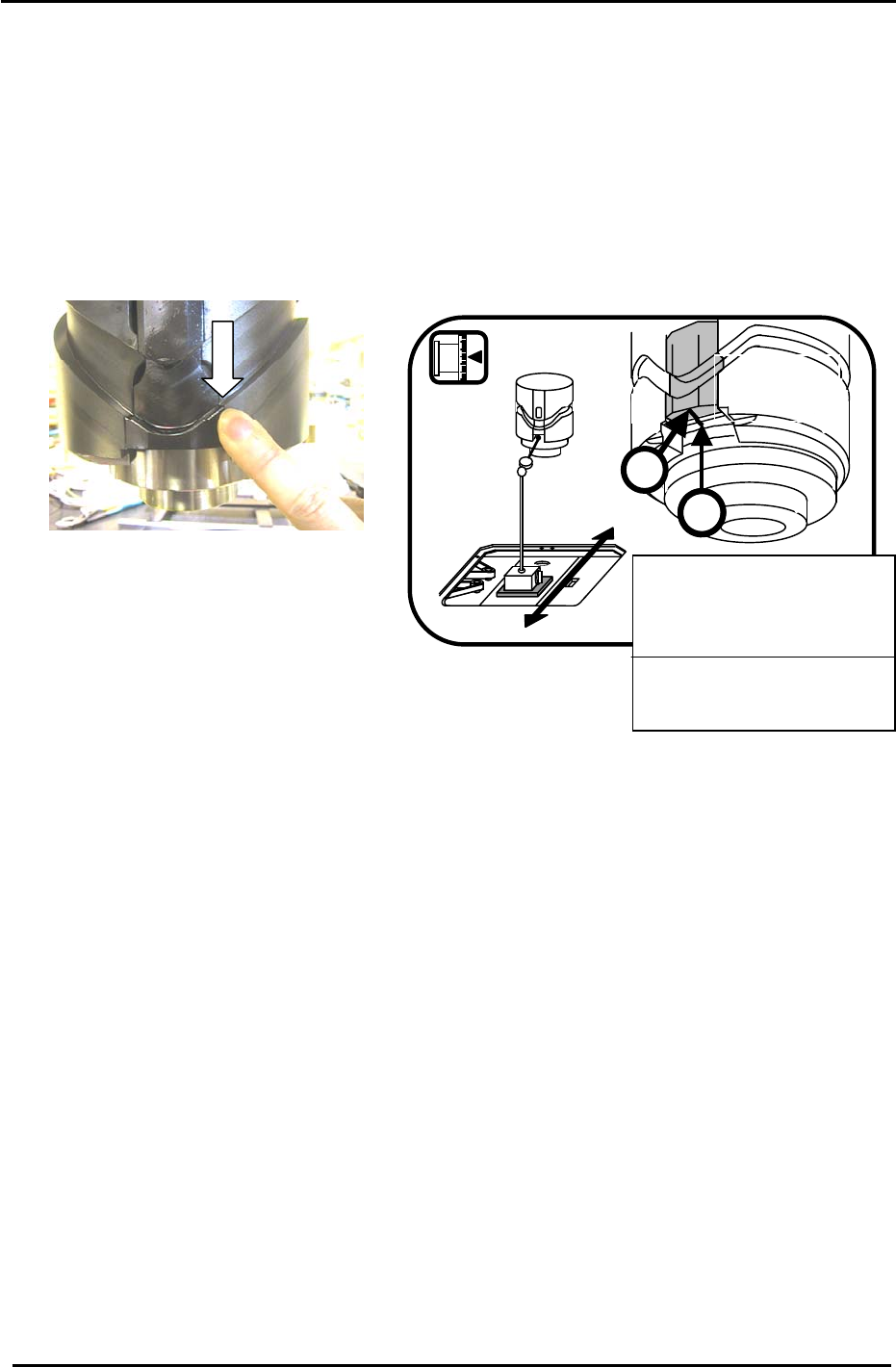
3. Adjust the slider height, so the leading edge top surface between the cylindrical cam and slider is
smooth to the touch. (See Fig. 51) Or use a dial gauge as indicated in Fig. 52.
CP-74*-series ST9 slider measurement
B
Cylindrical
cam
0
Cam angle = 0°
Figure 52
A
Place a dial gauge against
section A and set the gauge to
zero. Measure the height to
section B (in the Y-direction).
Tolerance: ±0.03 mm
Target: ±0.01 mm
Figure 51
4. Adjust the height using the 9
th
station adjustment rod in the cam box. After completion, rotate the
index and return to check the position. If OK, then make sure the lock nut is tight on the rod.
3.18 Reattaching the Shaft Assembly
When the slider height adjustment has been completed, reattach the shaft in the reverse order
removed.
1. Tighten the retainer installation bolts (M4 x 12 ) using a torque wrench:
Torque value: 1.96N.m (20Kgf/cm)
2. Using the bar jig (at station 9), re-install the shaft assembly (with the cam at 180 degrees) and
align the holder and clutch so the alignment jig inserts smoothly between the holder and the
clutch. (there should be NO resistance) It is important for all shafts and clutches to be aligned
properly in order to avoid problems later on.
Fuji Machine Mfg. Co., Ltd. (Okazaki)
SMT Equipment Quality Assurance Dept.
CS Section
3-34
FK-9F98-27 CP-7 Series Training Text for Service Engineers
Edition 6.0 Chapter 3. X, Y, Z and D-axes Adjustment [35/36]
3.19 Placing Height Z0 Calibration
Carry out the procedure listed below to set the Placing Origin height. (Z0)
NOTE: Calibrate only after adjusting the ST9
slider height.
1. Turn the ST9 solenoid valve ON at 0 degrees.
Y035 PLACE SOL ENGAGED
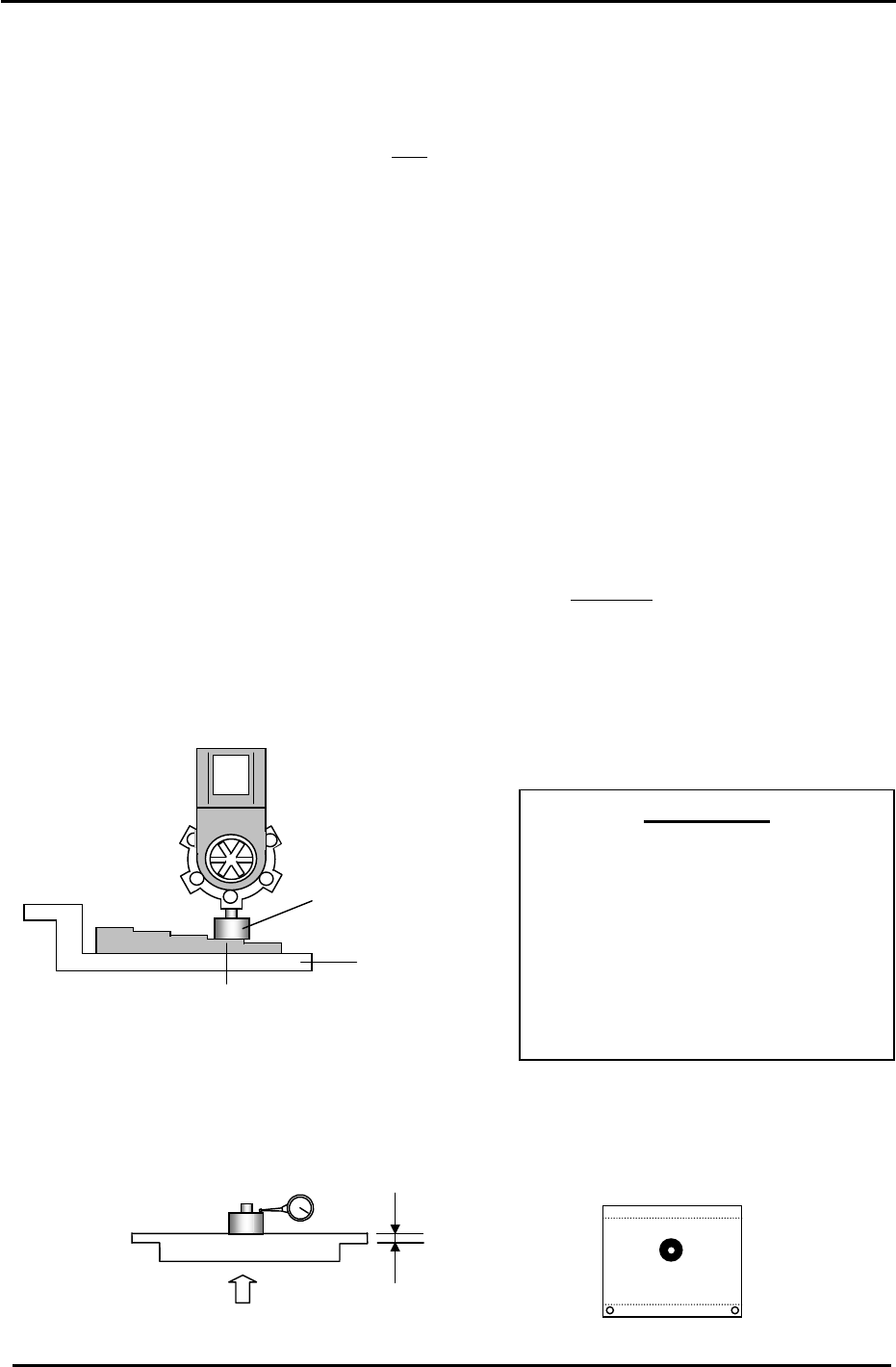
2. After the Z- axis adjustment is completed, clamp the jig plate (fig. 53) in the middle of the table,
and install the nozzle jig in the A holder.
3. Manually move the jig under the ST9, placing point.
4. Set the cam angle at 195 degrees to lower the nozzle jig. Manually raise the Z-axis so that the
nozzle jig is in contact with a feeler gauge jig (-0.3mm). The Z-axis servo counter at this time is
Z0.
Target: CP-732/733E (5000 +/-500 pulses)
Target: CP-742/743(M)E (6000 +/-500 pulses)
5. Calibrate “Z0” on the reference side, adjustable side and center of the jig plate. The
deviation between each measuring point should be within 50 pulses
of each other.
6. Enter the average value (of the three measurement points) to the Calibration Data as
follows:
Press: [Maintenance] → [Calibration] → [Placing Reference] → [Z0] → [Set]
Nozzle Jig No.:DCPJ0620
A
IMPORTANT!!
The placing height calibration is critically
important to ensuring stable placement.
If not adjusted correctly, damage to
components may occur (due to shock
from nozzle) or placing accuracy will not
be at optimum levels. Be sure to use
care when making adjustments in this
area.
Jig No.: AWPJ8111
-0.3mm
Figure 53
7. Alternatively, clamp the XC/YC calibration plate in the center of the table. Raise the Z-axis until
the dial gauge deflects 0.3mm. The Calibration Data value will be the servo pulse count with the
gauge deflected 0.3, plus 1050 (thickness of the jig plate). This procedure works well resulting
in basically the same value as obtained using the procedure in steps 1 to 6.
2.1mm
2.1/ 0.002 = 1050
0.3mm
Jig No.: AJPJ0062
Figure 54
Fuji Machine Mfg. Co., Ltd. (Okazaki)
SMT Equipment Quality Assurance Dept.
CS Section
3-35