CP7 training(6.0) (1).pdf - 第67页
FK-9F98-27 CP-7 Series T raini ng T ext for Service Engineers Edition 6.0 Chapter 4. S tation Adjustment [18/28] 2. The jigs pictured in figure 27 are needed for sensor positioning adjustment. A DCPJ0040 ( CP-7 Series ) …
FK-9F98-27 CP-7 Series Training Text for Service Engineers
Edition 6.0 Chapter 4. Station Adjustment [17/28]
4.14 Station 1 Tape-End Detection Sensor Adjustment
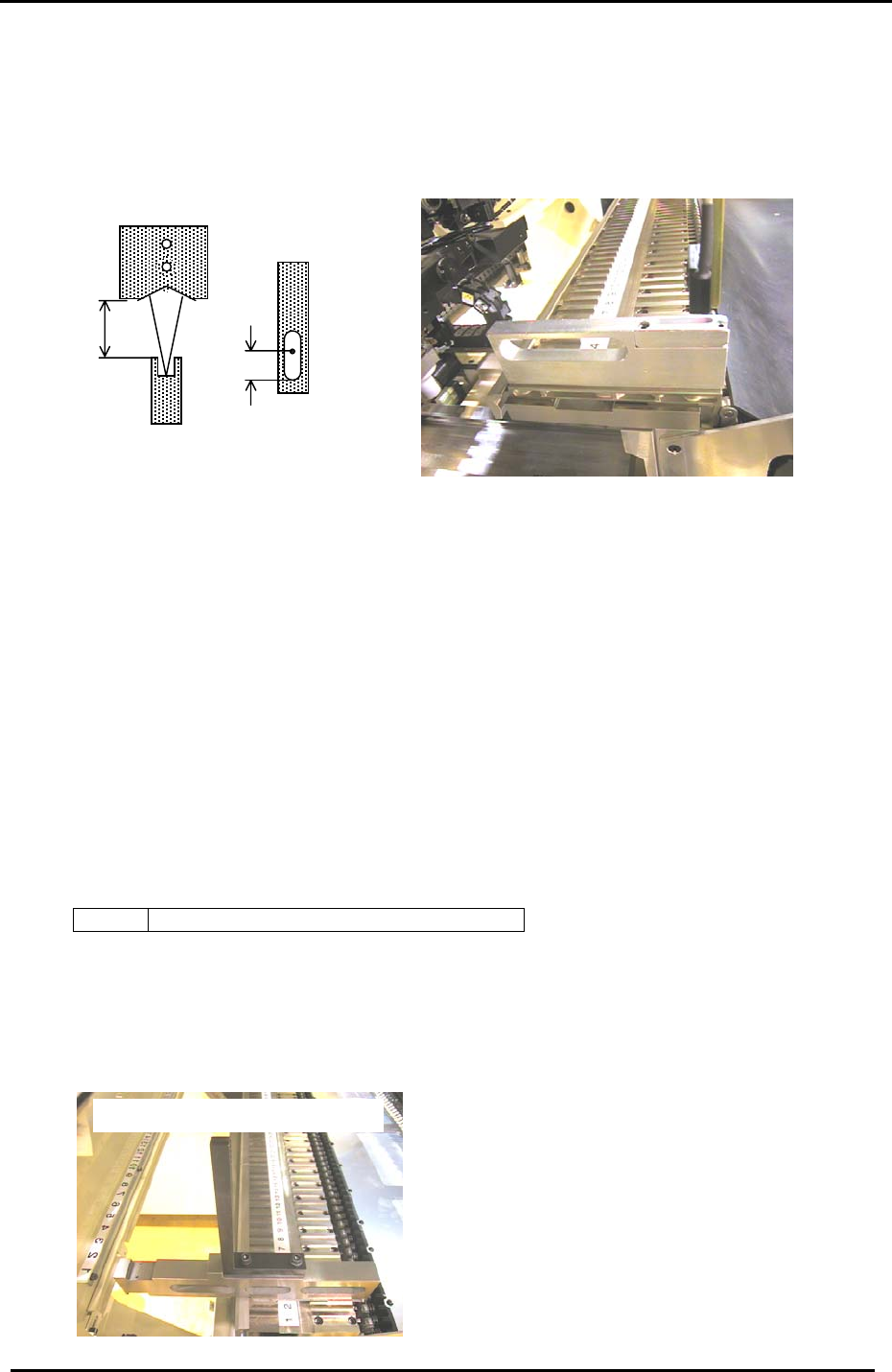
1. Set the tape end detection feeder jig at slot No.1 (Pallet No. 1). (Jig No.:Z9526ADCPJ8550)
2. Move the device table to the pick up position “PICK UP POS. T1” (This is calibrated in section
3.15)
Approx. 12mm
7mm
Figure 25
3. Adjust the clearance between the top of the jig and the bottom surface of the sensor to 12mm.
Adjust the bracket so that the horizontal direction of the light beam is at the center, and 7mm
away from the end of the oval hole.
<Setting the amplifier>
1. Set the switches on the amplifier as follows:
Output switch; D-ON, Timer switch; OFF, Sensitivity switch; Fine.
2. Turn the ”LOCK” protect switch OFF.
3. With the sensor beam centered in the slot, press the “SET” button for more than 3 seconds.
(Release the set button a couple of seconds after the yellow LED begins flashing.)
4. Set the “LOCK” protect switch back to lock and confirm sensor reaction by I/O.
<I/O Æ Standard Æ IN>
X03D TAPE END CHECK (Tape end detection)
4.15 Feeder UP/Down Sensor Adjustment
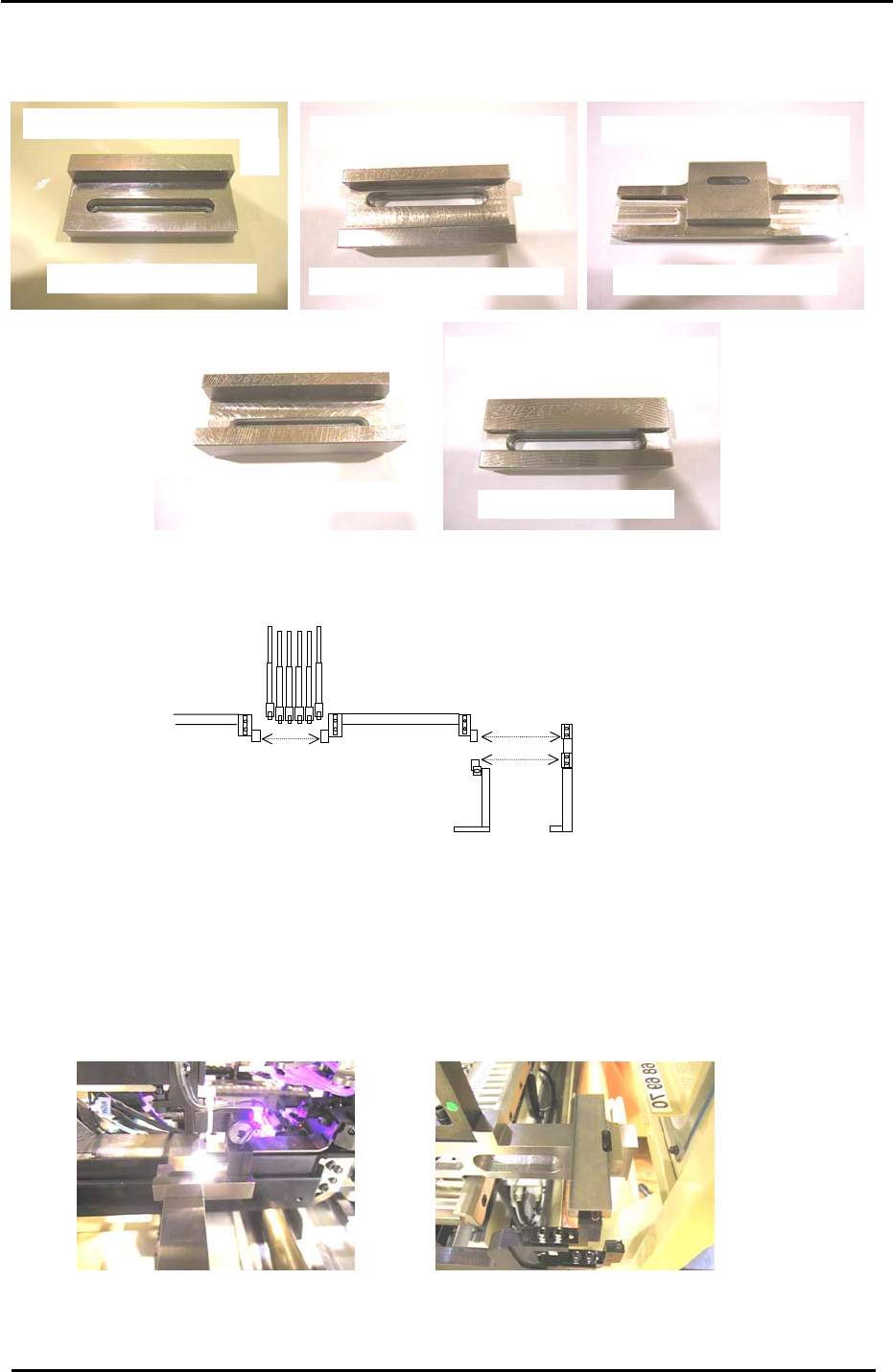
1. For this adjustment, use Jig No.: ADCPJ8020 illustrated in figure 26.
Feeder Check Sensor Positioning Jig
Figure 26
Fuji Machine Mfg. Co., Ltd. (Okazaki)
SMT Equipment Quality Assurance Dept.
CS Section
4-17
FK-9F98-27 CP-7 Series Training Text for Service Engineers
Edition 6.0 Chapter 4. Station Adjustment [18/28]
2. The jigs pictured in figure 27 are needed for sensor positioning adjustment.
A
DCPJ0040
(
CP-7 Series
)
Feeder U
p
sensor
p
ositionin
g
Ji
g
B
Feeder u
p
sensor
p
ositionin
g
Ji
g
DCPJ0050 CP732E
+
CP742ME
C
Feeder u
p
sensor
p
ositionin
g
j
i
g
DGPJ0040
(
CP742E Onl
y)
D
Feeder down sensor
p
ositionin
g
j
i
g
DCPJ0070
(
CP7 Series
)
E
Feeder down sensor
p
ositionin
g
j
i
g
DCPJ0060
(
CP7 Series
)
Figure 27
3. Refer to figure 28 below and the text that follows to determine which jig should be used for
which sensor:
Jig A should be used for sensors 1,2, and 3.
Jig B should be used for sensor 4 (CP-732/733E and CP-742ME)
Jig C should be used for sensor 4 (CP-742/743E only)
Jig D should be used for sensor 5.
Jig E should be used for sensor 6.
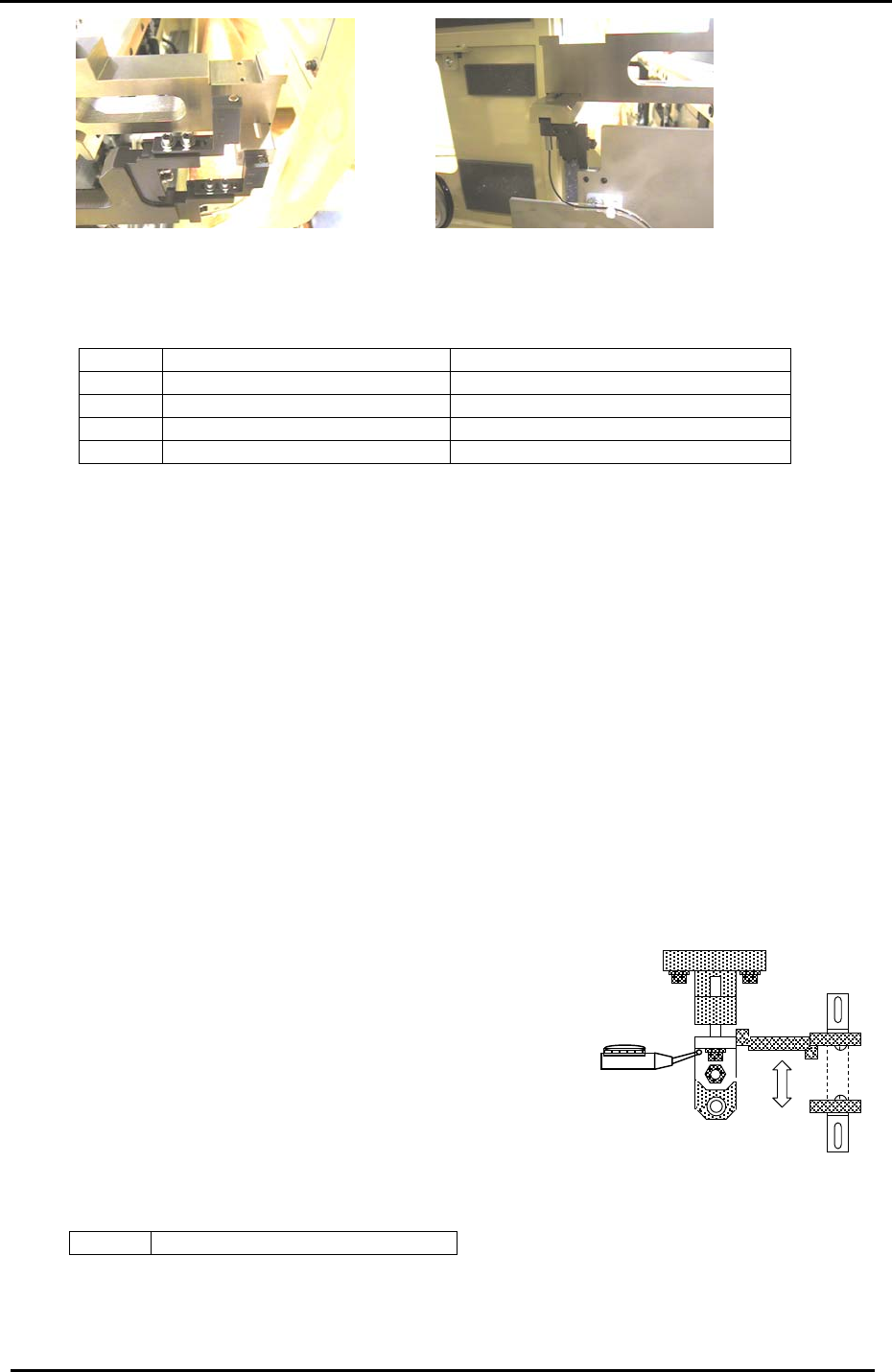
4. The various adjustments are pictured in figure 29 below:
Figure 28
Feeder Up and Down
sensors on the D axis.
6
5
34
1 2
A
lignment of sensor 1
A
lignment of sensors 1, 2, and 3
A
lignment of sensor 4 (CP742/743E Only)
Fuji Machine Mfg. Co., Ltd. (Okazaki)
SMT Equipment Quality Assurance Dept.
CS Section
4-18
FK-9F98-27 CP-7 Series Training Text for Service Engineers
Edition 6.0 Chapter 4. Station Adjustment [19/28]
Figure 29
A
lignment of sensor 6
A
lignment of sensor 5
5. Confirm sensor reaction by I/O.
<I/O Æ Standard Æ IN>
X042 TAPE LEAF CHECK (Tape guide lift check)
X043 D1 FEEDER CHECK UP (D1-axis feeder lift check – upper)
X044 D1 FEEDER CHECK DOWN (D1-axis feeder lift check – lower)
X054 D2 FEEDER CHECK UP (D2-axis feeder lift check – upper)
X055 D2 FEEDER CHECK DOWN (D2-axis feeder lift check – lower)
6. Set the Amplifier as follows:
Note: To unlock or lock the sensor amplifier, press the up or down key simultaneously with
the mode key for more than 3 sec.
a. Set the output switch to “L-ON”.
b. Press the mode key for more than 3 secondsÆ Turbo Æ select the “super” LED
(by using the up/down arrows) Æ Press the mode key once quickly Æ DLY (make sure
the “super” LED is ON) Æ Press the mode key once quickly Æ set to 200P by
using the up/down keys. Adjustment complete.
Note: There is never a need to press the SET button. Pressing the set button will change the
internal mode of the sensor amp.
4.16 Station 1 N times feeding Adjustments
4.16.1 Retract End Sensor Adjustment
Figure 30
1. With the cam at 0 degrees, turn ON the station 1
feeding solenoid valve. (Y033 TAPE FEED SOL
ENGAGED)
2. Rotate the cam axis and adjust the sensor bracket so
that the sensor turns OFF when the flag is 0.5mm lower
than the upper limit. Use a dial gauge to check.
3. Check sensor reaction by I/O.
<I/O Æ Standard Æ I/O>
X03C FEEDING RETRACT LIMIT
Fuji Machine Mfg. Co., Ltd. (Okazaki)
SMT Equipment Quality Assurance Dept.
CS Section
4-19