222085 Issue 1 - Horizon APiX Appendix Manual.pdf - 第145页
TECHNICAL REFERENCE APPENDIX PREVENTIVE MAINTENANCE 3.108 Appendix to Micron Technical Manuals Chapter Issue 1 June 15 Monthly Hardware Check SEMI Level General Maintenance Tick Check the condition of the board clamps. C…
TECHNICAL REFERENCE APPENDIX
PREVENTIVE MAINTENANCE
Chapter Issue 1 June 15 Appendix to Micron Technical Manuals 3.107
Month December Maintenance Procedure
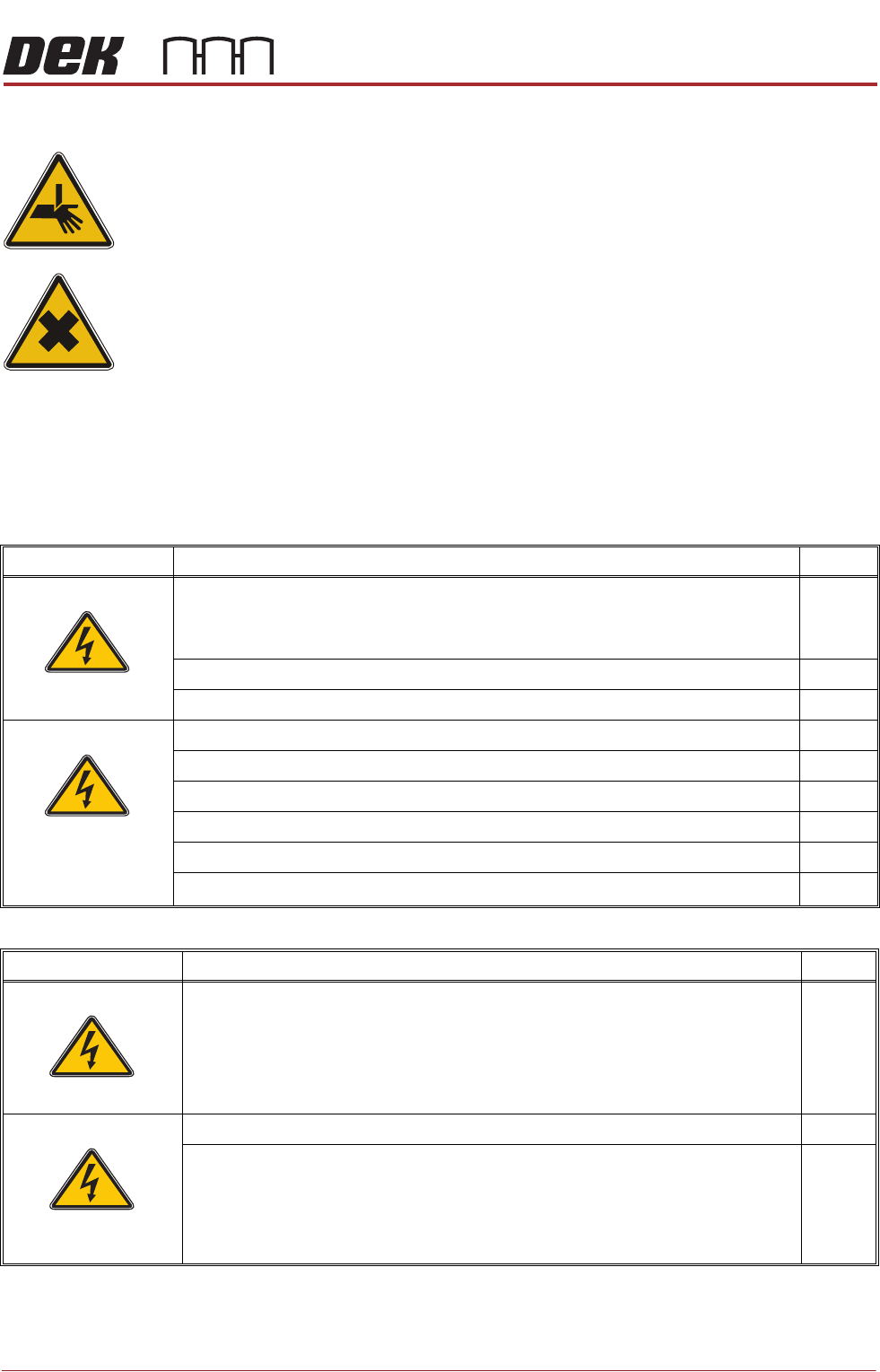
WARNING
BOARD CLAMPS. EXTREME CARE MUST BE EXERCISED WHEN WORKING IN
THE TOOLING AREA OF THE MACHINE TO AVOID INJURY. THE FOILS ON THE
FRONT AND REAR BOARD CLAMPS ARE VERY SHARP.
WARNING
HARMFUL SUBSTANCES. CLEANING WIPES AND CLEANING SOLUTIONS MAY
CONTAIN SUBSTANCES HAZARDOUS TO HEALTH. OBSERVE ALL
MANUFACTURERS’ HEALTH AND SAFETY GUIDELINES. ALWAYS WEAR
APPROVED PROTECTIVE CLOTHING WHEN CLEANING THE MACHINE.
SPC Alignment
Check and Machine
Cycle Count
Fill out details: SPC Alignment Check and Machine Cycle Count at the start of
this section.
Monthly Maintenance
SEMI Level Under Screen Cleaner (USC) Tick
Check the condition of the squeegee blades (Blue).
NOTE
ASM recommend squeegee blades are replaced every six months.
Check the screen cleaner height.
Check the condition of all hoses and connections.
Check that the paper feed mechanism operates correctly.
Check that the cleaner mechanism raises and lowers smoothly.
Check that the solvent dispenses and it is at a suitable pressure.
Check that solvent dispenses evenly across the paper or cassette.
Check the correct operation of the vacuum filtration unit.
Perform a USC cycle and confirm correct operation.
SEMI 1
SEMI 2
SEMI Level Environmental Control Module (if fitted) Tick
Inspect the air filters clean/replace (as detailed in the equipment manual).
Check for leakage in the system.
Check the system holds the temperature (as described in the equipment manual).
SEMI 1
SEMI 2
TECHNICAL REFERENCE APPENDIX
PREVENTIVE MAINTENANCE
3.108 Appendix to Micron Technical Manuals Chapter Issue 1 June 15
Monthly Hardware Check
SEMI Level General Maintenance Tick
Check the condition of the board clamps.
Clean the table top of paste and debris, apply a wipe of light oil.
Clean the round transport rails of paste and debris.
Inspect the air filters and clean/recommend replacement.
Cycle the board clamps ensure that clamping and release is smooth.
Cycle the Test 265test 1 board on the transport rails ensure smooth operation.
SEMI 1
SEMI 2
SEMI Level Screen Alignment Tick
Inspect the wiring and connections.
Inspect the three striker plates, clean and apply a wipe of light grease.
Check all actuators home correctly.
SEMI 1
SEMI 2
SEMI Level Screen Change Tick
Remove and clean the auto drip tray.
Fully extend the auto drip tray telescopic plungers and clean.
Clean the screen stop actuator arm lever.
Clean the screen at stop sensor.
Refit the auto drip tray and check operation of the screen change mechanism.
SEMI 1
SEMI 2
TECHNICAL REFERENCE APPENDIX
PREVENTIVE MAINTENANCE
Chapter Issue 1 June 15 Appendix to Micron Technical Manuals 3.109
SEMI Level Chase Tick
Inspect the condition of wiring/pneumatic connections.
Clean and lubricate with light oil, the omni track bearings and the underside of the track
plates.
Clean the left and right screen at centre optos.
Clean the stencil guide strips of debris/paste.
Remove the ASM pneumatic cylinder covers.
Ensure ASM cable assembly is seated correctly around all pulleys.
Loosen cable retainer bracket securing screws. Adjust position of bracket to eliminate any
cable slack.
Ensure all screen clamps are at their home position. Tighten retainer bracket securing
screws.
Refit ASM pneumatic cylinder covers.
Check operation of the chase clamps.
Check operation of the ASM.
Estimated time required for Monthly tasks 6.0 hours
Summary/Remarks
Signed: Date:
SEMI 1
SEMI 2