00196577-03 JG S-Feeder Care Test Station EN.pdf - 第10页
Introduction – Saf ety Instructions 10 CAUTION Moving the te sting device Always carry the testing device by holding on to it at the left and right o f the housing! The device for visual testing (camera tower) is sensiti…
Introduction – Safety Instructions
9
– Safety Instructions
WARNING
Safety notes
The safety instructions in the manual for the relevant feeder take precedence. This instruction manual and the safe-
ty information within are targeted at use of the testing device and the feeder, separately from the machine.
The "external feeder module power supply" is connected to the 230V AC (Europe) / 110V AC (USA); 50/60 Hz line
power supply. When connecting to the 110V supply, you do not need to perform any conversions or switch over
the setting on the power pack.
The "external feeder module power supply" must not be opened or manipulated.! (Danger of electric shock)
Always observe the applicable accident prevention and VDE regulations, plus the specific safety regulations for
handling laboratory equipment and systems outside the machine, as applicable in your country.
The test tapes are made of metal. Do not handle these near live parts.
CAUTION
Checking of feeder
The testing device may only be used to test those feeders approved for its use.
The testing and setting device may only be modified or repaired by the manufacturer.
The setting screws are sealed. If the setting screws are loosened or the seal is damaged, any claims for warranty
will be invalidated and cancelled.
Always transport the testing device in its original packaging.
In order to work safely with the testing and setting device, place it down on a suitably stable and solid table.
Introduction – Safety Instructions
10
CAUTION
Moving the testing device
Always carry the testing device by holding on to it at the left and right of the housing! The device for visual testing
(camera tower) is sensitive and NOT suitable for carrying the testing device.
Introduction – Overview of Devices
11
– Overview of Devices
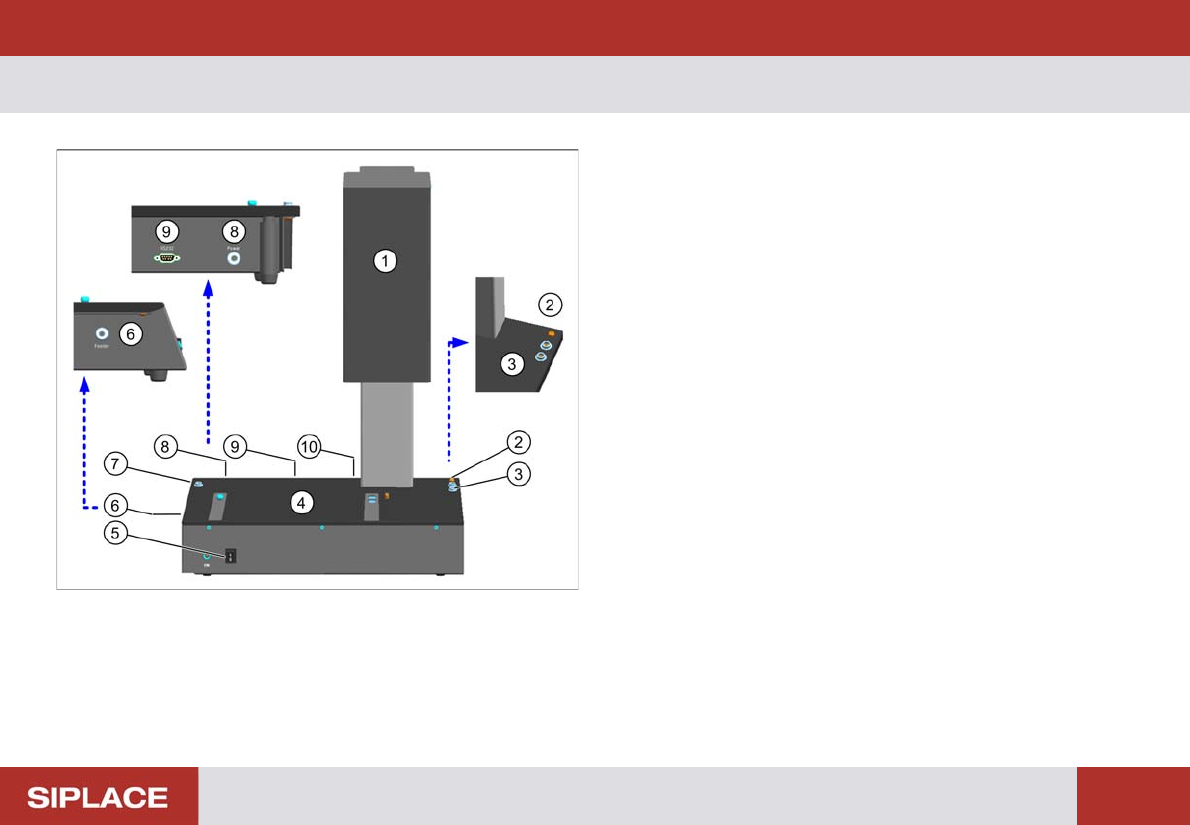
S-Feeder Checking Device
1. Camera tower
2. Connection for device ground
3. Connection for ESD wristband
4. Contact surface for feeder
5. ON / OFF switch
6. Connection for feeder
7. Connection for ESD wristband
8. Connection for power supply
9. Serial port for communication
10. USB camera cable