00196622-03_OM_WPC5_6_EN.pdf - 第31页
Setting up and Commissioning 4.2.1 Fitting the Downholder Setting Up the Module Operating Manual SIPLACE WPC5/WPC 6 31 ► Loosen the two screws (4) and (5) on the right side of the COT in se rt. The screws are unde rneath…
Setting up and Commissioning
Setting Up the Module 4.2.1 Fitting the Downholder
30 Operating Manual SIPLACE WPC5/WPC6
4.2
4.2 Setting Up the Module
Setting Up the Module
4.2.1
4.2.1 Fitting the Downholder
Fitting the Downholder
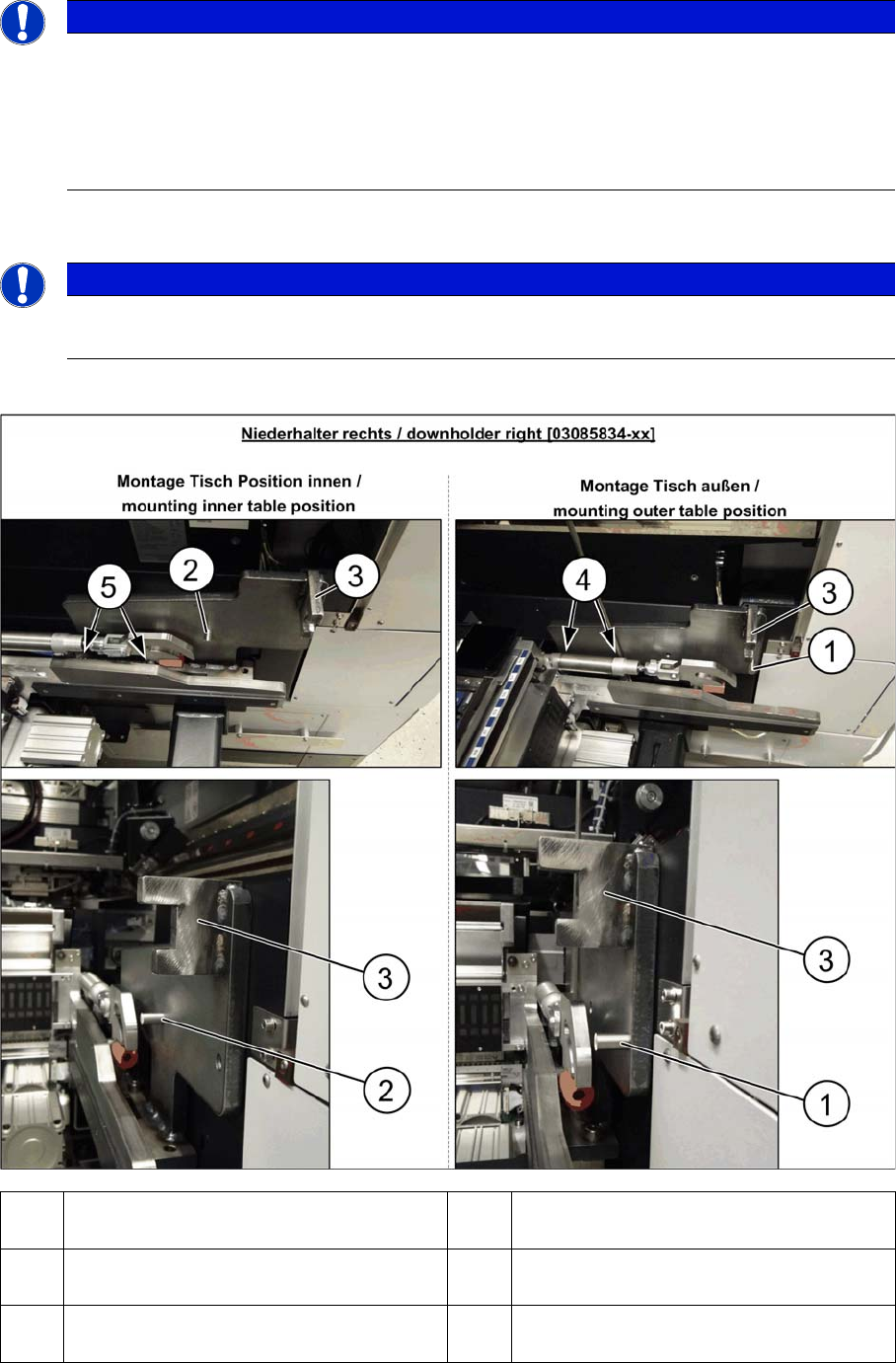
Fitting the right downholder
NOTICE
Requirements
The changeover table insert 30 has to be installed on the respective location.
The WPC5/WPC6 can be used in the SIPLACE SX1/SX2 (depends on head configuration):
► WPC5/WPC6 in SIPLACE SX2 on location 1 und 2.
► WPC5/WPC6 in SIPLACE SX1 only on location 1.
NOTICE
COT-I30 insert for the WPC
When using a COT-I30 insert for the WPC, you only need to fit the downholder on the right.
1 Pin DIN6325-10-M6x30-St [00358814-xx]
at position inside
2 Pin DIN6325-10-M6x30-St [00358814-xx]
at position outside
3 Docking aid 4 Screw ISO4762-M8x40-A2-70 [03042589-
xx]
5 Screw ISO4762-M8x40-A2-70 [03042589-
xx]
Setting up and Commissioning
4.2.1 Fitting the Downholder Setting Up the Module
Operating Manual SIPLACE WPC5/WPC6 31
► Loosen the two screws (4) and (5) on the right side of the COT insert. The screws are underneath
the COT insert cylinder.
► Place the "downholder COT-i right assembly" [03085834-xx] on the right side of the COT insert so
that the holes are aligned with one another.
► Screw the downholder tight with the two new screws (4) and (5).
► The downholder pin (2) must always be approx. 10 mm before the claws of the insert and the dock-
ing aid (3), behind the machine protection (cover flap).
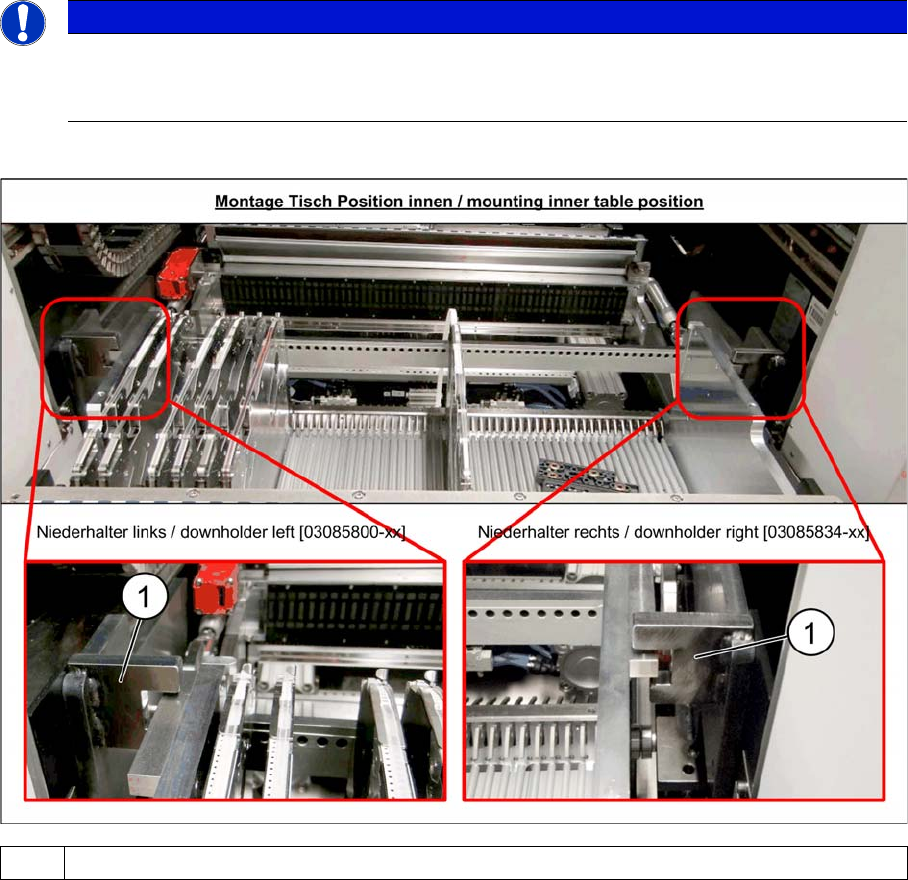
Checking the downholder positions
► Move the component trolley back into the machine.
► The component trolley height must be adjusted so that the side rails fit into the recess on the docking
aid (1). (See also Setting the Changeover Table Height)
NOTICE
Screws
Insert the new screws into the holes in the downholder and position the downholder together
with the screws onto the COT insert.
1Docking aid
Setting up and Commissioning
Setting Up the Module 4.2.2 Docking the WPC5/WPC6
32 Operating Manual SIPLACE WPC5/WPC6
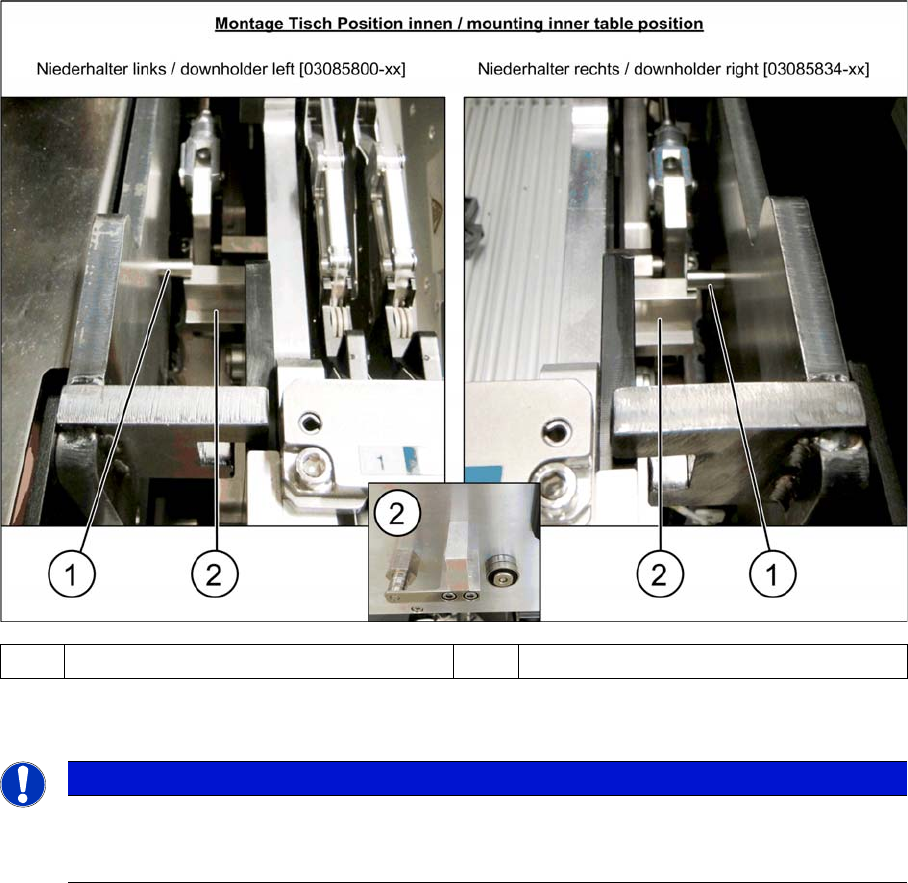
► After pulling the table in through the cylinder, the downholder pin (1) should be up, against the com-
ponent trolley downholder (2).
For removal, follow the instructions in reverse order.
4.2.2
4.2.2 Docking the WPC5/WPC6
Docking the WPC5/WPC6
When installing and removing the WPC5/WPC6, make sure that the arms of the feed axis do not hit any
parts (e.g. stationary cameras etc.).
► If the WPC5/WPC6 is not yet standing on its wheels, fasten the hexagonal shaft (crank handle) to
the lifting mechanism and turn in a clockwise direction, to lift the WPC5/WPC6.
► Stop turning when you have enough room to dock the WPC5/WPC6 onto the machine.
► Open the machine cover on the relevant location.
► If there is a height limiter present in the WPC5/WPC6 location, this needs to be turned over and fixed
into place upside down. Make sure that the height limiter does not touch the cover plate. To do this,
loosen the three screws fastening the height limiter and fit it into the same place upside down (with
two fastening screws).
► Move the WPC5/WPC6 into the location and connect the energy and data supply cable. Make sure
that the arms of the feed axis do not collide with any machine parts.
► Lower the WPC5/WPC6 until it is standing on its feet. Turn the crank handle on the lifting mechanism
until the wheels are about 1 cm above the ground.
1 Downholder pin on the docking aid 2 Component trolley downholder
NOTICE
Wear
In the event of frequent component trolley cycle changes, these parts may become worn. Both
the downholder pin and the component trolley downholder are available as spare parts.