00196622-03_OM_WPC5_6_EN.pdf - 第41页
Operator Tasks Non-Stop Module at WPC6 Operating Manual SIPLACE WPC5/WPC 6 41 5.3 5 . 3 N o n - S t o p M o d u le a t W P C 6 Non-Stop Module at WPC6 Function Description The flap of the Non-Stop M odu le allows to refi…
Operator Tasks
Inserting the Waffle Pack Tray Carrier
40 Operating Manual SIPLACE WPC5/WPC6
5.2
5.2 Inserting the Waffle Pack Tray Carrier
Inserting the Waffle Pack Tray Carrier
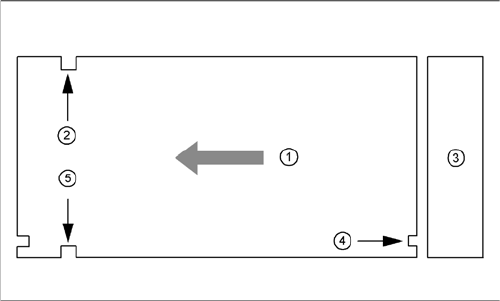
The waffle pack tray carrier is checked to ensure that it has been correctly inserted.
Make sure that the driver grooves (2) and (5) for the waffle pack tray carrier point towards the front, when
viewed in the direction of transport.
The control grooves (4) for the individual waffle pack tray carriers must be aligned above one another
and must point towards the waffle pack tray storage unit (3).
Legend
1. Transport direction
2. Driving groove free
3. Waffle pack tray storage unit
4. control groove
5. Driving groove for the feed arm
Operator Tasks
Non-Stop Module at WPC6
Operating Manual SIPLACE WPC5/WPC6 41
5.3
5.3 Non-Stop Module at WPC6
Non-Stop Module at WPC6
Function Description
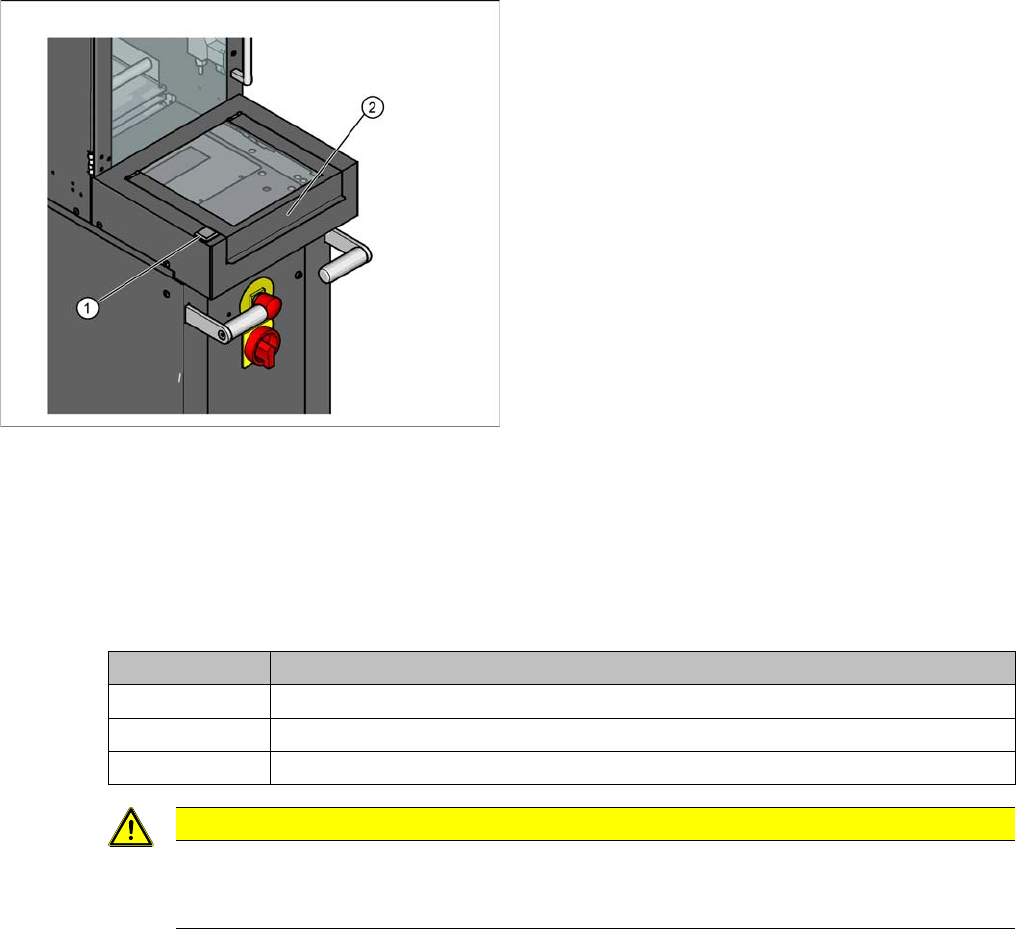
The flap of the Non-Stop Module allows to refill the waffle pack trays or to move it out without stopping
the SIPLACE SX during operation. The operator button shows whether a waffle pack tray is in the Non-
Stop Module or the Non-Stop Module is empty or a waffle pack tray is moving currently.
Non-Stop Module operator button
Overview
1. Non-Stop Module operator button
2. Flap for loading the Non-Stop Module
State button Function
Continuous light The waffle pack tray is in the Non-Stop Module. The flap may be opened.
Off There is no waffle pack tray in the Non-Stop Module. The flap may be opened.
Flashes The waffle pack tray is in action. The flap must not be opened.
CAUTION
Operator button at the Non-Stop Module is blinking
The waffle pack tray is moved and the action is not completed so far. If the flap is opened the
EMERGENCY STOP will be activated.
Operator Tasks
Non-Stop Module at WPC6 5.3.1 Refilling with the Non-Stop Modul
42 Operating Manual SIPLACE WPC5/WPC6
5.3.1
5.3.1 Refilling with the Non-Stop Modul
Refilling with the Non-Stop Modul
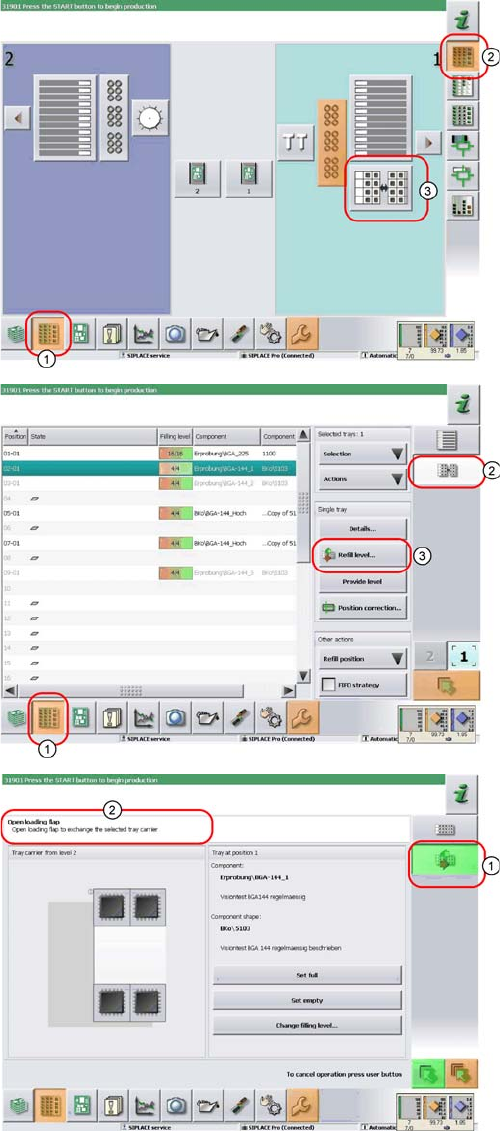
► In the tool bar of the main view click on the icon (1) for
the functions Feeder, Locations….
► Click on the icon (2). The user interface will switch to
the view Functions > Locations > WPC.
► Click on the icon (3) for the WPC5/WPC6 at the rele-
vant location (location 1 here).
The Setup > Locations > WPC view will be shown for
the selected Location.
► Click on the icon (2).
► Click on the Refill level… (3) icon.
The view for refilling the Non-Stop Module will be dis-
played.
► The icon (1) shows, that one tray carrier is transport-
ed in or out of the Non-Stop Module.
► You see the current actions in the indicator area (2).
Observe the hints and follow the instructions provid-
ed.
► Press the operating button to start the actions with
the Non-Stop Module. Check the status of the button
(continuous light, blinking light or no light) and carry
out the actions allowed.