D-serie LEVEL II.pdf - 第178页
Modular Conveyor Conveyor Settings Setting the Fixed Conv eyor Side (Single and Dual Conveyor) S tuden t Guide Advanced Level 2 SIPLACE D Series Modular Conveyor EN 05/2007 10-12 10.3.1 Setting the Fixed Conveyor Side (S…

Modular Conveyor
Technical Data - Dual Conveyor Conveyor Settings
Student Guide Advanced Level 2 SIPLACE D Series
EN 05/2007 Modular Conveyor
10-11
10.2.2 Technical Data - Dual Conveyor
10.3 Conveyor Settings
Type of interface SMEMA (Standard)
SIEMENS (Option)
PCB weight 3 kg
Component-free PCB handling edge 3mm
PCB changeover time 2.5 s
Ink spot recognition Possible
Automatic width adjustment Possible
Edge of fixed conveyor side Right (standard), left (optional)
Max. component height 6 mm for the C&P12
PCB format(LxW) 50mm x 50 mm up to 368 mm x 216 mm
2" x 2" to 18" x 8.5"
Long board up to 610 mm (24"), (option)
PCB thickness 0.3 mm to 4.5 mm
Max. PCB warpage upwards: 6 mm - board thickness
downwards: 0.3 mm + PCB thickness
Clearance on board underside max. 40 mm
PCB transport height 830 mm ±15 mm (Standard)
900 mm ±15 mm (Option)
930 mm±15 mm (Option)
950 mm ±15 mm (Option SMEMA height)
Type of interface SMEMA (Standard)
SIEMENS (Option)
PCB weight 3 kg
Component-free PCB handling edge 3mm
PCB changeover time 2.5 s
Conveyor mode synchronous or asynchronous
Components on each conveyor same or different
PCB width on each conveyor same or different
Ink spot recognition synchronous: not possible, asynchronous:
Possible
Automatic width adjustment Possible
ATTENTION: Press the emergency stop button!
When setting the lifting table, make sure that the table is secured to prevent unauthorized
movement!
Modular Conveyor
Conveyor Settings Setting the Fixed Conveyor Side (Single and Dual Conveyor)
Student Guide Advanced Level 2 SIPLACE D Series
Modular Conveyor EN 05/2007
10-12
10.3.1 Setting the Fixed Conveyor Side (Single and Dual Conveyor)
10.3.1.1 General Notes
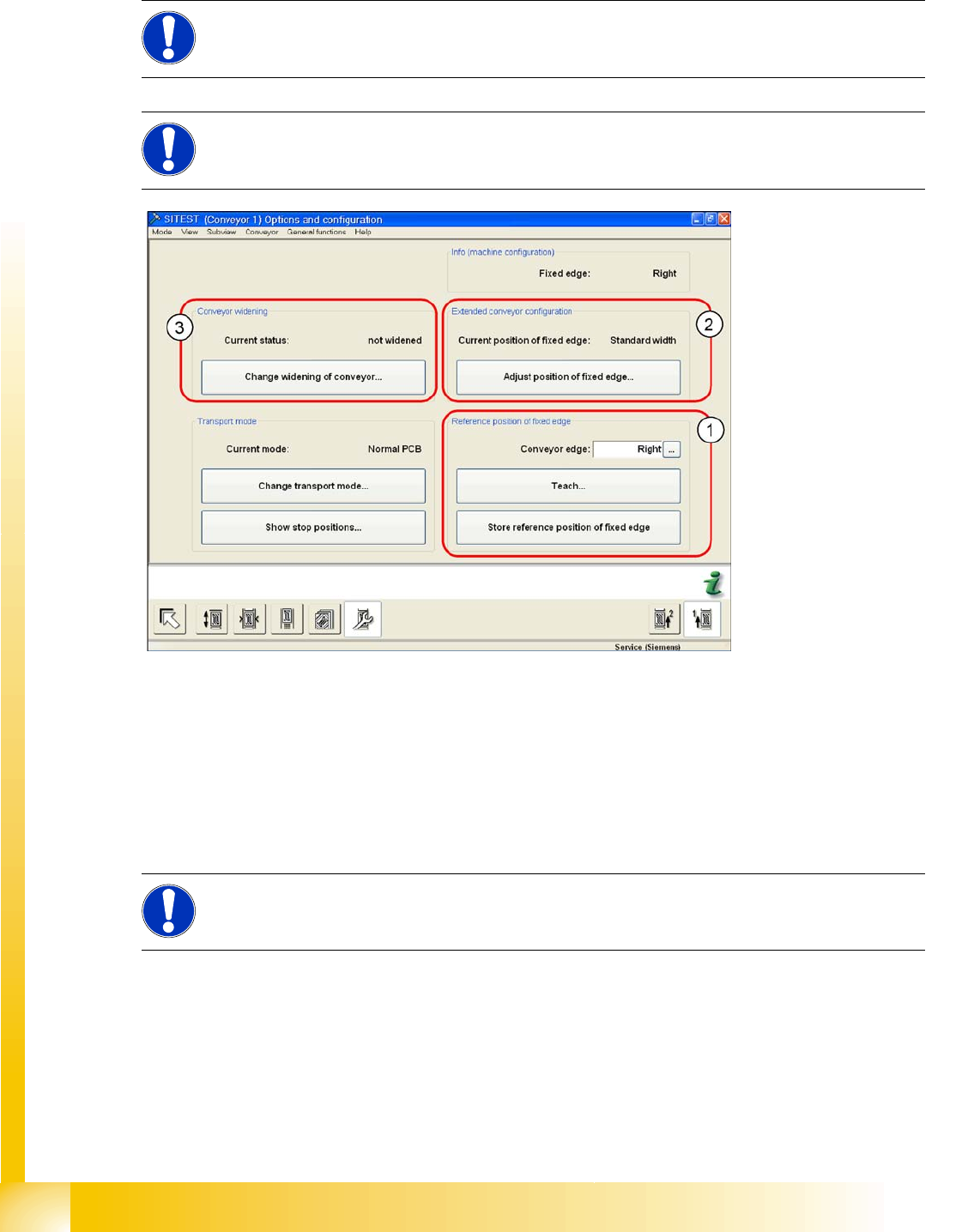
10-4: SITEST – conveyor "options and configuration"
See also:
J To (1): Reference Position of Fixed Side [J10-12]
J To (2), (3): Advanced Conveyor Configuration [J10-13]
J To (3): Widening the Conveyor (Flexible Dual Conveyor for Single Conveyor Mode) [J10-13]
J To (3): Converting the Single Conveyor Mode Back to Flexible Dual Conveyor Mode [J10-14]
J To (2): Setting the Fixed Conveyor Side for "Extra Wide" Mode [J10-15]
To (1): Reference Position of Fixed Side
The fixed conveyor side can be changed via SITEST and set to "Right side fixed"/"Left side fixed" as
required.
If the position of the fixed conveyor side which has been taught is saved, these values will be used
for the function
Move all conveyor edges to standard position
.
The default values will be overwritten and will need to be retaught.
If these dimensions are incorrectly set on the single or dual conveyor, the PCB reference corner may
be moved, leading to fiducial errors during placement.
NOTE:
In the SR/MC station SW, the fixed conveyor side of all lanes can be adjusted in the conveyor
firmware (flexible). However, this may only be set with the SITEST software.
NOTE:
If you want to change the conveyor mode from "widened" to "extra wide" (or vice versa), you
need to first move the conveyor back into standard mode and then select the new mode.
NOTE:
The menu (1) is protected with the Siemens Service password.
Modular Conveyor
Setting the Fixed Conveyor Side (Single and Dual Conveyor) Conveyor Settings
Student Guide Advanced Level 2 SIPLACE D Series
EN 05/2007 Modular Conveyor
10-13
To (2), (3): Advanced Conveyor Configuration
Two requirements for changing the fixed conveyor sides:
Extra wide conveyor: This moves the fixed conveyor side in D-series machines 25 mm (D3: X extra
wide 34 mm) outwards.
Widen conveyor:This moves the conveyor sides of the 2nd conveyor to the limit switch
In single conveyor mode, lane 1 of D-series machines can be set to widths of up to 380 mm (HF, X,
D3 lines up to 450 mm).
To (3): Widening the Conveyor (Flexible Dual Conveyor for Single Conveyor Mode)
X Select
Option and configuration
from the SITEST conveyor menu and then click on
Widen
conveyor
to widen the conveyor.
X The conveyor sides of the 2nd conveyor lane (right side fixed (lane 1 left side fixed)) are moved to
the limits.
X The SITEST SW ask for connecting the lifting tables.
Widening the board conveyor (from its standard width) allows you to use boards up to 380 mm wide.
If the PCB conveyor is switched from the mode "extra wide" to the mode "widened", this means that D-
series machine can place boards up to a width of approx. 400 mm (D3: approx. 420 mm).
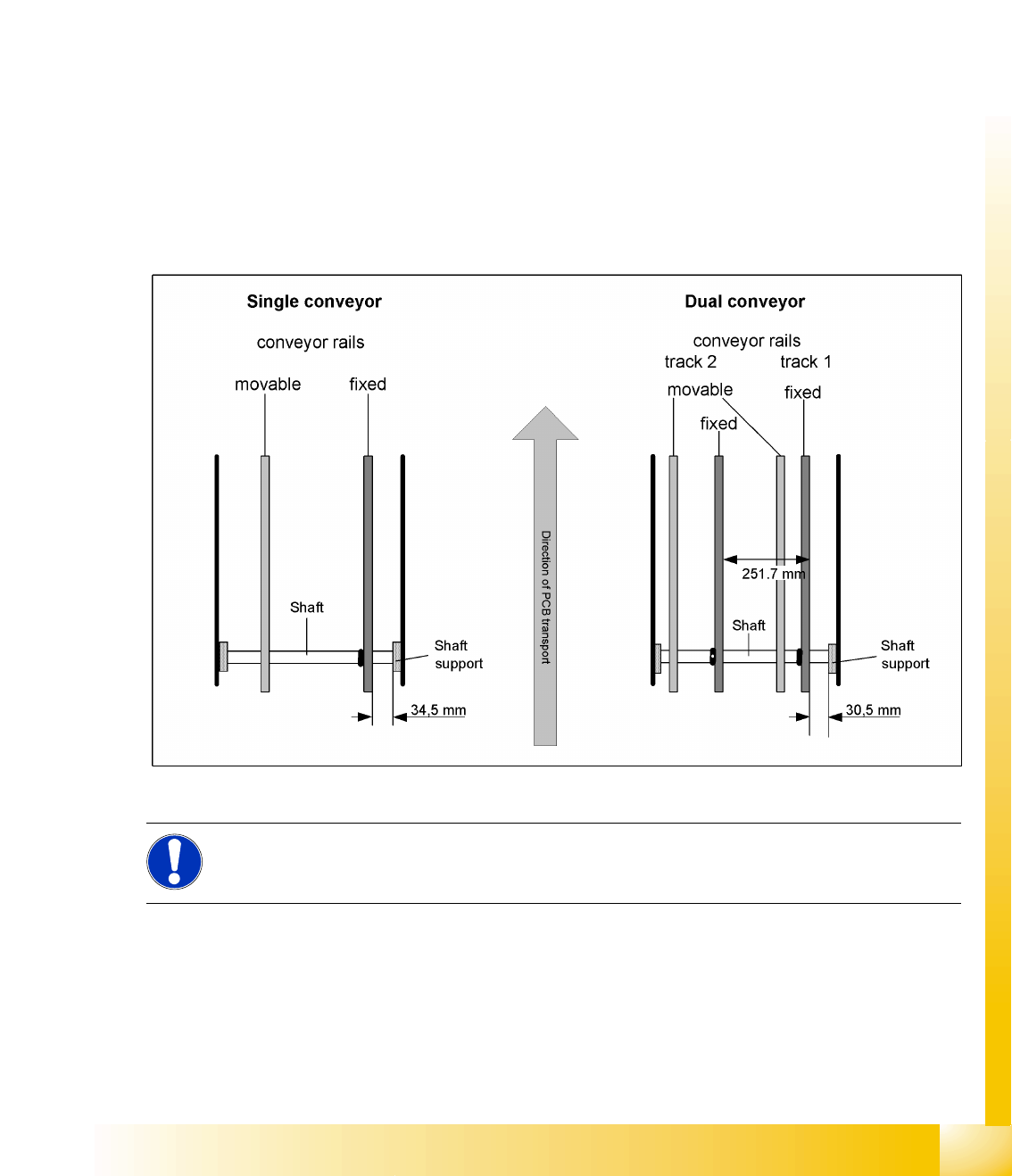
10-5: Setting the "fixed conveyor side" in SIPLACE D-Series
NOTE:
The fixed conveyor side should be adjusted only with the SITEST software and the width
adjustment devices. This ensures that the conveyor runs straight.