0197787-01_UM_HeadVerification_708_EN.pdf - 第21页
SIPLACE Head V erification User Manual Edition 01/2015 21 4.1.3 Explanation of Measurement Results Using Results PDF These results can b e seen if you scroll down th e "Summ ary" menu or generat e a results PDF…
SIPLACE Head Verification
User Manual Edition 01/2015
20
4.1.2 Explanation of Measurement Results in "Progress" Menu
After completion of the measurement, the following results appear in the "Progress" menu:
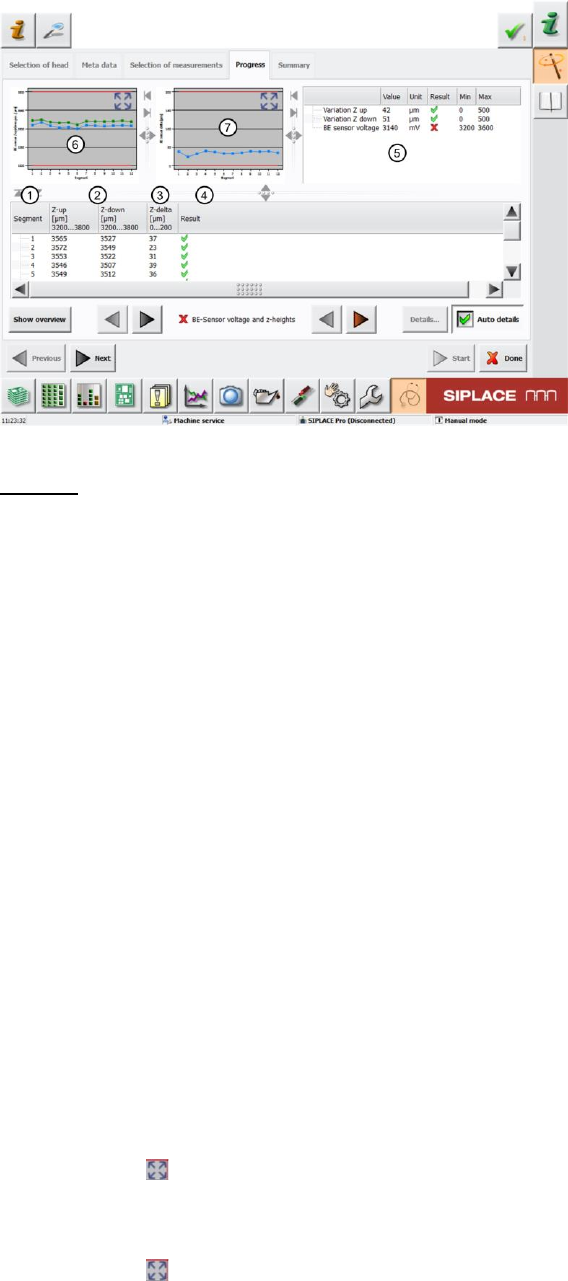
Figure 12: Component sensor voltage and z-heights result - Progress menu
Legend:
1. Segment measured
2. Value calculated for Z-down [µm] this value occurs when the nozzle interrupts the
component sensor laser beam during downwards movement. This value must be within a
plausible tolerance (in this case 3200..3800µm).
Value calculated for Z-up [µm] this value occurs when the nozzle releases the component
sensor again during upwards movement. This value must be within a plausible tolerance (in
this case 3200..3800µm).
3. The value for Z-delta [µm] is calculated using the difference between "Z-up" and "Z-down".
The "Z-delta" value describes the hysteresis of the complete system for this DP (segment).
This hysteresis value must be within a plausible tolerance (in this case 0..200µm).
0µm < Z-delta [µm] = Z-up [µm] – Z-down [µm] < 200µm
4. Results display (OK green tick / NOK red X)
5. The following values are displayed here:
a. Variation Z-up This value is determined from the difference between the lowest "Z-
up" (2) value and the highest "Z-up" (2) value. This value must be within a plausible
tolerance (in this case 0..500µm).
b. Variation Z-down This value is determined from the difference between the lowest
"Z-down" (2) value and the highest "Z-down" (2) value. This value must be within a
plausible tolerance (in this case 0..500µm).
c. BE sensor voltage This is the analog voltage value at the uncovered component
sensor.This value must be within a plausible tolerance, as defined for correct
functioning. In our example, the lower minimum tolerance value of 3200 has been
incorrectly programmed in the software (corrected from figure 126)
6. This diagram illustrates the segment values "Z-up" and "Z-down". Green line Z-up
Blue line Z-down
Red border Min and max tolerances (in our case 3200..3800µm)
Use the button to zoom in on the diagram.
7. This diagram illustrates the "Z-delta" hysteresis values for the segments.
Blue line Z-delta
Red border Min and max tolerances (in our case 0..200µm)
Use the button to zoom in on the diagram.
SIPLACE Head Verification
User Manual Edition 01/2015
21
4.1.3 Explanation of Measurement Results Using Results PDF
These results can be seen if you scroll down the "Summary" menu or generate a results PDF!
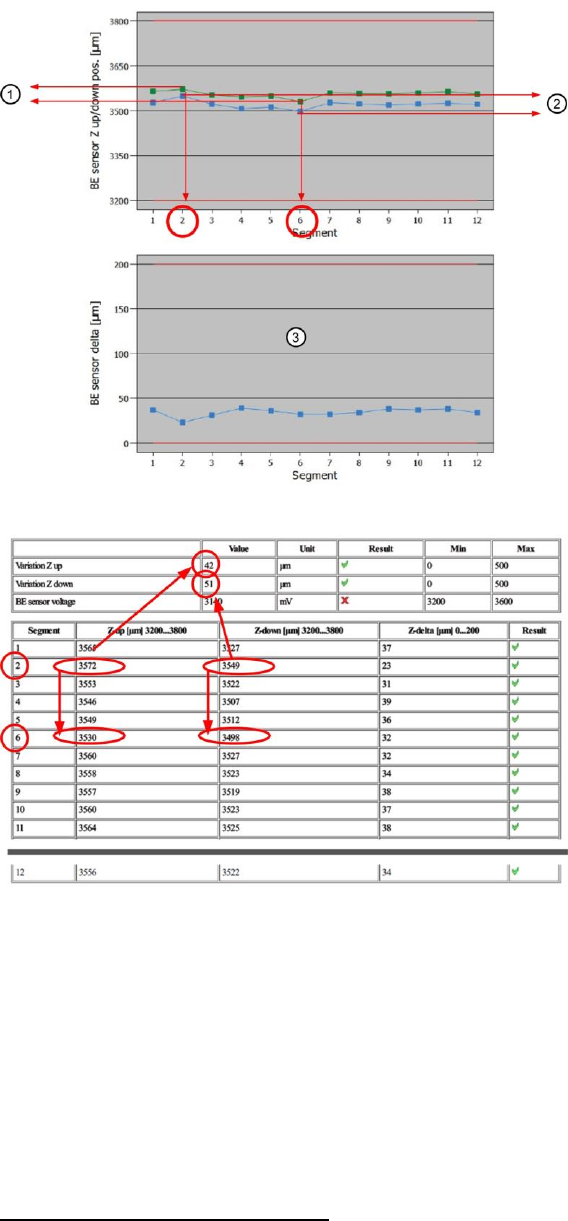
Figure 13: Results PDF for component sensor diagram
Figure 14: Component sensor table results
The "Variation Z-up" (1) value is calculated from the lowest "Z-up" value for segment 6 and the highest
"Z-up" value for segment 2! -> 3572µm – 3530µm = 42µm (1)
The "Variation Z-down" (2) value is calculated from the lowest "Z-down" value for segment 6 and the
highest "Z-down" value for segment 2! -> 3549µm – 3498µm = 51µm (2)
The hysteresis values for each segment "Z-delta" are calculated from the difference between "Z-up"
and "Z-down"! -> Segment 4 as example: 3546µm – 3507µm = 39µm (hysteresis)
4.1.4 Meaning of the Results
"Component sensor voltage" error
If the measured analog voltage value is under the plausible tolerance, the following causes and
measures apply:

SIPLACE Head Verification
User Manual Edition 01/2015
22
1. Dirty component sensor lens (prism)
Clean with cleansing tip and isopropyl alcohol
2. "Component sensor voltage value" check in the head "Single Functions"
If OK there, this error can be ignored here
3. Component sensor lens (prism) check for damage
To check the lens, hold a sheet of white paper between the transmitter and the receiver. A
red dot should be shown. If this is diffused, the lens is damaged.
Replace component sensor
4. Internal component sensor electronics defective
Replace component sensor
If the measured analog voltage value is above the plausible tolerance, the following causes apply:
5. Internal component sensor electronics defective
Replace component sensor
"Z-delta" / "Z-down" / "Z-up" error at all segments
1. The driver (jaws) of the Z axis has been displaced or moved
CPP: Replace front plate with Z motor assembly
CP20A: Replace Z axis assembly
CP20P: Replace Z unit assembly
CP20A: Readjust jaws (acc. to instructions)
2. Component sensor defective or dirty
Replace or clean the component sensor
"Z-delta" / "Z-down" / "Z-up" error at individual segments
1. Bad nozzle seat
Replace nozzle
Sight check, replace DP if necessary
2. Driver bearing on DP displaced
Replace the DP
3. Linear guide (segment guide) of DP displaced
CP20P/A: Replace the DP
CPP: Replace the segment guide