0197787-01_UM_HeadVerification_708_EN.pdf - 第23页
SIPLACE Head V erification User Manual Edition 01/2015 23 4.2 "Holding Circuit (Sealed No zzles)" Measuremen t The following tools are r equired for these m easurem ents: CPP: 12x nozzle t ype 2069 03094135- 01…

SIPLACE Head Verification
User Manual Edition 01/2015
22
1. Dirty component sensor lens (prism)
Clean with cleansing tip and isopropyl alcohol
2. "Component sensor voltage value" check in the head "Single Functions"
If OK there, this error can be ignored here
3. Component sensor lens (prism) check for damage
To check the lens, hold a sheet of white paper between the transmitter and the receiver. A
red dot should be shown. If this is diffused, the lens is damaged.
Replace component sensor
4. Internal component sensor electronics defective
Replace component sensor
If the measured analog voltage value is above the plausible tolerance, the following causes apply:
5. Internal component sensor electronics defective
Replace component sensor
"Z-delta" / "Z-down" / "Z-up" error at all segments
1. The driver (jaws) of the Z axis has been displaced or moved
CPP: Replace front plate with Z motor assembly
CP20A: Replace Z axis assembly
CP20P: Replace Z unit assembly
CP20A: Readjust jaws (acc. to instructions)
2. Component sensor defective or dirty
Replace or clean the component sensor
"Z-delta" / "Z-down" / "Z-up" error at individual segments
1. Bad nozzle seat
Replace nozzle
Sight check, replace DP if necessary
2. Driver bearing on DP displaced
Replace the DP
3. Linear guide (segment guide) of DP displaced
CP20P/A: Replace the DP
CPP: Replace the segment guide
SIPLACE Head Verification
User Manual Edition 01/2015
23
4.2 "Holding Circuit (Sealed Nozzles)" Measurement
The following tools are required for these measurements:
CPP: 12x nozzle type 2069 03094135-01 (vacuum nozzle red, closed)
CP20P: 20x nozzle type 4069 03106244-01 (vacuum nozzle red, closed)
CP20A: 20x nozzle type 1069 03094112-01 (vacuum nozzle red, closed)
4.2.1 Explanation of Measurement – Procedure
Firstly, a star axis reference run is performed to bring the axis into a defined position.
Vacuum is then applied to the holding circuit, so that each segment is in the state it would be in if, after
pickup, there was a component on the nozzle.This can be simulated by using the closed vacuum
nozzle.
The vacuum value for the holding circuit is then measured for each segment.
The results of these measurements provide feedback about the following sources of errors:
1. Defective filter disks
2. Vacuum hoses defective or dirty
3. Vacuum pump defective
4. Vacuum pump loop leaky
5. Holding circuit dirty
6. Leaky vacuum nozzle
7. Bad nozzle seat
4.2.2 Explanation of Measurement Results in "Progress" Menu
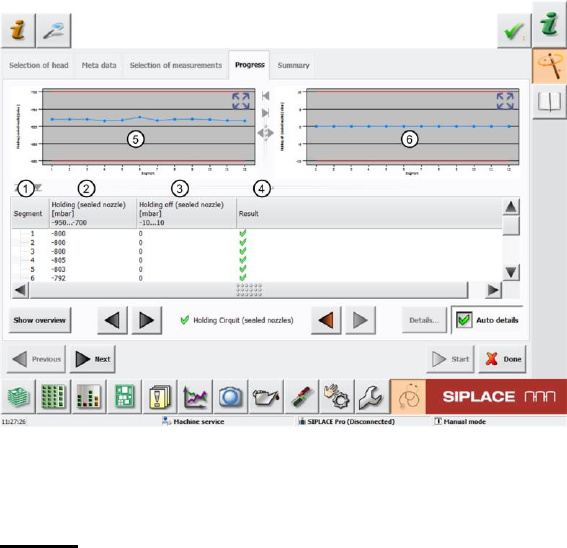
After completion of the measurement, the following results appear in the "Progress" menu:
Figure 15: Holding circuit (sealed nozzles) – Progress menu
The results shown are from measuring the holding circuit of a CPP head. The screen will look slightly
different for a CP20P/A, although the result is the same!
Legend:
1. Segment measured
2. Measured holding circuit vacuum value at the segment with closed vacuum nozzle in mbar.
The Holding (sealed nozzle) value must be within a plausible tolerance (in this case -950..-
700mbar).

SIPLACE Head Verification
User Manual Edition 01/2015
24
3. Holding circuit switched off, vacuum disabled. This measurement is used to check whether the
underpressure is reduced quickly, after the vacuum has been switched off. In an ideal case,
the pressure should be 0mbar (atmospheric pressure). The Holding off (sealed nozzle) value
must be within a plausible tolerance (in this case -10..10mbar).
This measurement is only performed for the CPP head.
This measurement is not performed for the CP20P/A and is therefore not shown in these
cases.
4. Results display (OK green tick / NOK red X)
5. This diagram illustrates the "Holding (sealed nozzle)" values for the segments.
Blue line Holding (sealed nozzle) in mbar for the individual segments
Red border Min and max tolerances (in our case -950..-700mbar)
Use the button to zoom in on the diagram.
6. This diagram illustrates the "Holding off (sealed nozzle)" values for the segments.
Blue line Holding off (sealed nozzle) in mbar for the individual segments
Red border Min and max tolerances (in our case -10..10mbar)
Use the button to zoom in on the diagram.
This diagram is only available for the CPP.
This diagram will not be shown for the CP20P/A.