0197787-01_UM_HeadVerification_708_EN.pdf - 第62页
SIPLACE Head V erification User Manual Edition 01/2015 62 4.11.2 Ex planation of Measurement Results in "Progress" Menu After com pletion of the measurem ent, the following res ults appear in the " Progres…
SIPLACE Head Verification
User Manual Edition 01/2015
61
2. Segment 1 is moved downwards with travel profile TP5 [TP5 LIGHT BARRIER]. The segment
has the rotary angle 0°.
3. The component sensor is monitored during the downwards movement.
As soon as the component sensor is interrupted by the nozzle tip, this value is saved as CS
pos 1 [µm]. This is now the value for the Z axis path, when the nozzle interrupts the
component sensor at segment 1 mit 0°.
4. When the nozzle meets the height reference run position of the conveyor side, the spring is
compressed in the segment and the Z down light barrier is activated by the switching ring.
This position is emitted as the end position signal. The value is saved as Measure 1 [µm] for
segment 1 mit 0°
5. Segment 1 is moved upwards with travel profile TP1.
6. Segment 1 is rotated by 60° 60° absolute
7. Segment 1 is moved downwards again with travel profile TP5 [TP5 LIGHT BARRIER]. The
segment has the rotary angle 60°.
8. The component sensor is monitored during the downwards movement.
As soon as the component sensor is interrupted by the nozzle tip, this value is saved as CS
pos 2 [µm]. This is now the value for the Z axis path, when the nozzle interrupts the
component sensor at segment 1 mit 60°.
9. When the nozzle meets the height reference run position of the conveyor side, the spring is
compressed in the segment and the Z down light barrier is activated by the switching ring.
This position is emitted as the end position signal. The value is saved as Measure 2 [µm] for
segment 1 mit 60°
10. Segment 1 is moved upwards with travel profile TP1.
11. Segment 1 is rotated again by 60° 120° absolute
12. Steps 2-5 are performed again.
13. This is repeated for the other absolute angles 180° / 240° / 300° / 360°.
14. The following measurements are reached for segment 1
Rotary angle 0° Component sensor value CS pos 1 [µm] & Z-Down LS Measure 1 [µm]
Rotary angle 60° Component sensor value CS pos 2 [µm] & Z-Down LS Measure 2 [µm]
Rotary angle 120° Component sensor value CS pos 3 [µm] & Z-Down LS Measure 3 [µm]
Rotary angle 180° Component sensor value CS pos 4 [µm] & Z-Down LS Measure 4 [µm]
Rotary angle 240° Component sensor value CS pos 5 [µm] & Z-Down LS Measure 5 [µm]
Rotary angle 300° Component sensor value CS pos 6 [µm] & Z-Down LS Measure 6 [µm]
You now have measurements for a complete segment rotation, in 60° steps.
15. Steps 2-14 are now performed for all other segments.
SIPLACE Head Verification
User Manual Edition 01/2015
62
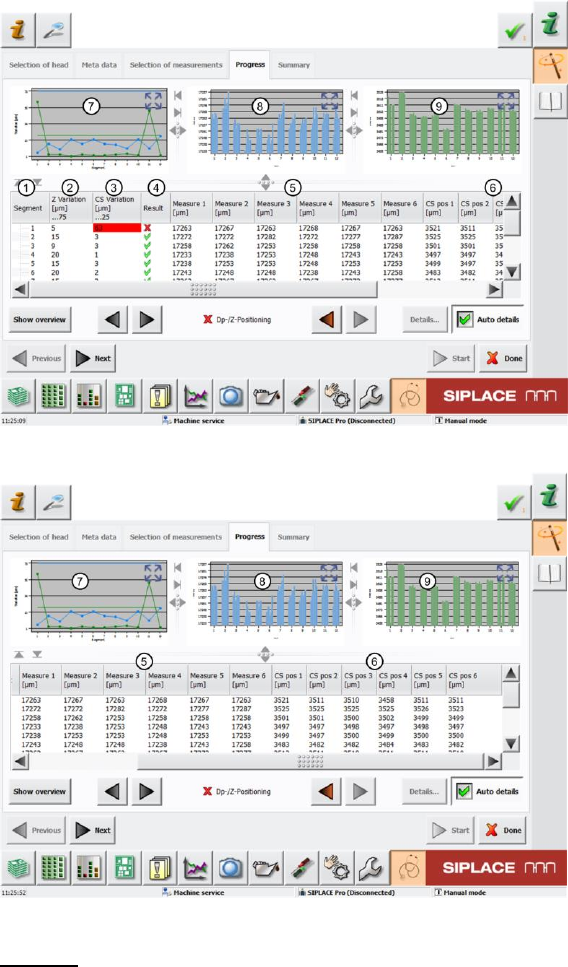
4.11.2 Explanation of Measurement Results in "Progress" Menu
After completion of the measurement, the following results appear in the "Progress" menu:
Figure 41: DP-Z positioning_1 result
Figure 42: DP-Z positioning_2 result
Legend:
1. Segment measured
2. Value determined Z Variation [µm] This value is calculated by finding the difference
between the minimum and maximum Measure 1 – Measure 6 value (end position signal Z-
down light barrier).
Z Variation [µm] = Maximum Measure 1-6 [µm] value – Minimum Measure 1-6 [µm] value
The Z Variation [µm] value shows the Z-down light barrier end position signal variance in
accordance with the rotary angle of the segment.
The "Z Variation [µm]" value must be within a plausible tolerance (in our case 0..75µm).
If the value is outside this tolerance, it is not possible to guarantee accurate placement at
every angle.
3. Value determined CS Variation [µm] This value is calculated by finding the difference
between the minimum and maximum CS pos 1 – CS pos 6 value (interruption of component
sensor).
CS Variation [µm] = Maximum CS pos 1-6 [µm] value – Minimum CS pos 1-6 [µm] value
SIPLACE Head Verification
User Manual Edition 01/2015
63
The CS Variation [µm] value shows the component sensor CS pos 1-6 variance in
accordance with the rotary angle of the segment.
The "CS Variation [µm]" value must be within a plausible tolerance (in our case 0..25µm).
If the value is outside this tolerance, it is not possible to guarantee accurate placement at
every angle.
4. Results display (OK green tick / NOK red X)
5. The values Measure 1 [µm] – Measure 6 [µm] are as follows:
Rotary angle 0° Light barrier Z-down measure 1 [µm]
Rotary angle 60° Light barrier Z-down measure 2 [µm]
Rotary angle 120° Light barrier Z-down measure 3 [µm]
Rotary angle 180° Light barrier Z-down measure 4 [µm]
Rotary angle 240° Light barrier Z-down measure 5 [µm]
Rotary angle 300° Light barrier Z-down measure 6 [µm]
6. The values CS pos 1 [µm] – CS pos 6 [µm] are as follows:
Rotary angle 0° Component sensor value CS pos 1 [µm]
Rotary angle 60° Component sensor value CS pos 2 [µm]
Rotary angle 120° Component sensor value CS pos 3 [µm]
Rotary angle 180° Component sensor value CS pos 4 [µm]
Rotary angle 240° Component sensor value CS pos 5 [µm]
Rotary angle 300° Component sensor value CS pos 6 [µm]
7. This diagram illustrates the "Variation [µm] (2)" values for the segments.
Blue line Z Variation [µm]
Green line CS Variation [µm]
8. This diagram illustrates the "Measure1" – "Measure6" values for the segments.
Blue bar one bar each for "Measure1(0°)" – "Measure6 (300°)"
If the Z-down light barrier is working reliably, the bars should
ideally be the same height or have little variance to the other
segments.
9. This diagram illustrates the "CS pos 1" – "CS pos 6" values for the segments.
Green bar one bar each for "Measure1(0°)" – "Measure6 (300°)"
If the component sensor is working reliably, the bars should ideally
be the same height or have little variance to the other segments.