YS24 保养手册.pdf - 第20页
3-18 3 Periodic maintenance items 3.2 Cleaning and lubricating the inside of the spline shaft Dust or grime ma y adhere to the air path of spline shafts and cause component pickup or mounting errors. Although depending o…
3-17
3
Periodic maintenance items
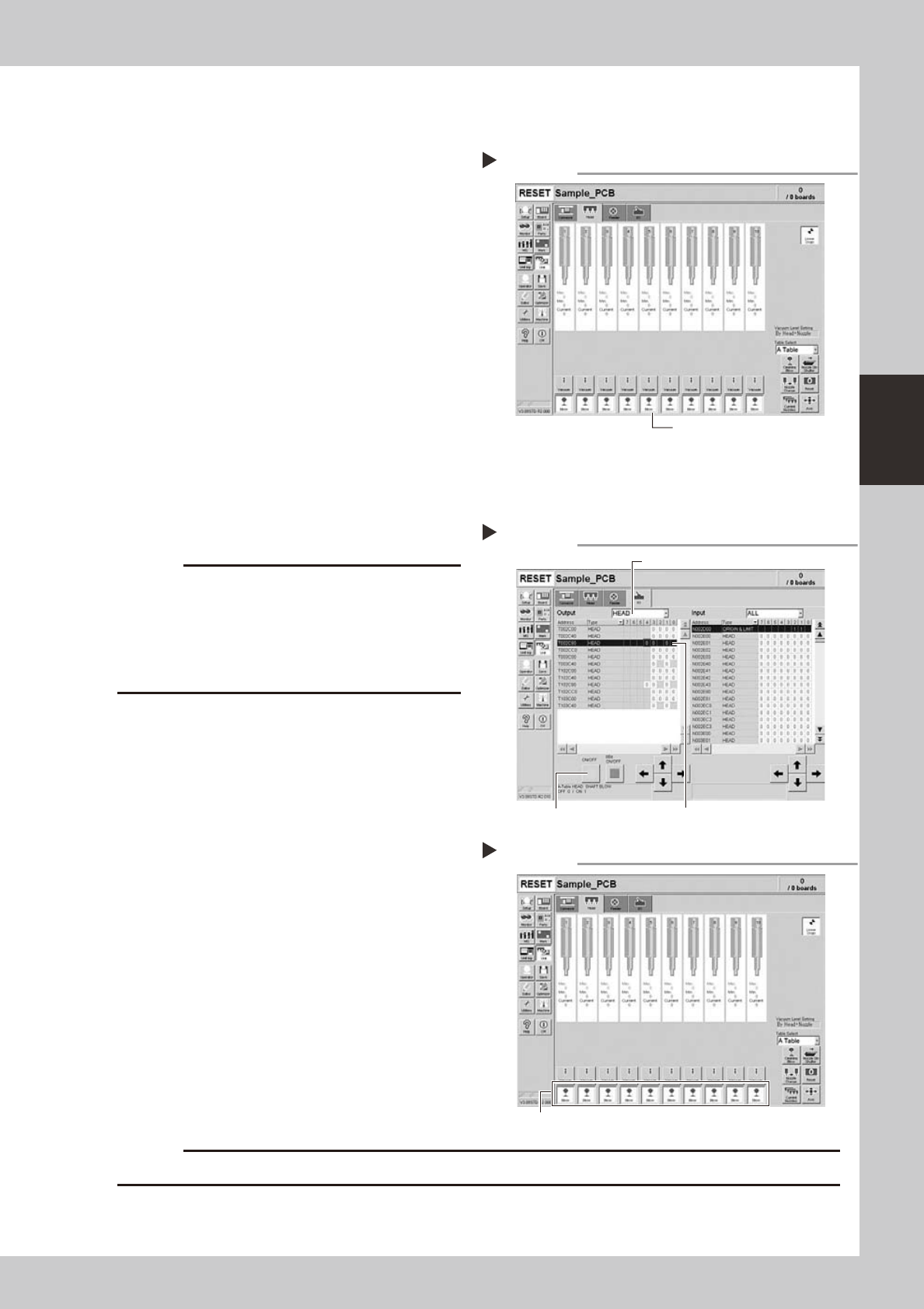
3.1.2 Checking the blow valve operation (each head)
Check the blow level of each ejector of the ejector unit to see if it is working correctly.
1
Check that the blow air is being
exhausted correctly.
To check if the blow air is being uniformly
exhausted from each air joint on the lower
part of the ejector unit, open the [Unit]-
[Head] tab and press the [Blow] button for
each head.
54307-L2-00
3.1.3 Checking the cleaning blow valve operation (for all heads)
Check that the cleaning blow function for the spline shafts is working correctly.
1
Remove the nozzles from all heads.
c
A strong air flow is exhausted during the cleaning blow.
Always remove all nozzles attached to the heads
before starting the cleaning blow. Starting the cleaning
blow while the nozzles are still attached may blow the
nozzles away from the heads causing the nozzles to
break or become lost.
2
Operate the cleaning blow valves.
1. Open the [Unit]-[I/O] tab.
2. Select [Head] from the Output dropdown
list and select an appropriate address for
the head shaft blow.
A-table: T002C804
B-table: T102C804
3. Press the [ON/OFF] button
to operate the
cleaning blow valves of all heads.
Change the address and operate the
blow valves for all tables.
54313-L2-00
3
Check the exhaust blow air of each
head.
Open the [Unit]-[Head] tab. Press the [Blow]
button of each head to check the exhaust
blow air from each head.
54308-L2-00
4
Turn OFF the cleaning blow valves.
c
Checking the exhaust blow air
Step 3
Press the [Blow] button for each head.
Operating the cleaning blow valves.
Step 2
Press the [ON/OFF] button. Select an address.
Select a head.
Checking the negative pressure
[Blow] button
Step 1
3-18
3
Periodic maintenance items
3.2 Cleaning and lubricating the inside of the spline shaft
Dust or grime may adhere to the air path of spline shafts and cause component pickup or mounting errors.
Although depending on the air supply condition and operating time, the inside of each spline shaft should be
cleaned once every 3 months.
c
3.2.1 Cleaning the inside of the spline shaft
e
1
Make the preparations for the
cleaning and lubricating work.
1. Take off all accessories susceptible to the
magnetic fields, such as a wristwatch
and/or magnetic ID card.
2. Press the emergency stop button to put
the machine in the emergency stop
state.
3. Put square bandages on the Y-axis linear
guide and push-up plate.
4. Move the head to a convenient position
for maintenance work.
n
NOTE
Move the scan camera to the right or left away from
the head assembly so that the scan camera will not get
dirty.
2
Remove the nozzles from all heads.
Remove all nozzles by hand.
TIP
When the machine is equipped with a nozzle station
(option), press the [Nozzle Change] button on the
[Unit]-[Head] tab screen to retract all nozzles.
3
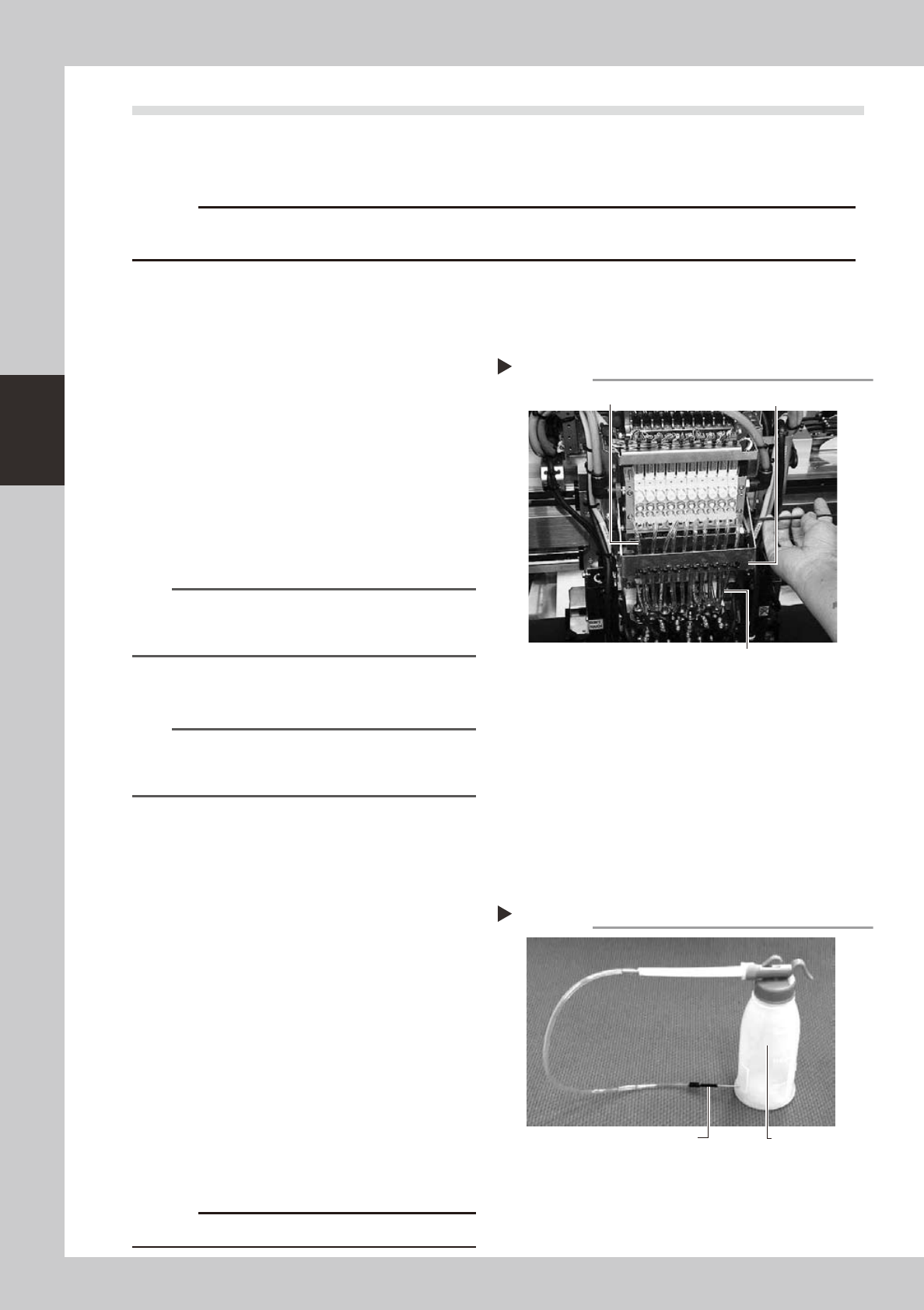
Disconnect the air hose from each
spline shaft.
Disconnect all air hoses which have been
inserted into the ejector side (upper) and
spline side (lower) of each head.
53318-L2-00
4
Remove the air hose bracket.
Remove the bolts (2 pcs.) securing the air
hose bracket with the hex wrench or
T-handle hex wrench. After that, remove the
air hose bracket completely.
5
Prepare the cleaning kit (KHN-
M8860-00X).
1. Pour IPA (isopropyl alcohol) into the
container of the cleaning kit.
2. Place a shop cloth or rag under the
spline shaft to be cleaned.
53319-L2-00
c
Disconnecting the air hoses
Step 3, 4
Air hose (spline side)
Air hose bracket
Air hose (ejector side)
Cleaning kit
Step 5
Pump (IPA container)
Nozzle
3-19
3
Periodic maintenance items
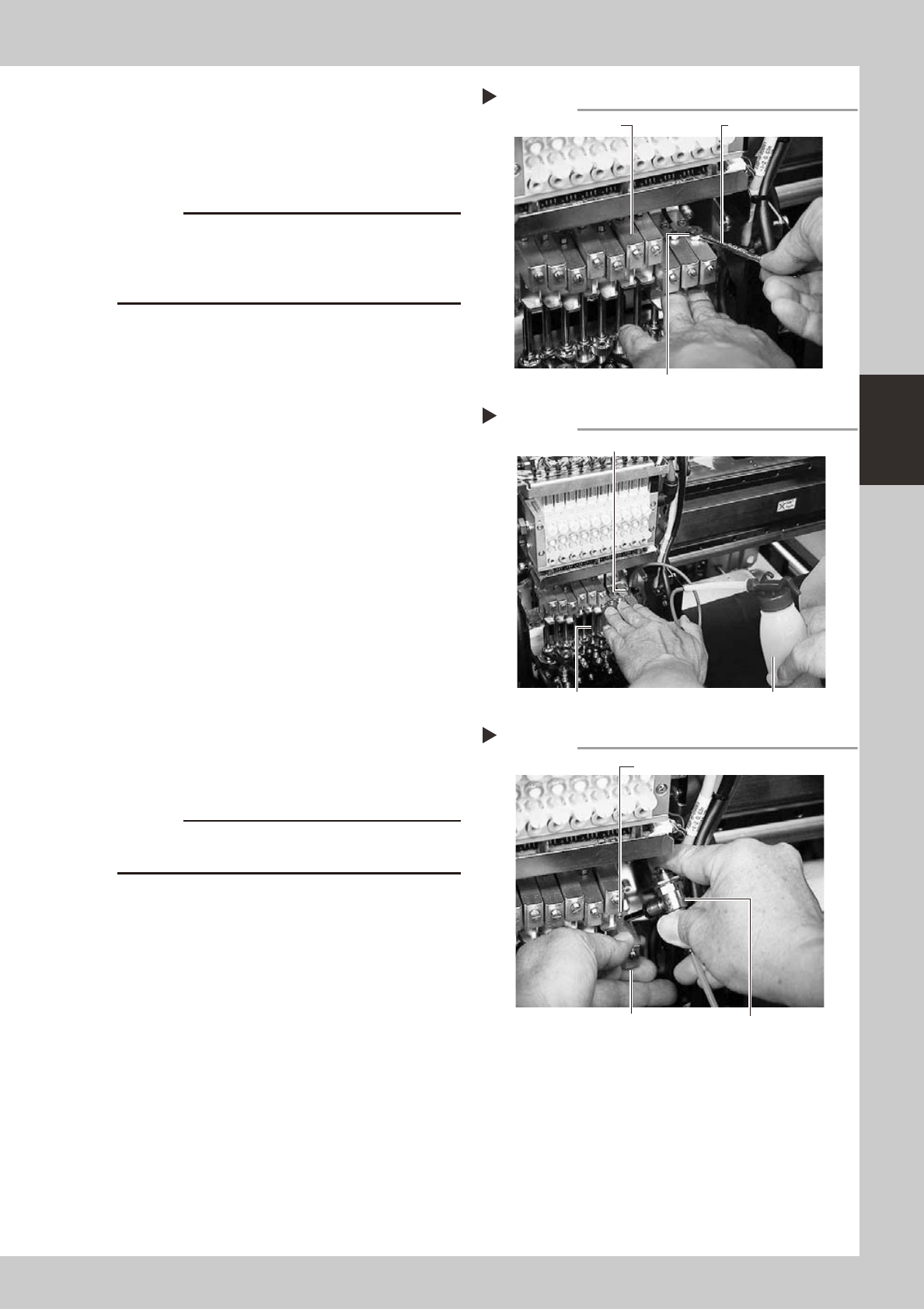
6
Remove the cap bolt for spline
shaft cleaning.
Use the precision wrench (supplied) to
remove the cap bolt (hex head bolt).
53321-L2-00
c
not to drop it.
a new one.
7
Clean the inside of the spline shaft.
1. Insert the nozzle of the cleaning kit into
the cleaning hole of the spline shaft.
2. Pour alcohol (IPA) into the spline shaft air
path to clean away dust and grime.
53322-L2-00
8
Blow air into the spline air path.
1. Prepare an air blow tool (available as
option) and connect it to an air
connector on a nearby machine. Then
insert the air blow tool nozzle into the air
joint of the spline shaft.
2. Place a shop cloth under the lower end
of the spline shaft, and blow air through
the spline shaft while blocking the lower
hole with your finger.
3. Repeat steps 7 and 8 until the IPA flowing
out from the spline shaft becomes clean.
Make sure that after blowing air, smear
no longer appears on the shop cloth
placed under the lower end of the spline
shaft, and then reattach the cap bolt.
53334-L2-00
c
to wear safety goggles.
9
Repeat the cleaning procedure.
Repeat steps 6 to 8 to clean the inside of
the spline shafts of all heads.
0
Reinstall the air hose and nozzle
back to their original positions.
Removing the cap bolt
Step 6
Precision wrench (supplied)
Cap bolt
Upper block of spline shaft
Cleaning the spline shaft
Step 7
Nozzle of cleaning kit
Spline shaft Pump of cleaning kit
Air blow into spline shaft
Step 8
Blow the air from this hole.
Air blow tool
Block the lower hole with your finger.