Process Lens PL Service Manual_EN.pdf - 第27页
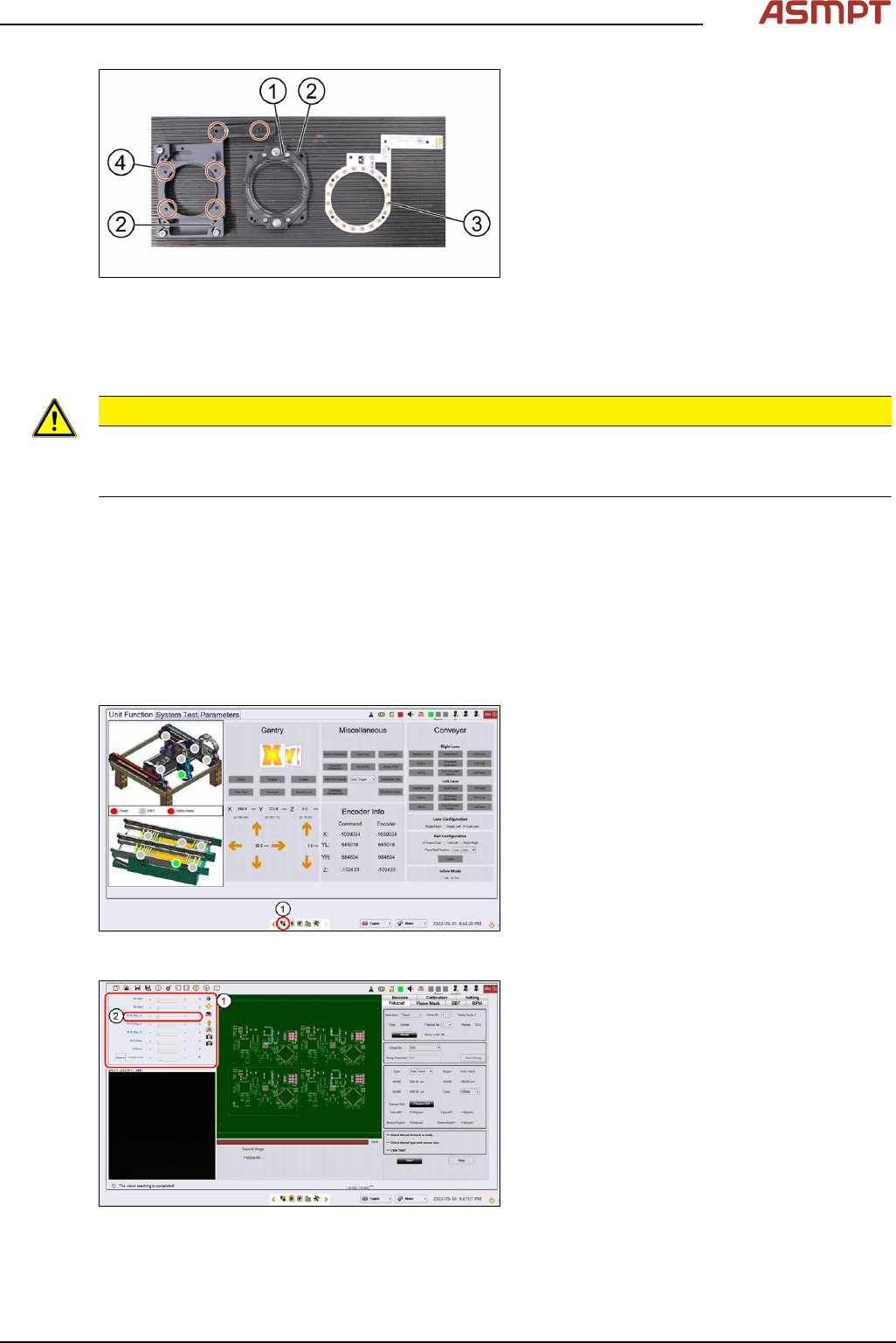
3 Replacing spare parts Se rv ic e Ma nu al P ro ce ss L en s PL - 0 3/ 20 25 27 Fig.15: Removing the high ring light board 1. High ring light assembly 2. Dowel pin 3. High ring light board 4. Screws ► Remove the six sc…
3 Replacing spare parts
26 Service Manual Process Lens PL - 03/2025
3.1.1.3 Replacing the high ring light board
Parts
03122924-xx High ring light board
Equipment and tools
●
Allen key size 1.5
●
Allen key size 2.5 (T shaped)
●
Philips screwdriver
Requirements
●
Machine is switched off.
●
It is advisable to dismantle the low ring light assembly as well for better access.
●
Use a T shaped Allen key to carry out this task.
Removal
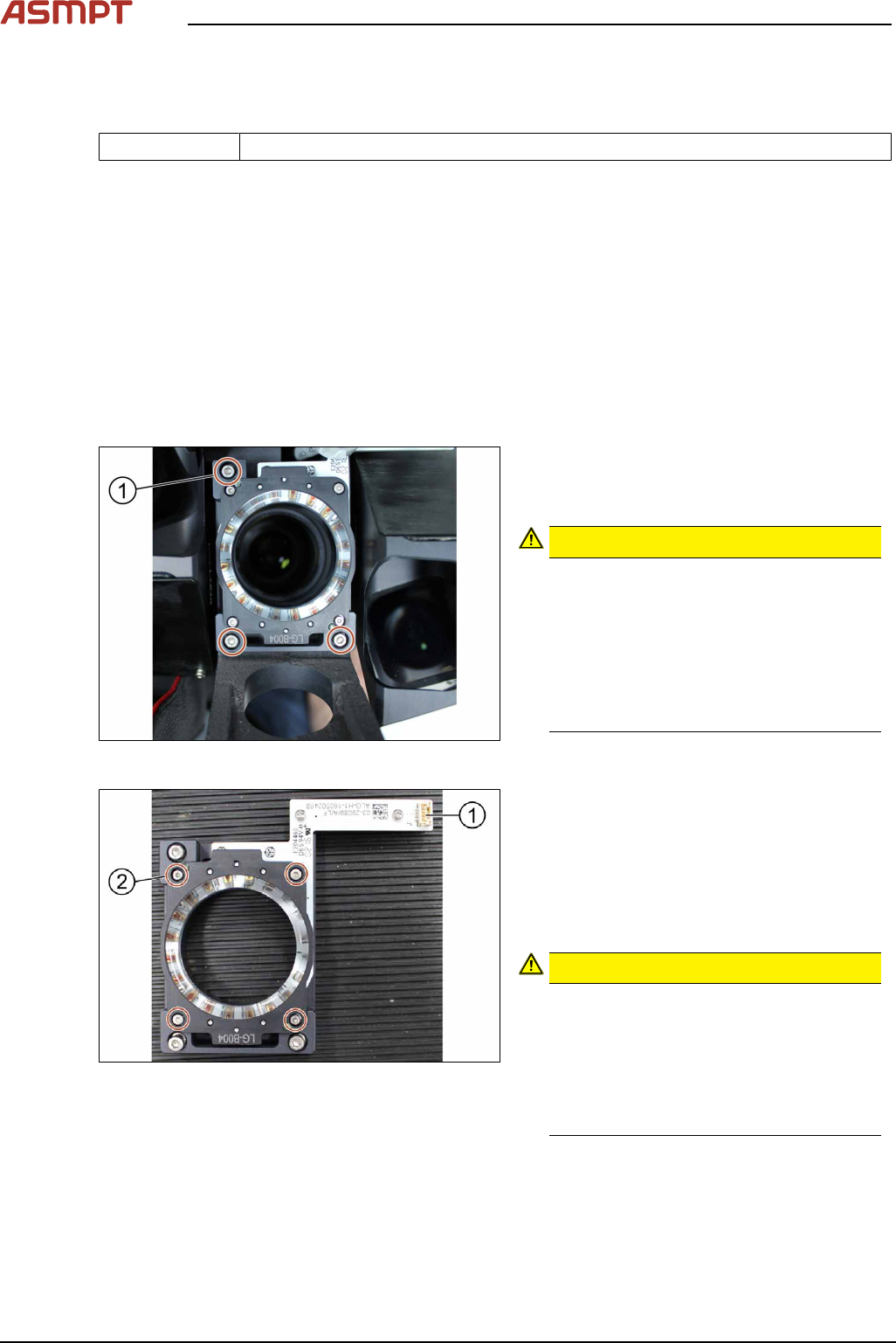
Fig.13: Removing the screws
► Unplug the connector
► Remove the three screws (1) using an
Allen key size 2.5.
CAUTION!
Small screws
The screws are very small. When the
screws fall into the machine they may
damage it.
Make sure the screws don’t fall into the
machine.
Make sure no screw is left behind inside
the machine.
.
Fig.14: Removing the connector
1. Connector
2. Screw (4 x) and washers (4 x)
► Remove the four screws (2) using an Allen
key size 1.5.
► Remove the four washers.
► Separate the high ring light assembly.
CAUTION!
Ring light assembly
The two parts of the ring light assembly
are hold together by two dowel pins.
When separating the two parts the ring
light assembly may get damaged.
To separate the two parts, carefully pull
the parts apart.
.
3 Replacing spare parts
Service Manual Process Lens PL - 03/2025 27
Fig.15: Removing the high ring light board
1. High ring light assembly
2. Dowel pin
3. High ring light board
4. Screws
► Remove the six screws(4) that hold the
high ring light board(3) in place using a
Philips screwdriver.
► Remove the high ring light board(3).
Installation
Follow the removal instructions in reverse order for installation. Also observe the following instructions.
CAUTION
Do not overtighten the screws
When the high ring light board is reassembled, one must not overtighten the screws, as this may
damage the high ring light board.
3.1.1.4 Checking the function of the low ring light and the high ring light
Requirements
●
Machine is switched on.
●
Machine doors are open.
●
The low ring light and the high ring light are mounted.
Checking the function
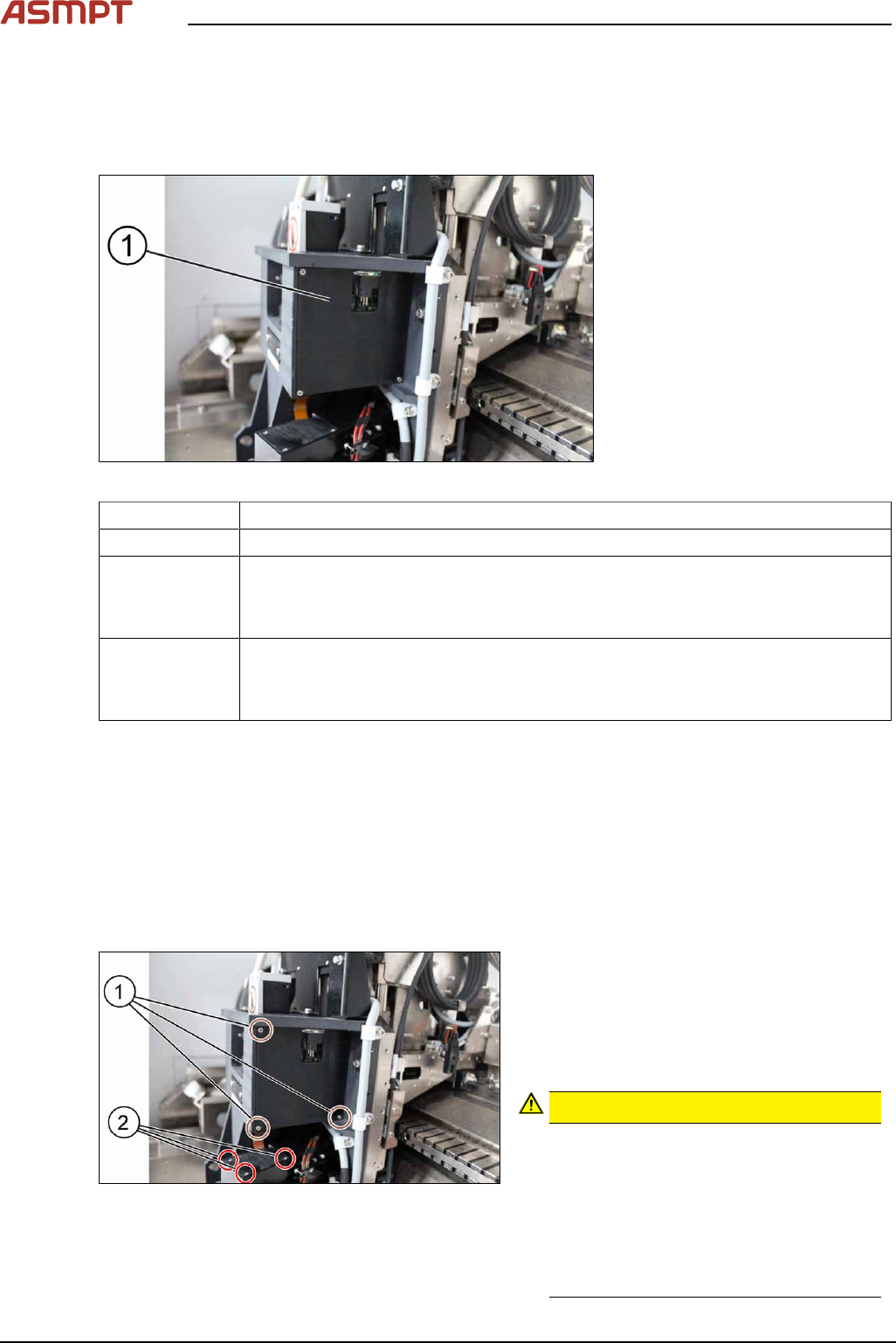
Fig.16: Control button
► Go to the diagnostic pages and press the
control button(1).
Fig.17: Lighting control page
► On the Lighting control page click on the
lighting control button.
► The Lighting box(1) is displayed.
► In the 2D Lighting Setup section push the
slider to the right.
► Starting with slider bar M-Ring_G(2)
check the green light of the low ring light.
► Check if all LEDs are functional and flash-
ing by using a mirror or view from under-
neath the optical head.
► Approach the same for all other slider bars
in that section.
3 Replacing spare parts
28 Service Manual Process Lens PL - 03/2025
3.1.2 DLP
3.1.2.1 Replacing the DLP left and right controller
Parts
Fig.18: Right DLP module (1)
03139342-xx In-house left DLP module
03139345-xx In-house right DLP module
03250887-xx DLP Controller Left G2
●
Single Lane: PL-0144 and above
●
Dual Lane: PD0030 and above
03250888-xx DLP Controller Right G2
●
Single Lane: PL-0144 and above
●
Dual Lane: PD0030 and above
Equipment and tools
●
Allen key size 1.5
●
Allen key size 2.0
●
Philips screwdriver
Requirements
●
Machine is switched off.
Removal
Fig.19: Removing the screws
► Remove the three screws(1) using a
Philips screwdriver to remove the cover of
the DLP module (circuit board).
► Remove the three screws(2) using a
Philips screwdriver to remove the cover of
the DMD module (connector).
CAUTION!
Small screws
The screws are very small. When the
screws fall into the machine they may
damage it.
Make sure the screws don’t fall into the
machine.
Make sure no screw is left behind inside
the machine.
.