Process Lens PL Service Manual_EN.pdf - 第90页
3 Replacing spare parts 90 Se rv ic e Ma nu al P ro ce ss L en s PL - 0 3/ 20 25 Fig.118: Pulling out the pinion gear drive ► From the rear of the rail, push the pinion gear drive out. Fig.119: Pulling off the bearing …
3 Replacing spare parts
Service Manual Process Lens PL - 03/2025 89
Equipment and tools
00386253‑xx Torque screwdriver ESD 0.4 - 1.0Nm
03078706‑xx Bit holder for screwdriver TorqueVario
00326015‑xx Belt tension measuring device
00353832-xx Allen key set
Bit, size 4
If required:
Magnet lifter or tweezers and adhesive tape
Measuring scale
Removal
CAUTION
Toothed belt
► Make sure that the toothed belt is not folded or otherwise damaged.
► Use the software or manually move the conveyor rail into a position which allows you best
access.
– To move the conveyor rail manually, pull the toothed belt of the width adjustment unit.
– Make sure that the rear side of the conveyor rail is also accessible.
► Switch off the machine, disconnect it from the power supply and secure it to prevent unauthorized
reactivation.
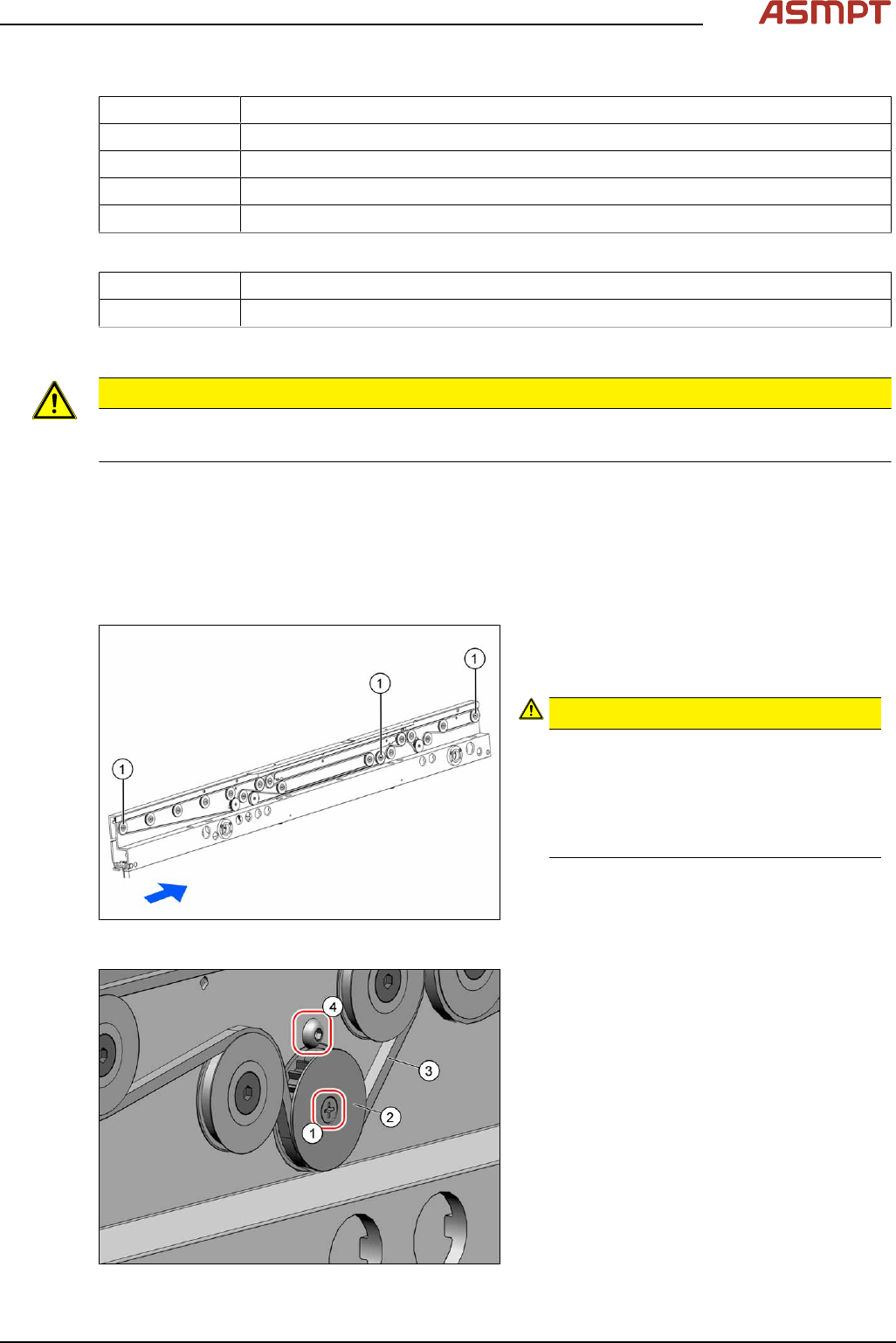
Fig.116: Movable idler pulleys
► Loosen the fixing screw of the relevant
movable idler pulley(1) to release the ten-
sion of the belt.
CAUTION!
Loosen the movable idler pulley only
as far as necessary!
Do not remove the movable idler pulley
(unless you explicitly need to remove it).
Otherwise the T slot nut on the inner side
fall into the conveyor rail.
.
See also Replacing the idler pulley (conveyor
belt)
Fig.117: Washer
► Remove the fixing screw(1) (cross head)
and take off the washer(2).
► Remove the toothed belt(3).
► Remove the fastening screw(4) (Allen).
3 Replacing spare parts
90 Service Manual Process Lens PL - 03/2025
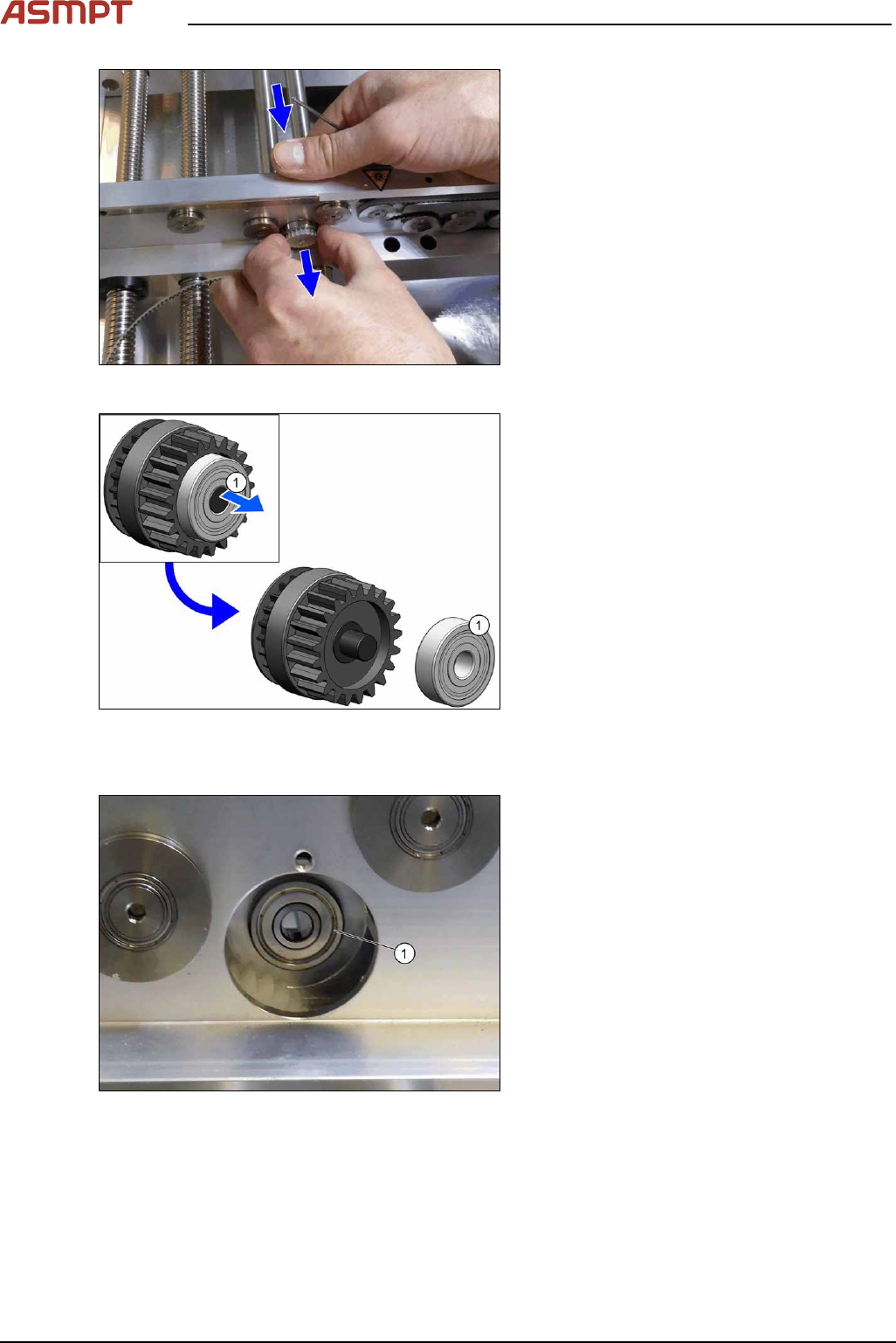
Fig.118: Pulling out the pinion gear drive
► From the rear of the rail, push the pinion
gear drive out.
Fig.119: Pulling off the bearing
► Pull the bearing(1) off the pinion gear
drive.
Installation
Fig.120: Inserting the bearing
► Insert the bearing(1) into the rail.
Make sure that the bearing does not fall
into the rail.
3 Replacing spare parts
Service Manual Process Lens PL - 03/2025 91
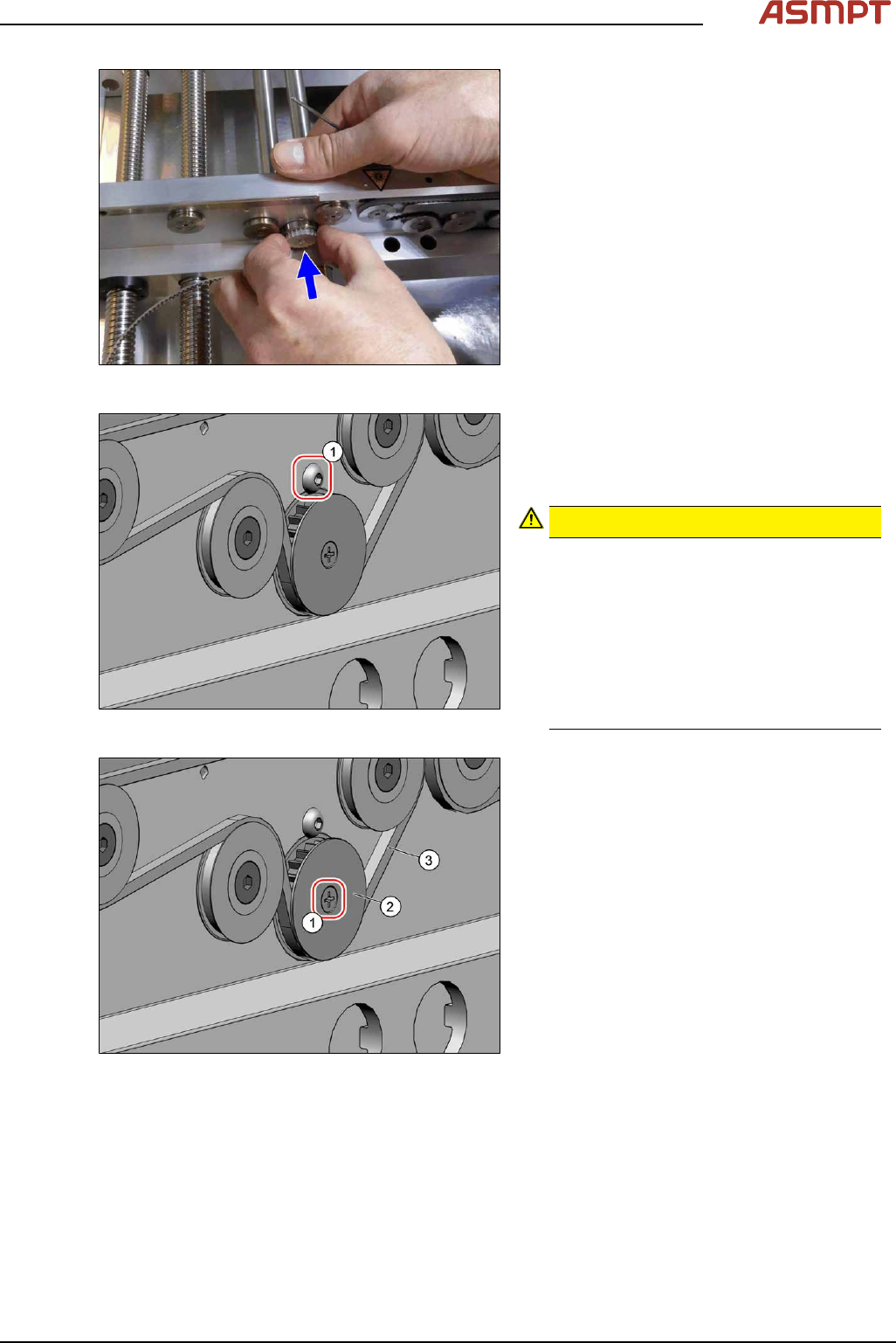
Fig.121: Inserting the pinion gear drive
► Insert the pinion gear drive.
Fig.122: Screw
► Secure the pinion gear drive with the
screw(1) (Allen, DIN EN ISO 7380-M3x4-
A2-70 [03074775‑xx]). Tighten the screw
with a torque of 0.58Nm.
CAUTION!
Make sure that you do not tighten the
screw too much. This could cause irre-
parable damage to the conveyor!
The corresponding threads are only in 1.5
to 2mm thick plates and could be dam-
aged if you use a torque which is too high.
For this reason, avoid using screws which
are too short. Use a measuring scale to
check, if needed!
.
Fig.123: Screw
► Thread in the toothed belt(3).
Make sure that the toothed belt is posi-
tioned accurately in the guidance on the
motor shaft or in the belt drive.
► Fix the washer(2) with the screw(1)
(cross head).
► When you tighten the idler pulley, set the tension of the toothed belt.
Setting the tension of the conveyor toothed belt