CP43维护手册.pdf.pdf - 第162页
Chapter 20 Memory Board Installation (5) T urn on the power and boot up the machine. (6) Press [SET], [MANUAL] and [VISION]. An ID code must be enter ed to access vision commands. (7) Press [INST ALL]. (8) Press [INITIAL…
20 – 1
Version 7.0
Chapter 20 Memory Board Installation
20.Memory Board Installation
The user must initialize memory board RAM when a new board is
installed. Initialize new boards only. Do not initialize a memory board
that contains data.
20.1Initializing Memory Board RAM
Follow the steps below to initialize memory board RAM.
(1) Turn on the power and boot up the machine. Delete all production
programs from machine memory using the MCS “Delete M/C
program” command in the Transmission menu.
Note: Refer to the MCS/2 System Instruction Manual, Part 3, for a
detailed explanation of the “Delete M/C program” command.
(2) Turn the machine power off. Open the control box and put on the
anti-static wristband.
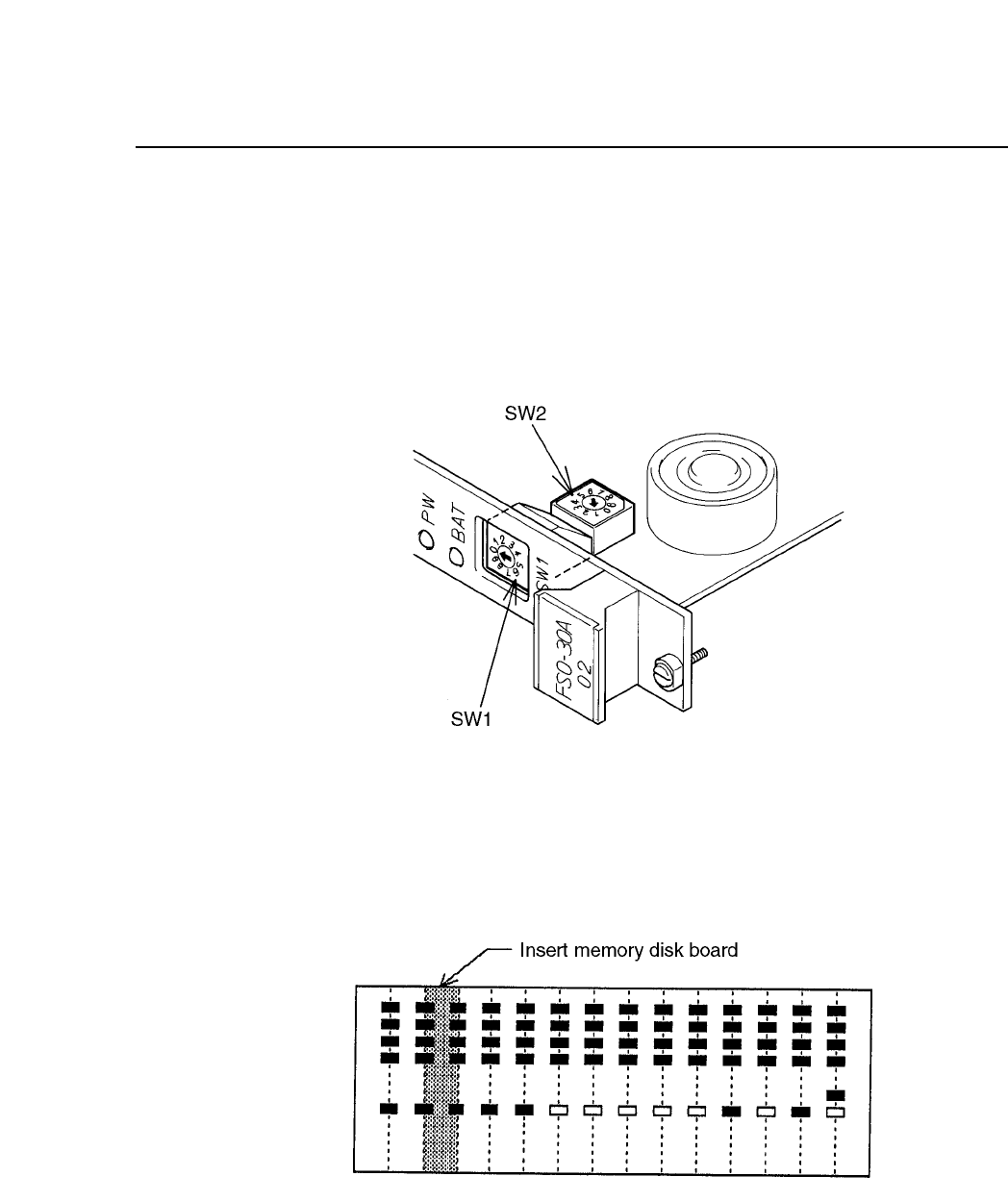
(3) Make sure that the SCSI ID switch settings on the board are correct
and that the jumpers on the VME rack are shorted. Mount the
memory board in the VME rack in the designated position.
Note: See section 4.5 for an explanation of SCSI ID switch settings and
VME rack jumpers.
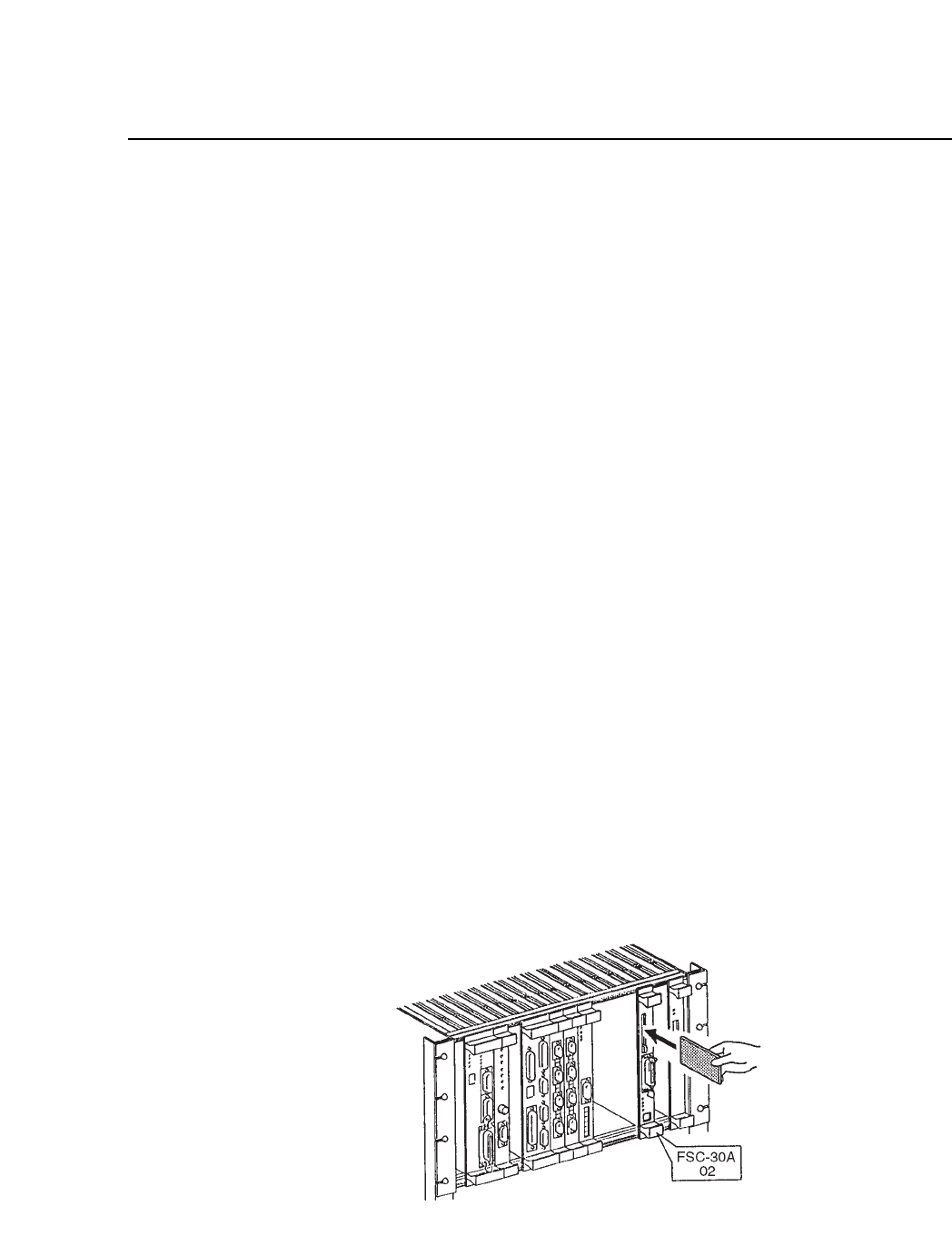
(4) Insert the vision software ROM memory card in the memory card slot
until the eject button sticks out. Attach the SCSI cable to the connector
on the board, as shown below.
Fig. 20-1 Attaching the SCSI Cable to the Board
CP IV-3 Maintenance

Chapter 20 Memory Board Installation
(5) Turn on the power and boot up the machine.
(6) Press [SET], [MANUAL] and [VISION]. An ID code must be entered
to access vision commands.
(7) Press [INSTALL].
(8) Press [INITIALIZE].
(9) Press [START] to initialize memory board RAM.
(10)After RAM is initialized, measure camera Proper data or load it from
a backup SRAM memory card.
Note: Refer to section 2.2 for instructions on loading camera Proper data
from SRAM memory card. Be especially careful to carry out the
procedures to confirm that data has loaded successfully. Be sure to
remove the SRAM memory card from the memory board and insert
the original ROM memory card before rebooting the machine.
(11)Turn off the power, then turn it back on and boot up the machine.
(12)Transmit a program from MCS to the machine and measure nozzle
centers.
20 – 2
Version 7.0
CP IV-3 Maintenance
20 – 3
Version 7.0
Chapter 20 Memory Board Installation
20.2SCSI ID and Jumper Settings
The SCSI ID switches on the memory board are set before the board is
shipped. The user normally has no need to set them. SW 1 is set to zero
and SW 2 to 1, as shown below. If for any reason the switches are not set
correctly, reset them as illustrated.
Fig. 20-2 SCSI ID Settings
The memory board does not communicate over the VME bus. When
installing a new memory board, confirm that the VME rack jumpers are
shorted as shown below.
Fig. 20-3 VME Rack Jumpers
CP IV-3 Maintenance