00197463-03_SM_CPP_Customer_EN.pdf - 第55页
5 Front plate, star, Z axis and smoothed distributor disc 5.5 Replacing the Single Core Solution (SCS)[03054790Sxx] (only for heads fromFS05) Service Manual SIPLACE Multistar (CPP / CPP M) 02/2018 55 Fig.82: Removing t…
5 Front plate, star, Z axis and smoothed distributor disc
5.5 Replacing the Single Core Solution (SCS)[03054790Sxx] (only for heads fromFS05)
54 Service Manual SIPLACE Multistar (CPP / CPP M) 02/2018
Removal
► If required, dismantle the front plate.
5.1 "Replacing the front plate [03061102-xx]" [}35]
► Remove the star.
5.2 "Removing and fitting the star (only for heads from FS05 upwards)" [}43]
► Remove the holding circuit.
8.4 "Replacing the holding circuit" [}101]
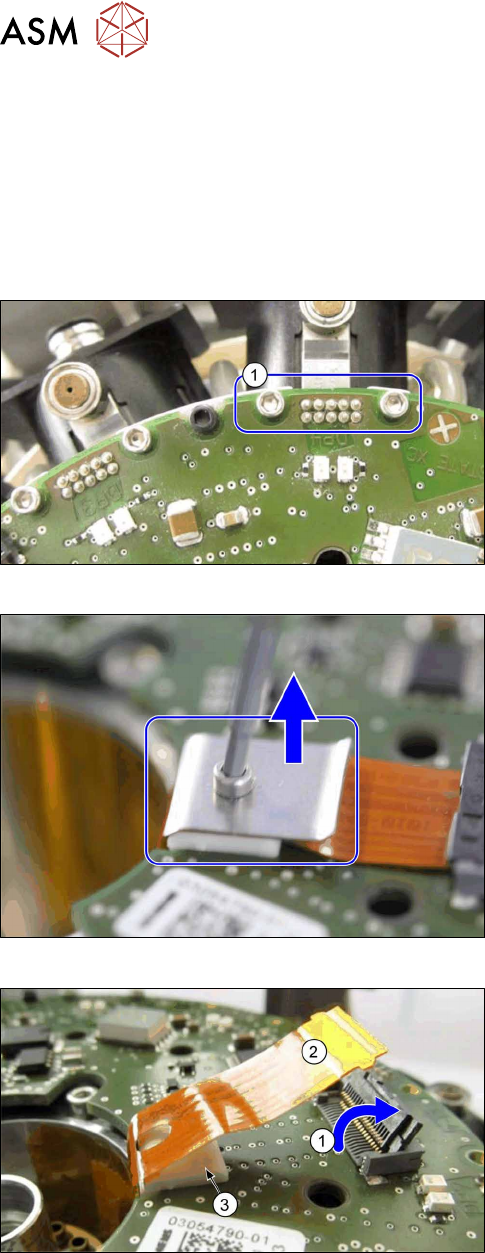
Fig.79: Removing the fastening screws for the connector
► For all twelve DP drives: remove both screws (1),
which fasten the connector to the Flexprint cables
on the SCS.
Fig.80: Removing the strain relief
► Remove the screw on the strain relief for the
Flexprint cable and remove the cover plate.
Fig.81: Removing the Flexprint cable
► Open the connector (1) on the Flexprint cable.
► Remove the Flexprint cable(2).
► Remove the white support(3).
5 Front plate, star, Z axis and smoothed distributor disc
5.5 Replacing the Single Core Solution (SCS)[03054790Sxx] (only for heads fromFS05)
Service Manual SIPLACE Multistar (CPP / CPP M) 02/2018 55
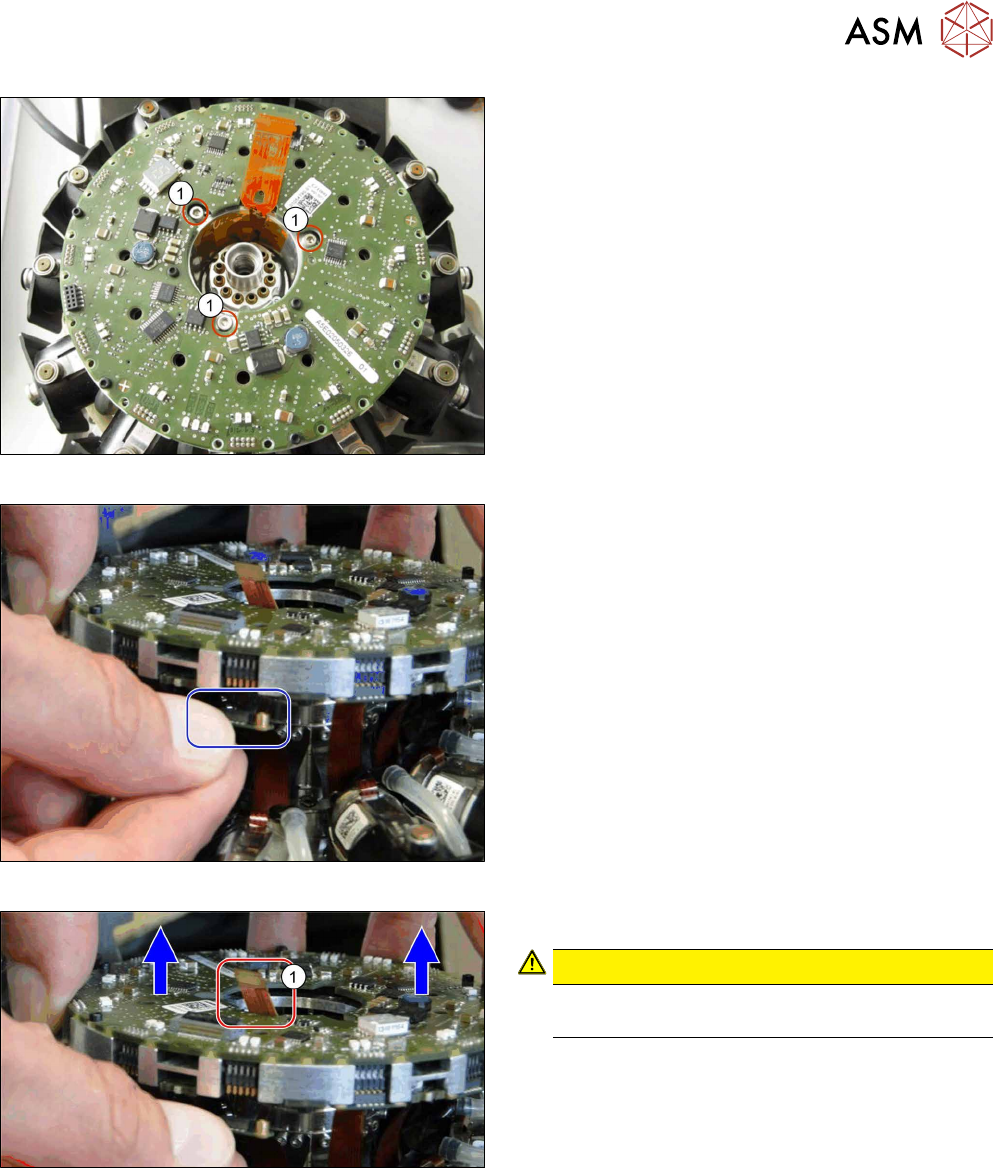
Fig.82: Removing the screws fastening the SCS
► Remove the three screws(1) fastening the SCS.
Fig.83: Unplug the connector
► Unplug the connectors from all twelve DP drives.
You can lift the SCS slightly, if needed.
Fig.84: Lifting out the SCS
► Carefully lift the SCS up and out of the head.
CAUTION!
Take care not to damage the Flexprint
cable(1) in the middle.
.
5 Front plate, star, Z axis and smoothed distributor disc
5.5 Replacing the Single Core Solution (SCS)[03054790Sxx] (only for heads fromFS05)
56 Service Manual SIPLACE Multistar (CPP / CPP M) 02/2018
Installation
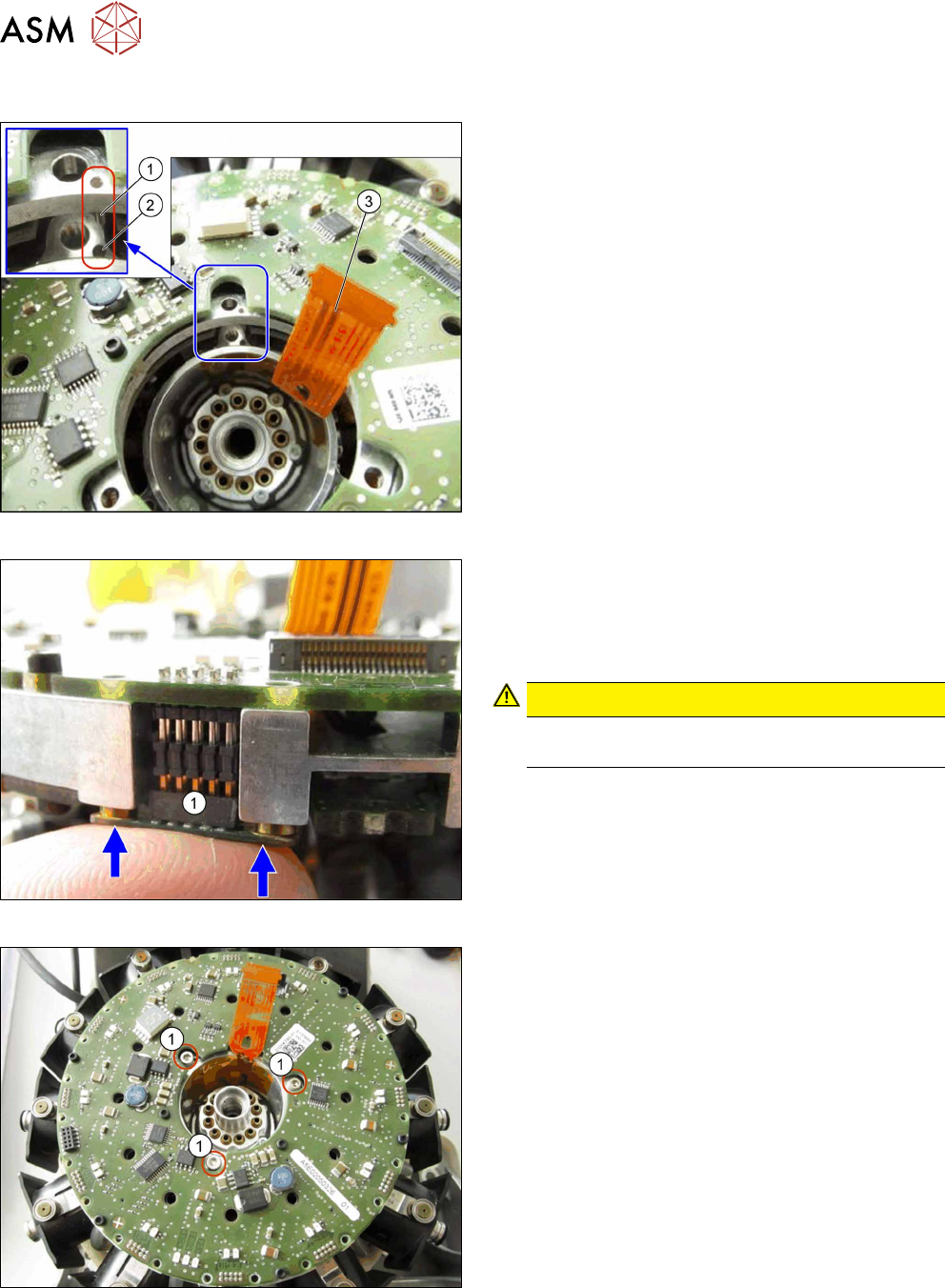
Fig.85: Inserting the SCS
► Carefully insert the new SCS.
Make sure that the pin(1) in the SCS is correctly
positioned in the hole(2) in the bottom part.
Also pay attention to the correct connection of the
Flexprint cable(3) to the relevant connector.
Fig.86: Connecting the plugs
► Attach the connectors(1) of all twelve DP drives
to the SCS.
Press the connector into position with your finger,
until the connector engages.
You can also lift the SCS slightly, if needed.
CAUTION!
Take care not to damage the Flexprint cable
for the DP drives.
.
Fig.87: Fastening the SCS
► Fasten the SCS with three screws.
Torque: 0.4Nm