80S-2080F480F5.pdf - 第427页
SIPLACE 80S-20/F4/F5 User M anual 6 What should you d o ... ? 05/99 Issue from S oftware Version S R.405.xx 6.9 When you refill the components 6 - 19 Key to Fig. 6.8.2 1 T able 1 (WPC) 2 T able 2 3 T able 3 4 T ranspor t…
6 What should you do ... ? SIPLACE 80S-20/F4/F5 User Manual
6.8 How to avoid track errors 05/99 Issue from Software Version SR.405.xx
6 - 18
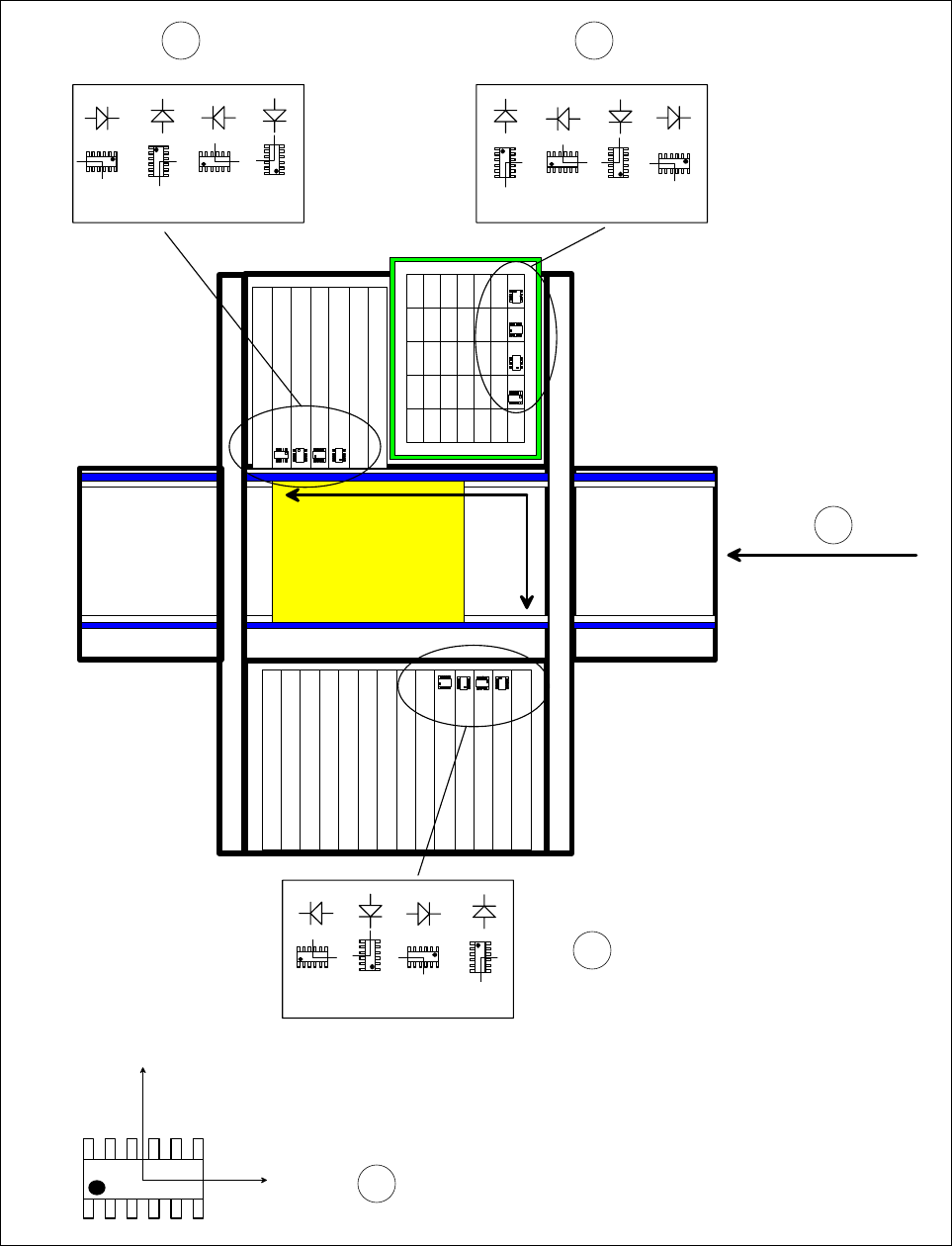
6.8.6 Checking the pick-up angle of the components
Fig. 6.8.2 Checking the pick-up angle of the components
0° 90°
180° 270°
X
component-removal belt
0°
90°
180°
270°
0°
90° 180° 270°
Y
0°
90°
180°
270°
0°
90°
180°
270°
0°
90°
180°
270°
Y
X
MKS
12
4
3
5

SIPLACE 80S-20/F4/F5 User Manual 6 What should you do ... ?
05/99 Issue from Software Version SR.405.xx 6.9 When you refill the components
6 - 19
Key to Fig. 6.8.2
1 Table 1 (WPC)
2 Table 2
3 Table 3
4 Transport direction
5 Description of the component in the package form editor, 0° description position
6.9 When you refill the components
Refilling with components with and without a barcode is described in Section 3.4 ’Feeders’, page 3 - 23.
PLEASE NOTE:
When you fill the long stick steel magazines with components, make sure that the connecting leads are not
bent.
WIth tape feeder modules, ensure that you always splice on a new tape in good time so that the feeder
modules do not run out.
But do not splice the tapes too early because if you wind onto the new reel after splicing the end of the old
tape, the reel with the new tape may be over-filled. The tape could then slip off the reel and become caught
up. Under certain circumstances, this could cause pick-up errors and prolonged down-times.
With large tape reels, always insert shafts and make sure that the dividing plates are inserted correctly
(see Fig. 6.5.2, page 6 - 11)
6.10 When you use wafflepack magazines
Use the following procedure to refill WPC magazines:
Call the "Feeder“ menu from the "Main view“ menu.
Then select the "Wafflepack changer“ menu.
Click on the "Go to refill position“ button.
Call the "Display magazine” and “Update inventory levels“ menu.
Click on the "Update inventory levels“ button. The current fill level of the magazine will be displayed.
Fill a magazine with components.
Click on the corresponding magazine in the table.
Click on the "New inventory level ...“ button to open the "Enter inventory level“ window.
Enter the number of refilled components in the "New level“ input box.
Click on OK. The magazine will be filled.
Return to the "Wafflepack changer“ menu.
Click on the "Quit refill position“ button.
Continue the placement operation if it was interrupted.

6 What should you do ... ? SIPLACE 80S-20/F4/F5 User Manual
6.11 Operator profile 05/99 Issue from Software Version SR.405.xx
6 - 20
6.11 Operator profile
The following tasks should be allocated to the operators.
Supplying the feeder module with sufficient components
Checking that the assignment of components to the feeder modules is correct
Refilling the components and splicing the tapes in good time
Checking the vibration intensity of the linear feeder modules. (This is no longer required for type 3 feeder
modules).
Checking that the components are in the correct position (see Section 6.8.5 on page 6 - 17 and Section
6.8.6 on page 6 - 18)
Checking the foil removal force (not on S feeder modules)
Checking the flow of material to the PCBs and on the input and output conveyor
Checking the quality of the PCBs
Random sampling of the PCBs upstream of the soldering furnace.
Observing the ESD regulations
Avoiding errors (see Section 6.7.1 on page 6 - 13 and Section 6.7.2 on page 6 - 13)
Noting error displays and messages on the automatic placement machines and notifying the line engineer,
if necessary
Carrying out the maintenance work specified in the User Manual
6.12 Tools for the operator
All operators should be equipped with the tools listed below. We recommend that the tools be stored in a suit-
able container, e.g. a leather pouch, in order to prevent injury to personnel caused by tweezers, for example.
For each machine operator, you will need:
– 1 SMD tweezer
– Short-bristled brush for cleaning the component table
– Set of small slot-head and Phillips screwdrivers
– Allen key for linear feeder modules and nozzle changers
– Tape splicing clamp and splicing materials
– Scissors for splicing (do not use multi-purpose scissors or diagonal cutters)
– Etching or glass fibre needle for fiducials
– Indelible pens for marking the tracks
– Cleaning agents (ethyl alcohol, Plexiglass cleaner, cotton wool buds, lint-free cloths, pipe-cleaners)
– Plus:
– Vacuum cleaner.